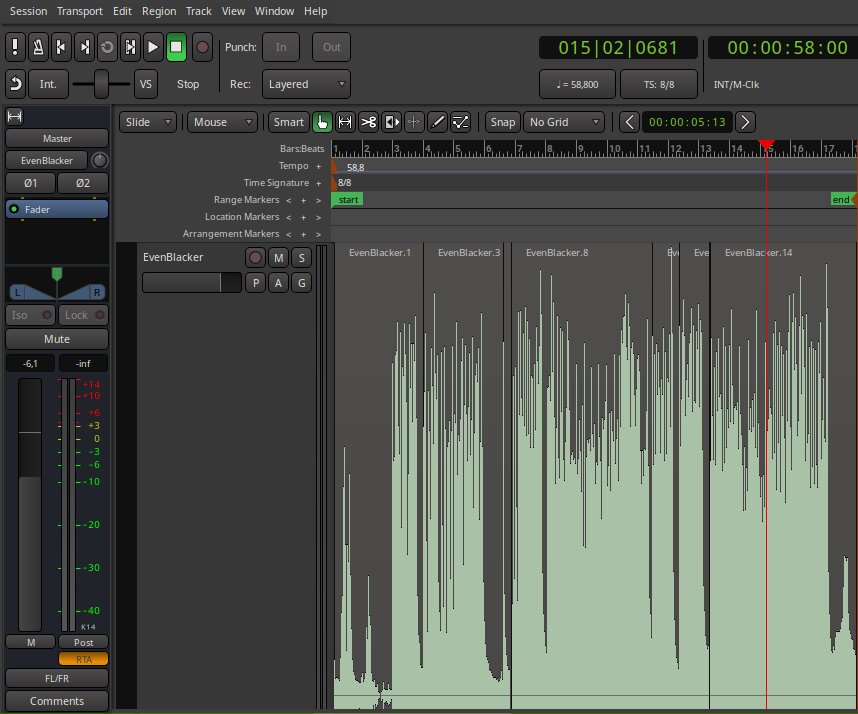
Difference between plugin button and plugin window on-off buttons

@x42 / any others interested
Hey Robin, thank you for your response.

Well, if I questioned something like this, as well as many other people, many times in the past have also questioned this.
And many other similar applications also offer an on/off button in their plugin window toolbars.
Just seemed like it might be something worth considering.
Would allow user to use this green on/off led from the plugin they are currently viewing, rather then having to find it in the Mixer channel to turn on/off.
But I am sure you guys have your reasoning if this was not agree with many times in the past.


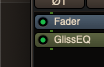
So the green on/off led in Mixer channels turns off that plugin from being heard + only prevents DSP from being used if plugin provides its own hard bypass.
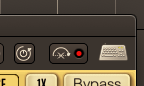
As where the red led on/off button in the plugin windows toolbar is a true hard bypass, no matter what, turns off plugin + DSP use?
Can anyone confirm if this is correct.


Probably not a good idea for me to make this post in the forum but because you brought it up.

So Ardour does and it is possible for a “hard bypass” to be made available. I have requested this in the past as well.
To me this might be nice to have accessible in the Mixer like making the green led be able to also show up as red meaning it is being hard bypassed.

I have seen you guys mention this a few times before about it is a good thing that a plugin uses all the DSP it will require no matter what.
I can understand the value to this especially when in live settings but to me I wish that this could be more up to the user to choose the behavior.
Especially because not all users are using Ardour in a live setting.

I have mentioned some of this in the past but here are just a couple of examples where to me constant DSP use would not be desired.

-To me this is one of the most important examples/use cases.
Say users have some MIDI tracks with instruments that use a lot of DSP.
So much that they decide to bounce this MIDI track to an audio track.
But they want to keep that MIDI track + MIDI data + Inserted Instrument plugin still in their project so they could make edits if needed.
If they deactivate the plugin (and this plugin does not truly bypass itself) and it still uses all the DSP that it would need. Then the bounce to audio track would not achieve much, DSP would still be used.
User would have to remove the MIDI track + plugin + effects + etc. from the project which is not desired.

-Similar, say user has an instrument + effects that use a good amount of DSP but is only present in the intro of a song.
Having those instruments + effects be using up all the DSP they need for the rest of the song does not seem that efficient to me, so this would also not be desired.

Again I agree that it is nice that their are no surprises, but at least to me, it is not always ideal to use all the DSP that a plugin would require, all of the time.

What would the solutions for these couple of example be?

1 Like

Use Reaper or another DAW :slight_smile:

3 Likes

Ah, at last…The forgotten art of speaking your mind wrapped in elegance of simplicity.
(No offense to anybody, it’s just a beautiful rare sight these days, especialy in online discussions)
:slight_smile:

The continue-to-use-Ardour answer for the MIDI track would be to document the instrument plugin and its settings and then remove it. You could even make a snapshot with it, so you could go back and re-check the settings.

The same thing would go for the intro scenario: bounce the instrument + effects audio to its own track, record the settings or save a snapshot for later and remove the CPU hungry plugins.

What would be nice in that scenario would be if there was a way to selectively restore a snapshot. In that case you would be able to keep all the subsequent changes in the session and only restore the supposedly unediteded, apart from the plugins, track.

Doesn’t per-region effects replace the original region with a copy that has the effect applied? Doesn’t that do what you want?

For #1, bounce to audio then right click on midi track header and uncheck “active”.
For #2 right click on a region and select “freeze” (if audio, otherwise like #1).

I’ve never understood why the always process DSP thing isn’t a user configurable option because it’s absolutely something you don’t want if you’re a composer working with a big VI template. Maybe it’s because MIDI wasn’t the main use case for Ardour originally, but it’s certainly making up for that with the last few releases.

3 Likes

Always processing DSP isn’t a MIDI/softsynth plugin issue, it’s a plugin issue in general.
I’d think the reason for it not being user configurable is because it’s tricky to solve from a programming POV.
If it was an easy fix I’d imagine we’d have it by now.

Maybe, but devs have strong opinions (and other priorities), that’s why we don’t have vertical zoom of waveforms in Ardour either.

I have no idea what you mean by that.
Alt-mouse scroll zooms vertically for me, at least…

I agree with you that a preferences option might be in order here, with the explicit clarification/warning from Ardour that if you use a hypothetical ‘Disable Continuous DSP Use’ option, that bypassing and un-bypassing plugins may result in audio pops and dropped signals.

My solution to all this, for the time being, was to just get a more powerful computer. But there are still gigantic projects I have that could benefit from a preference to kill CPU-use for bypassed plugins.

@x42, please consider… maybe. :man_shrugging: :melting_face: Or would something like that completely violate the foundational architecture for how your implementation of PDC works across Ardour, etc.?
-J

That increases the height of the tracks but it doesn’t zoom the waveform vertically while leaving the tracks the same height.

Here are a few threads about it:

As user, I’d consider bounce (with processing) and replace for this. At least until Ardour supports MIDI freeze. For Audio you can already freeze FX just fine.

1 Like

I’d consider bounce (with processing) and replace for this. At least until Ardour supports MIDI freeze. For Audio you can already freeze FX just fine.

FWIW, at least one of the composers I follow on YT (Guy Michelmore) does this same trick (bounce MIDI to an audio track, and then disable the MIDI track) frequently, but he uses almost entirely Cubase / Logic. In most examples, he does this dance in order to do audio processing tricks with the rendered sound, but I have seen at least one minimalist case (composing on a very underpowered laptop while traveling) where he did it on nearly every “completed” track.

Is this trick still a thing ? If so one could use a lua script to make some sort of dsp garbage collector that true-bypasses all bypassed plugins on demand.

2 Likes

No Robin, No! I’m not going anywhere… You leave!
It will just be me and Paul from now on, best friends :slight_smile:
Just a side note to Ardour users during this transitional period…
There might be a slight decrease in releases in the upcoming weeks because I do not know a thing about coding, so I will just need a couple weeks to get up to speed with the project and then Paul and I should be back on track! :slight_smile:

No but seriously Robin, I am not the only one in this thread who kind of agrees with what I am saying. Like I said I guess I could understand if the plugins are active then yes you might not want a random DSP spike to cause issues, but could anything be done about the scenario I mention where what if the track isn’t even being used. I am a little confused though because from what some are saying it sounds like this is already possible. Can you “freeze” a MIDI track or an Audio track with effect plugins and prevent DSP use from occurring?
Some mentionings of this are in this thread and also the link that
jean-emmanuel mentions above.
Is this already possible?

Also still have a question about the buttons that I typed up before I read all of this, if anyone is interested. I will put in a reply below.

(I typed the following before receiving any replies)
Again was just a little confused, because you guys said that these buttons are for different settings so I thought that they were not connected in any way.
However to me this is not entirely true, they do share the Mixers plugin buttons led lights.

My original question about these buttons were why were they depicted as being “reversed”.
I apologize, maybe I am not testing this with the right plugins, but could someone explain something for me…

STEPS TO REPRODUCE
-Set Ardour theme = “dark” (default theme) (just so my color references make sense)
-Open new session
-Go into Mixer view
-Create a MIDI track with an instance of Ace Fluid Synth
-Move its GUI window off of its Mixer channels plugin button so you can see them both at the same time
-Now click on your middle scroll wheel button to turn Ace Fluid Synth “off” which turns “off” the green led light in the button.
-When you do this, if you look in Ace Fluid Synth plugin windows toolbar, the bypass button turns “red”.

Why couldn’t the button led in the plugin window be green / “on” (instead of dark red) to match the plugin the green led in the plugin button.
Then when either of these buttons are turned “off”, they would both show an “off” darker green color/state?

Again maybe I am not testing this out with plugins that behave differently (use these led lights differently)?
But if all plugins function the same with these led lights…
Would the suggestion I just mentioned above not be easier to understand then the current default approach used?

Thank You

This conversation is going in circle… the button / led thing has already been answered, what about doing more music and less nitpicking ? I’m not intending any harm, but this looks like a very long argument for such a trivial thing. And I can be quite picky over even a pixel, but sometimes the issues I just fade away when I focus on what matters most.

1 Like

To hopefully quell your gripe with the light colors once and for all, think of it this way…

It’s actually quite simple:

If you at all see a bright GREEN light, then the plugin is active/on:

Screen Shot 2026-05-26 at 11.26.09 PM

If you at all see a bright RED light, then the plugin is inactive/off:

Screen Shot 2026-05-26 at 11.25.43 PM


@sound8, It’s important to remember to pick your ‘battles’ wisely. Ardour is like a ±3-person effort (generally speaking), so whatever ‘issues’ you raise to the devs should be weighed with care. You might in fact be ‘right’ about this issue or that issue, —no matter how ‘small’. But believe me, if you don’t like this light-color/state design, then I am 1000% certain that you’re going to run into faaaaarrrrr worse and vastly more impactful problems with Ardour in time… So again: pick your battles wisely. :grimacing: :military_helmet:

-J

2 Likes

(I had already typed out response to my sidebar losing focus post that most of you were a part of, the responses to this led button post are humorous, exact opposite experience)

I don’t know, responses seem a little unfair.
I understand, but it is going in a circle because no one is actually answering the questions I am asking?
Did anyone try the example steps I mention?
@jean-emmanuel
I mentioned on Mantis that there seems to be a reverse behavior being used with these lights and suggested to remove the icon and just show a button with a green led light like the plugin buttons do.
You mentioned on Mantis that they were not reversed and that they were different.
Correct?
So I said I would ask this question here, which is what I did.

If Mixer plugin buttons led light is green when “on” and you MMB click which turns this led light “off”, which then triggers the red led light to go from “off” to “on”. Then is this not a reversed approach like I mentioned?
I have never seen an application use this kind of approach before, so I was curious why this would be done this way? and thought it might be a good idea to make it a little easier for users to understand.

I will create a separate post about the freeze track, because I agree I was not expected this to turn into this either.
Thanks again

1 Like