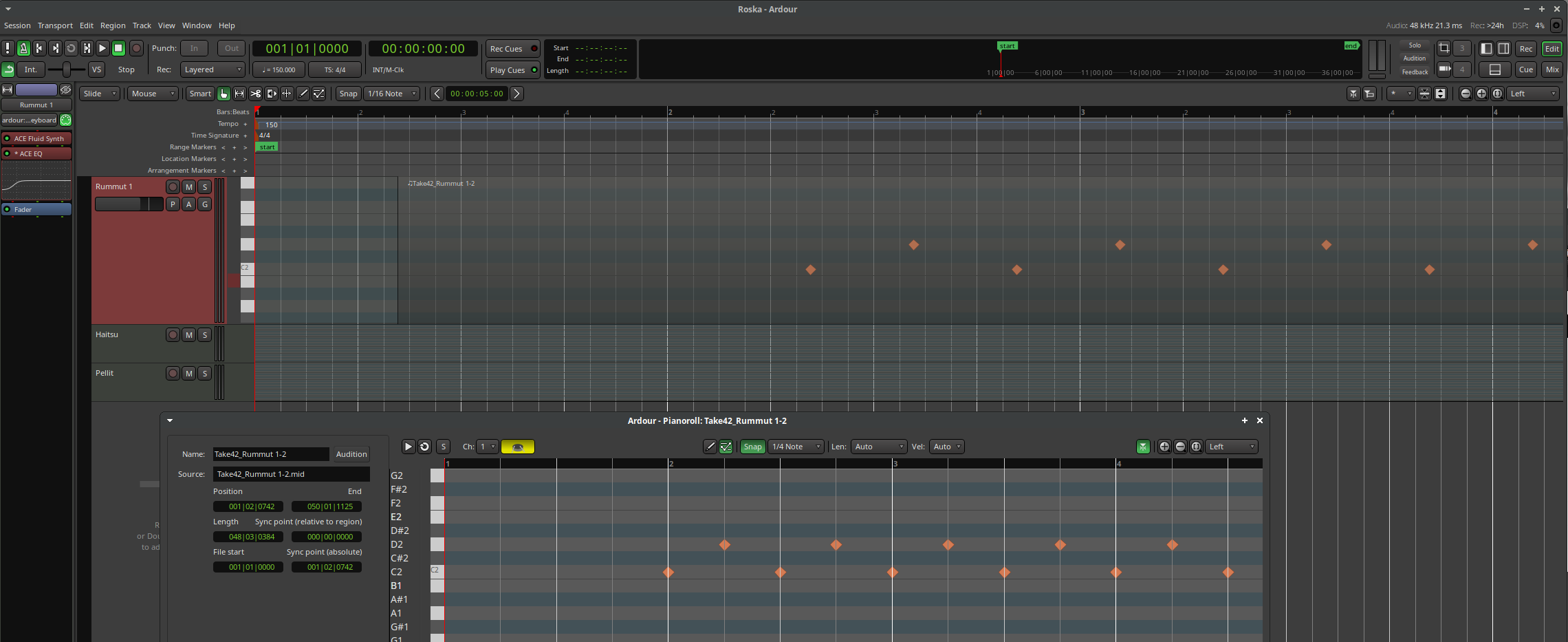
Am I doing something wrong but drawing drum beats on the piano roll window with shift + drag mouse misplaced the midi events. Here is a screenshot showing the same events on the Piano roll and Edit - window and you can see they show the event positions differently. I did draw the events starting from bar 2 on the Piano Roll but they play out offset just like they show on the Edit - window.
I’ve always thought Ardour was an amazing project. Extremely impressed with the ongoing refinements. Thank you very much!
It is important to realize that the pianoroll window is not just a “zoom in” on some part of the timeline. It shows just the region (or the whole file the region is from). If the timeline region is not aligned to the grid, then the apparent alignment of notes to the grid shown in the timeline and in the pianoroll will appear to be different. This is the case in the screenshot above.
If you look carefully, you will see that the first note is exactly 1 bar from the start of the region in both the timeline and the pianoroll. The difference is that the grid in the pianoroll is region-centric whereas the one in the timeline is global. In both cases, the note is 1 bar from the start of the region - where that lines up relative to the global grid/click depends on where the region is on the timeline.
Put another way: you could move your region to be precisely aligned to a bar and the notes would line up with the grid/click, but the display of the region in the pianoroll would not change in any way.
This is a very important point - it does seem that there’s a natural inclination among users to think that the pianoroll is like a magnifying glass view of the timeline - it is not.
2 Likes
Was the GM synth updated? It was said here that it would be General MIDI Synth Update but I can’t see it in the patch notes.
I did some tests to reproduce this and realized the cause just before reading your comment. So it is by design, but does seem to create some confusion like seen here. Could it be possible to show the real session pattern counts here instead of a regions perspective of the pattern count or would it create other problems ? When one manually inputs midi events those need to go to the exact time in the session and the regions different perspective of rhythm does not help at all.
You can move the region, and the region can exist at multiple different positions on the timeline. It seems to me that the region editor should show where notes are relative to the start of the region, given the lack of a 1:1 relationship with notes on the timeline.
If you’re doing MIDI work and the grid timing matters to you, then you should probably have snap enabled in the editor, so that your regions align to the grid, which then removes most (not all) of the difference between the region editor grid and the timeline one.
3 Likes
Yes I see. One needs to always create regions that start and stop at the exact region boundary and then the problem goes away. Thanks for the explanation.
I really like the fact it allows to nudge the entire region around the beat without losiing the ability to work with a local grid, it sounds very logical to me.
1 Like
Yes, GMsynth was updated; thanks for reminding me. While it is bundled with Ardour, it is not part of Ardour’s source-tree, which is likely why it was lost.
- General MIDI Synth now includes an updated soundfont
- Support for sample rates up to 192kHz was added.
Trying to use sample-rates larger than the supported max now fails to instantiate the plugin. Previously using sample rates > 96kHz raised the pitch instead.
3 Likes
I’m hoping for a detailed demo of the new cue window, with live looping, approach that of Live. Would love to get my kids involved with that.
Actually, an overview would be great too.
This kind of video goes a long way to spreading Ardour’s influence. Many people do best after seeing others by example.
1 Like
Learn Ardour | Ardour DAW will get you 90% there, there isn’t a video on recording yet, and you can’t get full Live experience with a grid controller yet, bc the Launchpad surface hasn’t been updated for clip recording. It will be in 9.x.
5 Likes
Thank you ! 
great job
1 Like
wow, I must say: in terms of appearance this is the smoothest transition from one major version to the next I ever experienced (I started using Ardour with version 0.99)
great work, many thanks for this 
4 Likes
RPM build on Fedora 42 with commit d16a029492 added. Seems to work fine!
RPM spec needed a few changes due to the switch to YTK.
Good job!
Congrats to this release! Looking forward to spend some time with this next week or so.
Edit: Found some time. It is magnificent and very stable. Love it. Up until now, I have been, more or less, ignoring the cue view, but with the bottom midi editor, it really shines.
The RTA and region effects are absolute sound design an mixing highlights.
Congrats on the release! And a big thank you!
Congratulations! 
The top bar appears on every window in ardour now. Even if i have two (Mixer and Edit) open at the same time. Is there a setting not to do that? I do not need it twice on my screen and would be happy to have more space in the mixer window.
1 Like
“You can please some of the people all the time, or all of the people some of the time, but you can’t please all of the people all of the time”
4 Likes
I understand that. To me it just does not really seem usefull to have the same thing twice on the screen. I get, that the navbar is good to have in every viewmode. But if you seperate these into different windows, usually people have these windows visible at the same time. I can not imagine a workflow where having a second navbar due to “quicker” access is prefered over more space in the mixer strips. But maybe there is. 
As this was not implemented in ardour before i guess you had some person asking for it 