Not sure if anyone else is aware of this but you can create specific posts about a topic
I have come across a couple posts where this topic has been mentioned, one of these posts is one I created.
I decided to create this post to have an actual location/post with the topic in the title name, where users can discuss this topic specifically.
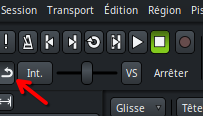
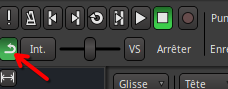
Not my idea, but it appears that many users are interested in having the Auto Return button / visual indicator be added back into Ardour GUI.
I think the idea is that it is not wanted to be added in the Application Toolbar.
I would think that if this was going to be added that it would then be added into the Editor toolbar along with the two new playhead based tool buttons on the right side of the toolbar. This way all the playhead based items would all be together, but it sounds like this is not agreed with either.
I might be overlooking that this would need to be seen/known in all windows, which then would have to be added in the Application Toolbar.
Here are the two posts I know of that mention this topic
I strongly disagree. This is relevant for the recorder and Cue page, and also useful in the mixer.
At least in the mixer is where I usually use it. space, listen, tweak, space (auto-return), and then disable auto-return to move on, and re-enable it… I expect others also use that workflow.
If an explicit button returns it will be in the Application Toolbar.
Couldn’t that be simply a “fixed” shortcut or even a transport button? I for example would use the spacebar for stop with auto return and the comma on the number pad for stop without auto return. I had a macro when I was using Cubase and that was really conveniant. I have a similar thing on my X-touch: the normal transport button stops with autoreturn, the scrub button (which I don’t use anyway) does stop without.
No, I’m aware of the shortcut for toggling auto return. What I meant is to have two stop buttons, one with auto return and one without. That’s very handy if you usually work with auto return on. You’re rolling, and then you run into some glitch and can immediately stop right there instead of remembering the shortcut, toggle (maybe toggle wrong at first try ;)) and then hit stop. By that time that flaw is long gone…that’s at least what I constanty ran into. Now with my extra-button this is really easy.
I like the idea of having an explicit action for this. Thanks for suggesting that.
It’d be similar to “stop and forget capture”, and likewise it’d be just an action which can be triggered with a keyboard shortcut. I’d not add a dedicated button for this, given that the toggle won’t go away.
That’ll be a new feature though, and hence after 9.0.
Thanks to x42 for putting the button back. It gave me the opportunity to notice that with the “xcolor” color theme the button did not change color in on/off…
I changed with the “dark” theme and now it’s better…
Just to be clear I have not really thought about this topic fully.
I just made this post so that there was a specific post location where users can speak about this topic.
Also you guys mentioned that you did not want to add anything to the Application Toolbar
so everything is fine!
In France we say “il n’y a que les imbéciles qui ne changent pas d’avis”
So thanks to the devellopers
And this add 'return of the button " is a subtle and discreet change