In the distant past, “Playhead follows range tool clicks and range selection” was not limited to the Range tool; it also jumped to the start of the Region. This led to a problem, particularly for new users: the user selects a region whose start is offscreen. Then the playhead either disappears (if Follow Playhead is off) or they jump to an entirely different part of the song without any reference to what happened (if FP is on). So we relaxed this rule to only follow Range selections since range selections (by definition) always get initiated somewhere on the visible screen.
I’m not against adding a button that locates playhead to the beginning of the selected region. (or selected midi note…?) But it’s one of those things: there’s the danger of adding so many (nice) features and options that you are in button-hell. Or you hide the button in prefs, and developers forget to test all the combinations that users may (knowingly or unknowingly …especially if there’s a shortcut) engage.
I can understand about what was mentioned about how this would perform if region beginning is not visible to the user.
In this case, as mentioned it would be a toggle button that user would have the option to use, so they would hopefully know what the buttons purpose is before using it.
Default would obviously be with this button in the “off” state, because agree it could be confusing for new users in certain situations.
The choice was already made to add more buttons and offer this feature, so one more button to me does not seem like it would be an issue. Grab Mode and Range Mode are commonly used tools so the idea is that it is strange that the playhead would only be designed to interact with only one mode.
The moving of the playhead feature is based on another application, which also offers playhead to be moved to beginning of regions. To me might as well offer both functions.
What is nice about this being offered on Ardour is that user would be able to make a decision how they want the playhead to currently perform, also nice that these buttons are right there in the main Editor interface so user can access them easily, rather then having to find a setting in Preferences, if change this setting often.
Hopefully others agree.
Does anyone else feel this could be a good idea to be added?
sadly, I don’t agree. at least not as a default. we did not make the choice to add more buttons - if anything we are trying to remove buttons from the default layout. Ardour’s transport bar is already massively overstuffed compared to most other DAWs (take a look at Logic and Live, for example). Adding more is the opposite direction from the one we want to go in …
Okay, nice that someone elses request within my request gets added?
Those other applications are not Ardour.
It doesn’t seem strange though that only 1 tool has the capability of interacting with the playhead and not the other(s)? Would only be 1 extra icon, would it be that much of an issue? there is space and it would serve a purpose.
Also adding another icon could give more focus and purpose to that new little toolbar section, and it would be relevant because all 3 icons would pertain to the “playhead”.
I know that it is not up to me, but it can just be strange that every time something is added, if another user mentions an addition to that thing, then it seems to always then be viewed as overboard/too much?
Other applications names were mentioned/compared to, so I will mention one as well.
Moving the playhead based on Range Mode is behavior offered by Audacity.
Audacity also contains the same behavior of moving the playhead to the beginning of Clips (Regions) when they are selected, so this would complete this style of workflow if it was added, so it is not that far out there as a suggestion to be added.
Over the course of 25+ years, we have found this not be a particularly solid design rationale. It sounds right (“users should know what a button does before using it”), but what actually happens is that we get support requests saying “my playhead keeps vanishing from the visible part of the timeline”.
Not really. The playhead-follows-range feature was already present (Ctrl-3, and in the Transport top level menu). The button you’re thinking of replaces a larger button that used to be in the main transport bar, taking up less space and perhaps (or perhaps not) being in a more sensible location.
The “Auto Return” button/indicator also disappeared when that was removed. Bit me during a show the other night. Couldn’t figure out why the transport kept resetting.
Yeah, I miss that one, too. Not so much for switching it on and off (I use hotkeys), but to visually indicate the state.
I’m thinking about adding an “auto return” button like how “follow range” was changed, would you accept that? I submitted a PR here, thanks to @BenLoftis for the icon.
I guess the Auto Return indicator was unintentionally removed from Ardour, as a backport of the toolbar changes that occurred in Mixbus. (I haven’t re-built ardour to verify, so ymmv)
The toolbar changes in Mixbus11 are intended to separate the ‘transport’ features (like auto-return) from the ‘editing’ features (follow selection)
Transport options are global… ‘Auto Return’ applies on any page (edit/cue/mix/record), or from an external controller.
Whereas “follow playhead” and “follow range” are only meaningful if you are looking at the editor window.
The current Ardour toolbar has a mix of transport and editing features, and this gets a little weird when we allow the transport bar to appear at the top of the mixer and cue pages where some of those buttons have no meaning.
So regarding your patch: adding “Auto Return” to the editor toolbar is a short-term fix but not the correct long-term fix, in my opinion.
I had some more to say on the topic but seems the decision has been made so will hold off at least for now.
Things have already gotten a little off topic so I will as well.
I have noticed a few posts regarding simplifying things (I think I know what is influencing this, but not important) I have opinions on some of this that maybe I will share in another post if anyone is interested. All I will say here is that it is okay to simplify things I guess for new users, but I would just do this in the form of hiding items. Allowing users who want to see/use these items to easily be able to turn them back on. Rather then removing or overly simplifying features just to cater possible new users / to compare to other applications.
I do not know if I would want to sacrifice functionality just because someone does not know how to use the program.
For example I really like how Ardour makes all its modes/features visible/accessible in GUI.
This way depending on the task, can just activate and deactivate those modes/features instantly, rather then having to open up a Preferences window to turn things on and back off. Like “Slide” and “Ripple” edit for example, user can easily change between them and also know which is currently active.
Anyways, not really why I am here at the moment, I had mentioned in my original post above asking about keyboard shortcuts for these 2 existing buttons.
KEYBOARD SHORTCUTS QUESTION
In Ardour-9.0.rc2.58-demo
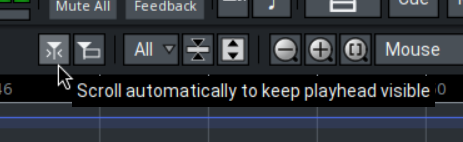
I found action/shortcut available in Keyboard Shortcuts Dialog for Scroll automatically to keep playhead visible
it is called Follow Playhead
However, I have not been able to find one for this action Playhead follows range tool clicks and range selection
Does anyone know if this exists?
Just wanted to see if this existed before making a Mantis post for this.
I had a hunch that this would be the wrong (logical) place for it . Logically, it should go to the row of transport buttons, right? But then it would be bigger and also displace other elements to the right of the block…
It survived the merge, and I did remove I intentionally, since I did not find a good place to pack it into the main application bar. It looked out of place.
The goal for Ardour is to have a minimal clean application bar, unlike Mixbus, and more like most other DAWs.
Hmm, would modifying the icon of the stop button be suitable? I.e. if auto-return is active, overlay the arrow to indicate stopping will return to the start position. The button could either toggle auto-return on right-click, or put that setting in a context menu (like how you can choose percent or semi-tones for varispeed).
After reading some of the responses to this request I am a little confused.
I did not say to add anything to the Applications Toolbar or the Transport section within the Applications Toolbar.
I also was not expecting this idea to get rejected so I did not mention certain benefits that this could offer in my original post.
Some reasons have been given why this would not be accepted, so I also have some possible counter points to mention.
For better clarity I am going to mention this in a Mantis post instead.
I imagine the results will be the same but at least I might be able to present it better then where this went.
Thank You
Seems that other users do not have an issue with wanting new buttons to be added either.
I noticed this being mentioned a lot in various posts so I decided to create an actual specific post about this topic.
Auto Return post can be found here if anyone has any more information to share on the topic

 . Logically, it should go to the row of transport buttons, right? But then it would be bigger and also displace other elements to the right of the block…