Hi , I am at a crossroad so to speak.
After a calamity, to begin with self-inflicted, … now trying to install the latest version of …
I guess the Linux communitiy’s latest talk.
So I am looking for alternatives like Ubuntu Studio or Fedora Jam etc.
If you will just use your system as a workstation and want really good stability, I’d go with AVLinux probably. However, I use Tumbleweed for the rolling release model. It’s really stable and the guys at GeekosDAW have a really complete repository with all things audio.
I’ve been very happy with Ubuntu Studio, currently at the 24.04.3 LTS release. It installs the KDE desktop, which I have used productively for many years, along with a large number of utilities for music production. It also installs many, many packages unrelated to music production (things like graphics, video production, etc) which some users find to be excessive. I have found several of them to be useful.
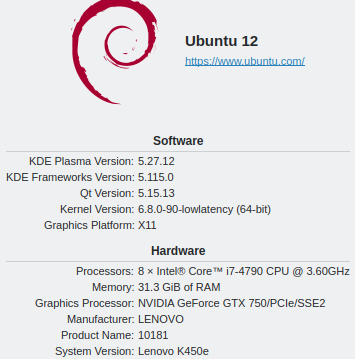
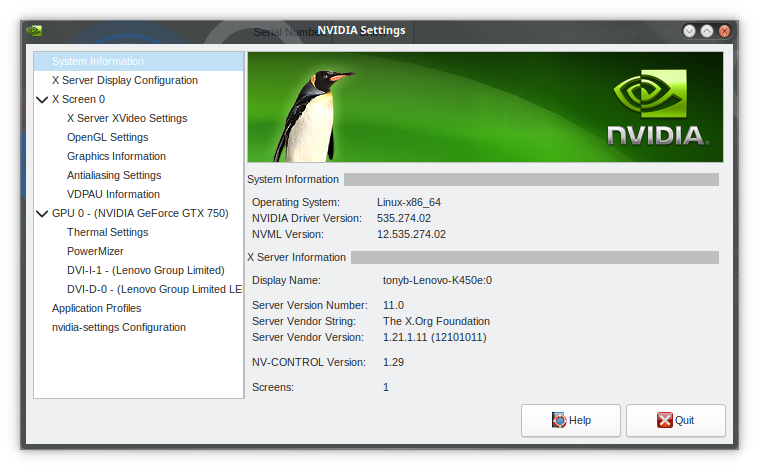
It runs well for me on my old hardware - Lenovo deskside tower, 32 GB, NVidia hardware and proprietary driver, dual boot with the original Windows 10 OS. Running Ardour 8.12 and using the LSP suite wherever possible. Good results.
I like the LTS version because it’s very stable once you get it working correctly, and requires very little/occasional adjustments to the base OS packages when updates come along.
I’d also try AV Linux 25 first, and i would definitely use that (basicaly, all software is already packed in it’s .iso instalation image file, minus sample lybraries). The only reason i don’t, is my specific laptop hardware don’t play ball with it. Back when i had various Thinkpads, everything was cool and ready to go once the installation and initial setup was done.
…And you have Glen McArthur (creator and mainteiner of AVL) often present on this, and LinuxMusicians forum.
Regarding AV Linux it’s not like Ubuntu Studio, GeekOS and other things, AVL is essentially my daily system setup informed by 18 odd years of Linux Audio and Video experience that I share using the build toolchain of MX Linux. It is far more in-depth than any other Multimedia Distro out there with a lot of extra handy File-Actions and utilities that most people don’t even know exist, BUT… What kills it for a lot of people is that it isn’t focused on the ‘Big Linux Desktop Experience’. If your daily joy is working with Gnome, KDE, XFCE4 et al then you may find it confining. It uses a highly customized Enlightenment Desktop Environment for it’s blend of nice compositing, great scaling and very low RAM usage (+/- 450 Mb depending on your hardware)… Enlightenment is quirky and unique and it looks and acts like Enlightenment… If you want to focus on the Desktop Environment then it will never act or look like Gnome, KDE or MacOS… It has a panel, a menu a Desktop and everything you need and if you’re focused on using Applications it will set you up without wasting your resources but if your focus is not on the Applications then you may not like it, just being honest…
Of course you can boot the USB and see for yourself, it comes with Ardour 8.12 and a boatload of popular and useful Plugins many of which are not in any Repos, Windows Plugins are also supported after running the included ‘Wine4VST’ utility . PipeWire is ready to click play and go. It uses the excellent MX Linux Repositories (with Debian Trixie) and their extensive backporting makes running a Debian stable base feel like running a Rolling Release Distro.
@JcVardy
That is interesting ! I never heard about GeekosDAW .
…and that you are happy with Tumbleweed is good to know too. I don’t if you have guessed the problems I encountered are with openSUSE 16.0 => it should have never been released in that state.
Reading the replies , I will further investigate AVLinux, GeeKosDaw on Tumbleweed and Fedora Jam
@Ljuba @GMaq
I certainly have a close look at AVL , meaning I will install it and see how I get along with “Enligtenment” . I do like the concept behind it and the opportunity to talk to the creator !!!
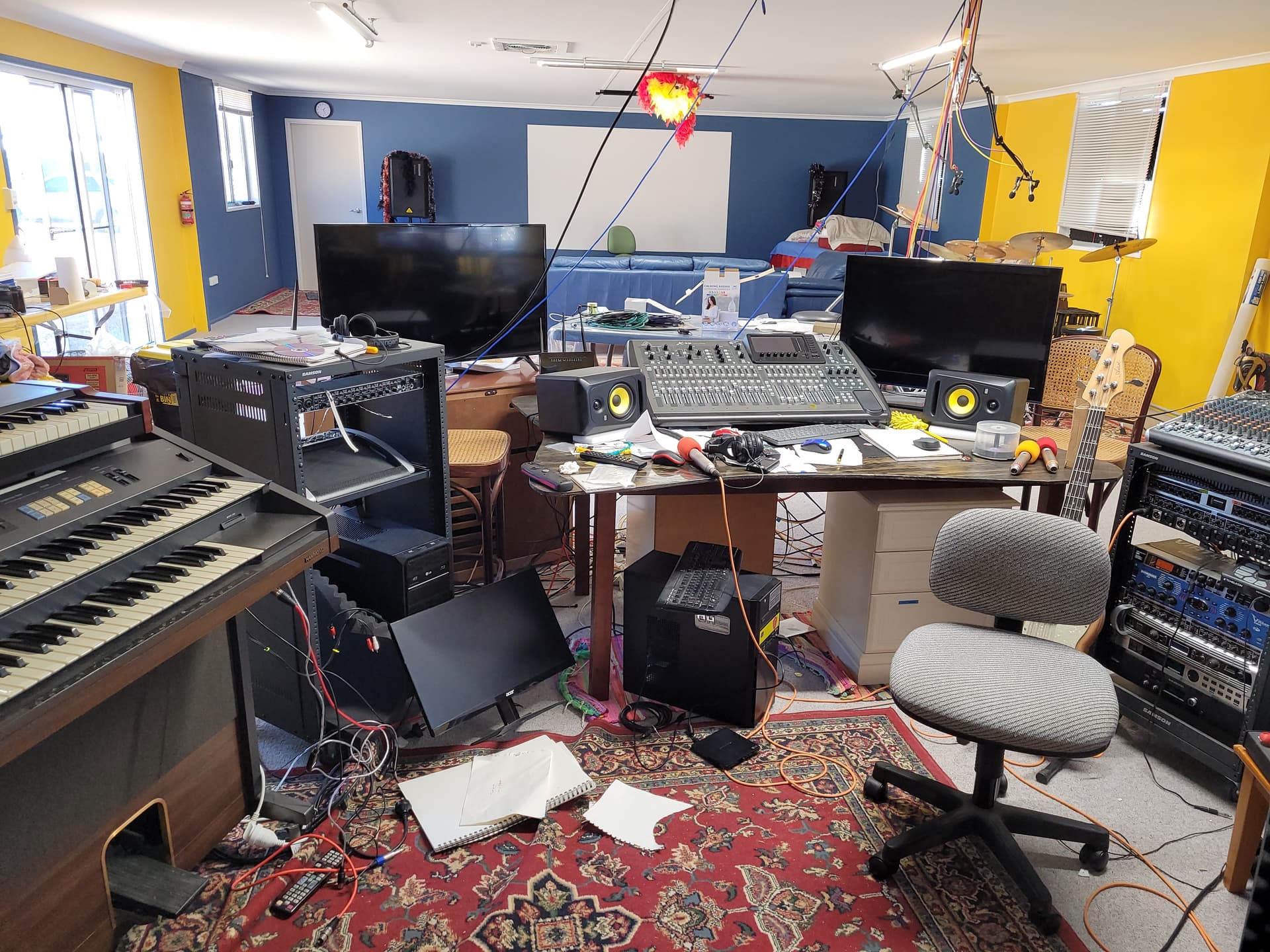
A pic of my studio
@JcVardy
Hi JcVardy, I was trying to contact you via private msg which does not exist.
Anyway, I have some questions re Tumbleweed and GeekosDAW and some of my background.
I was (!?!) using SUse since 2005 which proved to be a very stable system and by running Ardour the last 5 year no xruns.
Since I have to start from scratch with one of my system there was Leap 16.0, which never should have been released in that state.
Anyway I shortlisted AVLinux (not sure about “Enlightenment” ) and GeekosDAW (familiar environment and KDE)
So, does Tumbleweed still come with full functioning Yast ? If “Cockpit” was introduced , does it work “out-of-the-box” ?
You mentioned the system is stable. I assume you have to run updates … in what frequency?
Do you have problems with xruns ?
Could you give me a brief rundown on GeekosDAW , just features you like, how it stacks up to other systems … just some brief comments.
Well, for starters, you just install Tumbleweed and add the repository for GeekosDAW, which also goes by the tag “Audio” or something of the sort if I recall correctly. You should give that repo some priorities as well.
So you’ll get frequent updates both from the main OpenSuse repos and from them. Sometimes you do have to make some calls regarding conflicting versions that exist in your system during updates, but usually they are just a few. I tend to simply favor keeping obsolete pkgs just in case.
The main repos will keep you updated with the newest kernels, drivers and any update to your desktop environment quite close to their released date. The GeekosDAW repo has a very extensive collection of packages (probably the most extensive for audio I’ve seen, and I’ve tried lots of distros for this) and they are very up to date. They usually discuss that on telegram. I tend to update every Monday, figured it gives some time to actually have something reflected on my system but also not to accumulate a lot of changes all at once.
Also, as it probably was the case when you used Leap, for some codecs you do have to enable additional repos provided by Opensuse as well.
I have yast, but I installed my system before they decided to replace it. However, I do see it on the repos, so there should be no issues getting it. I should point out as well that AVLinux does come with the great mxtools as well, so both systems have a lot of tools to support. Both also come with prepared solutions for windows VSTs. GeekosDAW has a GUI for yabridge that is quite nice, and some diagnostic tools for rt.
I have no xruns, and in so far everything is geat.
I have used about three distros over time. Tried AV Linux a while back. Dabbled with Linux Mint and stayed with Ubuntu Studio. Ubuntu Studio is stable, customizable and Ardour works out of the box; though you will need to tweak it a bit depending on your setup . But regardless of distro, your personal distro needs to provide you a easy way to identify and reduce xruns for long term use while saving you time on setup/customization. If I was starting over, i probably would just have stuck to Ubuntu Studio just cause it has a lot but that is not with any recent experience of AV Linux.
Like most people, I have scripts to cut on my workflow, even on ubuntu studio for stopping services, setting up monitors, pushing into performance mode (when i run laptop), turning off wifi/internet, and opening auxiliary programs all so I dont waste time clicking when i need to record. I would bet that most people here have tweaked their systems and inside ardour with scripts.
which distro would save the most time for you out of the box given what your potential workflow?
I doubt the Linux distro actually makes much of a difference as long as it’s a recent release with decent hardware and kernel. Sure, there are great out of the box dists out there are tuned well for most hardware, but it is not guaranteed to be flawless with YOUR hardware. That part is completely up to the user to tweak.
Having said that, I have also experienced system degradation after simple updates to the same version. My most recent update on F42 resulted in all my HDMI outputs (I know, not really relevent here) to disappear from pavucontrol. Well, they are still there, but now the only selectable option is Pro Audio (Stereo, 5.1, 7.1 etc are gone). While this is not causing any problems so far, I now have selectable 4 HDMI interfaces on the playback tab of that mixer whereas before I had only one. That is unless my UMC202 was plugged in. Then I had two playback interfaces to chose from.
I suspect the kernel (v6.17) or Pipewire (v1.4.9) is now misconfiguring the audio devices because of the detected EDID from my three monitors. I will try rearranging them in the near future to see if it fixes this.
Hello I tried out several distros - and Linux Mint was as fast as e.g. ubuntu Studio, if you make some Settings like the Governor etc - not so difficult
I have been using Linux since RedHat 5.1 which I purchased boxed at a Staples store in the mid-nineties. Of course it’s known as Fedora now, or RHEL on the professional side.
Fedora Linux by default uses a very capable kernel with realtime dynamic enabled by default. You just need to add a grub option to get to full preempt and a few other minor tweaks. They even offer a Spin called Fedora Jam which is audio ready. You can of course add this to any Fedora installation even if you have not installed it in the beginning.
No distribution is perfect by any means. We just try to get the best we can with the tools provided. In my opinion, Fedora comes pretty close, as does AV Linux.
Hmm. In regards to Ubuntu Studio. It certainly gets the job done for sure. I think it’s a great out of the box solution for sure. I was a big fan of KDE for years even before KDE Plama (was that version 4 I think of KDE?) but I have kind of lost my liking for it due to too much going on. It is by far the most customization DM that I’ve ever seen and this customization “feature” can be done a little too easily. For that last 6 or so years I have found the simplicity of Ubuntu MATE is a refreshing change. It doesn’t look as “modern” as KDE but I fine it’s default layout great for any type of productivity work. I think because it keeps the task/app that are opened in the panel at the bottom and the rest at the top. I always add section in the middle of the top panel like the Home folder, terminal, System Monitor, Calculator…utility apps. I also have always had MATE’s Caja file manager setup for single click access. These combo have ways been super “planted” kind of feeling when using it. HOWEVER…I’ve always…and I do mean always have had an issue with Ubuntu MATE 24.04 for some reason. On every PC (there are eight in total and many more that I had setup for the company I work for) there has always been issues. Now these are PCs with different hardware…from the most capable 12 core studio computer to an older low end Celeron HP desktop - 24.04 has shown me it’s not an OS that I want to use on anything. Nearly every PC running shows an error dialog upon login. Just as the desktop shows up BAM! It doesn’t indicate what the error is…your only options are to close the windows or send out a report but so far I’ve never been able to find what the problem is.
I gave it one last shot as it’s running right now on this machine which is my studio computer. Same issues! It’s amazing how consistent this issue has been but I just don’t trust it on a machine this important. I almost have it down to a science when it comes to setting up generic versions of Ubuntu into a production machine but 24.04 has been available for a long time now and receives updates every other day almost but the problems still existing. It doesn’t seem like anyone else have had this issue.
Over the last two weeks I’ve decided to try out Debian MATE for the first time since 2006. Although the installer looks like it came from 1995 and needs A LOT of setup and tweaking it really does seem to be a great foundation for anything you’re using it for. I have put together a document that includes packages, notes on repos, all of the odds and ends to get Debian MATE 13 to function more like Ubuntu Mate. There is a lot of functionality that I’ve taken for granted when using Ubuntu. Functionality that Debian doesn’t have, but I learned what package add this functionality to Ubuntu and added them on Debian…most of them. I have to say I’m really liking it and as soon as my Amazon delivery of the new SSD drive comes in I’m ready to get up and running on Debian Mate 13. Out of the box it’s just not setup like Ubuntu and I can see now why Ubuntu is preferred when it comes to newer users coming from Windows or an OS that might be used in a business or school but once you got it setup Debian seems like a better foundation to work from than Ubuntu.
Keep in mind I’ve only developed this opinion in the last 2 weeks or so but it’s because I’m running Ardour on it…added all the repos and packages,I even installed a non-USB compliant MOTU Midi Express 128 from reversed engineered driver from source…works as if it’s running in Windows.
Anyway I would share my notes with anyone if you are toying with the idea of kind of building a system from the ground up.
Does it also have the error dialog on login? Otherwise if the only reason for abandoning it was that it’s “too configurable”, perhaps it’s time to give it another chance.
Ubuntu Studio has really helped me with two things. First, it has extended the life of my 2014 Lenovo K450e deskside tower. It’s always been an excellent machine, hardware spec-wise; but Windows 10 was suffering the inevitable slow-to-a-crawl affliction and Windows 11 isn’t supported. I moved to Ubuntu Studio a couple years ago in a dual-boot configuration with the Linux OS on its own dedicated drive. Second, Ubuntu Studio with KDE Plasma has allowed me to use it as my “daily driver” in an environment that’s very familiar to me. (I used KDE in Red Hat Enterprise for 8-10 hours a day for 20 years in my profession.) The adjustability of KDE is what keeps me using it; for the most part I set everything up the way I liked it when I installed and only have to mess with the settings on the rare occasion that something changes or I need some specific behavior for a new program.
In the end I selected Ubuntu Studio LTS with KDE because I knew it would be a suitable daily driver for me and allow me to focus more on my computing tasks - including some music production - than on spending time getting the computer set up and working optimally. Sincerely hope this is helpful.
Hey Tony thanks for taking the time to write.
Yes the error always shows up on login. I still have no idea what it is. One thing I didn’t clarify is that I’ve worked with just about every distro there is for professional use and personal. I’ve made the switch to Linux full time in 2005 or 2006. Windows issue with slow down is simply due to its design. I had a computer service/sales/development company for 14 years. Windows is job security for all in this business. Windows slows down for a good reason and the rule of thumb is that a Win PC needs to be serviced every 2 years for this reason.
I find that KDE, although it doesn’t seem to require anymore resources than some of the other popular DMs I now find it a bit annoying with certain things and this is the reason why I seem to gravitate to older, similar designs like Mate.
I very much appreciate the specs as I will document everything that you posted here. I went down the Debian road because I knew it was the foundation of Ubuntu. Granted I was kind of surprised how much wasn’t setup in Debian but at this point I’m past that and have a really good idea of what needs to be installed. Including near 40 packages that need to be installed…lots of them are utilities that we take for granted in Ubuntu.
One thing I just thought of. Ubuntu Studio is version 24.04 as is the Ubuntu Mate I was using but that error didn’t occur in Studio…only Mate. I wonder the issue is with Mate DM only? Haven’t tired straight up Kubuntu or Ubuntu (Unity), just Mate.
Interesting comments on Windows; first time I’ve seen it articulated in that way. Clearly based on significant personal experience with your company.
I also started using Linux in 2005, coincidentally.
Sounds like the fact that Studio doesn’t show you the login error doesn’t overcome your annoyances with KDE, though. Can you install MATE on top of Studio?
Tony, I was going to really go into the Windows issue that you were having but it’s so far off topic for this forum that I deleted nearly all of it! lol I will say this though. There is a very specific reason why Windows computers slow down over time but nobody cares about that here. I still say this to my customers. “Windows computers are the cheapest to buy and the most expensive to own”. My meaning behind this is, due to the gradual slow down of Windows, it either needs to be “serviced” or the user goes out and buys another computer because they simply don’t understand WHY their Win PC is slowing down. They think it’s the hardware…the computer itself. I’d be happy to share with you more but I don’t this is the place to do that.
Tomorrow ill be getting in the new 240gb SSD drive and when it comes in my intent was to get “my” version of Debian running with Mate as I’ve been preparing for this for almost three weeks now. Learning what Debian needs to be that solid foundation. But I have Ubuntu Studio on a flash drive I think still.
Of course I could install MATE, replacing KDE and honestly if I did install Studio I think I would do this but since I don’t know what has caused all of the 24.04 MATE errors and quirks I wonder if I would bring the problem over to Studio since I would be replacing KDE with MATE. Hmm.
When I first stumbled on Ubuntu Studio years ago I really thought “wow this system is way to bloated for me”. I felt that way this time too. Oh what did do instead is, I installed Ubuntu Mate 24.04LTS then I installed the “ubuntustudio-installer” and used this app to install what I needed. That was a bit better than running the default version of Studio… I guess the bottom line is I need to feel good about what I use. Mate 24.04 still to this day is kind of quirky on so many machines I’ve tried it on that I just gave up. I gave it one more try on the studio PC and ended up with the same results that I had with the other PCs. So all of my PCs’ run Ubuntu Mate 22.04 instead. I guess I could try 25.10 but I really wanted a LTC version.
Which is another reason why I wanted to try Debian 13. All Debian main release become LTS versions . I now have Debian in a place that would work for me but before I get that SSD in I many take look at what we are talking about. The package “ubuntustudio-installer” will make any “version” of Ubuntu into a studio machine…but Mate has become my go to. I actually tried the newer Gnome desktop on Debian and that was pretty good too. Hmm…not sure what I’m doing now.
 with “Enligtenment” . I do like the concept behind it and the opportunity to talk to the creator !!!