Agreed this is not the place to discuss Windows’ tendency to slow down over time.
Good luck with your fresh install to the new SSD. If the same issue crops up, hopefully others here with setups similar to whatever you end up with can assist with any debug.
Thanks Tony,
Well I just got the SSD in about 10 mins ago. I intentionally installed Debian 13 like four or five more time and set the system up as I need it. This includes everything from fstab mounting on login for the two NTFS drives, repo sources, nearly 40 other packages that doesn’t come by default on Debian when compared to Ubuntu Mate. I’ve perfected the entire process. Including the installing from source of the a MOTU drivers for a mini interface. I do have it mostly working perfectly on this temp hard drive.
I had an issue while booting where it couldn’t mount one of the NTFS drivers because the fstab dev. was incorrect. AND because Debian usually has a root account setup by default and I oped out of this to have a setup like Ubuntu the system wouldn’t boot after that…So I had to boot Ubuntu Mate 22.04 from a flash drive then navigate into etc directory of the system drive, correct the issue and reboot and all was well. But IF I end up using Ubuntu I think it would have to be 22.04 rather than 24.04. Since I still had that issue with 24.04 I would really like to avoid. But it got me thinking.
The issue didn’t happen on Studio 24.04 with KDE but it did happen with Desktop Ubuntu 24.04 Mate…and it doesn’t happen with 22.04 Desktop with MATE. I’m thinking the issue might be with the DM. When I run MATE in Debian 13 there are no such issues either.
I’m going to have to do more testing I guess but thanks for your input on all of this!
C
Glad to hear you found something that works for you, that is what matters most in the end. For ‘market research’ I have to ask if you tried AV Linux at all and if you did why didn’t it even make your short list?
Don’t hold back, I’m a big boy and I’m not made of glass, if you didn’t try it at all then no need to reply…
Hi Glen, I installed AV Linux and was hoping for a dual-boot. The boot partition on my system is mounted /boot/efi. What would I need to do for a dual boot ?
getting that working , I can give you a fairer feedback.
Just forup, I did load AV-linux. My first impression was clouded due to a monitor problem. It was out of focus, so to speak. I did not like the “dark” appearance". On my second go, today, the monitor was in focus and I had a “tidy” impression but still too dark for my liking. That, of course says nothing about functionality.
I found looking at eg Fedora-jam, I could get almost the same functionality on open Suse by piecing together the software myself. And I am running Suse since 2003. I know my way around, just a bit. Suse was very stable till the recent release of 16.0
Whilst I was working in the IT industry, I am not a command line freak.
Anyway, if you could come back to me re Dual boot …
When that is work I have a closer look and let you know what I think. I used to work in sales .
Hi, thanks for your time, please don’t feel like you’re being guilted into this…lol. I’m offline most of today but as far as the dual boot question there is a full detailed triple boot install example Video on the AV Linux home page. There is also a full optional light theme included, I will post later how to do that, it’s quite easy.
To change Applications to a light theme: Menu–>Settings–>“Look” tab—>Application Theme–>Select ‘mx-ease’
To change Enlightenment’s palette to match the light theme: Menu–>Settings–>“Look” tab–>Palette–>“Select Palette” button and then select ‘mx-ease-light’.
@GMaq
Hi Glen , I Haven’t forgotten you. I installed AV Linux and was hoping for a dual boot .
There is a bug in Suse-tumbleweed which does not allow it. I wanted to have a good crack of AV Linux to give you feedback. I also installed Ubuntu Studio again no dualboot.
… and had a go with Fedora Jam.
Both Fedora and Ubuntu are using KDE . It is my understanding AV Linux could run with KDE as well.
From an installation point of view Ubuntu was the easiest especially considering customized partitioning. I found out how to do it within AV Linux but it was a bit hidden . With Fedora it was a bit of a drama.
Since I grow up (linux world) with KDE, I like it . Plasma came a long way.
What I liked with the AV Linux installation was you integrated Samba in the install. !!!
From an first impression (nothing to do with functionality) Ubuntu stood out.
I immediately could find my way around. Fedora solala. Av Linux …got the hang of it
I think the one thing you should fix (in my opinion) is the partitioning in the install process.
and the other give the user the option of KDE
cheers from DownUnder
Thank you for your time in trying things out and commenting, much appreciated. I think you’ve noted some things that are probably common opinions. I have no intention of changing your mind but I will answer your concerns in case other reader have similar questions/concerns…
As far as the Installer I have no direct input into that, it is the standard MX Linux Installer dressed in an AVL suit, I will agree it is not the most intuitive installer and it is not as pretty as Calamares but it gives a lot of nice choices for User’s who are Linux-savvy and may want some more in-depth options. In my Install Video I was quickly and easily able to whip up a functional triple-boot with no issues. So yes it is a different Installer than the mainstream Distros but I think the Video is a useful tool to demystify some of the differences.
I tested Plasma for 6 months last year, it is full featured, attractive and very Windows-y in a familiar way. But using KDE/Plasma and Distributing it are very different things. Plasma is the most disorganized and messy DE with it’s configuration files I have ever seen! Configs sprayed all through the home folder, not even contained to a sensible folder in ~/.config or similar. People have no idea how much work goes into building an ISO and endless testing to have configurations perfect before it builds itself package by package… Plasma would be so much more effort than any other DE to pre-configure and that alone killed it for me. AVL used XFCE4 for many years and as time went on the RAM consumption went from around 400Mb to 650Mb and in it’s latest iteration it’s closer to 850Mb… what changed? Well, a few things but double the RAM consumption for a very vanilla and bland DE that still looks like a vanilla and bland DE??! Not on my watch! I want AVL to fly on new PC’s and keep 10-12 year old PC’s out of the landfill and productive as Bedroom Studio appliances. On my own hardware Enlightenment uses about 450Mb of RAM, XFCE4 uses about 900, and Plasma uses 1.4Gb and that was with a pretty basic ‘Standard’ install and not much Desktop bling. Is Plasma a 1 Gb better presentation than Enlightenment…? Sorry, not to me… Enlightenment is quirky and peculiar but it sips RAM while giving you some nice smooth ‘shadows and fades’ and it also has the best Display scaling I have ever seen (I use a 4K monitor). Plasma also has decent scaling and XFCE4 scaling is abysmal…
Admittedly and obviously many people don’t share my stingy nature with RAM and many people just can’t get onboard with Enlightenment… That sucks and is discouraging but oh well… There is no Audio/Video Distro out there even close to as in-depth as AVL and it is also apparent many people don’t want or need the extra functionality so it’s truly great that there are many other choices both of DE and Distro. I’ve been doing this for almost 2 decades and I simply don’t care about the Big DE’s and their trends any more at all, if you want Plasma there is a world full of great Plasma Distros including Ubuntu Studio, AVL is here in it’s own little corner and ready to work for those who find it useful.
 )
)
 now I want to know it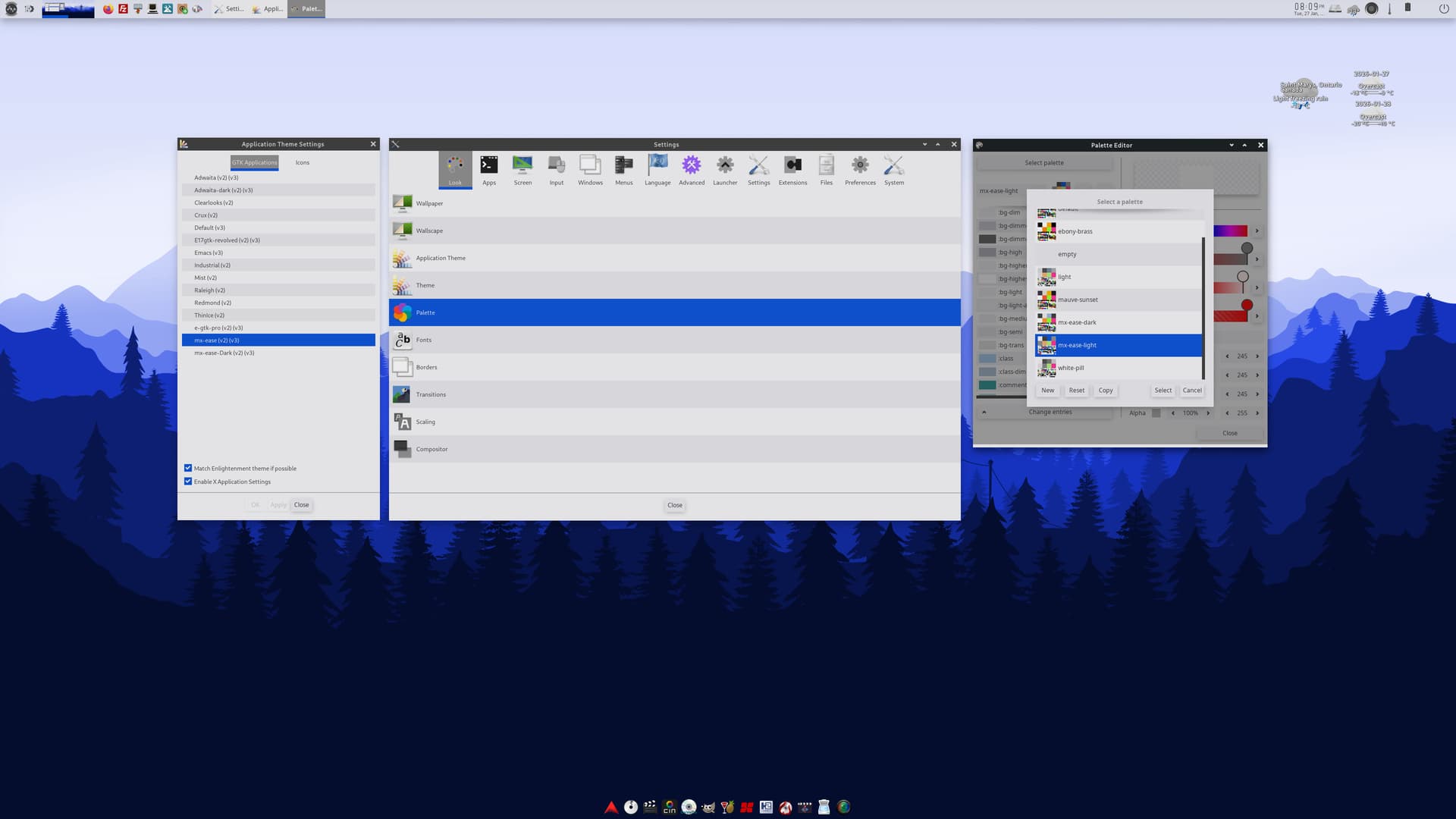
 give the user the option of KDE