One issue I’m having concerns ‘playback speed’, i.e. the time it takes for the project to begin outputting audio once you press the space-bar.
Obviously in many situations, any ‘playback lag’ here is negligible and therefore not noticeable or ‘impactful’. However, on larger and larger projects (-in terms of numbers of tracks, buses, plugins, etc.), this can quickly become a very irritating and time-impactful issue, resulting in upwards of 2-3+sec playback delays, as I posted about here on Ardour’s bug-tracker: https://tracker.ardour.org/view.php?id=10116
Apparently this is all greatly influenced by “Buffer refills”, as @paul put it on the tracker.
…
So, question:
Which of these is the most important for reducing “buffer refill” time, and thus reduce playback lag?:
Increased CPU speed.
More CPU cores.
More RAM (GB).
…
In short… when ‘souping-up’ a computer for Ardour specifically, what hardware parameters (etc.) should I prioritize???
I think it’s important to start with the audio interface’s latency for any given sample rate, as that’s the most impenetrable bottleneck. Really can’t force it to become any faster than it is, so if quick response is essential, need a computer that can handle calculating and cleanly recording everything for a target sample rate, as higher sample rates reduce round-trip latency I assume because of less expensive resampling calculations, so a higher sample rate might become attractive from a latency perspective but will need far more computational power.
That said, recording higher sampling rates preserves and accumulates ultrasonic frequencies which are aliased in the majority of real-time plugins which have some type of saturation/distortion stage which essentially folds ultrasonic frequencies back down into audible range. So lower sample rates have that going for them but at a higher latency.
It’s rough in these streets lol.
So I think if absolute speed is the goal should shoot-out specs between interfaces to find one that offers the lowest latency for the target sample rate and build the system around that.
Also have to consider latency of any given Virtual Instrument or Plugin in that mix as you will need to favor those which have less as well, which means usually using “Draft” mode instead of HQ highly oversampled great sounding virtual instruments, or just prefering samplers and samples of those great sounds which are usually far less latency.
@Crunchtar Sorry if I was unclear. I am not referring to the audio interface. Mine is a Resident Audio T4 (Thunderbolt 2) interface which, as far as I can tell, was engineered specifically for macOS systems of the mid-2010’s, which is precisely what I have (i.e. macOS Mojave on a 2013 Mac Pro).
The T4 therefore seems to be very fast and responsive, unsurprisingly.
But thank you for your nonetheless detailed and informative response!
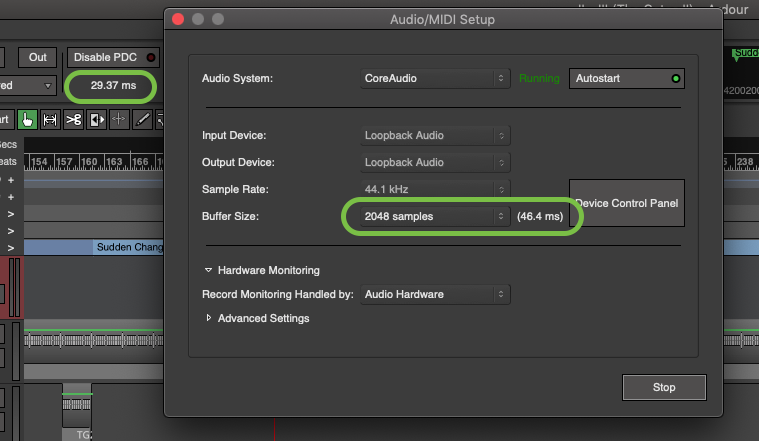
Yes. This has nothing to do with signal latency, e.g. PDC or Audio/MIDI Setup Buffer Size, which as you can see here should be a negligible ±75ms:
Again, according to Paul on the tracker, the culprit in question is:
“Buffer refills. I know it seems as if they should not be needed if you just stop and restart, and conceptually that’s true. In practice, at present, it’s not.”
So now I’m trying to determine if there’s something I can do with hardware to speed this “buffer refill” process up.
In the above example, an internal, NVMe SSD is used for all project files and sources. It has read/write speeds of ±1500/1300 MB/sec according to my own tests (via the “AJA System Test” program). So, unless I’m mistaken, that shouldn’t be causing the significant lag.(?)
I see now. Funny that I was in a similar situation with this 2014 Macbook Pro as I was stuck on Big Sur.
But the problem for me a lot of the time was the background processes going on, and the biggest problem for me before I jumped to MX Linux on this system was that MacOS constantly reindexes its hard drive if any new file or change hits it, which is usually what happens as a DAW is operating. I forgot what it is called in the system processes but it was massive and would essentially take over whenever it wanted to, especially mid-recording. I remember reading some solution to it online but it seemed like a hackjob to me at the time.
So when I made this move with MX Linux and the Liquorix Kernel I was able to control process priority and put audio to the top and that made everything snappier and let me get far better recording and playing results with lower latency.
So I guess maybe Mojave could be the bottleneck with that current situation if it is prioritizing expensive background processes over audio production. Another problem if it’s internet connected is the constant calling home that any or all plugins being used might be trying to elbow their way into doing.
Agreed, the disk setup seems optimal.
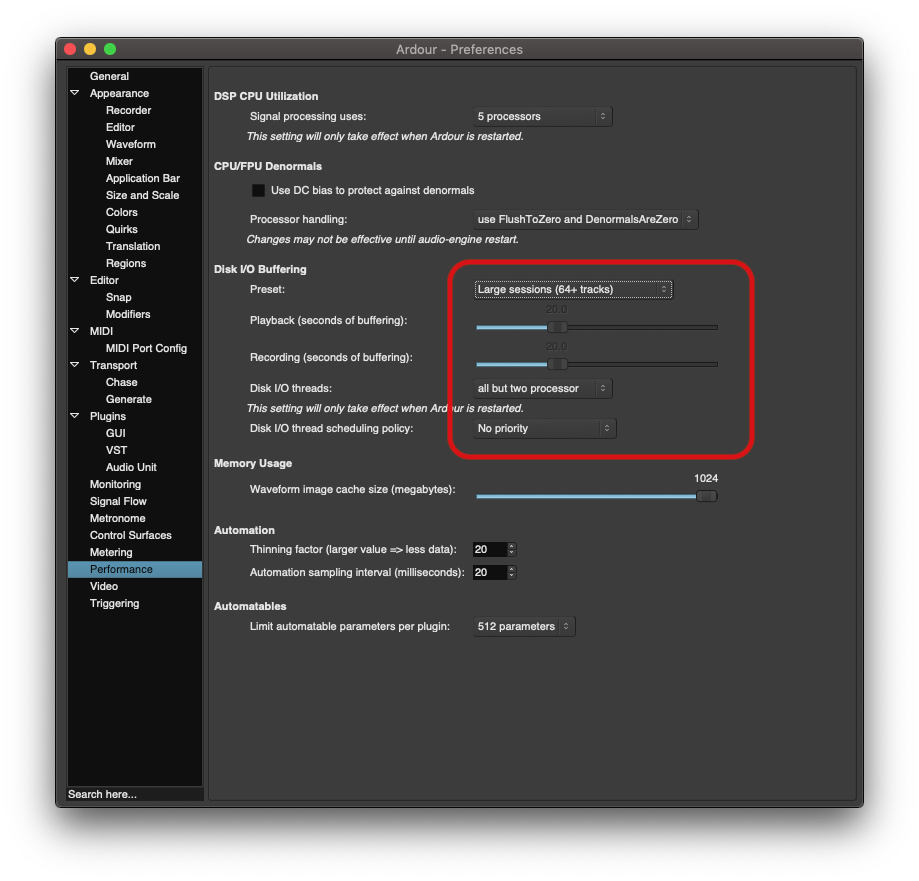
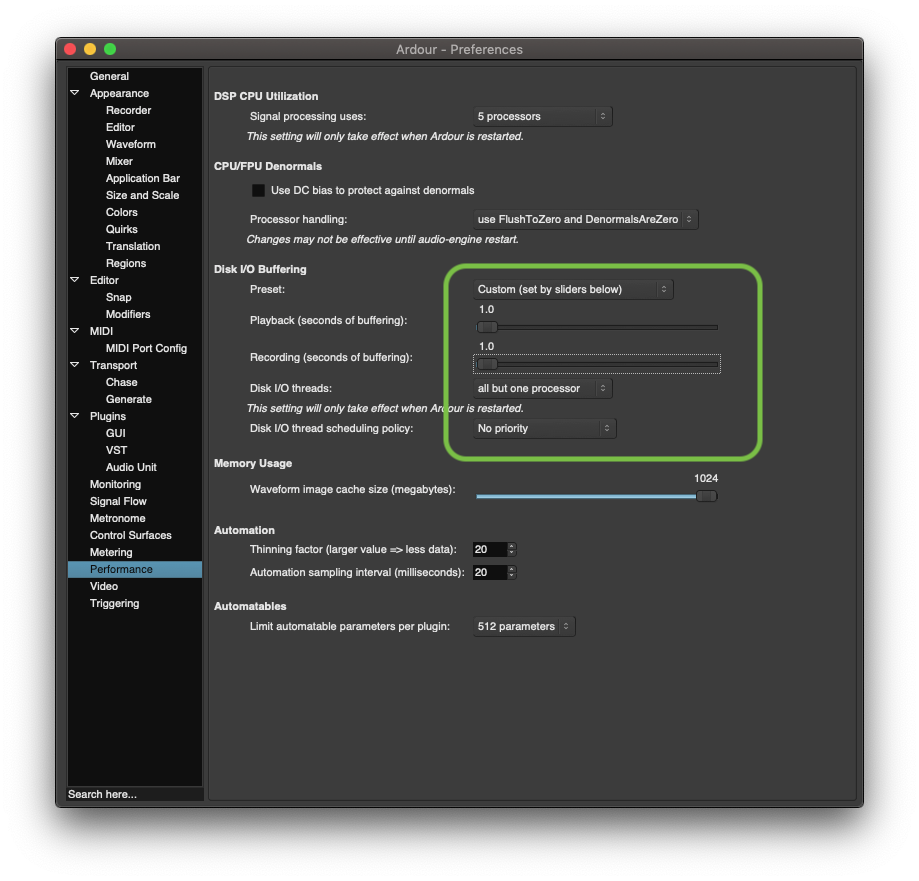
There is a setting which sets the buffer fill length before starting. Since the disk should be fast enough to keep up even with minimal buffer you could try setting that buffer to a much shorter length to see if that helps.
Then again that is mainly aimed at memory usage. The problem isn’t bandwidth (which is very low for audio), but throughput (limited by seeking many small files).
I don’t know how much latency is in the filesystem lookups, but NVMe drives don’t have much problem with random read workloads. Writes are still slower than reads, but that won’t affect filling the buffers to get started.
The original post didn’t mention, but I see a later post specified MacOS. I’m not sure how the performance of MacOS compares to e.g. XFS or ext4 on Linux.
MacOS Mojave introduced the APFS filesystem, and it is commonly encrypted by default I believe so that could be another drag. The indexing issue is that it builds a database for searching the hard drive using Spotlight, but it doesn’t stop indexing even if you attempt to turn off/disable Spotlight so I had that trap of disk encryption meeting unnecessary indexing and it was a resource hog even though I kept it as a dedicated offline music production system.
…
My system seems quite happy/capable with that 1-second buffering. But what signs will there be if that’s too low? -X-runs? -Drop-outs? -Etc.? What is the importance of having this setting in the first place? … (I suppose I’ll poke around in the manual(s)…)
@ccaudle Thank you SO MUCH for this tip! You ‘solved’ my issue! Instead of 2-3sec, it’s now ±0.5secmax. on my largest (-327 total routes-) project. For that size of project, that is quite reasonable! For the project I was testing earlier, it feels like, idk, ±300ms?(!) ~Also totally reasonable! -Feels sooooo much better!
Thank you all!
… Main takeaway:
Using Ardour for 10+ years does not mean you know how to use Ardour.
-J
[PS:
I suppose one question now remains…
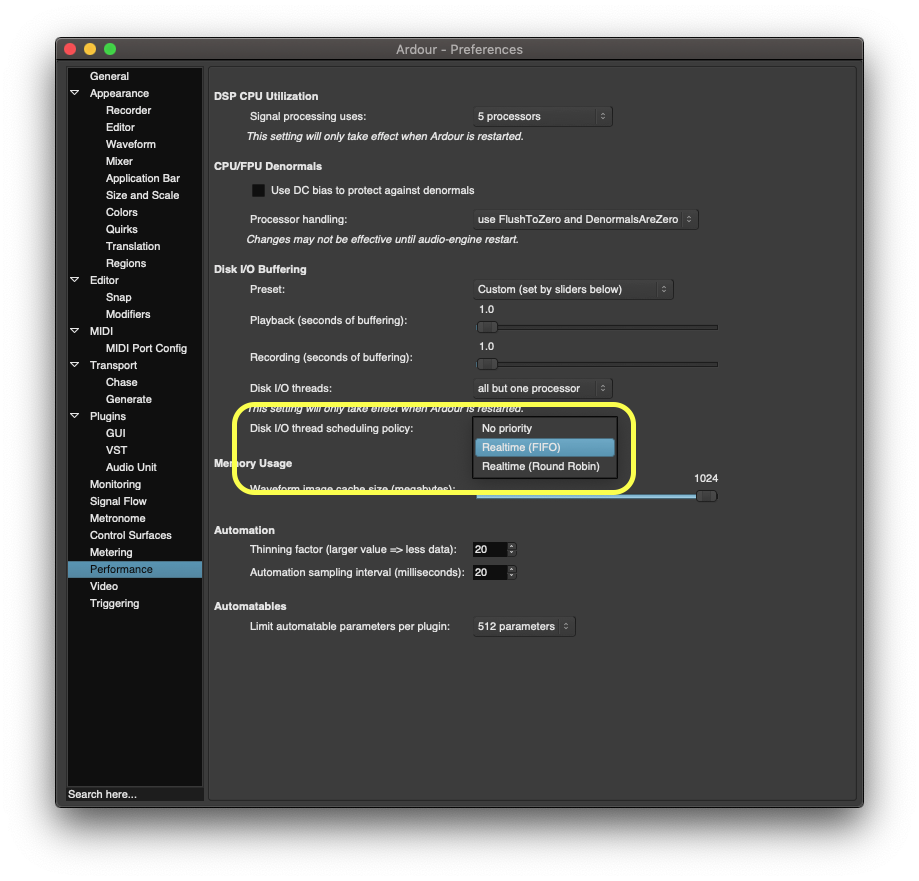
What are these settings, and why should you use one over another?:
Yea those settings directly affect a few things that I fully expected to see this. Namely every time you relocate, the buffer is filled before you can interact again. I believe it is a same story when you stop a recording and the buffer is flushed to disk, but not as sure on that one. That is why there is a delay, the tradeoff as you mentioned in avoiding the ‘disk to slow’ popups, which is a great tradeoff when recording live with 60+ tracks:)