Advice on reducing DSP % / CPU-load?

The Goal:

→ To Reduce DSP % and prevent x-runs/dropouts.


TL;WR:

→ What to do to achieve this goal? -Any suggestions/comments on hardware, software, workflow, etc.?


Things to consider so far:

Hardware:

  • Speed of CPU cores.
  • Number of CPU cores.
  • GB of RAM. (?)

Software:

  • Increase the Buffer Size to max. (esp. when mixing).
  • Set Ardour to use all available cores for DSP processing (via prefs.). (?)
  • Set “Disk I/O Buffering” to “Custom”, and use 30-60sec (via prefs.). (?)
  • Run only one instance of Ardour (esp. when mixing).
  • Close all unnecessary applications/network-connections/etc…

Artistic / Workflow:

  • How many plugins am I using (esp. reverbs/delays)?
  • Monitor the “Plugin DSP Load” window to identify more-taxing plugins.
  • Commit/“Freeze” plugin-heavy tracks. (-I want to avoid this as much as possible.)
  • Numbers of tracks/buses in use.
  • Aux Sends vs Direct Connections. (?)
  • Use a lower project sample-rate. (~I already use 44.1kHz exclusively. :white_check_mark: )

My current setup:

Computer Hardware:

  • 2013 “Trashcan” Mac Pro (6,1).
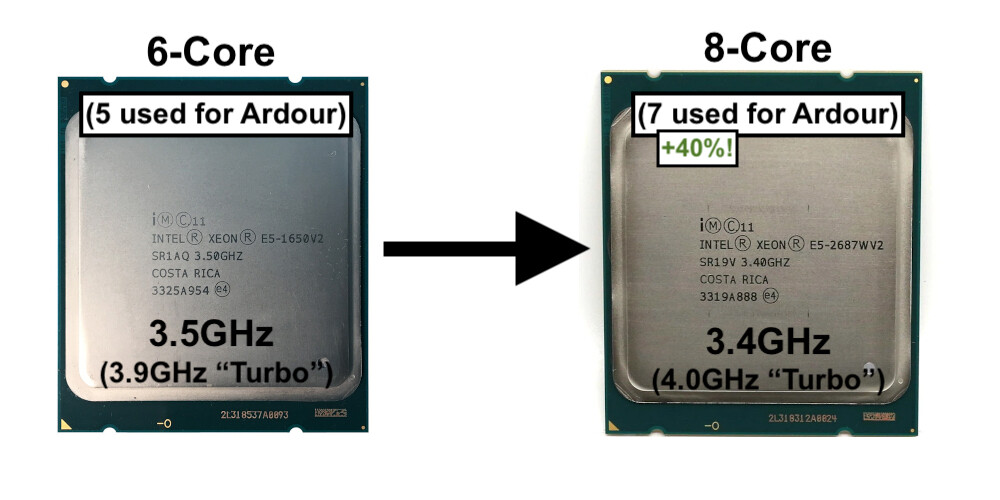
  • CPU: 3.5 GHz 6-Core Intel Xeon E5.
  • RAM: 32 GB 1866 MHz DDR3.
  • GPU: AMD FirePro D700 6 GB. (-Best available for this model of Mac Pro.)

Computer Software:

  • macOS Mojave (10.14.6).
  • Whatever latest Ardour 9 Nightly build.
  • Ardour projects with anywhere from 30-150 tracks/buses, and seemingly-endless plugins.
  • Loopback (v2.0.0), for audio routing / device combination.
  • macOS’s CoreAudio.

Audio Interface(s):

  • Resident Audio T4 (Thunderbolt 2; bus-powered).
  • Audinst HUD-mini. (-Just a simple DAC for headphones+.)
    (-Both connected to Loopback and “Loopback Audio” is used as my main I/O “device”.)

My Main Questions:

  • What advice can anyone give me on choosing a superior (but compatible) CPU? -Should I prioritize CPU speed, or number of cores? (For example, I could get a 3.4GHz, 8-core CPU upgrade, but beyond that, and speed starts to take a significant hit (e.g.: a 12-Core, 2.5GHz option).)
  • Beyond ‘get a better computer’, what advice in general would anyone give for reducing Ardour’s CPU-load?
  • Any obvious thing(s) missing from my list so far?
  • …?

~Thank you for ANY comments/suggestions/ideas/etc.!

:+1: :v:
-J

I’m a Windows user so not even vaguely familiar with the newer Mac CPU’s but I gotta say, I’m surprised if you’re seeing poor DSP readings with an Intel Xeon. I’ve an Intel Xeon.E5-2690 here (running Windows 10) and the only time I ever see ourageously high DSP readings is when using the surround sound stuff in Mixbus For normal usage (whether Mixbus or Ardour) running without plugins rarely even gets me into double figures!

So plugins might be the culprit here…Mixbus now offers something called RegionFX. I rarely use Ardour but if Ardour offers it too, try giving it a go. You might be pleasantly surprised at the fall in DSP.

1 Like

Faster can help, but only if the system is tuned to take advantage of it. For example newer CPUs may have faster cores, but may still spend time in system management mode, which is time the OS is blocked from running. SMM is the term used in servers, not sure if there is a different term for the same behavior in desktop designs. I’m also not sure if Apple uses that. Just pointing out that faster cores can help throughput, but doesn’t always equate to better realtime performance.

Only helps if they can be used. A lot of Ardour processing has to be done serially, so there is a limit to how many cores can usefully be used by Ardour.

Rarely an issue with realtime performance in general, but Robin has pointed out that something like a sampler plugin can use a lot of RAM, so you need to have enough physical RAM that Ardour and any plugins can lock the memory space they need into physical memory, and still leave enough for general system use.

I would not think that was a good idea, because you can freeze out the GUI.

Definitely, especially if you are using the default of use all cores -1 for DSP, that would mean that you would have multiple Ardour instances competing for time on the cores.
Just curious, why would you ever run multiple instances of Ardour? That seems like asking for problems unless you have a really high RAM and high core count machine, and can reduce the number of cores that Ardour is configured to use but still have a reasonable core count per Ardour instance.

Other realtime applications yes. Normal applications should not be able to use time which is allocated to realtime scheduled tasks like the Ardour DSP threads.

That would be the biggest change you can tweak.

Are you running debug builds? I haven’t compared debug vs. optimized Ardour builds lately, but generally debug builds are going to be somewhat slower than optimized builds.

That is very vague. How many plugins are you really using, and what kinds of plugins? Some plugins are more DSP intensive than others.

That is essentially a separate audio interface, which requires CoreAudio to run a realtime resampling thread, which will subtract from time available to Ardour.
Why are you not using the headphone output of the T4?

1 Like

so i have tested audio setups on a few different computers. amd desktop, amd laptop, mseries laptop. are you running windows or linux on your xeon?
i have found as a rule of thumb the higher the better in terms of cpu clock speed. i have noticed a clear benefit of 5.1Ghz versus 4.3ish for my big projects (lots of audio processing).

a couple factors to consider: your use case.

  1. using primarily on real time recording: focus on lower latency. i have see very good performance on m1 series chips out of the box. i have run at very low buffers without xruns. this is related to the arm board whereby the cpu sits “closer” to other components and i believe it is the reason that the mseries tends to do well. i have a m series but i dont use it. people have said you can get by with less ram on these systems. i did do a check and believe it may be true. also you need to consider whether you want apple tech in general. if linux was running reliably well on an mseries chip with compatible plugins, it would really be a serious contender to most other laptops for audio.
  2. virtual instruments: you mentioned plugins but does that include virtual instruments? because running big instruments libraries can potentially use a lot of ram and give you some vacillations on cpu as well.
  3. mixing: you can focus on higher buffers as you mentioned.
  4. desktop versus laptop. are you traveling or doing all in house. if you are doing a laptop setup, you should need to do some tweaks for top performance mode which there are a few threads here. in terms of amd laptops, i have noticed that thermal throttling is the metric to measure. it is pointless if your laptop can hit top speeds for 2 sec and gets throttled for 10 minutes cause the heat is too hot. so specs aside, look at laptop reviews on heat.
    if you dont know a lot about this, look at the gaming computer builds.
  5. your current plugins: are you tied to your portfolio of plugins and on what platform? if you are linux, it is more manual but you can do almost everything without paying for plugins. if you are new to linux, bit of a learning curve. are you using emulations (wine) cause they do add some additional weight on cpu or sometimes even add volatility on cpu use.

people online have tested amd’s desktop 5800x and 7800x (non x3d) 7900x with some excellent results for big projects. i have been using amd series chips with priority on cpu speed and 64 gig ram and am quite happy. apologies for lack of info on intel but i stopped folllowing intel for the time being but that is not a judgment. i am sure other people have great experience with intel and audio.

from privacy and stability standpoints, linux is the way to go. i stopped using windows years ago and have not looked backed with regret.

quick trigger suggestion: an amd desktop with priority on cpu speed (such as 7900x with 4.7Ghz), then cores (12 for that processor), and 32-64gig ram (with good timings/speed that the motherboard can handle well). also for a motherboard you want the lanes on the motherboard to link the cpu and audio hardware as close as possible. the more controllers between your usb connection and chip, the greater the possibility for latency. there is a difference in motherboard selection. so make sure your usb has exclusive use of these chip resources.

there are some other threads on builds as well if you are looking at building.

hope this helps.

2 Likes

Thank you all for the great responses! : )
This is A LOT of info. you’ve shared! :+1:

Well, on just one project (so far) it hit 100% DSP upon pressing play, but then dropped to ~75%.
This ‘flirting’ with dropouts was enough to scare me into thinking about all this again, as I do NOT want to encounter this limit.

Good to consider, thank you. But how would this potential GUI freezing happen anyway? -Would my computer have to hit 100% DSP on all cores or something?

Only during this initial editing phase am I running upwards of 3-5+ Ardour sessions at a time. I am merely copying and pasting audio regions between projects (see here), also tracks/buses via saving templates, etc… During actual sound-production/mixing though, of course just one project will be open at a time.

No, only the optimized version(s).

Well, for this one ~100 track/bus project, I have an average of about 3 plugins per track/bus, so that’s ~300 plugins. A lot (currently) are very simple, low-DSP-use LADSPA/LV2 plugins. But anyway, clearly a lot of plugin elimination and/or combining/sharing needs to be done! :woozy_face:

-Really? But the sample-rate is the same for both: 44,100…
The way the T4 handles monitoring is good for some scenarios, but not for mine. (E.G.: If I didn’t want my headphones to constantly play audio, I’d have to unplug them every time (…from the back of the unit…).) So right now it’s just giving audio to my Yamaha HS7s, and I’ll probably keep it that way. But this is something I didn’t consider! … I think I’ll test different setups to see if any CPU-load changes are negligible or not!

Neither. → macOS Mojave. :grimacing:

Luckily no, it does not!
For now, I’m basically exclusively an audio-regions-only guy.
-No midi instruments (in the final mixes) whatsoever.

Yep. And thanks to my T4 interface, I guess I’m stuck with a max. of 2048 samples. (I would gladly use 4096 or 8192, they’re just not available. :man_shrugging:)

-All in-house/studio! My older, i7 MacBook Pro could NOT handle what I wanted/needed! So that’s why I got this Trashcan Mac Pro as a modest (and certainly cheap) upgrade. : )

I 100% agree with you, and will probably make my ‘main’ machine a GNU/Linux one at some point.

But the physical clock oscillators are not the same, and physical devices are not mathematical abstractions. In real electronic devices the “44,100” clock will be running at some small percentage higher or lower than that, and any two devices which do not have their clocks synchronized electrically will eventually have a point where one device needs audio data, but the other device has not provided it yet, or one device has data which must be read and the other device is not ready to accept more data yet. Resampling is therefore required to make a “virtual clock” which is taking data in at one physical actual clock rate, and outputing data at the second actual clock rate.

2 Likes

You can check Ardour Menu > WIndow > Plugin DSP load

Scroll down (sort by “worst case”), remove plugins that add significant load and/or find a more lightweight replacement.

1 Like