Tracks/buses lose routing... (-Edit XML directly for now?)

Hello,

Back in this post, I commented that:

… “all of my inputs/outputs/routing gets completely obliterated”

Well, that happened to me again twice last night, and is completely unacceptable, so today I’ve been on the hunt to track down the root-cause… (To recap what’s been actually happening, the basic problem I’m facing is that sometimes when I rename and reroute tracks/buses, save my project, quit Ardour, then reopen my project, many of my routing is totally gone, as though I never routed anything to anything.)

Long-story short, I did stumble-upon the issue, but still have no idea why this is happening:

The Problem:

→ Ardour occasionally is NOT saving my new bus names to the XML for outputs. :warning:
Thus, when I save my project and reopen it, Ardour searches for names of routes (buses) that DO NOT EXIST, thus → broken/lost routing. :x:


-Here’s an example:

First, I changed some bus names like so, and then saved my project:
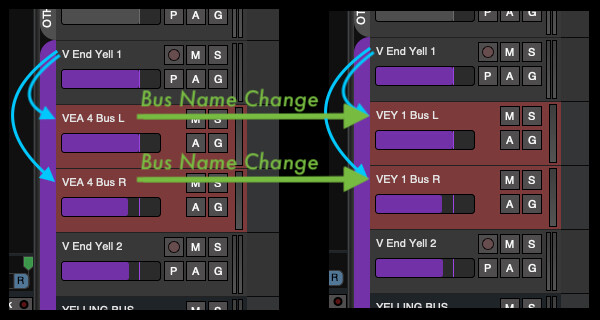
Ardour (8,12) - Track and Bus Routes Not Saved - Initial Bus Name Changes


Now, I would expect that the XML would update upon saving the project, but it does not!
The code that describes this particular track (V End Yell 1) is still linked to the OLD bus names:
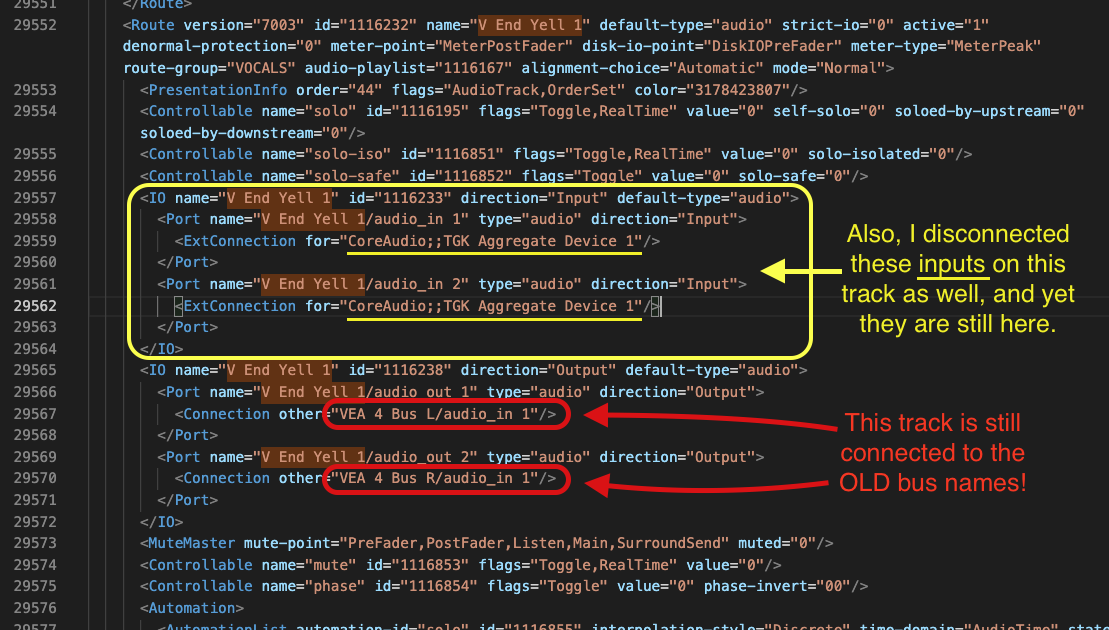
I have now submitted a bug report.

But I am posting here on the forum as well for additional comment, and perhaps suggestions, as this is a very urgent and terrible problem for me. :confounded:

What are some possible workarounds to prevent this from happening?

For example, I just now saved my project, quit Ardour, and then manually inserted the correct routes using VSCodium like so:
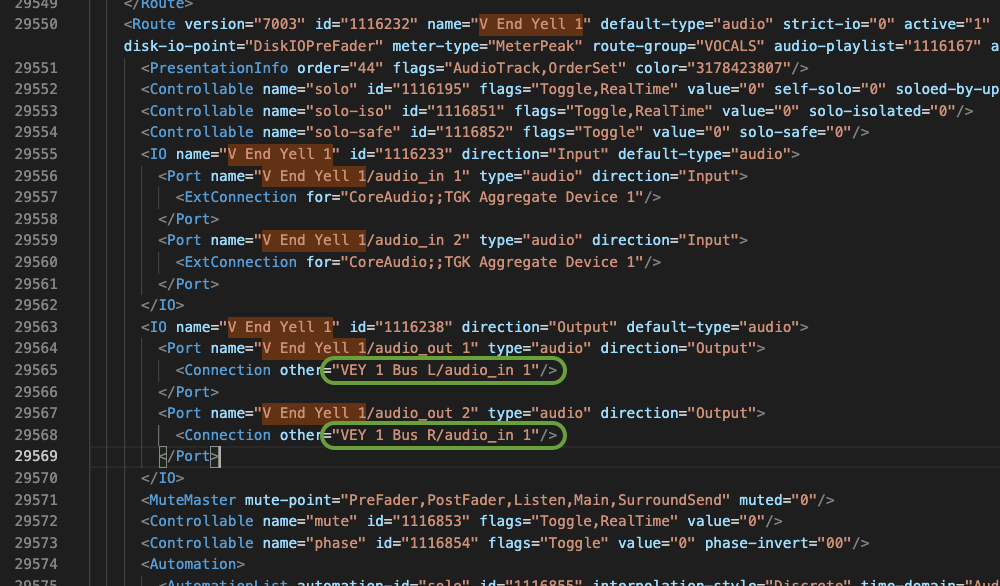
→ And upon reopening the project, that new routing did indeed appear in the DAW as intended! :+1:
Now, is doing this stupid/dangerous? (-Note: I’ll be saving backups/snapshots along the way.)


Any other strategy to avoid this chaos?
-Or is this just a totally unique thing that no one has ever encountered?

Also, might this have something to do with migrating my project from Ardour v2?
(-The migration process I used: v2.8.16 (32-bit) → v6.9 (32-bit) → v8.12 (64-bit))


Any comments/suggestions would be greatly appreciated, as a lot of problems have come my way in Ardour over the years, but this one takes the cake… -___-

Thanks,
-J

1 Like

Uh, will one of you kind Ardour users out there try observing this bug for me?

I would like to know if I’m crazy or not… O___o
Because I have now experienced this same issue across multiple operating systems and hardware.
And I’m now just trying to pinpoint whether or not this truly is Ardour’s fault, or if Satan himself has cursed my mixing room… : P

Only if you’re using Ardour v8.12, and if you have 5min you can comfortably spare, it would be greatly appreciated if you could do exactly the following:

  1. Open Ardour 8.12 and create a new session (e.g. “ROUTING TEST SESSION 1”)…
  2. → But set it to 44.1kHz sample-rate.
  3. Create 2 stereo audio tracks, 2 mono audio busses, and one stereo audio bus.
  4. Rename them to and organize them like so:
    Audio Track 1
    Bus L
    Bus R
    Audio Track 2
    MAIN BUS
  5. Disconnect any and all from going to the Master Bus.
  6. Route the left-output of “Audio Track 1” to the input of “Bus L”.
  7. Route the right-output of “Audio Track 1” to the input of “Bus R”.
  8. Route the stereo outputs of “Bus L”, “Bus R”, and “Audio Track 2” to the input of “MAIN BUS”.
  9. Route the output of “MAIN BUS” to the input of the Master Bus.
  10. Save the session.
  11. Quit Ardour.
  12. Reopen the session (using 8.12 of course).
  13. Observe that all the routing is (likely) still fine and good.
  14. Rename ALL of the 5 tracks/buses you created to whatever you want.
  15. Save the session.
  16. Quit Ardour.
  17. Reopen the session.
  18. —> All links/routing are now gone/disconnected (-except for that final bus that connected directly to the Master).
    —> And there will be log errors (in the Log window) about how certain connections don’t exist.

-END-

If by step 18 you do NOT experience routing loss, then I’d really like to know! -And I’d like to know about what OS you’re using, etc…

Thank you to anyone out there at all for even considering!

-Cheers!
-J

Reproduced here with 8.12

1 Like

Problem understood (but not yet solved).

1 Like

That is wild. O_____O

Thank you very much for testing this!

And thank you very, VERY much for trying to address it with such immediacy! : )

I have noticed several times since I got Ardour 8.12 (last year) that sometimes my tracks/busses would lose their routing, but I never took the time to actually try to reproduce it. → I would simply re-route them and move on… -And if you do that (-that is, without changing the names again) then all is ‘fine’ (i.e. the routing is preserved from then on)…

I just had no idea that this was likely a legitimate bug!


I guess I should have heeded this comment:
It’s Probably Our Fault

haha… : /

Anyway, thanks again! :star: :star: :star: :star: :star:
-J

The workaround for now is to rename things before you connect them. Or disconnect and reconnect them after renaming something.

1 Like


EDIT:

Yes, I just confirmed this works well, and is probably the best, temporary workaround:

:ok_hand:

1 Like

This bug has now been fixed in git.

3 Likes

I just updated the bug post.

Long-story short:
The problem remains precisely the same, at least on the demo version of the 9.0.pre0.1469 build. :disappointed:

Should I trying using the full version?
Or maybe try building from source?


Are the demo or nightly builds only ‘pretending’ to be the latest iteration of the software?

Because my analysis (using VSCodium) of the XML mutation as I changed names and saved projects (Steps 1-18) reveals identical behavior between 8.12 and this v9 1469 build, as though Robin’s commit was not actually implemented whatsoever, or is perhaps irrelevant.

Odd.
-J

I was able to trivially reproduce the behavior with an even simpler test case. After the fix, the behavior was gone.

However, it does indeed seem that doing the full set of steps you described still triggers the behavior. Depressing.

1 Like

I ended-up doing the test that way because it’s just more ‘real-world’.
→ More tracks.
→ More buses (some stereo, some mono)…
(~A ‘healthy’ variety, you know.)

And yes, depressing…
I was almost ready to celebrate, until I finally got around to testing it…
Thank you for your efforts so far though!


I was curious about your “even simpler test case”, so I tried something simpler myself, which also proved buggy (-all in Ardour 9.0.pre0.1469 of course):

  1. Create a new session.
  2. Add x1 stereo audio track, and x1 stereo audio bus.
  3. Rename them.
  4. Disconnect both from the Master Bus, and route like so:
    Audio Track → Intermediate Bus → Master
  5. Save, quit, and reopen Ardour.
  6. Rename the track and bus you added.
  7. Save, quit, and reopen Ardour.
  8. → Observe that the connection from the track to the intermediate bus is now gone. :x:
    -___-


So I don’t know what “simpler” test you performed where things changed.
(-Perhaps your test was a fluke?)

Because that’s :point_up: a super simple test as far as I’m concerned, and it still failed.

Depressing indeed… :confounded: :tired_face:

The simple test I used was: new session, add track, add bus. disconnect both. Connect track to bus. Rename track and bus. Save. Quit. Reload … connections are missing. This is no longer true.

@paul @GhostsonAcid Please use the issue tracker to discuss this.