Ok, look, I admit sometimes I am as slow as paint drying, but, as I am getting older my brain is freezing, ok. I have a terrible time (and I know most of you will probably roll your eyes at this) figuring out how to link tracks, link midi inputs and outputs, link external effects etc, etc, using the input/output tables in Ardour. I mean, this track out, to this track in, and over and around again, I usually end up just blowing my ear drums out with feedback.
Now, I must warn you, I am about to use some bad language here, but I find the much simpler way this is handled in (and here it is, I’m not swearing) Reaper, so much easier to follow. Problem is, I like Ardour (I use the free version of Reaper), but getting these things to work just frustrates me, like trying to use Jack (yeah I know, 99% of you do it with your eyes closed).
Is there a ‘simple’, easy to follow tutorial somewhere that can help me. I mean, I need to share my genius with the world guys. I want Ardour to help me do it, but I can’t figure this simple step out. Have pity, help me, please.
Sometimes routing (no doubt in any DAW) can be very confusing. Although I do continue to be surprised by how many point to Reaper’s routing abilities as ‘superior’, when I’ve always found modern Ardour to be very intuitive and easy to navigate in terms of routing. Ah well, everyone’s different…
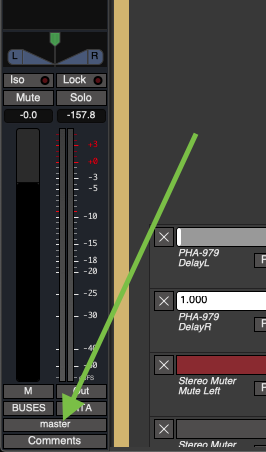
For me, I basically never use direct connections to connect routes (e.g. tracks to buses), except for final sub-bus connections to the Master bus, which are required in that case. Each track/bus mixer-strip has a button towards the bottom that can open the “Routing Grid” window to make such direct connections:
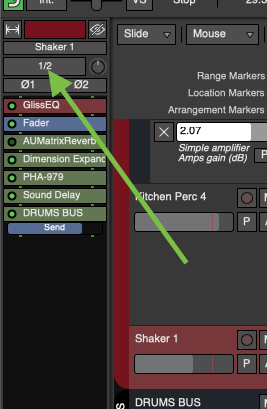
Likewise, a button at the top of each strip allows for making input connections (-in this case it’s showing that inputs 1 and 2 of my 4-input audio interface are being fed into this track):
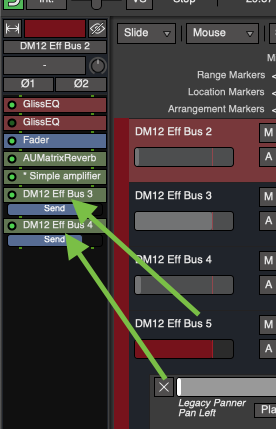
For outputs though, instead of direct connections, one can use what are called Aux Sends, which manifest as repositionable elements (like plugins) as shown in the picture below. Aux Sends are arguably preferable not only due to greater flexibility of the send itself (i.e. you can reposition it, mute/disable it, invert its polarity, and it has its own fader), but for the more-technical reasons outlined here by @x42 some years ago. Here’s an example of two Aux Sends on a bus:
…
However, as for external, physical hardware connections to-and-from Ardour, I unfortunately have zero knowledge about that, so I’m sorry if the above is more or less already understood by you.
Regardless, hopefully something here can help you out somewhat.
It’s somewhat outdated, I’m afraid. Specifically, this part — “All routing, both internal and external to Ardour, is handled by JACK.” — as well as the JACK part below that. Will have to fix it, thanks for tagging me




 –kidding! : P
 Ardour.