Hi all. Hoping to get some help routing MIDI from one VST to another on separate tracks. I’m running Ardour 9.8 on OpenSUSE Tumbleweed.
The set-up is:
Track 1: Prologue VST3 (Prologue - Chord Progression MIDI Effect). This generates multi-part MIDI as follows:
MIDI channel 0: The full ensemble
MIDI channel 1: The bass part only
MIDI channel 2: The chords
MIDI channel 3: Melody
On tracks 2, 3 and 4 I have separate instances of Surge XT which I wish to receive the MIDI separately for the bass, chords and melody. Meaning that as I make changes in Prologue on track 1, the different parts are played on each of the different Surge presets. This is hopefully familiar with anyone who has used Instacomposer on Windows.
What I’m stuck with though is routing the MIDI from Prologue on track 1 so that MIDI channel 2 is sent to Surge on track 2, MIDI channel 3 is sent to Surge on track 3, and so on.
In Reaper this is quite easy to do using the routing settings, but in Ardour I’m stuck. It must be possible, but how?
Any ideas would be greatly appreciated!
Thanks
Nick
1 Like
Found the answer here: https://www.youtube.com/watch?v=L81cxZiFOY0
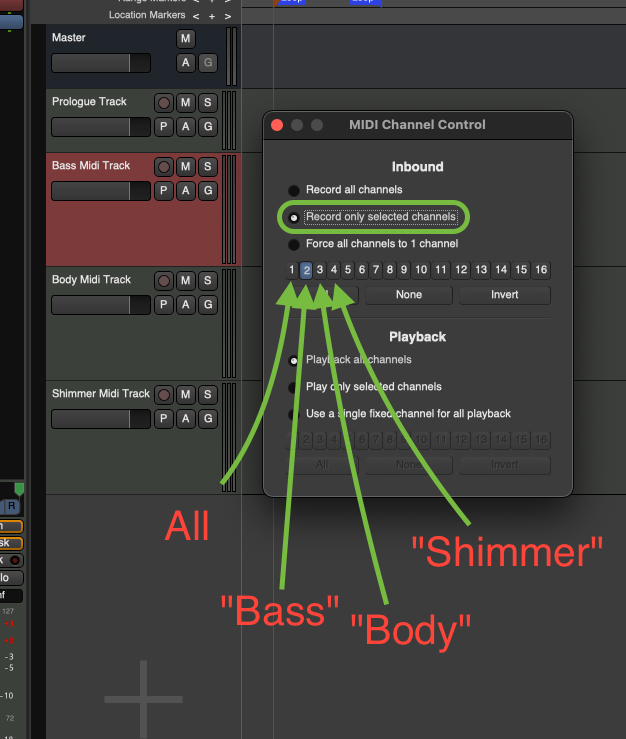
Basically route the MIDI from track 1 to tracks 2, 3, and 4. Then in the Edit page right-click the track head for each 2, 3, and 4 and use ‘channel selector’ to ‘record only selected channel’ and filtered the MIDI that way.
The methods in the video you found seem nice, but seem nice for when a physical midi keyboard is plugged into your computer and you want to switch between midi tracks with the click of a channel button on the keyboard.
If Prologue is meant to output multiple midi channel info all at once, then using midi Buses instead might be the way to go. -But that’s for you to decide! 
You can try this for a minute:
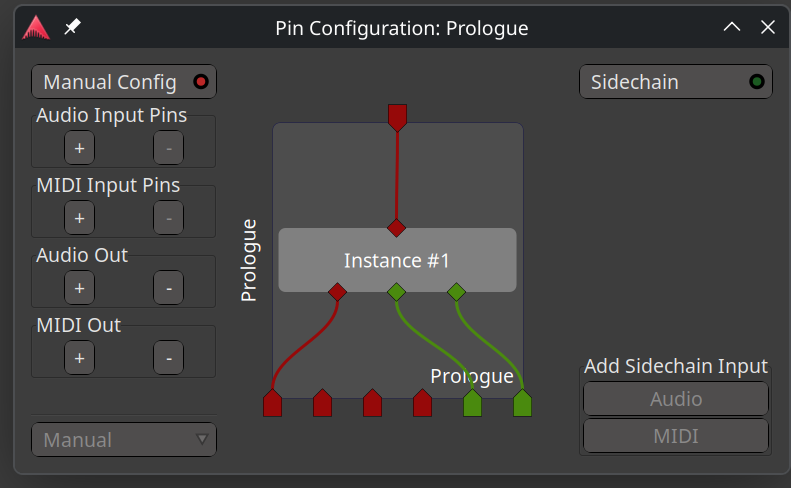
- Using the ‘pinout’/“Pin Management Dialog” for your Prologue plugin on a midi track, make sure the various midi channel outputs are exiting the plugin as intended. (For this, you might have to engage “Manual Config” in the top-left and make manual changes, but maybe not in your case.)
Here’s a related example not using Prologue of course:
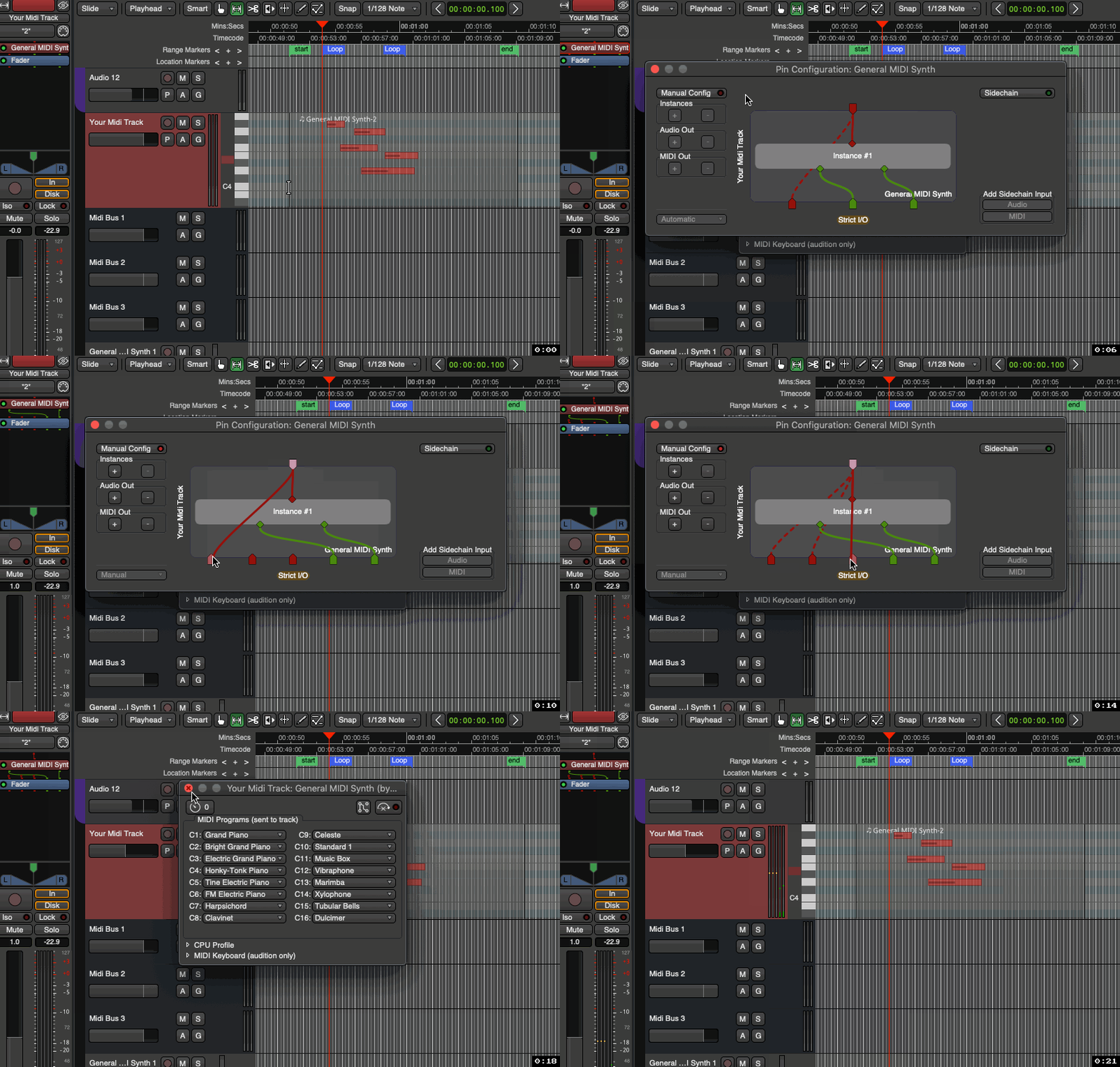
- Go to a midi Bus you’ve created, click on the inputs tab → Routing Grid → Tracks, and then attach whichever midi output(s) you want to the midi input of that bus:
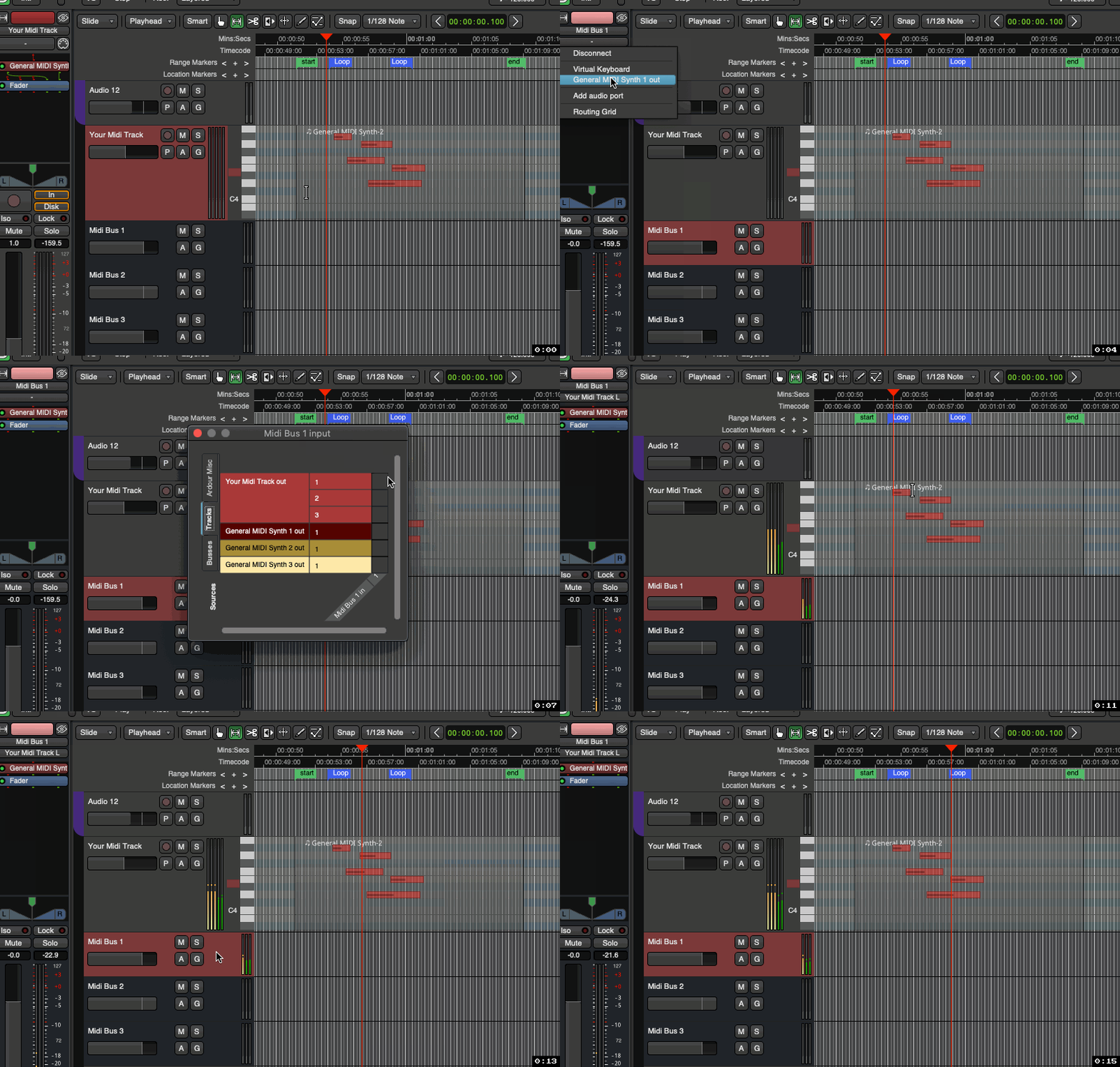
- Repeat this process for different midi channels from your Prologue track to different buses and their inputs…
- Use your Surge XT instrument plugins on each bus to each be a different synth/sound.
-Done! 
In Ardour, tracks and buses are distinctly different things. I’ve heard that in Reaper this is not necessarily the case, and they are kind of one, merged concept.(?) (-Someone can correct me if I’m wrong here.)
Thus, in any instance where signals ‘should’ be flowing from one track to another, I instead think of one track flowing into a → bus.
-J
Hey many thanks for the comprehensive reply! I have tried this with Prologue but cannot find a way to route the 4 MIDI channels out of the plugin as there seems to be only one MIDI connector I can move. Hopefully this screenshot shows where I am:
I believe I would need another 3 red dots on the Prologue plugin itself so that I could connect them to the corresponding red connectors beneath it. I’m probably misunderstanding (I’m still learning Ardour)!
Thanks again.
1 Like
Okay, I hopped on over to macOS Monterey so I could download your exact plugins and experiment. The single midi output from Prologue is fine. -All Midi channels are sent via that one midi output.
So do this:
-
Forget the MIDI Buses (-and even the pin-out windows). -Simply create 4 MIDI Tracks: Your main ‘Prologue Track’, a ‘Bass Track’, a ‘Body Track’, and a ‘Shimmer Track’.
-
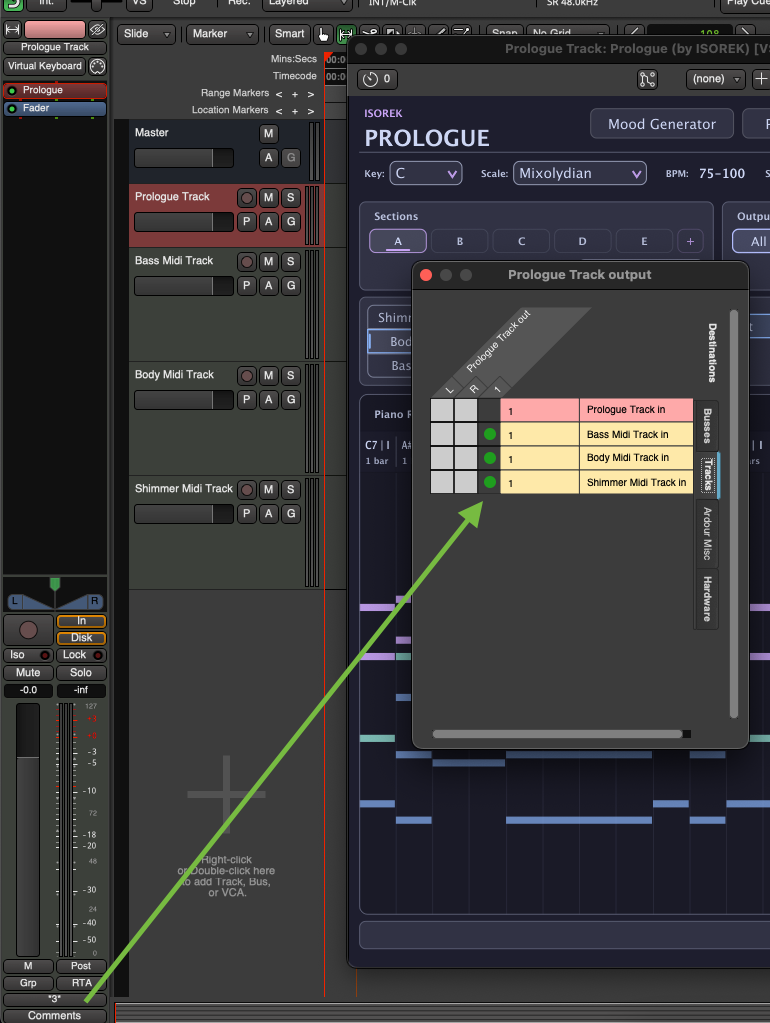
Using the Routing Grid (outputs) of the Prologue Track, disconnect from the master, and route the one MIDI stream to the MIDI inputs of the three other MIDI tracks like so:
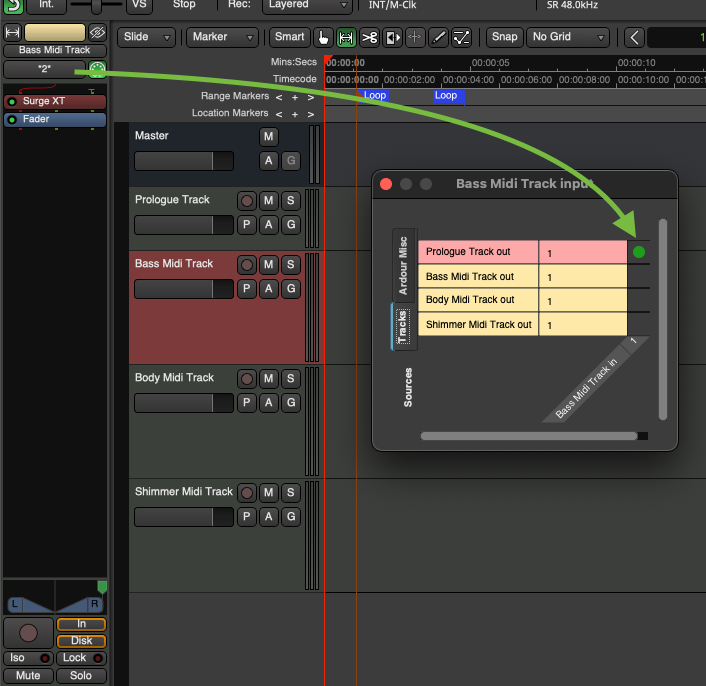
–Alternatively, you can use the Routing Grid for the inputs of the Bass, Body, and Shimmer MIDI tracks themselves, like so:
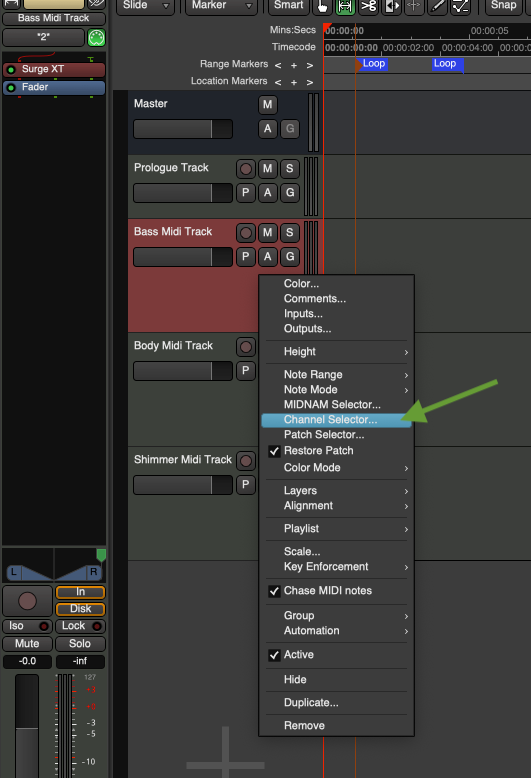
- Now, right-click on each track, click on “Channel Selector…”, then set (-under “Inbound”) to “Record only selected channels”, and get it so only the appropriate channel is highlighted (“Bass” = 2, “Body” = 3, etc.), as shown here:
- Repeat this simple setup for the other two tracks, e.g.:
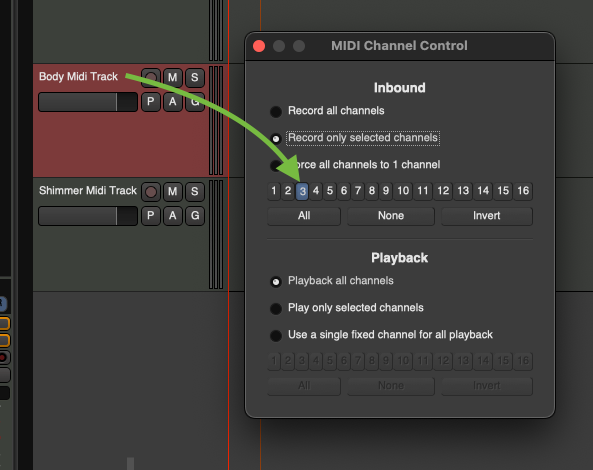
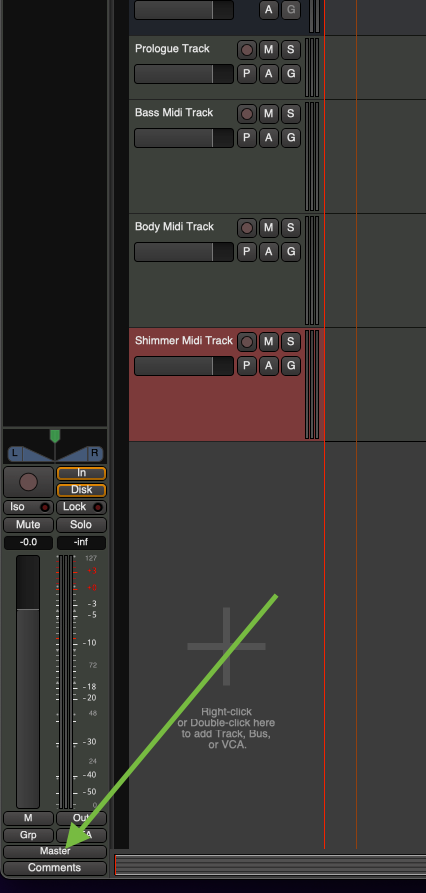
- Ensure that each of the Bass, Body, and Shimmer MIDI tracks are still being routed to the Master (-or whatever Audio Bus you want them to connect to in whatever chain you want, etc.) so you can hear the outputs:
- You can now mute/solo the different tracks to hear how they’re each receiving the appropriate MIDI notes from the Prologue plugin. You are now free to alter the Surge XT settings for each how you want, mix them individually, etc.!
That should do it! 
(I did this, too, cuz I want to learn more about MIDI in Ardour as well, which has mostly been completely opaque to me, o___o haha.)

-J
Top notch help - I drew the same conclusion and have implemented it as you described. I really appreciate your time spent checking this for me, and writing it up for others to learn from.
Thanks again!
1 Like