So I just came across this Gamma Vocal Studio plugin for rock/metal vocals and it is really much better than anything else I was using to far (mostly stuff included in Ubuntu - I know, that’s on me).
So I am wondering if there are other awesome plugins I might be missing. Anyone here working with this kind of music (Power, Symphonic, Progressive Metal, no growling or screamo) to recommend plugins, workflow and other stuff that might have flew way past my head all these years? I am trying to learn editing of everything, including rythm and solo guitars, electric and acoustic, bass, drums, keyboards, lead and background vocals, even choir if I ever get a good tutorial and plugins for that.
I don’t really work in that genre but there are literally thousands of Plugins to choose from both Open Source and Commercial Vendors. ‘Do it all’ Plugins like that Gamma one can be incredibly helpful but they are essentially just convenience-chaining a bunch of different Plugins together. Maybe the individual processor parts are great and maybe by simply making your own chain of compression, EQ, limiting with top choices of each you could do better. ‘Easy buttons’ in music production are very rare and often deliver less than they promise…
You mentioned Ubuntu but Gamma is a Windows Plugin isn’t it? Are you using yabridge to host it?
Exactly, I’m using yabridge, so Windows plugins work fine now. The only restriction is free vs. paid plugins. I’m fine with non-free plugins as long as they have some trial period for me to test.
Also yeah, there are thousands of plugins, but this being a hobby I cannot go out testing thousands of plugins, right? Hence I am asking for opinions of things I should check out first.
Thanks I will look into all of those right now. I already know Dragonfly reverbs and indeed it is great.
This is a one-man-band project so yeah, I do all instruments. The drums are recorded via MIDI so I need a decent MIDI plugin for that. I have been using LSP Multisampler with some custom samples that I picked around and found cool, so it is a mix-and-match of a several different drum systems. I doesn’t sound great, but it is the best I could do with the tools I had. It does sound too “automatic” right now, though, even though the tempo is the actual tempo I played on the actual MIDI drum.
For compressor/limiter I use LSP Limiter, also serves me well. I am wondering if it is a good idea to combine that with NovaClip, I got mixed results.
Have you explored the variety of sounds in the standard GM2 MIDI set. That includes all sorts of “proggy” stuff, including strings, organ, and choir sounds.
Regarding workflow, I doubt there’s anything genre specific here when it comes to recording real instruments. A lot of people start with a drum track and then overlay from there.
Remember, you can always have disposable tracks that are just there to help with tracking and building the project.
As an example, on some projects I have laid down a crappy single-note-per-bar baseline just to help me understand where I am in the song, when trying to capture a live drum performance. There’s also the concept of “guide” or “scratch vocal” Scratch vocal - Wikipedia
You have unlimited tracks, don’t be afraid to use them to help you.
The same with BVs and guitar doubles, etc. if in doubt, you can record another layer and try it out. If it’s not working, then mute and hide it.
A lot of the workflow you use will depend on how much you want to use the DAW as a tool for experimenting with and developing your song.
This approach contrasts with the more traditional workflow where you start with a very clear idea of what you want and focus on getting the performance captured.
The latter is the approach that is often taken by professional studios and producers partly because they are experienced enough to know what works and, for older producers, it’s the workflow they are most familiar with.
Consider that, back in the pre-DAW days, it was far more difficult and expensive to just capture sounds and performances and experiment with them. You were recording onto tape with a limited number of tracks, and “plugins” meant physically modifying the room acoustics, or hard wiring an expensive piece of studio equipment in. Applying an effect to an existing recording would degrade the quality of the recording.
That lead to studios making decisions about things like amp tone, drum sounds, and any effects up-front and recording those directly, rather than making changes after the performance had been captured.
A lot of people consider this “analogue workflow” to have benefits and will use a similar workflow even today with DAW where the constraints don’t exist anymore: it reduces “option paralysis” and endless tinkering in the DAW and forces you to think more about capturing a good performance.
If, for example, you decide you don’t like the guitar tone, then there’s a limited amount you can do if it’s been printed to the track and, if you really don’t like it you may have to re-record the track. That discourages tinkering and makes you focus on what you need; if you do decide to re-record, you will do so with a clearer idea of what you want.
But, as I said, this approach is born from having the experience to execute it, so it may not work for you.
Yes, I intuitivelly do lots of the things you described, including the guide track on top of a metronome and recording the drums first. I also make a vocal guide on a clean guitar for recording vocals, because never having heard the song before, I will tend to get… “too creative” when singing. The guide keeps my brain on track (and on pitch).
About the choir, I have no idea how to even record that, but maybe that is me being terrible at harmonies anyway. Every time I try to record a choir it just sounds like a bunch of maniacs screaming from hell. Interesting effect - but not what I am going for.
@willy_dinglefinger
I love how Ugritone sounds, but I didn’t find a trial/demo version, am I missing something? I got some of the Audio Assault ones, that might be a good entry point since they are cheap. The ACMT are annoying to try with the 60 sec limitation, but I don’t feel like it made a massive difference when compared to LSP Limiter and similar ones - unless I am doing something wrong.
I don’t understand Airwindow, that’s supposed to be ui-less? Maybe I’ll skip that for now…
I think it depends what you are trying to do. Historically, a lot of proggy stuff used a synthesizer or samples for choir sounds, with the Mellotron being a particular favourite. The Mellotron is, effectively, an early sample-based keyboard.
Airwindows plugins do have a UI but it’s pretty basic. These plugins are fantastic, but they are not for the feint-hearted. For a start, working out which plugin to use (and what they actually do) is a bit of a minefield, even with AirWindopedia. There are, currently, over 350 individual plugins, and Chris is adding new ones all the time. Auditioning all of these is not practical for most people.
Personally, I have used AirWindows ToTape8 for tape characteristic, and some basic compressors/limiters.
You might want to look to one of the Console plugins (e.g. ConsoleX) which provides a lot of functionality in one plugin.
I have also used Monitor3 on my monitor bus to good effect.
For guitars, I personally use Genome from Two Notes, which is paid. But for free, I find Neural Amp Modeler or Aida-X very good.
For drums, I’m a fan of Drumgizmo with its drum kits https://www.drumgizmo.org/wiki/doku.php?id=kits
I haven’t used AVL Drum Kit much, but I think there’s plenty to do with it.
If it’s paired with Ardour, there’s plenty to do with Hydrogen.
As mentioned above, AirWindows is a goldmine of ideas to explore.
Otherwise, I use Analog Obsession plugins with Yabridge, and there’s a free Distressor that I love with kiive audio… and many others.
I will say if you have a working yabridge and Wine setup DO NOT update Wine or change anything, it has been very volatile in the past 18 months or so and Wine now routinely breaks yabridge. WinVST with Wine has always been a hack but it was a fairly predictable and reliable hack, it isn’t any more.
Do you mean record a choir, i.e. a large number of people singing together in a group in a room, or simulating a choir with multitrack recording of one or a few number of people?
I confirm: Yabridge and Win VST plugins only work with native version 9 in distributions or on a staging version 9.21. You should absolutely not install version 10 via WineHQ. One technique is to freeze your Wine Installer installation with the “hold” command.
I regret that the Wine developers were unable to make a version 10 compatible with Windows VSTs in ProAudio, but there must be many coding reasons that escape me.
I honestly don’t understand the whole SW monitor thing. I can clearly hear the delay and it is difficult to sing anything which is not very slow. Fast guitars are impossible. I guess that my recording gear is on the very low end:
Flow 8 audio interface (thanks to people in this forum who recommended)
MXL990 from ancient times that still work
an ancient ToneLab ST with USB port
also a RODE NT-USB+ for recording “on the road”, but I find the MXL990+Flow8 gives much better results most of the time somehow
I only use HW monitoring. Flow8 has a few simple effects (reverb, delay and etc) that I can use to add to the monitoring only so it doesn’t sound tooo boring. It also has a gazillion input channels so I can record the dry vocals together with the monitor channel (with the effects) into two tracks in Ardour. I can play analogous shenenigans with the guitar combining Flow8 with TonelabST and I end up with one track with effects and one without - so I add whatever amp I want later in Ardour. I don’t know if those are good practices, I feel like I’m improvising everything like a maniac.
As for Airwindows… I think I’m too green to try it now. I don’t even know what I should be doing while mastering the track. I sometimes see that these producers know exactly which frequency range each instrument should have for the mix to sound good, and I really need to learn those things too, specially in Power Metal where there is “a lot going on”, everything is loud and the end result tends to be a mess of overlapping things that shouldn’t be overlapping. Is there any comprehensive guide around for those things?
@nabo_nono
Thanks I will look into Genome and Neural Amp. As I said, I am fine with paid as long as I can try it first and it seems that genome has 14 days trial.
@GMaq
Yeah, I am using stock Wine from Ubuntu 24.04. I got too lazy to try wine-staging and I guess I lucked out? Haven’t had problems so far.
@ccaudle
I mean simulating a choir, as in me several times. I’ve tried recording with the microphone in different positions and distances and focusing on very chest-y voices for choirs (lead vocals is very head-y). It did not sound even half decent but 99% chances that I am just not ready to do that.
A good start to a solution for that would be to put a hi / low filter on your tracks. Panning also helps as well.
For example, on guitars, you may want to filter the bass out, I cut in the ballpark of about 100hz and below. and roll off the very high end all the way back to 6 to 8 kHz, or what sounds good. Adjust to suite your needs.
Synths I usually cut the top off as well.
A spectrogram can be used to view what is clashing, and try reducing frequencies by a small amount of dB for one of the clashing instruments.
A limiter on the master buss can help also.
Also, a tape emulator ( air windows toTape8) on the master adds some flavor.
Whilst this can be used for real-time control-room monitoring, it’s also useful for mix monitoring as you have controls and can add plugins that are useful during mixing (or mastering) but that you don’t want to be part of the master track and printed onto the exported track. Think things like room correction, metering, and loudness processing. You can also easily switch the output to mono to test for mono compatibility.
That is just a variant of recording background vocals then.
The first thing is obviously singing skill, you have to be able to sing with very precise and repeatable pitch and timing. Record each voice part multiple times (which also implies having a wide enough range to sing multiple voice parts), then start by panning the voices slightly so they have a left/right spread and are not spacially right on top of each other.
After that a more advanced technique is using early reflection delays (e.g. Dragonfly Reverb early delay) to give an impression of front to back spread.
It always has to start with good singing (with “good” being context dependent, e.g. some metal genres have a style that classical vocalists would be hesitant to call singing, but those guys can do it consitently and repeatably and get the effect they want, so they have skill in that particular style).
Judging by your comments you don’t want the “bunch of maniacs” effect, so you will have to start by learning to sing in a controlled and repeatable way in the style you want.
After that it is “just” a matter of doing that a lot of times and then mixing together.
Honestly, don’t worry too much about what social media influencers say, don’t think too mathematically about “do XYZ at A frequency to achieve B and C” and just focus on using your ears Mixing is about making a song sound good, fundamentally. So switch off the eyes and switch on the ears.
I do a lot of heavy guitar music and there are, by it’s very nature, many overlapping frequencies… Soloing the guitar bus while tweaking levels and EQs of channels is useful, then hearing yhe guitar bus and bass bus together… Dynamic EQ on the bass bus sidechained by the kick… It varies and can be difficult but just let your ears be the boss and you’ll get to a good place in the end
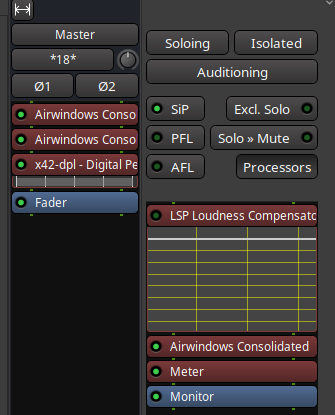
There is actually an Airwindows Consolidated VST3 that is like a container for Airwindows individual plugins, has a GUI, contains descriptions of each plugjn and allows you to switch between them seamlessly… Well worth a look if you’re out to discover new Airwindows plugs and see what does what.
Actually, since Mixbus changed their licensing system, I dropped it and instead stay in Ardour for mixing and basically I use the same mix toplogy (channels → busses → mixbus / master) and add Airwindows Tape at the end of the master bus and Console8 on each channel/bus/the master to recreate that Mixbus vibe and honestly it sounds better to my ears. ACMT plugs handle EQ and compression / gate / expander duties. It all eorks very nicely.
I actually do use AirWindows Consolidated. The only downside is that it shows up in the processor box as that, so you have to do some clicking around to see what the actual plugins you are using are.
Ah OK cool Yeah I know what you mean… I usually rename each instance like ‘verb’ or ‘tape’ or whatever which helps a bit with overviews and organisation but not optimal, I agree.
Joe Gilder has a very good YouTube tutorial on recording background vocals:
Of course the one point he always comes back to is “GIRATS: Get It Right At The Source” which means exactly what @ccaudle is saying. That particular video is acoustic rather than metal, but I think the approach applies equally to both.
 Mixing is about making a song sound good, fundamentally. So switch off the eyes and switch on the ears.