PitchNet - manual pitch correction plugin

How about this (anyone tried?) :
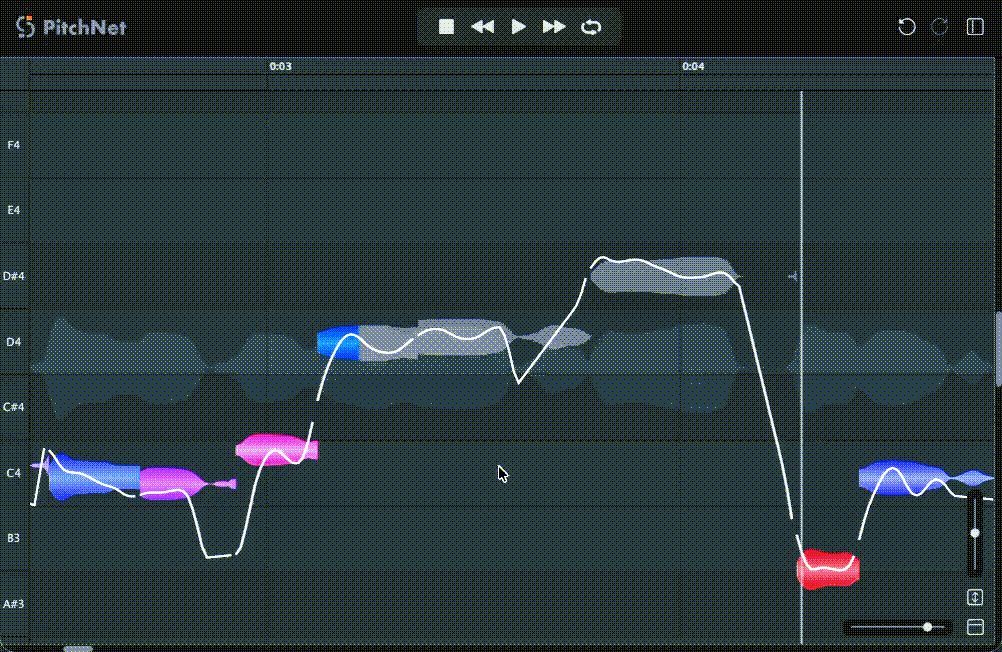
https://www.kvraudio.com/product/pitchnet-by-session-loops

3 Likes

Thanks!!! I build it now on linux and this plugin is awesome :smiley: I tried it now 10 minutes and it sounds great! Thanks again!

1 Like

You’re welcome. Easiest thing ever🙂 .

https://linuxmusicians.com/viewtopic.php?t=29951

1 Like

Wao, i am impressed. it’s really powerful.

What didn’t work for me was adding the plugin to the region. In my opinion, it should then load and analyze the region. That doesn’t work.

3 Likes

:point_right: Less “correction”, more takes.

I will never use a pitch “corrector” on anything.

1 Like

In general, i do agree with you, but i have to say and stress that it depends.
I had been in circumstances where i recorded 102 takes with the vocalist and every time the take turned out kind off good, but not really good. So i had to use manual pitch correction here and there, or give up the project. In most cases, at the end of it all, i didn’t regret it. And sometimes, especially when it comes to really dense mixes, it doesn’t hurt to “correct” layered background vocals to sound more coherent - but yeah, even that depends on performers, style, arrangement etc…
Even some sound lybraries and sfz instruments sometimes sound out tune in relation to each other. So, i doesn’t hurt to have something like this plugin in case of necessity.
All in all, if you can finish everything without this, i’d recommend taking that route (and it definitely will sound more organic and authentic that way) but if you must, pull your toolset out and start working :slight_smile: .

1 Like

Haha, the plugin also surprised me extremely positively. A good pitch correction plugin was still missing in Linux. Now the collection is complete.

1 Like

Weeellll…for me personally, if this plugin proves to be good, then basically i only need Elastic Audio style thingy with good algorithms. The rest of plugin chain i usually use when i’m working in Windows can already be substituted with similar style (or combination of a few) native Linux plugins.

1 Like

Question, how is audio added when it’s used as a plugin on an Ardour audio track?

I’ve installed it, re-scanned for plugins in Ardour, and I can add it to a track as usual. But from there I can’t see how to get the audio into it. Appreciate any help here.

I see the 1.2 GB memory consumption as well. ArdourGUI process is using 0.8 GB.

It works impressively in standalone mode. Very similar to the Melodyne demos I have seen. Sounds fine on first impression.

1 Like

I haven’t really tried it yet (just picked up the news from the net and reported it here), but, if it works similarly as other plugins of its kind, there should be a “rec” button somewhere inside plugins GUI. So, you solo the track, hit that rec, it “imports” or “scans” the audio in real-time while it plays, after that sound become visible as waveforms+notes inside plugins GUI, and then you move around the notes and play with formants…something like that.
Maybe hit play inside plugin, and it will scan the audio during the first run…? dunno

There’s a capture button there. You have to press it, and then it will record the audio track.

1 Like

I haven’t tried this on vocals yet, but I just used it to correct some off notes in a guitar solo. It sounds really good. Not noticeable at all. I want to make some vocal harmonies with it next.

I’m so happy we finally have this. Not just Linux native, but FOSS as well!

1 Like

No thanks. Takes are a pain in the ass. Bring on the correction, and move on to the next task. :sunglasses:

Hi,

I haven’t tried it yet, does it capture in real time? ie do you have have to capture using Ardour’s playback or does it capture the track it’s loaded on in some sort of scan/analysis way?

1 Like

In my very brief experience with it, @Ljuba 's method is exactly correct. Thank you @Ljuba and @woozl.1986 ! When I first posted, I was looking for some way to force it to quickly scan and recognize the audio without playing through the track in real time, but as far as I can tell it doesn’t do that.

Also it seems like saving, closing, and re-opening the Ardour session requires that the procedure be repeated. That is, the plugin doesn’t “remember” the audio from session to session. The pitch changes/edits, though, are maintained as expected and can be seen when the audio is re-scanned. Having never used Melodyne, I can’t say if it has the same behavior.

I’ve installed PitchNet on my “test” computer where I evaluate new software (including Ardour 9.8) prior to installing it on my daily driver computer. It’s going to be hard to fight off the temptation to install it on my production machine, but I’ll wait a bit until there’s more community evaluation. It just seems like this is in the “too good to be true” category (and I say that in a good way)!

2 Likes

Well, it should remeber what you saved during the session and you should be able to pick up from where you left off.
If it doesn’t, that’s probably a bug or inconvenience of similar sort.
Cheers!

Yes, a (very minor) inconvenience. Just to clarify my previous comment, the pitch corrections/adjustments are “remembered” and saved to the actual audio track. But in the scenario where you can’t work through the entire audio track for some reason, you have to re-scan it into PitchNet the next time you open Ardour. This means waiting for the entire track to play through in real time.

1 Like

Wouldn’t it be better to simply split the problem area(s) into regions and only capture those short regions into PitchNet?

1 Like

I guess this has to do something with ARA support. Plugin allegedly makes heavy use of it, and Ardour doesn’t support ARA. That’s just my guess.

1 Like