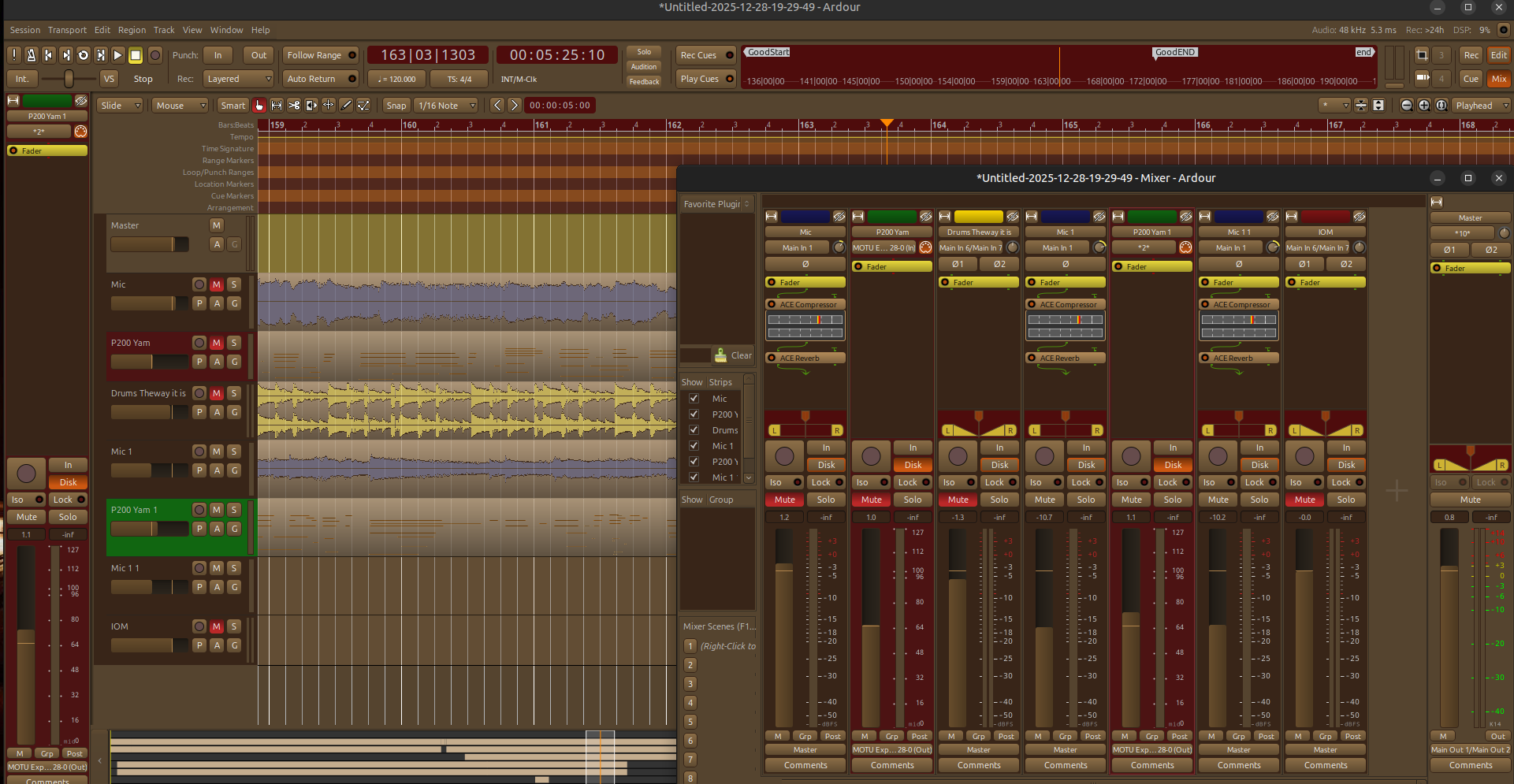
Hi guys,
There was a post about how the color theme works and ways to possibly improve it but it’s a closed topic so I couldn’t add to that conversation. I do agree that the color theming is a bit bumpy when it comes to customizing things either on a devel level or a user level. There were some great suggestions on that post from late 2025 and I hope this eventually happens although it’s likely very low on the priority list of things to do.
Personally I like themes that make me feel good and for me that’s warm tones and colors. Although I think there may have to be some tweaking of this theme due to features/dialogs, etc that I haven’t seen yet which might require changes to make contrasting foreground and backgrounds look better, so far everything that I’ve seen in Ardour 8+ has looked good and has been easy in my eyes.
The theme is called Autumn and was inspired by what we see here in the North Eastern USA. The states of Rhode Island, New Hampshire, Vermont, Maine and Connecticut together are known as New England and this theme reflects the look and feeling of the season of fall/autumn. So if you like this kind of thing, put on some plaid, find a rocking chair and pull up a fireplace.
I’ve placed the XML file called “autumn-ardour.colors” and screenshot image inside of a tar file but I don’t think this forum is going to allow this tar file to be uploaded so I’m not sure how to get this theme to others…
If your using Ardour in Linux this XML file would go in /usr/share/ardour8/themes.
I’ll update this message when I boot into the Windows version of Ardour to learn where these files go in Windows version of Ardour.
Hey thanks! I’m glad you like it. It seems most like the gray shades and dark but dark doesn’t necessarily need to be the bowels of a battleship! lol
I may just put it up on my music website for download as a package tar.
lol well nothing against the guys that made it and like it. But for me I feel like I need to see a therapist and get out of that man straitjacket after a session with those themes!
I just finished making a .deb file for this theme. It seems to work as far back as Ardour 6 so far but I would need to make a script that dumps the theme file into the appropriate ardour# folder. I could make it sloppy and simply make a /usr/share/ardour6 and an ardour7 and so on but that’s not really how this should be done. If I did it that way you would have all of these ardour# folders in your /usr/share directory even if you didn’t have those versions of ardour installed. So for now I’ll keep it hard-coded with the version number…which is currently 8. I’m going to have to get it setup in on a new file download page on my website. Since I have a lot of other custom things for music related software and hardware it only makes since.
I’ll let you know in the next day or so when I get the deb file setup for download. I’m glad you like it!
Soup
We didn’t design the themeing system to make it easy to create new themes. We designed it to be easy for us coders, since we’re the ones doing more with it almost all the time.
We know that people would love to be able to point at something in the GUI, find out its theme name, and modify that name to effect that item and that item only. Alas, that’s not remotely how it works (and we have several principled reasons for believing it should not work that way, either).
yes I fully understand that Paul. There were some post on here that are now closed where someone was trying ask for exactly that…make it super easy for color and theming changes.
They had mentioned about changing the XML file by not using actual names of the colors and so on. I thought the original author of that topic was part of the Ardour coding team.
I thought I may have seen a reply from you on this post, explaining a few points of this. In fact I think it might have been this past September if I remember correctly.
Hey thanks for your work with Ardour. It’s like an oasis to me. I started using it on version 5 I believe but only recently on a serious level.
Awesome. And yes, nothing wrong with the battleship theming, it’s a nice battleship aesthetic after all, just good to have even more options to step outside into the surroundings every now and then.
Usually, i don’t have a habbit to colour everything my way. But, i surely do see the point of applying certain colour to group of tracks with the same instruments, or even more frequently, colour the bar lines stronger and subdivisions with some lighter, less pronounced colours. So, mostly i colour for efficiency reasons.
On the other hand, this particular theme do seem nice, simply cause it’s relaxing for the eyes.
At least, that’s the way it looks at the first glance.
Yeah Ljuba, Well when it comes to track ID colors, oh yeah for that’s a must. Just a small project with only 12 to 24 tracks it’s very helpful. We were having a discussion on another topic here and hardware controllers came up. I use the Behringer XR-18 for my “audio device” with the X-Touch hardware controller. Colorizing the tracks in Ardour shows up the same on the X-Touch…well as l long are you use standard colors. If you start using colors with weird hues or darks and lights of a base color the X-Touch can’t generate those colors by default but can with a custom script which I’m looking onto writing. Be even with just basic colors like Red, Blue, Yellow, Green, Black, White for tracks does make a big difference when your got 7 to 16 tracks just for drums, then a stereo for piano and on and on. Once you get into a groove of what works for you the color coded for the tracks helps a lot…
But this post was for the color theming of Ardour. I think I upset a few on here. My intention was nothing more to contribute. Since the theme I made felt good to me I thought others might like it too. Honestly I’m so freakin happy to be on Linux and Ardour for music production I just kind of wanted to share my enthusiasm with others. As I had mentioned a few post back - I’m pretty sure I’ll have to tweak it a bit more as I used it because, like you said, the colors of the subdivisions or bar lines you may want more contrast on these. So far over the past three days it’s been really nice on the eyes for me. Kind of cozy.
Hey Tony and the rest of the guys. Well I decided to make it easy for Linux users and make a .deb file. I really want to support all open source software especially Ardour and the guys that make the magic. My personal website is kind of embarrassing but I haven’t spent any time making what I want to be. So please excuse that my best is not displayed here.
With that said, I had made a section on there called “The Tools and the Methods”. This section has not been created yet but was designed to show how songs are made, the tools that we use and the methods we follow to create a finished product. It’s in this section that I will show Ardour at work in it’s roll it played in the two, of 8 songs (mostly written in the 90s) that are part of an album that I’m trying to finish. I would like to really give Ardour and the team a big “plug” on the pages and videos I’ll be making in this section. I honestly feel that Ardour and the plugins available for Linux based pro audio needs to be showcased.
Anyway that will be later. In the meantime here is a link directly to the color theme “Autumn”. I just though this page together in an hour…looks kind of “90s”…but whatever.
Linux users can just download the .deb file where Windows and Mac users can down load the XML “.color” file and place it into the theme directory in their system. I’ll get those paths in the next day or so . Thank you guys for the support. I’m happy to part of this community with you all. I’m sure there will need to be minor tweaks to this theme due to contrast issue of something I may have not seen yet so if you find anything please let me know guys.
Great Website! Great music productions too from what I listened to! Haha, the theme isn’t my thing but I don’t even use my own ‘Diehard’ theme most of the time. Thanks for taking the time to create and distribute it!
Hi Paul, now I’m curious: What are these reasons? It has happened to me that I generally liked a theme but e.g. the grid line contrast was too high for me. Over time, I’ve learned what to look for in the Preferences to change that. But what you’re saying is that you intentionally made it hard for me to find? Why?