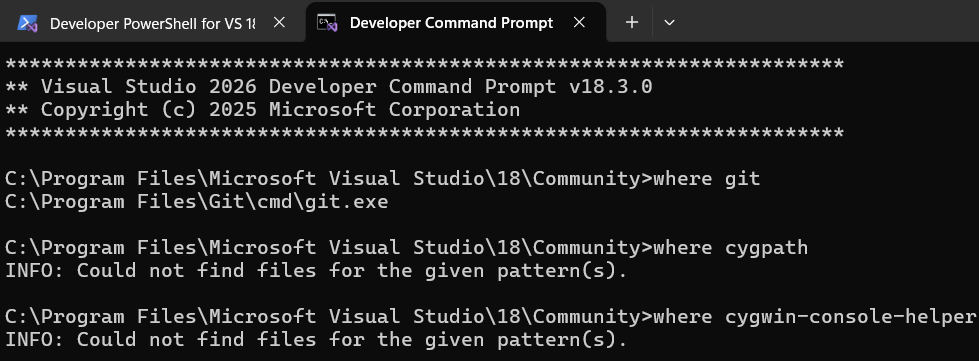
But it worked for me… So once again that makes me wonder what differences exist between our setups.
Today’s a busy day, so doubt anything gets done today. But how exactly am I to take a look? Will you share the logs using something like pastebin? Does the terminal mention any log files directly?
So you can build there with both VS2022 and VS2026?
That works in Powershell but it doesn’t help.
Regarding the log files there are 4 files showing an error at the end:-
‘make-install-x64-windows-rel-err.log’ and ‘make-install-x64-windows-rel-dbg.log’ both say this:-
./libtool: line 150: -nologo: command not found libtool: warning: remember to run ‘libtool --finish /usr/local/lib’
‘make-all-x64-windows-rel-err.log’ and ‘make-all-x64-windows-dbg-err.log’ both say this:-
./libtool: line 150: -nologo: command not found ./libtool: line 150: -nologo: command not found ./libtool: line 150: -nologo: command not found ./libtool: line 150: -nologo: command not found ./libtool: line 150: -nologo: command not found ./libtool: line 150: -nologo: command not found ./libtool: line 150: -nologo: command not found ./libtool: line 150: -nologo: command not found cygpath: error converting “. -I./…/src/libffi-3-c1e5d7d6da.clean/include -Iinclude -I./…/src/libffi-3-c1e5d7d6da.clean/src” - No such file or directory win64_intel.S
./libtool: line 150: -nologo: command not found ./libtool: line 150: -nologo: command not found
[Edit…] BTW - like I said about 6 posts ago, libffi IS getting built here, so it looks like there’s some problem in cleaning things up at the end.
Are you using cygwin to compile libffi? I thought you guys were trying to use MSVC only.
suggests to me that it’s cygwin trying to do something. That would also explain the -nologo errors, since it seems to be a flag to MSVC’s cl.exe .
From libbffi’s README:
It’s also possible to build libffi on Windows platforms with Microsoft’s Visual C++ compiler. In this case, use the msvcc.sh wrapper script during configuration like so:
It just occurred to me that you could choose to remove the installation of glibmm/libsigcpp/pangomm/cairomm from vcpkg (Just remove their names from the root vcpkg.json), and instead do those manually, and copy the resulting files in the correct paths (In which case one can probably use vcpkg’s port rather than the manual port of pango? I’m not sure.)
(Still, can’t help with that today, or likely the next few days…)
Just keep that as an option to at least finish installing packages without errors (since it’s glibmm that needed libffi). Then test configuring ardour, after editing the version requirement line in Ardour’s wscript.
(I don’t know if you can make some dummy glibmm-2.4.pc / giomm-2.4.pc files with version numbers to pass their checks in the configuration, just to see if the other .pc files are found.)
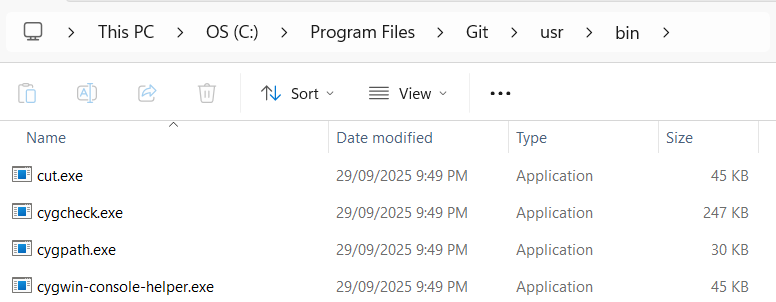
@peder - yes, that confused me too. Neither vcpkg installation contains cygwin itself but Microsoft’s official version of vcpkg contains files called cygpath.exe and cygwin-console-helper.exe (which don’t seem to be present in @EZ4Stephen’s version).
So I’m guessing that Stephen’s build is calling one of those exe’s somehow (to clean something up?) but the exe’s aren’t present. Though of course if cygwin itself isn’t involved, I’m not sure why they’d be getting called.
Hi Stephen, I already tried that (albeit with libffi) but it doesn’t help. I’m pretty convinced now that the problem doesn’t lie with building libffil That part’s working fine but vcpkg detects that something didn’t get cleaned up properly, so it keeps trying to build it, over and over.
Sorry Stephen but it’s starting to look like you’ve just left a lot of stuff out of your repo which needs to be there (and the fact that you’ve given your folders non-standard names probably isn’t helping…)
[Edit…] I’ve found another clue…
I decided to rename those 2 exe’s and then (in Microsoft’s repo) I deleted ‘libffi’ and its dependencies and asked the official repo to rebuild them. It rebuilt them just fine without any errors.
So Microsoft’s repo obviously isn’t using the cygwin stuff (even though it contains some exe’s) whereas Stephen’s repo DOES need them but his repo doesn’t contain them.
Hopefully he’ll be able to figure out why his libffi build is using them, when it shouldn’t need them.
@EZ4Stephen - for when you’ve some time available, I’ve just discovered something very significant which might explain why this works for you but not for me…
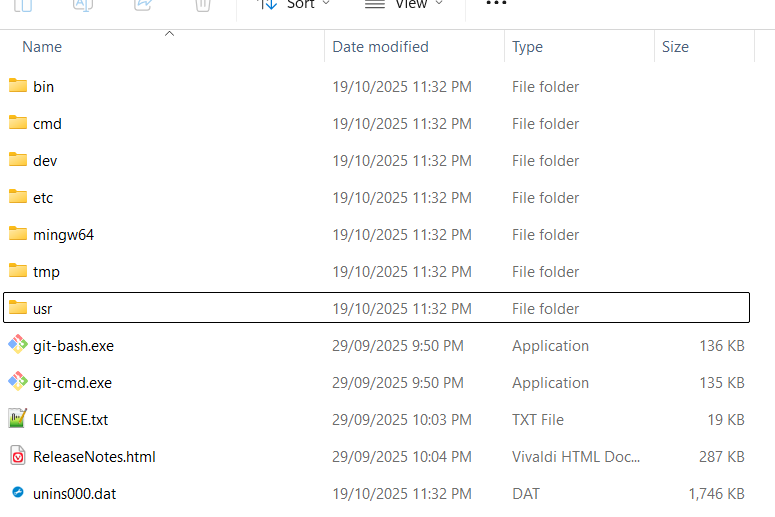
Obviously you’ve got Git installed on your system and I’ve just realised that Git contains its own versions of cygpath.exe and cygwin-console-helper.exe - BUT - on my system, the path to those exe’s doesn’t currently form part of my system’s path. Can you check if your version of Git contains them (and if so, is their path contained in your system path?)
If it is, that’ll explain why they’re getting found by your builds but not by mine.
[Edit…] Okay I think I’m getting a bit closer. I added that Git folder to $env:PATH but it didn’t fix the problem. So I then tried typing cygpath -I./…/src/libffi-3-c1e5d7d6da.clean/include on the command line - and later cygpath -I “./…/src/libffi-3-c1e5d7d6da.clean/include” and in both cases, cypath returns unknown option - I
So whatever’s generating that command is getting something badly wrong (though like I said earlier, cygpath shouldn’t even be involved )
BUT looking at my files in C:\000Ardour\ardour\vcpkg_installed\vcpkg\blds\libffi, it appears there’s no difference between what you said and what I see. So the error is coming from some other point, surely…?
For me, libffi falls under the “The following packages are already installed”. I didn’t get an error there…
The only idea I had but didn’t mention is to find any vcpkg cache and delete them and try again. But at this point you can feel free to just remove glibmm, pangomm and cairomm out of the vcpkg manifest. I’ll take responsibility to find an alternative way to get instructions/commands to build those outside of vcpkg and copy their files, when I have sufficient time. (though that might not be until next week.). It’s easier to call the repo (currently only tested by you and me to my knowledge)a partial success and failure and wait for an update (or someone else’s attempt and feedback)
Hi Stephen - The error I’m seeing (at the moment) is because cygpath doesn’t accept a parameter beginning with -I although AFAICT cygpath shouldn’t even be getting called.
So the latest thing I tried was to copy vcpkg.exe from Microsoft’s official repo into your repo and see what happens. That one still fails but now gives me a different set of errors. So it might just be that the various copies of vcpkg.exe have subtle differences and yours just happens to work. Is there any way you can get it to me? That’s the only thing left I can try.
One more thing though was I discovered that Microsoft’s official repo contains a lot of files called portfile.cmake. They seem to contain things like specifying the compiler - MSVC or Nmake or whatever. There’s one for libffi which your repo doesn’t contain. So again I just think your repo has a lot of stuff that’s needed but it’s all missing.
Update [As of 3 March 2026]: I’ve been working on a Python script for building the remaining 4 (libsigcpp, glibmm, cairomm, pangomm). Had to solve problems along the way. Mix of doing manual file edits, and running commands on Powershell, logging these edits and commands, and getting it into the script. Successfully built and installed libsigcpp, glibmm and cairomm with it, but at the end of running the python script, I currently get:
tools\extra_defs_gen\meson.build:7:46: ERROR: C++ shared or static library ‘glibmm_generate_extra_defs-vc142-2.4’ not found
[This is likely because glibmm/giomm is built with NMake whereas the others use meson]
I expect myself to find the solution to this, and share the python script within 2 days, after testing a clean installation in a different directory than my current testing one. The resulting folder in vcpkg_installed/x64-windows is ~850 MB for now, and vcpkg_installed/vcpkg is ~5.75 GB, which can be deleted after using the updated vcpkg.json.
The Github repo is updated to show just the simplified vcpkg.json, in the meantime, though I’ve also changed the baseline version, so one might have to run git pull for vcpkg again. Installing using vcpkg took 1.9 hours to install. I believe the file is functionally sufficient (to the extent that this + the python script should be enough together to pass the configure stage), but simplification may be possible.
I checked Microsoft’s official build here and it reports exactly the same error - so clearly, that particular problem isn’t an issue in your port. And yet building from your repo fails whereas Microsoft’s succeeds.
Did your repo need to change anything in libffi or should it be identical to Microsoft’s?
My repo currently only builds things from microsoft’s vcpkg ports folder, no extra port folder is used. So I’m inclined to think any chances of errors would be reduced, and blame would be on microsoft/vcpkg’s side.
Could you try copying the vcpkg.json that’s currently there, into a new folder and try installing there from scratch? Then tell if any errors still come relating to libffi. vcpkg install --no-binarycaching, to be precise.
Since you don’t currently have a folder for libffi (i.e. under vcpkg-recipes) I assume you meant to add the folder and then add libffi’s vcpkg.json file? So I did that and then started a full build from scratch but it still fails at libffi. The only difference is that it was previously taking around 6 minutes to fail. Now it fails in only a second or so.
{Edit…] A bit more info to clarify… when your build took 6 minutes to fail, it was actually completing the build and then failing (for some reason we can’t identify). But after this change, it’s not even starting the build.
No folder was used with the vcpkg.json file that’s in there. libffi is a dependency of something that’s directly or indirectly listed in that single file.
Could you paste the complete output from the terminal from “Installing libffi…” or however it’s called, in a block using ``` or >?
It’s the same message from post #6 except with these lines preceding it:-
Installing 1/62 libffi:x64-windows@3.5.2…
Building libffi:x64-windows@3.5.2…
D:\vcpkg-stuff\testardourdeps\vcpkg-recipes\libffi: info: installing overlay port from here
CMake Error at scripts/ports.cmake:156 (message):
Port is missing portfile:
D:/vcpkg-stuff/testardourdeps/vcpkg-recipes/libffi/portfile.cmake
Note that it says that portfile.cmake is missing. So I found the relevant file in Microsoft’s repo and copied it to the newly created libffi folder and ran the build again. That changes those line to this:-
Installing 1/62 libffi:x64-windows@3.5.2…
Building libffi:x64-windows@3.5.2…
D:\vcpkg-stuff\testardourdeps\vcpkg-recipes\libffi: info: installing overlay port from here
– Using cached libffi-3.5.2.tar.gz
CMake Error at scripts/cmake/vcpkg_extract_source_archive.cmake:92 (message):
Could not find patch: ‘dll-bindir.diff’
Call Stack (most recent call first):
D:/vcpkg-stuff/testardourdeps/vcpkg-recipes/libffi/portfile.cmake:6 (vcpkg_extract_source_archive)
scripts/ports.cmake:206 (include)
Once again, dll-bindr.diff exists in Microsoft’s repo but not in yours. So I’ve copied that file across and at the moment it looks like it might work!! (I’ll let you know in a few minutes)
CMake Error at scripts/cmake/vcpkg_fixup_pkgconfig.cmake:134 (message):
C:/Users/JohnE/AppData/Local/vcpkg/downloads/tools/msys2/9272adbcaf19caef/mingw64/bin/pkg-config.exe
–exists libffi failed with error code: 1
  ENV{PKG_CONFIG_PATH}: "D:\vcpkg-stuff\testardourdeps\vcpkg_installed\vcpkg\pkgs\libffi_x64-windows\lib\pkgconfig;D:\vcpkg-stuff\testardourdeps\vcpkg_installed\vcpkg\pkgs\libffi_x64-windows\share\pkgconfig;D:\vcpkg-stuff\testardourdeps\vcpkg_installed\x64-windows\lib\pkgconfig;D:\vcpkg-stuff\testardourdeps\vcpkg_installed\x64-windows\share\pkgconfig"
  output: Package libffi was not found in the pkg-config search path.
Perhaps you should add the directory containing `libffi.pc’
to the PKG_CONFIG_PATH environment variable
Package ‘libffi’ not found
Call Stack (most recent call first):
scripts/cmake/vcpkg_fixup_pkgconfig.cmake:196 (z_vcpkg_fixup_pkgconfig_check_files)
D:/vcpkg-stuff/testardourdeps/vcpkg-recipes/libffi/portfile.cmake:54 (vcpkg_fixup_pkgconfig)
scripts/ports.cmake:206 (include)
This one says that I need to add a PKG_CONFIG_PATH entry for the folder containing libffil.pc
(do you need to do that??) Because I tried that once before but libffi.pc keeps getting deleted and then re-built.
Up to now I’ve simply been copying Microsoft’s files into your folders (because your build seems to expect different folder names). I haven’t tried using Microsoft’s folder names but I could try that tomorrow if you think it might help?
But my updated script doesn’t have a folder…? If you still have a vcpkg-configuration.json, try deleting or moving that and the folder.
If by “using Microsoft’s folder names” you mean renaming vcpkg-recipes to port, I don’t see how that could help, but I’m not stopping you.
My current assessment of the situation (if the problem doesn’t somehow resolve itself in about a day) is that You and/or I make a custom portfile for whatever the latest release of libffi is, and build that and make adjustments as necessary for its portfile.cmake.
I really want the process to get the dependencies be seamless and easy for anyone, not just me.
Huh…? Your repo does contain that file but it’s in the top-level folder (so if I was to delete its folder I’d effectively be deleting your repo from my disk drive??)
 )
)