I’m trying to understand how tempo gridding is supposed to interact with MIDI regions.
If I start with a pattern at 120 then adjust the global tempo to 100, the pattern stretches to match 
If I click the Grid tool, click to insert a tempo change marker somewhere in the middle of the midi region, and type in “120” to its properties dialog, then the second half of the midi track stretches to match the new tempo :
But if instead of clicking with the grid tool I drag to insert a tempo ramp the behaviour doesn’t make sense to me. If I stretch the grid the MIDI doesn’t stretch with it; I can place e.g. beat 2.1 in the middle of what should be beat 2.4 
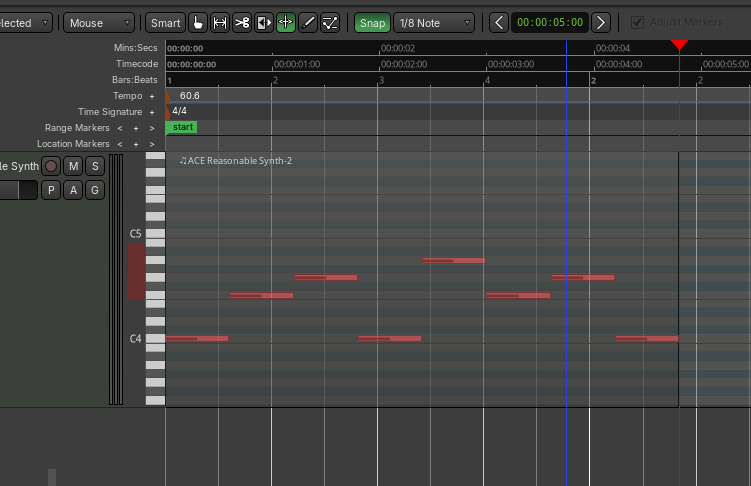
if I turn on the “Lock (toggle)” option then the MIDI still doesn’t stretch when I drag the Grid tool, but it will sometimes crop the region if I speed up the tempo too much. So it’s sort of half-respecting the tempo ramp but not actually stretching the midi notes as it does this.
Is not stretching the MIDI an intended feature? Is there some toggle somewhere I’ve missed that makes MIDI follow the tempo grid more reliably? Does this have to do with “lock style” ?
I see in What is "Lock Style" [Music/Audio/ in tempo map? that maybe this has been an unfinished area for a while but that thread is 6 years old. I’m hoping someone can fill me in on the current state of this feature 
( btw I’ve made a version of this post at Ardour BeatGridding Question · GitHub with more screenshots, since Discourse won’t let me put multiple screenshots in yet )
I’m on Ardour 9.8 ! (and I love the new scale/key feature !!)