…if the distros do a bad job at packaging it, as indicated by your latter indication that AVL and US apparently do it right.
Make sure you file bug reports with the “bad” distros so they’ll work out-of-the box in the future.
…if the distros do a bad job at packaging it, as indicated by your latter indication that AVL and US apparently do it right.
Make sure you file bug reports with the “bad” distros so they’ll work out-of-the box in the future.
I don’t think these are bugs.
It’s just that with a standard distribution—unless I’m mistaken—there isn’t anything (for a novice) to configure PipeWire for low-latency JACK operation.
It is certainly possible to configure and use Ardour or other audio software, but without the proper setup, I don’t think it’s possible, for instance, to watch a YouTube video while Ardour is running.
But perhaps I’m wrong.
I agree with @peder that this seems to be, primarily, a packaging problem.
The same problem existed many years ago with Pulseaudio and Jack. When Pulseaudio (originally called Polypaudio) first came out (2004-ish), there were very often not good tools to support its configuration and it wasn’t well integrated into desktop environments. Graphical tools got added a couple of years later, and better desktop integration followed.
But even then, the integration with Jack was pretty dreadful, and there were all sorts of hacks and workarounds involving custom scripts. In most cases, distros didn’t provide these and you had to hand-install them, or use third-party repos.
I lived through this and, believe me, it was far, far, far, far worse than the situation we currently have with Pipewire.
It was around this time that audio-centric distros like AV Linux and KXStudio emerged. I believe these distros were created largely to solve these problems for users. A lot of the early tools to support easy integration/configuration of Pulseaudio and Jack into desktop environments came about through these distros.
Third party tools like the UbuntuStudio Audio Configuration tool and Cable do a good job of making configuration easier and, I hope, tools like this will increasingly be shipped with distros (again, a packaging problem).
That has not been my experience.
If you configure Ardour to use ALSA then, yes, you will not be able to watch Youtube and hear audio on the same device that ALSA is using. This is pretty much the same issue as you would get on Windows if you use the low-latency ASIO drivers.
The main challenge here is to get your ALSA setup working well, which is more down to things like USB ports, interrupts, and performance scaling. Any issues here will trickle up the stack to Jack and Pipewire, and make your experiences there worse.
If you configure Ardour to use Jack, then it uses the Pipewire Jack emulation and, in this case, you can use desktop audio (Youtube in a browser, for example). Admittedly there are potential latency challenges with this, because most desktop distros do not set Pipewire up for this by default (again, a packaging problem).
Get it set up properly, and it works pretty well in most cases in my experience. Getting it set up well involves diving into config or using a tool like Cable (again, a packaging issue if your distro doesn’t provide it). Personally, I tend to prefer direct ALSA operation where possible because it cuts out a lot of potential issues.
Pipewire certainly is not perfect. It inherits a lot of issues from Pulseaudio which it is broadly compatible with. One of these is a complex configuration which, although very powerful, is largely out of reach for most users.
Another is you have to be careful with your environment because Pipewire does sample rate conversion and dynamic sample rate switching to make any-to-any connections easy, but there’s implications to that, so you need to pay some attention to what it’s doing to make sure it’s not switching sample rates out under you, although dynamic sample rate switching tends to be turned off on most distros. But you do need to make sure that the baseline sample rate is configured properly for your hardware and usage. Again, using something like Cable (if your distro provides such a tool) if you don’t want to dive into config files.
Cheers,
Keith
It’s mostly a packaging issue, but … it’s also partly a function of PW’s concepts relating to configuration being wildly complex and there being no simpler layer (yet) that is readily available for most users. I mean, really, the interactions of potentially dozens of different configuration files, the split of responsibility between PW itself and WirePlumber, not to mention the things from PulseAudio that remain present and in some cases critical …
@newmusicpower there’s no reason to use pw-jack on a system where Pipewire’s JACK support has been “properly” installed. That means the PW JACK libraries are installed and ldconfig(1) knows about them. Once that is done, any JACK-using application will discovered the PW JACK libraries and will, to a very large degree “just work”.
There’s also ALSA UCM. Although most people don’t tend to mess with that (or are even aware it exists).
Cheers,
Keith
To elaborate on Paul’s comment, PW’s JACK library is usually installed in something like /usr/lib/x86_64-linux-gnu/pipewire-0.3/ and is called libjack.so.0.3.<some-number>
For ldconfig to find that file you probably need to have a .conf-file with that folder name in /etc/ld.so.conf.d/ and it needs to appear before any “proper” JACK library that may exist on your system
ldconfig -p | grep jack.so should return something like
	libjack.so.0 (libc6,x86-64) => /usr/local/lib/x86_64-linux-gnu/pipewire-0.3/jack/libjack.so.0
	libjack.so.0 (libc6,x86-64) => /usr/local/lib/libjack.so.0
	libjack.so.0 (libc6,x86-64) => /lib/x86_64-linux-gnu/libjack.so.0
In this case PW’s JACK is found before my self-compiled version and the distro version of “proper” JACK.
If not you need to figure out where that file lives ( find / -name "libjack.so.0.3.*" ), put that folder name in /etc/ld.so.conf.d/00_pw-jack.conf and run ldconfig as root
For IT specialists like you, all this is simple, but for musicians using the system, it’s a different story.
In the past, there was qjackctl or another KXStudio interface to help with configuration.
Now, there is no longer any graphical tool provided out of the box.
But once you know how to do it, there are no issues—PipeWire is great; it’s excellent.
Thanks to all for your advice.
I’m not a novice in Linux and in the tasks needed to perform setup optimization in order to use Ardour and record music without xrun issues.
So, I know some configuration and optimizations to be applied for best performance: usage of realtime kernel, setting up priorities, IRQ 's, etc. … in short, all things I’ve read from Audio Wikis and controlled/enforced using rtcqs tool. I’m also able to configure pipewire jack setup from the configuration file/s.
One thing I learned from your posts is the “Pro-Audio” profile configuration stuff, a feature that I’ve never heard before (and I think didn’t existed in jack and is a pipewire “optimization”).
I’ve tried this configuration too, and it helps me more on the setup phase (seeing separate inputs and outputs) that with performance/xrun issues.
Maybe?/I’m sure? that I’m missing some point but, in fact, the same hardware and software configuration that I was able to use effectively for recording live instruments and voice without xruns configuring jack with 128 or even 64 samples at 48KHz, performs worse/bad with pipewire even using 256 or 512 samples at 48KHz (maybe 1024 can work good with unacceptable latency).
I will leave the progress go on and use ALSA for my recording tasks with Ardour.
That’s all.
Thank you all.
Regards
Marco
I assure you, it’s not always simple when you (nominally) know what you are doing.
And I get your point, but this is why we say it’s mainly a packaging problem: most of the distros are not (yet) including the graphical tools needed by musicians to make this work easily. And they also are not configuring sensible defaults with musicians in mind.
The fact that some distros DO do this, is the evidence that it CAN be done. And as these tools become more popular and mainstream, I expect they will be included in more distros.
As I said, back in the day, when Jack and Pulseaudio were relatively new, we had the same problem. And I would argue that trying to get Jack and Pulseaudio to work well together was just as complex, if not more so, than trying to get Pipewire configured well is today.
Now we have a fair number of good tools for Jack and Pulseaudio, but there was a time when it wasn’t the case and we had to hack away at scripts and config files.
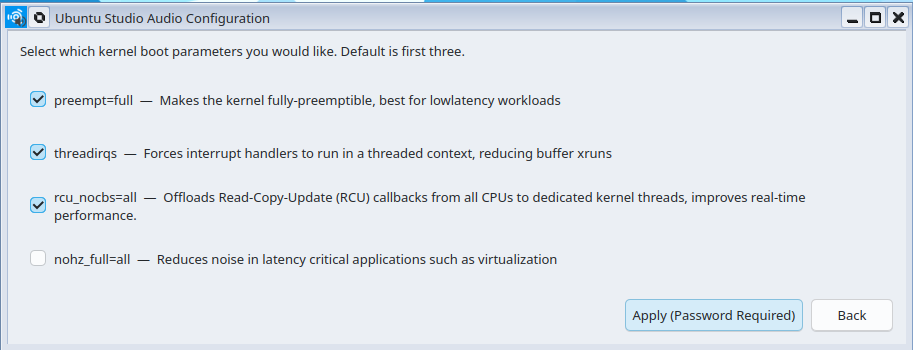
@peder was giving some good advice there, and it’s not expected that most musicians would know how to do that check without someone like him giving this advice. But if you are using (for example) UbuntuStudio, you have this:
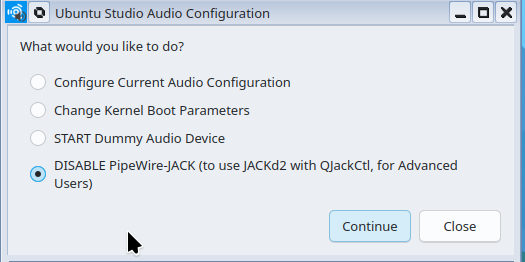
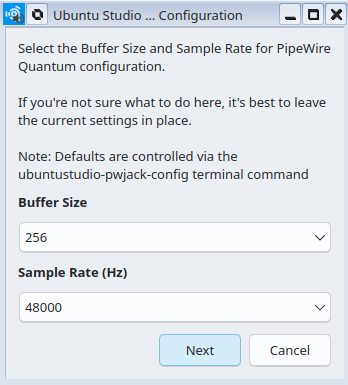
Cheers,
Keith
Are you talking about connecting software/devices? qjackctl works with pipewire’s jack implementation and qpwgraph is a pipewire-native implementation of that that GUI.
qjackctl and other GUI interfaces were not “out of the box” - they also had to be installed, just like cable does.
however, qjackctl was a sort of one-stop-shop, whereas cable only addresses one part, and you need other tools for patching (eg. helvum, qwp etc). it’s a bit of a mess, but typical of the linux ecosystems where there’s normally 3-10 ways to do any given thing.
@mcannavo the reason that JACK had/has nothing like the “pro-audio” configuration is that JACK was pro-audio only. If you wanted to use it with common consumer audio setups (bluetooth, HDMI-connected speakers, 5.1 builtin intel audio chipsets), there was nothing there for you. Pipewire is at least trying to cover all the bases, even if it is not quite there yet.
Cable does do patching, in multiple ways It also has pw-top, alsamixer and jack-iodelay built into it.
To be fair, lots of musicians 40 years ago had no idea how a studio (which is what a DAW actually is) worked; how to align the azimuth of a tape head, how to sync up two 16-track tape machines or even how to get the sound from the mixing board and to the actual machine.
They just set up their instrument in the recording room and started playing when the engineer told them to.
If you want to be both a musician and a studio engineer you may have to learn a bit more than just how to arm a track and hit Record.
Or make sure to use a distro where all of the above is already done for you.
So, just to be sure i got that right:
Besides the things you usually did, even without pipewire being involved, and always did (boot parameters, according kernel, set governors …)
For programs usually using “jack” you:
?
Thanks.
As for item 4, it doesn’t matter what the file is called; it’s the content that’s important.
If you want real-time processing and the ability to lock memory you need to have something like “rtprio 95” and “memlock 8000000” in one of those files, regardless of the filename.
It also doesn’t matter if the group you assign those rights to is called “pipewire” or “audio” or “rupert”.
All that matters is that your user is a member of that group (unless you assign those rights directly to your user, which is what I’ve done on my setup).
Ah. I see.
I guess then the difference comes down having to install pipewire-jack, wpctl to set the audio-card and editing pipewire.conf.
I could not see if your problem has been solved.
Anyway I had the same problem. Running Suse Leap 16.0 . With 16.0 suse switched to pipewire.
I used to change in /etc/security limits.conf as recommended by Ardour.
Now in Leap 16.0 that location became somewhat superseded by /usr/etc/security
There you find a file called 25-pw-rlimits.conf. I added
# Applied 24th April 2026
#
#Ardour mod 24 Aug 2022
#
@audio  -   rtprio 99
# for rosegarden 18/9/22 and Ardour 5th Jan 2026
@audio  -   nice -15
@audio  -   memlock unlimited
#
#  End of Mod

You should not do it because it could be changed during the next update.
 If you introduce it in /etc/security, the change had no effect.
( there are a lot of things you should not do...well then)

That did the job for me. Could be different with other distros.

An additional XRUN problem came up when I changed some HW interfaces.
I noticed you use Behringer UMC202HD.
I am using X32 as recording interface where per channel I can
set Gate ( almost always ), EQ (only for voice sometimes)
and EQ (sometimes).
You can use the other X32 effects too but then you loose flexibility .
By default use the DAW FX. That's by the by.

I do have a UCM1820.  So Input via X32 output UCM1820.  That was causing Xruns.
It should not but it did.
 I did not bother to find out why, just changed the HW.

I hope that helps

Best regards
Thank you very much for your advice.
Please note that this post is quite long and has been translated from Italian using Google Translate; I apologize in advance for any awkward phrasing.
Today, I found some time to resume testing PipeWire configurations. I achieved some positive results, but more importantly, I gathered the information I was missing to get a fairly complete picture of the situation.
For these tests, I used external drives connected via USB. My PC runs Windows 11 as its primary operating system—I need it for developing Windows-based applications, so I cannot remove or replace it.
To carry out the optimizations—most of which align with your suggestions—I used the tool:
“rtcqs/rtcqs: rtcqs is a Python utility to analyze your system and detect possible bottlenecks that could have a negative impact on the performance of your system when working with Linux audio. - Codeberg.org”
(which is based on the script “GitHub - raboof/realtimeconfigquickscan: Linux configuration checker for systems to be used for real-time audio · GitHub”)
along with the documentation found at:
“https://wiki.linuxaudio.org/wiki/system_configuration”
I attempted to install and configure various Linux distributions using PipeWire; here are the results:
0.- I was unable to test Ubuntu Studio. With the latest versions of the Ubuntu installer, I cannot get a functional installation on an external drive while coexisting with Windows 11 on the laptop’s internal drive—something I could do without any issues in earlier versions of Ubuntu. However, I have managed to get hold of a decent laptop (Intel i7) where I plan to try installing Ubuntu Studio on the internal drive over the coming days.
1.- On Linux Mint (running from an external Crucial BX500 drive via a USB adapter)—with the Ubuntu Studio audio configuration software, a real-time kernel, and PipeWire installed, and after applying the optimizations suggested by rtcqs and selecting the “Pro-Audio” profile (at 128 frames and 48 kHz)—the results in terms of XRUNs are poor. 2.- On AV Linux 25 “Ease” (using a fast 128GB SanDisk Extreme PRO MicroSD card and a SanDisk USB adapter) with the Liquorix kernel—incorporating the missing optimizations suggested by rtcqs and the “Pro-Audio” profile set to 128 frames at 48kHz (configured via the cable tool)—the results regarding XRUNs are better, though still not acceptable. I suspect that using a higher-quality external drive might yield better results.
3.- On Fedora Jam (using a Samsung T7 external SSD)—with optimizations suggested by rtcqs adapted for the Red Hat environment (as opposed to a Debian-based one) and the “Pro-Audio” profile configured to 128 frames at 48kHz (set up via pavucontrol or wireplumber to ensure persistence across reboots)—the results are acceptable (with XRUNs near zero).
Naturally, these evaluations cannot be directly compared, as the external drives differ in terms of performance. However, I can state with certainty that when using JackD and QJackCtl (prior to the advent of PipeWire) with this same hardware, I encountered fewer issues and difficulties in achieving acceptable performance regarding XRUNs. If I find more time to spare—as this isn’t exactly a fun activity—I may experiment with different combinations of environments and hardware to observe variations in behavior.
In any case, to conclude, I have learned a few things that I was previously unaware of—insights that I believe will help me build a high-performance system using PipeWire:
1.- I was not aware of the existence of “Pro-Audio” profiles, which, in fact, make a significant difference.
2.- I had not realized that WirePlumber is an essential component of PipeWire; I previously thought it was merely an audio-routing application, whereas it is actually a service that allows for the configuration of critical parameters, including the audio profile for a given device. 3.- I’ve also discovered the existence of pavucontrol—which, among other things, allows for the configuration of device profiles—as well as “Cable” (for similar tasks) and “Cables” (for audio routing)… and I’m not even sure what else might be out there.
I was accustomed to using alsamixer/alsactl + Jackd + QJackCtl to configure the system optimally; these new components/tools have left me feeling confused and rather skeptical about the true potential of PipeWire.
Once I have more time to experiment and study, I’ll likely come to appreciate the actual value of using PipeWire. For now, I’m using it with some reservations (though that’s just a reflection of my own skepticism/lack of knowledge).
Thanks to everyone for your patience.
Best regards,
MarcoC
Keep in mind that each layer in “the stack” can have (and sometimes requires) its own control applications, and that, this being Linux, there’s normally more than one tool for that task.
alsamixer/alsactl control only your audio hardware (simplified a little bit, but true for 90% of all users). In some cases, even those tools cannot do the work required for device-specific control (e.g. see the wonderful GUI tools for controlling Focusrite Scarlett devices).
qjackctl controls only things related to a JACK server.
I believe that everything wire-plumber does and controls can also be done with PW command line tools, and most of what it does can also be done with the (growing) set of GUI tools.
The primary point of Pipewire from an audio perspective is to provide a single server that can serve the needs of both desktop audio and pro-audio/music creation workflows. PulseAudio was fine at the former, and JACK was good enough at the latter, but they did not interoperate well together, and having two distinct systems is (arguably) more confusing than even Pipewire itself