I am using Mackie Control to have my korg nanoKONTROL2 controller to work. I learn that from this thread.
I read in the doc that I can customize the control surface with mackie control, but I am stuck because I can’t find the right midi map to customize. I have a Korg_nanoKONTROL2.map but in the case of Mackie control, it appears it is not the right one being used.
My question is: How and what should I modify to change the behavior of a button of my nanoKONTROL2 MIDI controller?
Not sure rn if there are simple map files for the MC protocol devices, but from what I remember, MC is just a custom combination of 14bit and sysex commands.
This chapter describes how to modify controller to action mappings:
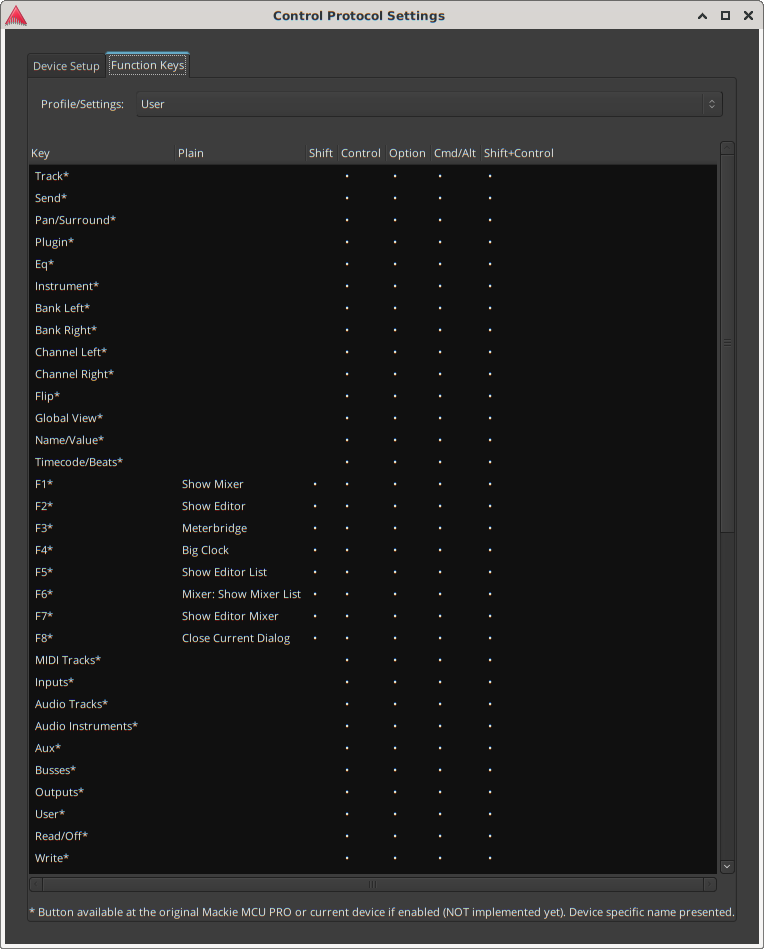
Edit: for the buttons, you can just go to the Funktion keys tab in the control protocol settings
Preferences > control surfaces > enable mackie > show protocol settings > Function Keys
The last column has no heading on my system. Don’t let it fool you, just click on it and it will reveal a dropdown for action selection (what a rhyme )
For anything continuous, you would have to set up generic midi device
Mackie Control is it’s own thing. There are no binding maps. The customization referred to in the manual only is in the dialog for Mackie control, accessed by dbl-clicking “Mackie” in Edit > Preferences > Control Surfaces and it looks like this:
Having said that, there should be almost no reason to ever do this, except for weird devices that use Mackie Control Protocol but really don’t have any controls that are labelled for any sensible purpose. The whole point of Mackie Control is that every control has a name and an implied purpose.
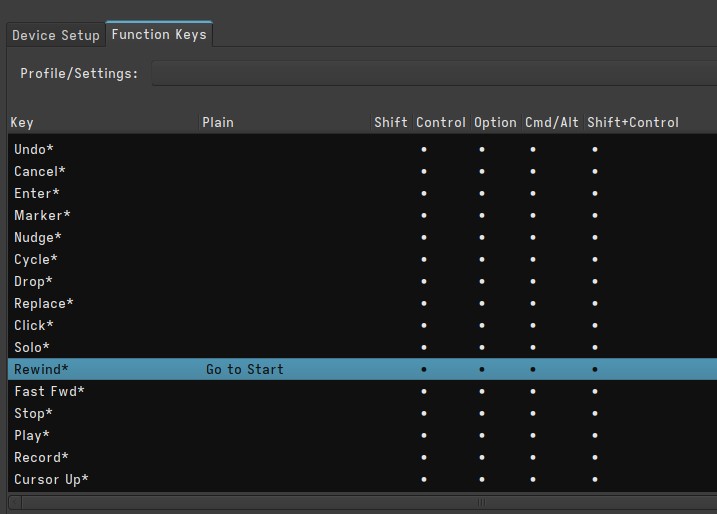
Thanks for your answers. I just wanted to change the [<<] button of the nanoKONTROL2 from Rewind to Go to start. Thanks to your feedback, I managed to change it this way:
I want to make an update after I discovered how to do exactly what I want. The following points are very much based on other people’s answers to this thread and that one.
How to use nanoKONTROL2 MIDI controller with custom MIDI mapping
First, nanoKONTROL2 needs to be updated with the correct map to fit the midimap file we will use later. For that, I use KORG KONTROL EDITOR software over wine on Linux. Then, I open that file, and send it to the device (communication > write scene data).
In Ardour:
Download this (MIDI map file) and save it in ~/.config/ardour8/midi_maps (for linux)
In Ardour preferences > Control Surfaces, select Generic MIDI and Show Protocol Settings
Then, to have it work with Ardour, there is this trick you may have to do:
press the SET and << buttons while plugin the USB cable.
Things that remains mysterious for me
The toggle buttons are not synced to Ardour’s interface: The ON/OFF states sometimes fits the LED sometimes not. I wonder how to fix that. Every toggle buttons are properly set to TOGGLE in the Korg editor, so I wonder if there is something to do in the midi map file.
Each time I restart my computer, or I unplug my MIDI hardware, I have to select them again in Ardour’s preferences. I spend a lot of time doing that for each session. Is this a common issue? I wonder if a Lua script could solve that.
 )
)