Yep, and they look fully populated.
I’ve been putting debug statements in to try to trace what’s happening. I have been concentrating on the file “generic_midi_control_protocol.cc” as this seems to be at the lowest level of this function. I have debug statements throughout it. None of them are showing up in the output and looks like the GenericMidiControlProtocol object is never being created, though I assume that’s a base class for something more specific ones. In 9.5, I was able to see debugging data from this object, but so far, nothing in 9.7.
There is a function inside this file called “midi_map_filter” that I can see being called several times in the output, maybe 30 or 40 calls, which is close to the number of controllers I see in the midi_maps folder, but nothing for the class object itself.
I’m trying to trace where the class objects themselves are being created, but that’s a deeper dive and will take me a while longer, but hoping this might trigger something in the dev team. I think there is a bug here as I’m seeing definite differences in behavior between 9.5 and 9.7, and I don’t think there should be a difference at this level, but perhaps it was intended and something else replaced this.
EDIT: Ok, the “midi_map_filter” static function is being called from within the GenericMidiControlProtocol class, so that is evidence that the object is being created and now I can see the midi maps being created for each of the files, including my own. I don’t think the class has visibility to stdout though, so that’s why my debug messages are not displaying. That seems to be what has changed from 9.5 to 9.7. Everything seems to be loading correctly, but I’ve no idea why it’s not displaying. I can even see the compiled surfaces being loaded, but they don’t display either.
There’s a misconception here I think. We don’t instantiate control protocol objects as part of discovery.
If you run a debug build with -D controlproto, do you see (on the terminal) a list like this:
DEBUG::ControlProtocols: Control surface protocol discovered: "Open Sound Control (OSC)"
DEBUG::ControlProtocols: Control surface protocol discovered: "PreSonus FaderPort8"
DEBUG::ControlProtocols: Control surface protocol discovered: "PreSonus FaderPort16"
DEBUG::ControlProtocols: Control surface protocol discovered: "PreSonus FaderPort2"
DEBUG::ControlProtocols: Control surface protocol discovered: "PreSonus FaderPort"
DEBUG::ControlProtocols: Control surface protocol discovered: "Generic MIDI"
DEBUG::ControlProtocols: Control surface protocol discovered: "Mackie"
DEBUG::ControlProtocols: Control surface protocol discovered: "SSL 360: UF8 UF1"
DEBUG::ControlProtocols: Control surface protocol discovered: "Tascam US-2400"
DEBUG::ControlProtocols: Control surface protocol discovered: "Wiimote"
DEBUG::ControlProtocols: Control surface protocol discovered: "Ableton Push 2"
DEBUG::ControlProtocols: Control surface protocol discovered: "Steinberg CC121"
DEBUG::ControlProtocols: Control surface protocol discovered: "Novation Launch Control XL"
DEBUG::ControlProtocols: Control surface protocol discovered: "ContourDesign"
DEBUG::ControlProtocols: Control surface protocol discovered: "WebSockets Server (Experimental)"
DEBUG::ControlProtocols: Control surface protocol discovered: "MCP HTTP Server (Experimental)"
DEBUG::ControlProtocols: Control surface protocol discovered: "Softube Console1"
DEBUG::ControlProtocols: Control surface protocol discovered: "Novation Launchpad Pro"
DEBUG::ControlProtocols: Control surface protocol discovered: "Novation Launchpad X"
DEBUG::ControlProtocols: Control surface protocol discovered: "Novation Launchpad Mini"
DEBUG::ControlProtocols: Control surface protocol discovered: "Novation Launchkey 4"
Yeah, that’s the output I was just seeing with the cout’s I put in. I can try the -D controlproto and see if that enables more of it.
Definitely some misconceptions on my part as I figure out your code. Hard to get in other people’s mind to figure out how they designed something. I have a decent background in c/c++ but every solution is different, so just takes some time to decode it.
Everything seems to be working as you intended it, but it just doesn’t show up in the window. I thought it was a data problem, but that seems to be working just fine. Not much left other than the display window. Doesn’t make sense why they’re not displaying.
gtk2_ardour/rc_option_editor.cc:ControlSurfaceOptions::set_state_from_config() is where the treeviews get populated.
Ah, thanks. That will save me a lot of time tracing that back. I’ll see what’s going on there.
Found it. In the ControlSurfacesOptions constructor, there is a scale check for the size of the font or table. On my system that evaluated to zero. I added in a check for zero and set it to 1 and it started working. Here is the short code segment:
class ControlSurfacesOptions : public OptionEditorMiniPage
{
        public:
                ControlSurfacesOptions ()
                        : active_heading (_("Active Surfaces Mod"))
                        , devices_heading (_("Control Surfaces"))
                        , _ignore_view_change (0)
                        , _protocol_change (0)
                {
                        int scale = UIConfiguration::instance ().get_font_scale() / 102400;
                        cout << "DEBUG:COntrolSurfaceOptions:UIConfig Scale is " << UIConfiguration::instance().get_font_scale() << "and Scale is " << scale << endl;
                        if (scale < 1) scale = 1;
But onto the next problem…
When I activated a generic midi interface and went to select the MIDI bindings, there aren’t any controllers on it. There are just three options; Generic MIDI, Drop Map & Learned, and Drop Map Bindings. Do I select one of those and then that enables something? Or should I be seeing the whole list of controllers there? I know they’re loaded, but they aren’t on this list.
I was running this with ardev so should have been the default build config.
EDIT: Never mind. I had done a clean and lost my custom file. When I added it back to the directory with Manufacturer “Any”, it showed up on the list and should be bound. Much nicer system. The pulldown list was huge before.
I think we’re good now. Thanks all. Love Ardour. A fantastic DAW.
EDIT #2: One more thing. If you set the midi_map manufacturer to something other than “Any”, like the actual manufacturer name, it will show up on the main list, but if you click it, it will crash Ardour. Might want to put a check there as well.
Nice find. That ought to be float scale = UIConfiguration::instance().get_ui_scale()
(Already fixed in git)
You don’t activate “the generic MIDI interface” and select bindings any more. You select the device type. The “Any > Generic MIDI” device is basically a placeholder for devices that we have no binding map for. You can still do MIDI learn with it, which is useful for lots of people.
I’m not able to reproduce the crash by clicking on a manufacturer name.
Just setting it to a float did not work for me and the listing disappeared again. There still needs to be a lower bound on it. 1 is working, but not sure if it can go lower. GTK should really be setting that bound and not just failing if too low.
And I did crash it earlier by setting a manufacturer name other than “Any” in my custom file, but just tried it again and seems to be fine. Maybe something was just out of alignment with all the configuration changes I was making.
Yes, the GUI can be scaled down for small screens. In fact 80% is required for screens smaller than full HD.
–
PS. I just tested hardcoding float scale = 0.8; in gtk2_ardour/rc_option_editor.cc:1502 and that works just fine.
Yeah, I don’t envy you having to support all those different displays. I set the limit to 0.8 and that works fine for me too. Thanks!
V9.7.51 : the preferences > control surfaces is now looking good,
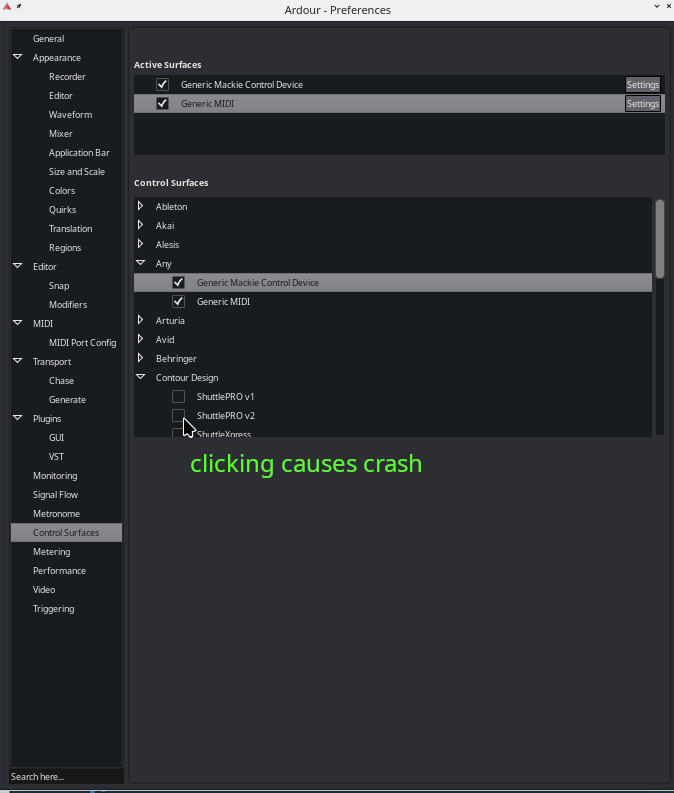
but although my shuttle pro2 is functioning inside Ardour, the checkbox is not checked.
If I click on the shuttle pro checkbox trying to enable the settings, the sound stops and ardour crashes.
It’s not possible to adjust the shuttle pro2’s settings inside ardours active surfaces.
I did have a similar random crash while I was trying to get this working on my system, but just tested the Shuttle pro 2 and it came right up.
There are no “settings” for things supported by a MIDI binding map (as is the case with the Shuttlepro). The settings buttons are only for things supported by a surface module that has distinct parameters for the user to adjust.
Hello Paul,
Yes I do understand that.
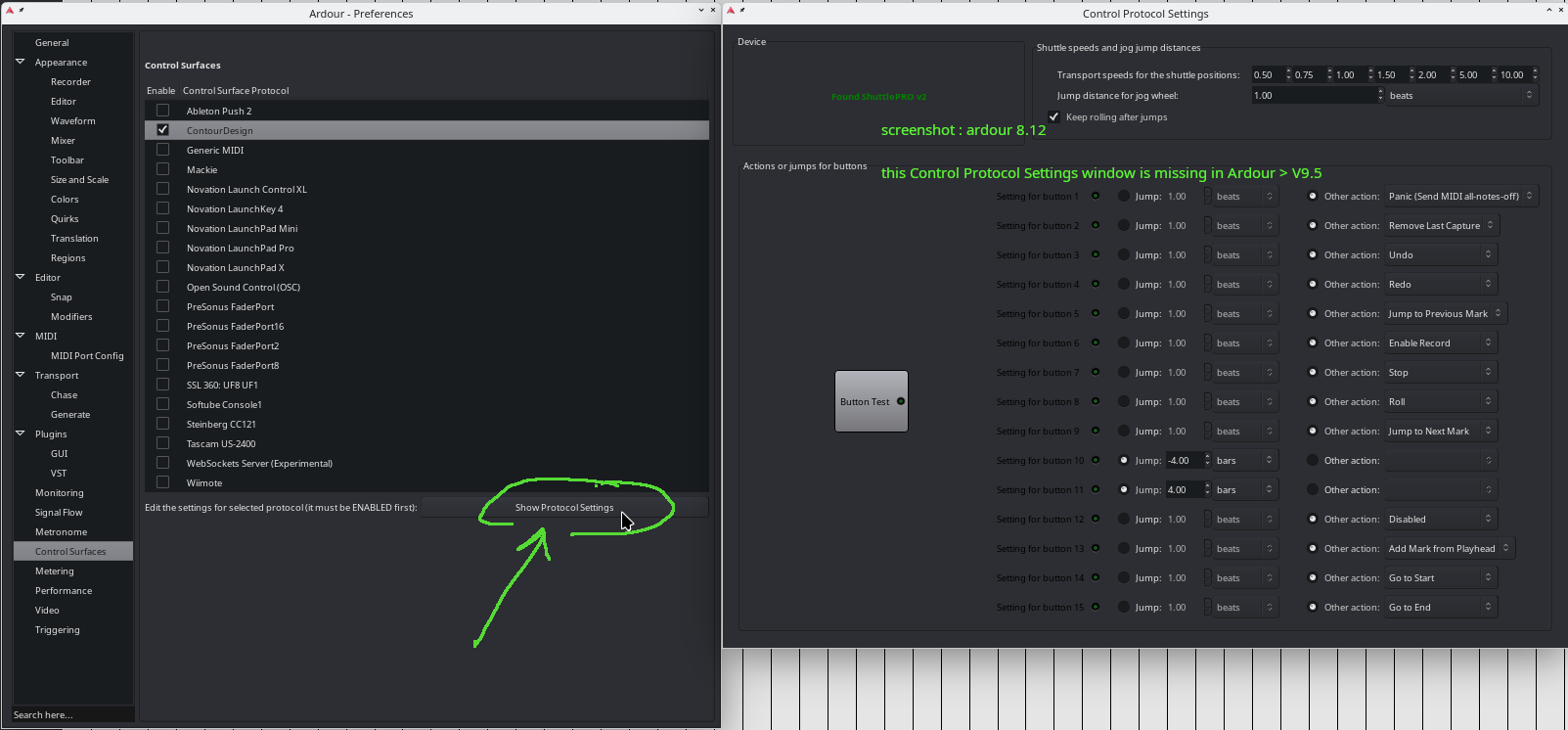
Maybe it’s a misunderstanding, but on Ardour versions until 9.5, for the shuttle pro2 it’s possible to assign an action of choice for each button, by first activating in the prefs > control surfaces > click the ContourDesign checkbox, and then after clicking the ‘Show Protocol Settings’ a Control Protocol Settings Window opens.
This window was superhandy but is missing in the recent Ardour version 9.7.51.
See this screenshot from Debian 13 X11 KDE Ardour 8.12 version.
I’m not complaining but this would be nice to see again in the recent Ardour version.
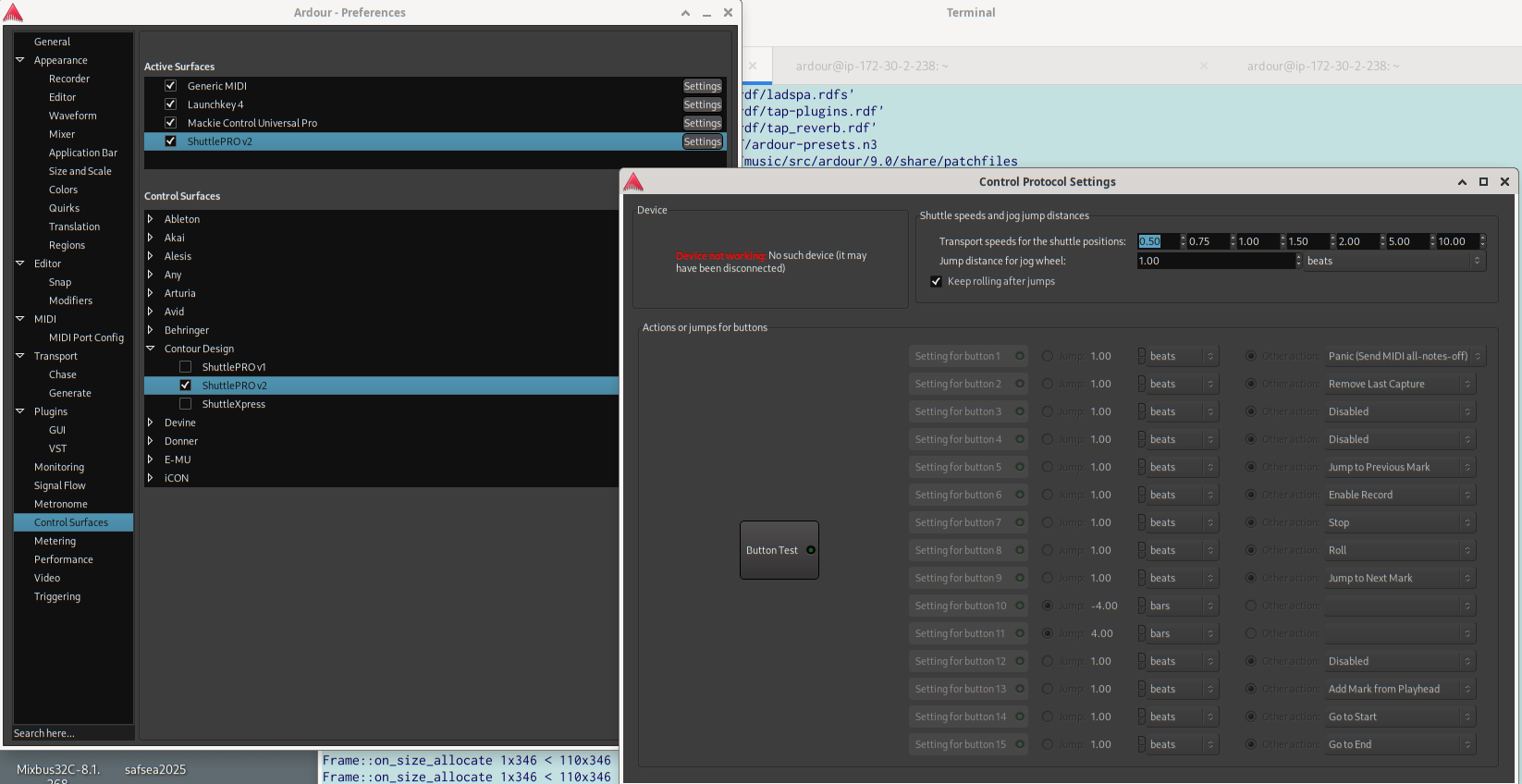
Grrr, is it again some spooky things going on with my system… ??
Probably ??
Maybe someone with a shuttle pro reading this can also check this out.
Is this because as soon as I click Shuttle Pro2 checkbox Ardour crashes, so Ardour even can’t open this Control Protocol Settings Window on my system ?
Did you build from scratch or using their pre-built executable? I also see the Shuttle Pro window when looking at the settings for it. Does it crash on other controllers or just the Shuttle Pro 2?
Hello Mark,
I did self build from scratch yes, to profit / check from the latest bugfixes.
I have 2 other controllers which are midi controllers, sending out midi data to Ardours midi control in ( for dedicated midi input use from midicontrollers ).
These midi controllers work perfect in Ardour.
The ShuttlePro2, isn’t a midi controller ( I think you know this ) but is sending out key commands I think.
In a previous linux Debian12 setup, I did install the Lander software ( Robotista / Shuttle Lander · GitLab ), but in Debian 13 I didn’t install anything for the shuttlepro2 because it is recognized instantly ( konsole command : lsusb ),
Good to hear you have the shuttle pro window in working condition, to access the individual shutlle pro buttons !
Hoping to experience the same behaviour in near future 
Kind Regards, Luc.
Hey Lauren,
No, I didn’t know anything about the ShuttlePro2 but trying to do a crash course in it. I’ll try to help as best I can since I started this thread and have learned a little bit about this area of Ardour.
I’m kind of thinking that something is different between our systems, and that difference is that you actually have a ShuttlePro 2. That would indicate to me that there is something wrong in the communication with the device, though there is probably a strong argument that if it was working in 9.5, it should be working in 9.7 as there probably weren’t any changes in this part of the code (my guess at least).
Can you try unplugging the Shuttlepro and then opening the window? That will verify if it’s something in the communication with the Shuttlepro and not just a configuration issue.
I’m also kind of curious if there is a difference in the device name since you said you used to have to load a driver and now you don’t. Did the name of the device change? Did you ever try loading that driver anyway?
There are also debug messages throughout this area of the code, but I haven’t been able to get a debug version of Ardour yet that will show those messages, which may be because I don’t have a shuttle pro. Run it from the command line and check the output to see if there are any debug messages that might say why it’s crashing.
EDIT: You would have to create a debug version of Ardour to see debug messages, and I’m not exactly sure how to do that. I used --debug-symbols on the waf build and configure options but didn’t really have any change, so not sure I’m doing that right.