Complete Classical Music workflow

I will do it.

Ok. 44.1/24-bits

The next piece I will record have ppp in the low register and FFF in the highest, maybe could be useful a compressor for it. I’d like to try Flux Syrah. On other good compressor? Loudmax?
Edit: Not longer available and not for Linux:

Compressor in the master or in a bus?

Great! can I listen you or your music? You should have music for flute… :wink:

Yes, I think that the time could be similar to the anachruse of this movement. Each piece can be different, but I can be wrong.

I would like to discuss about this, but I have not a technical basis for do it…
On the subject I can say that I find small differences of level between each one of the pieces that I have recorded, perhaps I should equal the LUFS, they are close in all the pieces but not exactly the same…

Today I am much more critical of the results I get…

I’m listening to previous commercial recordings of mine and the sound I get with these mics is much worse. For a single flute record the result is not really professional.

Yesterday I managed to cancel a lot of wheezing with a multiband compressor, but still the sound of my flute is much worse than if I compare with previous recordings.

I think that without good microphones all this work is a waste of time…

Now I have to study what to do…

It could be the mics, but there are several variables at play, such as the mics, the room, the preamps, the A/D converters. I’m not sure the CM-4 would make a huge improvement (I like it for my flute, but I’m playing in a completely different genre, traditional Irish, where there is little dynamic range and in the first octave the Irish flute is generally played at the edge between the first and second octaves so there are lots of harmonics and overtones). You could get much better mics, but you have to identify the limiting factor: is it the mics? The preamps? The distance from the flute to the mics? The room? When comparing home recordings to studio recordings there are a lot of variables that could be causing the difference and it’s hard to determine which one (or which combination) is key.

Is it possible for you to rent mics from a music store in Seville? If for example you rented a pair of Schoeps cardioids and put them in ORTF, then see whether that makes a difference, you can at least determine the role that the microphones are playing. One simple option, if it’s available for rent, is this https://schoeps.de/en/products/stereo/stereo-microphones/mstc-64-u.html (the mics are already set up in ORTF).

If they don’t make much difference see if you can rent a recorder like the Sonosax R4+, which has amazing preamps and by most accounts has now surpassed all the Nagras as the field recorder of choice. If that sounds better, perhaps your interface is the limiting factor.

Thank you @bradhurleyI think that level of equipment is going to be hard to find here for rent. And if there is, I think it’s going to cost me more than buying the CM4s.

The Audient preamps seem to be decent, I also think it has to be a mix of everything: the place where it was recorded, the placement of the microphones, the recording level, the artificial reverb and the microphones.

I find it very complicated to make a single flute cd on a professional level myself…

Could you post some short clips of those professional recordings so that we can listen whether there is that much of a differernce .

Hi, @vasakq You can listen here:


Here the mics were AKG, I can’t remember the model, maybe AKG C480B?

With other flute and, place, and mics, (Neumann I can’t remember, maybe TLM 103) :

More here:

http://endrino.pntic.mec.es/~lorc0003/Luis_Orden_records.htm

Do you prefer some mp3 files?

I’ve been traveling since Friday AM and will not have chance to respond properly until tomorrow. I hate typing on my phone but I will at least say this: don’t be discouraged! I think there are easy steps to take to improve the sound by discussing your workflow from the very start. That probably means revisiting your stereo array. I will also say this too… Your recordings sounded good to me especially given your recording venue and current microphones. More later!

Yes, please! For some reason Spotify is not available in my country. Just a short, 45 second clip would be enough.

Here are:


1 Like

Don’t worry about it. Thank you!

Well, I compared “03.Sunayama.mp3” with the “Syrinx - Luis Orden - Eq2.wav” (my favorite of your recordings on this thread)… there are distinct differences, but I wouldn’t say that Syrinx is unprofessional compared to Sunayama. Sunayama has got this beautiful bright open sound to it without being harsh, if I’d have to guess I’d say there were some room microphones involved in the mix, which totally changes perspective and begs the question whether investing in much more expensive microphones will make the difference you are looking for. Syrinx sounds very different. The first improvement that comes to my mind would be to move microphone at least twice the distance from the flute and to record in the space large enough for the sound to develop and not to bounce back from the walls immediately. But, as I said before, it does not sound bad at all.

1 Like

Yes, the space where I recorded Syrinx is small, and that of Sunayama large and high, but I also find other differences, such as that the sound is richer, with more harmonics and nuances, more present and cleaner.

I have tried to record at different input levels in my interface to see if it improves the presence of sound, if it is very low then raise the sound is something dirty, and if the volume is very high then it seems to distort, even if I do not get to make peaks. By the way, how do you raise the general level in Ardour if the input signal is low? With the master, with the mic inputs, with a limiter?

The recording was made with only two AB mics, the guitar mic was close and the flute mic a little farther away. The room was very reverberant, but even a little reverb was added to the mix.

According to the mastering engineers, the best thing to do is to raise volume in several stages, for example 3dB with EQ plugin, 3dB with compressor (even without turning on any compression i.e 1:1 ratio), 3dB with Ardour gain trim and another 3dB with limiter or any other combination. There are some explanations why that’s right thing to do, but I am not engineer so I don’t want interpret the reason wrongly.

I have recorded one particular flutist with the same microphone/interface in several different spaces and the results were very different. Different frequency bands travel different distances through space (high frequencies loose energy quicker so the don’t reach as far as low frequencies) and reflect differently off of different surfaces (stone, wood, …) which all add to the quality of the sound. Even if you decide to buy a new microphone It would be useful to know what you want exactly because different mics have different frequency response regardless of the price. There are some safe bets, though.

You actually need to be very careful with this advice. The reason is gain staging applies in a DAW same as it would anywhere else, and if your plugin cannot handle an overleveled signal coming into it, you can clip the signal there with no real warning. While Ardour itself, and for instance many of the plugins and processes in Mixbus will handle these situations fine, the same is not guaranteed for all plugins.

I suspect the point of that advice was more to ensure that you weren’t overprocessing at any single stage of the signal processing chain more than anything. Otherwise, assuming that the above issue I mentioned doesn’t exist, there isn’t a difference mathematically between the process you mentioned and adding in 12dB with an amplifier process at the end of the chain, they will come out identical really.

The main issue is to make sure you aren’t developing to strong a signal at any single point in the chain to cause distortion or clipping in any process. Also keep in mind if you do add in stages like this, that where any sends are placed in the channel strip will affect their level as well and you could end up with some sends significantly stronger than others. Again if you are careful about gain staging mathematically it might come out even, but it is generally something to keep in mind.

     Seablade
1 Like

Generally we record a nominal signal at around -18dBFS. The reason for this is more practical on the recording side, as we want to make sure there is plenty of headroom so that we are in no danger of clipping if something is played slightly louder than anticipated (And any professional engineer worth their salt will tell you that musicians never check at the same level they perform at).

If by ‘to low’ you mean that the input signal is sitting generally well below this -18dBFS, then you should correct this at your microphone preamp at the recording stage. If you are beyond the recording stage, you can do so by adjusting TRIM or utilizing Region Gain to boost the region gain which will have the same effect to get you to a decent signal level. In general this won’t be quite as good as increasing microphone preamp level in the recording, but as long as you were close the difference should be minimal.

Beyond that where to fix level issues for the output depends on what you are trying to achieve. Whether it is most appropriate to use a compressor on the input, or limiter on the output for instance depends on what you want to do to the signal. If you want to tame only the highest brief peaks to allow some extra headroom to raise the overall signal level then a limiter on the output could be more appropriate. ON the flip side if you find the overall dynamic range of the piece to great for comfortable listening, then a compressor might be more appropriate, but where depends on the goal again and it will affect the sound. These are usually decisions made in the mastering process however, so unless you are mastering your own piece it can be best not to reach for these first and instead let your mastering engineer weigh in here (Making sure they understand that this isn’t a rock and roll piece to be squashed to hell as some ‘mastering’ engineers in name only seem to think all things are)

Not sure if I answered your question or not though, hopefully it helped.

Seablade

Back home and couldn’t wait to jump in!

Ensuring that your device and DAW are set for 24-bit bit depth and, say, 44.1k sample rate, you should be aiming for about -10 or -12 dB peak level in the DAW for the microphone capture. After much research, I can safely say that this is good and solid advice. No need to aim higher and, actually, you can aim lower and still not have any problems in 24-bit. This way you have a good safety zone for if any performers play with a bit more vigor after sound check :wink: I believe this, and much of what follows, is in alignment with what @seablade is advocating. For a new session in any DAW be it Ardour or any other, all your faders etc will be at unity and at this point you are simply using the gain knob on your audio interface, field recorder or whatever, to adjust to this recommended peak level. In post, you will raise the gain via region gain or gain plugin on the master bus to, say, -6 dB true peak for solo flute and call it good, or, listen back and figure out your desired LUFS level be it integrated, max momentary and the like. Here, as previously discussed, -18 to -20 LUFS integrated across the whole album with -1dB true peak is good. For a well-recorded album this could be all you need to do to put out a very nice recording. Please note that Mixbus, in particular, has a lovely workflow for gain-staging via the mixer. There’s a great video from Harrison Consoles explaining it here. There’s an earlier video too.

Often with classical music you want to retain all dynamics (or much of it) and so you won’t necessarily want to be reaching automatically for a compressor, limiter and the like. I would definitely only recommend a limiter for really, really loud stuff like orchestral climaxes. As discussed previously, for a wide dynamic range that may not fit in the intended listening environment some very slight compression 1:1.1 to 1:25 might work. Even better is parallel compression.

The point here though is that gain staging should not need to be happening via compressor, limiter and the like at capture. If you are not able to get a ball park peak of -10 dB or so for your fortissimo passages during recording after only setting your physical gain knobs, something might be wrong in the chain.

It might be covering old ground but I return to microphone arrays. Strict ORTF, DIN, NOS, EBS etc are standards for a good reason: under the right circumstances they have a good chance of producing excellent recordings. The Williams “stereo zoom” paper gives graphs to show how near-coincident pairs can be altered via separation and/or angle to best fit the recording angle you’d like/need. This way your workflow is finding the best spot in the room and then figuring out the most appropriate stereo array formation. Same for spaced omnis. I will say that Williams has much narrower omni configurations than traditionally thought of but I think he is correct in his outcomes. It goes without saying that a matched pair would be excellent but two of the same microphone bought separately from a company like Audio Technica will be extremely close and give very even results across the stereo field.

Room is also key, obviously. Record in the best rooms you can and adding reverb will sweeten things ever so slightly versus trying to cover bad things up. Advice given to me has often been to use cardioids in bad spaces and omnis in good ones but I realize it isn’t always that simple.

Anyway, back to the main point. If you are not getting -10 to -12 dB peaks as your input levels with just your interface preamps (and all DAW faders at unity i.e. untouched) check the following (the first two can probably be dismissed easily):

  1. Do you need phantom power (+48V) on your microphones and have you set this on your interface?
  2. Perhaps your microphone is faulty?
  3. Does your interface have a software control panel and are all faders at unity? I realize this is probably not an issue for Linux but you may want to check in alsamixer or similar that your faders for both playback and recording are all set to unity.
  4. Are the numbers looking good but headphone/speaker output low? Again, check physical knobs on your interface. At this tracking stage for a stereo pair without any plugins added, what goes in should be coming out at the master bus at the exact same level.
  5. Are your headphones/monitors working correctly? I’m very surprised that the Audient preamps are “distorting” before you even peak! Something doesn’t feel right…

There may be others but I can’t think of any more right now. I apologize if I’m stating the obvious but I assure you that I’m just trying to cover all the bases no matter how easy it might sound.

Also, I just purchased the Audient iD44 myself so I darn well hope the preamps are good for classical :wink:

They are! I know a guy in my town doing excellent classical recordings with this Audient 8-channel adat box, asp880, plugged into RME Babyface pro.
Could you, please, test if iD44 works with Linux, and if so what kind of functionality is available through alsamixer?

Of course, I’d be happy to. On a brief Reddit post the user claims every channel works in Ardour but I will do a more in-depth report as soon as it arrives at the end of the week. In other news, as part of the same order, I picked up a pair of the Shure KSM141s, pair of M40x headphones as well as the upgrade to RX 7 (vs going with Acon for now, at least).

I’m definitely now at a point where I feel that the only next logical step is to move into the upper tier of microphones such as a pair of Schoeps but, to this day, the best recording I ever made was with a single matched pair of ADK TLs in omni mode. They are magical microphones. I still have doubts whether paying through the nose for Gefell, DPA, Schoeps etc is worth it in the grand scheme of things. Pity I sold the ADKs when I moved across country :frowning:

Thank you very much for your advices @anon60445789 @vasakq and @seablade!!!

Today I tried to record myself one more time, now following some of your recommendations. Before I was trying to get close to 0 when I was recording, between -3-6db and that might saturate the signal. The Audient controls were almost at maximum and I was about 2 meters away from the microphones.

Today I recorded a piece with a great dynamic range and I tried not to exceed -18db in the most extreme notes. The Audient controls have been almost in the middle.

To know the signal level I have added in the Master the plugin “True Peak and RMS stereo” which leaves marked the maximum signal peaks. I can’t see the laptop while I play…

To raise the signal I have done it in three ways, following the advice of the sound engineers ( @vasakq ). ALT+6 (I did it 5 times) on the tracks. I added the a-compressor on each track (Threshold -20db Makeup +3db) I added a mono LSP limiter ( 1:1 Treshold -3db).

I don’t know if everything has been too complicated and could have been done more simply.

The result of the recording has been better, it has much less wheezing, I think, although today my sound has not been the best :frowning:

The setup of microphones and the recording space has been exactly the same as in the other recordings.

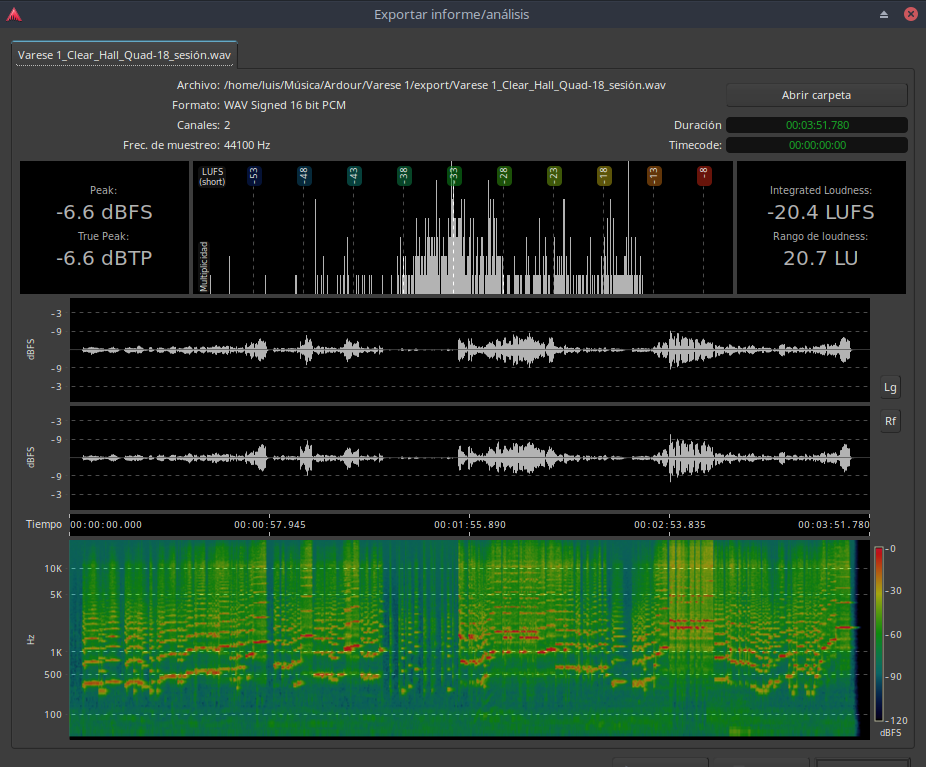
Here is the result in LUFS out

And here the wav file:

Thank you!!! :slight_smile:

I think so.