Also, just remembered, I think KXStudio’s Cadence is my favorite app for controlling audio interface settings and Jack/Alsa things. I really like that it gives you a summary of current kernel, cpu governer settings etc. I believe if the governor line is greyed out, you need to install cpu-freq or something similar that I can’t remember off the top of my head. Just great for stopping and starting Jack and going in to set latency.
The ‘meta-audio-plugins-collection’ package is an alternative to installing all plugins at once.
If you’re the kind of person that only wants to install the best plugins, consider installing this package first before installing other audio meta-packages.
This way installing ‘meta-audio-plugins’ will not pull ‘meta-audio-plugins-ladspa’, ‘meta-audio-plugins-dssi’, etc.
Still not found my way to my AntiX partition yet but when I do (tomorrow?) I’ll update the list if I find other favorites.
For the record, I haven’t used my licenses for these in years, but I KNOW I used to run WaveArts plugins including their restoration suite in Linux under Wine. Of course this is a different purpose than the Izotope RX destructive editing which is VERY useful for some things, and even the offline broadband noise reduction etc. does give better results than the WaveARTs, but the WaveARTS are nice plugins and I still have them because of that.
Also in the same vein, Harrison just released a new channel strip plugin with noise reduction intended for Vocals primarily. I don’t have enough money for it yet, but I will probably pick it up, it does seem to be Linux native though they don’t clarify plugin formats very well on their site.
From what I’ve read in the manual and website, this is an OSX Pro Tools AAX plugin only. And the pricetag seems more than a little extravagant at $1.5k when compared to Flux EVO Channel, Metric Halo Channel Strip, WaveArts Trackplug, Alloy etc. Noise reduction stuff aside, surely the point of Mixbus and Mixbus32 is also to have console-type channel strips baked in and for a stellar price? I’m clearly not the intended audience so I probably don’t know what I’m talking about
I finished reading Robert Toft book Recording Classical Music and there’s a section on loudness with table documenting loudness levels over time from 1980 to 2014. It’s a little bit of a problematic study in terms of scientific method but his conclusions are that the average level is -21.9 LUFS integrated, loudness ranges between 9.1 and 26.2 LU (but mostly between 15.2 and 23.6) and true peak between -7.2 dBTP and full scale. I think I would have preferred seeing the levels of whole albums and maybe selecting 5 or so representative works showing how levels vary over the years and differences between the record labels. However, the table presented by Toft is good enough for a ballpark estimate at least.
So, I ask of the classical engineers following this thread:
Do you use LUFS integrated, max momentary/short term or simply use good ol’ peak meter in 2019?
If LUFS, do you use the Tidal advice of making the loudest track of the album between -18 and -20 LUFS integrated, or, do you strive to make the whole album conform to that integrated level (and is there a big enough difference to care?). Or, like me, do you utilize the momentary or short term max to approximate the Bob Katz K-meters?
Should classical music be aiming for something higher, say -16 LUFS integrated to conform with Apple’s streaming standard? Does that mean the necessary use of dynamic squishing either via drawing in manual volume curves or engaging transparent compression and limiting?
Do you also aim for loudness range to ensure pleasant playback on, say, a car stereo without having keep messing with the volume knob? A classical engineer I was recently in contact with suggested between 10 and 15 LU but he was also aiming for -16 LUFS integrated.
Yea they do mention AAX, but I never saw a specific OS mentioned, and the installation instructions include where to put license files on Linux, so it isn’t perfectly clear to me yet, however it is more than likely it may be AAX only which would limit it to I believe Windows and OS X and Protools for a host, which would suck to some extent but on the flip side it may be they need the hardware assistance AAX can provide for it to be utilized much, not sure.
If I had to guess, they have just mindlessly copied and pasted the usual plugin blurb that we would use for the Essentials bundle, Mixbus license etc. This also in the manual:
The MPC Channel only supports the AAX (Native) format on Pro Tools 10 or higher, running on OSX 10.6.8 or higher.
So sounds like a no-go for Windows and Linux (at least for now).
Ahha good find then, I didn’t find that in the manual. Unfortunate then, understandable but unfortunate. I don’t have money for it right now but would consider it for the future, honestly that price isn’t crazy to me personally in terms of what my current toolset of Rx, WaveARTs, and various other plugins cost, but isn’t something I can spend on a whim either. And considering I have two other very expensive software purchases on the horizon it would be a bit before I could do it anyways.
Today I’ve been recording myself, with the new Liquorix kernel I haven’t had any xruns! Fantastic!
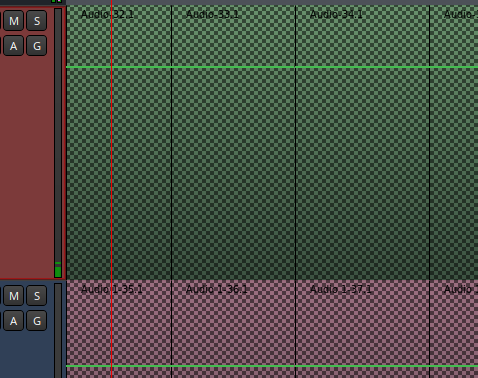
However sometimes when I open a project I get this problem. Do you know what it is?
That’s been my experience with Liquorix and bare-bones distro. I’m amazed (I shouldn’t be!) that Linux feels like a better and more stable platform for recording these days.
It looks pretty My guess is that the pattern goes away once Ardour has re-created the peak file? If you are opening projects made with your previous install this might explain things… Once the waveforms re-appear and you re-save the file, does it happen next time you open the file?
Yes, very cool… It happened after I renamed the file and reopened it. I’m still recording in MXLinux, I haven’t installed the plugins in Antix yet. I’ll keep an eye out for other situations.
Here’s what I recorded yesterday, in case you’d like to hear it. Clear Hall Bricasti -20db reverb
Can we talk a little bit about the workflow of classical music recordings?
I’ll tell you what I’m doing:
I record about three times each piece plus some fragments just in case.
I rename the archive to work with a copy. I choose the version I liked the most, the first or second, it’s usually, and if there’s a fragment that I liked the most in the others I change it. I erase the rest of the versions and take the piece to the beginning.
I work with reverb and equalization.
Sometimes I have used to combine everything but some crossfades get a click…
Could you comment on differences between RX and Acoustica? I have RX7 Advanced and have some of Acon’s restoration tools, but Acoustica looks quite good and is of course far cheaper than the advanced version of RX. I’m happy with RX for now, but as a long-term investment it could become expensive (I’m referring to upgrades to new versions over time).
That’s it! When there are multiple pieces in a session, or a piece with multiple movements I dedicate some time to place CD markers (or simply ranges) for multiple export.
I am curious, though, why do crossfades get a click? It should be possible to trim the ends of the regions, and, since regions are semitransparent, to align overlapping regions in faze. There are, also, multiple types of crossfades in Ardour (right click on a crossfade…). Finding a right place to make cut and edit sometimes take time and effort, but it is certainly possible in Ardour - just make sure layering is correct.
That’s probably it. The renamed file was looking for the associated peak files, couldn’t find them so recreated them. That’s my best guess, at least. Again, if it no longer does that on re-opening you are good to go. Perhaps in future, saving snapshots of the file would be a better workflow? Your original files won’t be damaged by any editing so you can always return to original state easily.
I always aim for about 3 times myself too but only do the patches after I’ve listened through so I know exactly what I still need. On location, if the conductor has a sense that something needs patching of course we do it there and then. When I’m musician and engineer I find it difficult to focus on both so try to separate my roles as much as humanly possible. What is your incoming sample rate and bit depth?
As noted above, I don’t archive given that snapshots in Ardour and any editing in the DAW is going to be non-destructive. Your original files will always still be there. I do keep the original files off the recorder in a separate location during my work so that if the worst happens and my hard drive dies, I can always start again with the raw files.
Noise reduction, reverb, EQ and compression/limiting for me most of the time.
I agree with @vasakq. I’m not quite sure I follow so feel free to explain some more. One of the things that helps me tremendously is the transparency of waveform on overlap. In a typical edit I can precisely align a transient and then tweak the crossfades either side of the region to occur just before the transients. Works almost every time without further editing given the default short crossfade is like the source-destination fades in Sequoia and Pyramix and invisible to the naked ear (!). Of course, there are instances where a longer crossfade and type is better but easy to do as a follow-up as necessary.
I export to 44.1/16 FLAC, MP3 (can never settle on bitrate but 320kbps sounds safe) and for cd creation a wav+cue and DDP. I’m interested in using Opus format in the future.
I’m in a similar boat. I only have RX Standard because everything I need for classical is there aside from the new loudness stuff. However, I’m still on version 4 because I refuse to pay for upgrades that will make little difference to my classical workflow. That being said, psychologically, it hurts my brain every time a new version comes out and wondering if the spectral editing has improved any. Acon Acoustica Premium seems like a fantastic deal. I’ve used the demo enough to know that spectral editing is great plus you get all those amazing plugins like restoration, mastering, verberate etc. I don’t believe there’s anything lacking in the Acon software at least for classical. I’m going to purchase Acoustica Premium next major version number. Upgrades at $79 sound sweet!
Thanks! It does seem great, although I have to say that the Acon tools I’ve used so far (declick, deverberate, etc.) don’t seem quite as effective as the same tools in RX 7. But I’ll give Acoustica a try as I like the interface
I use WaveArts Master Restoration (and Power Suite) for the plugins and think those are still up there with the best. RX or Acon would be for manual spectral editing, loudness conformity and resampling/dither as necessary. Honestly, with Acoustica I’d also be excited to get Verberate 2 as part of the deal. The unknown for me is the resampling engine (doesn’t look as good in the tests but “looks” may not translate to audible). But to be honest, I’d probably be coming out of Acoustica in 32-bit float.