Hi Glen, I’m currently upgrading my computer components and would like to install AV Linux MX on it. However, I can’t find a link to download an ISO file. Is there a timeline for when the file will be available again? Best regards.
Great! That’s what I was looking for.
Thanks, but I prefer the 23.5
AVL 25 is currently in it’s second release candidate for testing and will be released very soon. AVL 25 is based on current Debian Trixie and AVL 23.X is based on Debian Bookworm which is now the ‘oldstable’ release.
Thanks Glen, my gear will be up-to-date, and I don’t know if I’m qualified to be a tester. I much prefer playing drums  I’ll wait for the AVL 25 release and play with the old system until then.
Best guth
1 Like
As an aside, for those of us who can’t/won’t move up to a Python 3.10-capable system, you can use “uv” for Python tools like yt-dlp, which I use a lot. Install UV, install Python 3.12 (or whatever) on UV, and then install yt-dlp on UV. Works for me so far.
Why should I do that?
Unless you have some specific reason to stay with the older python version then it’s not something you need to worry about, for normal AVL usage the version of python isn’t really that significant. On the subject of yt-dlp AVL 25 now has a File Action use yt-dlp from the file manager… but I digress
1 Like
Wasn’t this already shut down by YT due to licensing issues?
EDIT:Well, I design graphics and videos with AVL. I like the selection of programs in AVL. And I like Linux itself, ever since Red Hat 5 or so… That’s right, I once tried downloading videos from YouTube, but I didn’t find it particularly problematic that it didn’t work and I abandoned the idea.
No, yt-dlp is alive and well, it needs regular updating and a new deno dependency to keep functioning but “60% of the time it works every time”
1 Like
Does that mean the file manager can handle HTTP or HTML?
Hi, no not exactly… Like many of the AVL File Actions it’s an ‘Open With’ from the File Manager. In this case you select a directory and ‘Open With’ the YT-DLP Helper Action, paste the URL (so the Action handles the http stuff), name the file and it downloads the Video to your selected folder. BTW because it’s an ‘Open With’ action and not a specific Thunar ‘Custom Action’ it should work with most common Linux File Managers…
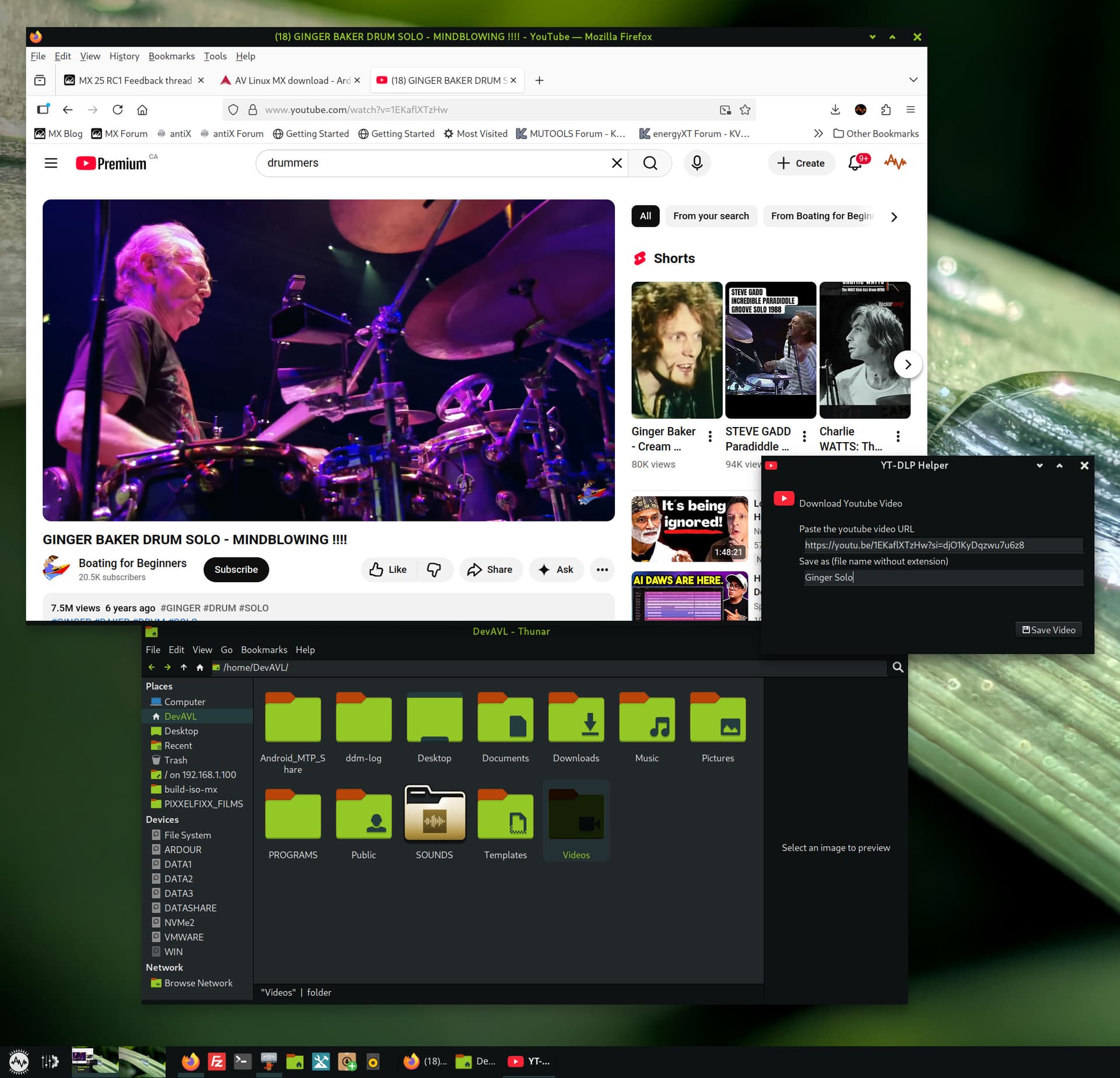
Right now I’m working on a Quickemu File Action to quickly download and run VMs from Thunar as well. No, it’s not an A/V requirement but it’s handy for developers and Distro hoppers and far lighter than Virtualbox or Gnome Boxes…

Thank you very much, that’s good to know.
I’ve now installed AVL 23.5 on my new system, great work @Glen. Everything is still so new and unfamiliar; I feel a bit lost. For some reason, switching the language to German didn’t work, or maybe I’m just too dense. I always like having a user manual; is there one for AVL 23.5?
Edit: I actually think the idea of a reduced AVL version is ideal. It’s so easy to install additional programs.
Hi there,
Much did change between 21 and 23 so much so that the manual was pretty much made obsolete and literally it was written over many years and I haven’t been able to reproduce it. AVL 23 also was not super friendly to install for non-English Users due to how Enlightenment (the Desktop Environment) handles it’s keyboard settings, this has been vastly improved in AVL-25 (coming soon).
If you right click on the flag on the lower right part of the screen, you will get a settings dialog where you can add a new keyboard layout, I don’t recall if all locales were installed in 23.5, if not you can go to MX-Tools (the toolbox icon launcher on the panel on the lower left screen) and select the Locale tool which should help you select the German locale, if that is not the case please let me know and we can get it installed manually…
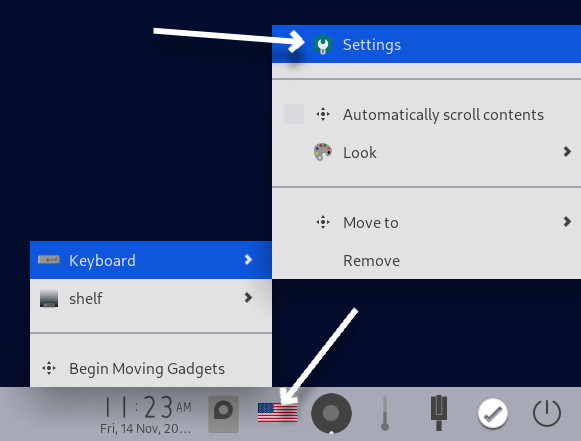
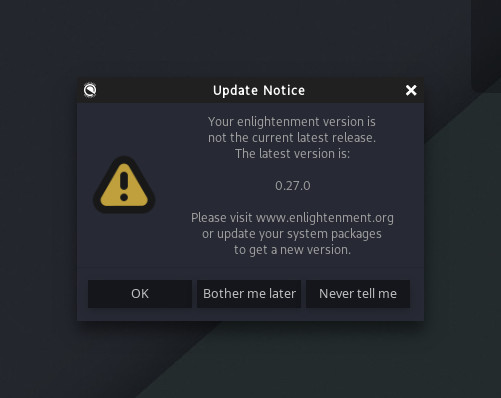
Thanks Glen, the German flag is up, the language packs for Office, Fuchs, and Vogel are installed. And an Enlightenment message is asking for the latest version 0.27.0 to be installed.
Is a more complex action required to change this in the system settings as root? I mean changing the system-wide language settings.
Hi,
Glad to hear things are improving.
That update to Enlightenment did not have much at all in the way of noticeable improvements and for AVL 23.5 I would suggest to leave it as-is and select ‘Never Tell Me’. Enlightenment will tell you if there is an upstream update but the version in Debian (the base of AVL) won’t be updated anyway so it’s kind of a needless message. As is said often “If it ain’t broke, don’t fix it”.
Installing the German locale should affect root as well (I think). Have you logged in or restarted since the locale change?