If you are interested I’d like to announce the release of AV Linux and MX Moksha 25.2. This point release was a huge amount of work with some big changes, please take a bit of time to read the Blog post in it’s entirety because there is a LOT of new info!
Great news. I’ve just installed the AVL File Actions, Ardour 9.5, and everything that’s new at the BSRPKG repository, like the DVD tools. Not tried everything, but things look good so far. I did find I had to install a few extra packages for ones like mjpegtools, but they were all easy to find in the MX repository.
The new Ardour themes look very nice too. Thanks for your efforts.
Hi, thanks for the feedback. Yes, those three packages I listed like that because they are external packages but on an existing AVL or MXM install they will pull in some new Repo dependencies, that is to be expected.
@GMaq Glen, I didn’t see any obvious paragraphs about why AV Linux vs MX Moksha. I need to move up from AV 21 (which I don’t enjoy abandoning), as another product I use forces me to the upgraded glibc. You have a good A/B comparison out there? Thanks!
@GMaq
Hi Glen. I’m reading thru the list of changes. Cool new file actions.
There are some things there i didn’t know exist for Linux. What’s this AI video upscaling model? Do you use it and how good are the results compared to something like Topaz Video Enhance?
The core of AVL and MXM are the same, so same Liquorix kernels, IRQ threading and other general rtqcs stuff pre-configured and also the same set of preinstalled File Actions. The difference is MXM comes as a basic OS and isn’t loaded with DAWs, Plugins, NLE’s or Graphic Editors. It is easily made into a full Moksha AVL but doesn’t come that way out of the box in case some folks are simply looking for a nice Linux OS with Moksha since AVL is so loaded with multimedia stuff. All of the DAW, NLE and Plugin Packages in the AV Linux ‘BSRPKG’ web archive will work in both AVL and MXM.
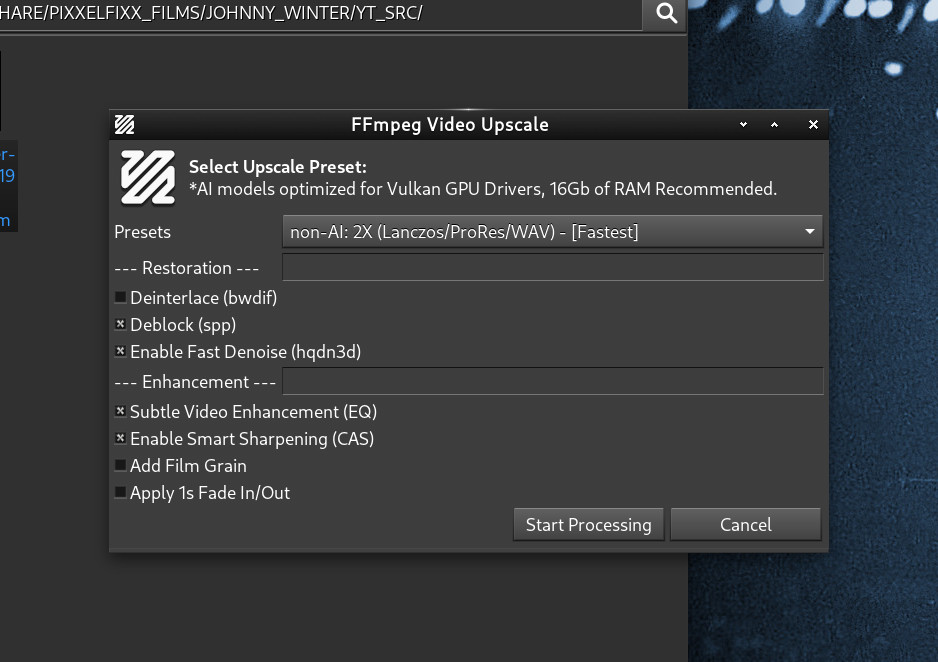
Here are the straight goods on the new upscaling in AVL/MXM. Can you generally get the same AI upscaling quality as Topaz Labs…? Nope… I use Topaz Labs in my Win 10 partition, it’s the top of the heap for this workflow and nothing in Linux even comes close… BUT, hear me out… If you want to bring a clean SD source up to good quality HD that is very possible with the ‘Upscayl’ stuff in AVL. A huge problem with the whole upscaling racket in general is that it’s kind of your usual technology ‘stupid big numbers’ game similar to 192Khz Audio. Upscaling anything 4X except perhaps the most pristine quality source is likely to give pretty bad results regardless of the software. A 4X increase puts so much space between the original pixels that the AI has to do an awful lot of guess work with little to go on with regard to filling in all those generated edge pixels to meet the increased resolution. 2X makes this a much more reasonable and achievable proposition so even though some of the supplied ‘realesrgan’ models for upscayl are 4X models I would advise against using them unless you have perfect sources and years of processing time to wait because the processing speed for 4X upscaling is literally seconds/frame not frames/second. This is another area where Topaz Labs excels, it’s highly optimized for your GPU and Upscayl’s use of Vulkan drivers is commendable but not nearly as highly optimized.
I personally find that the 2X AI ‘realesr-animevideov3’ preset gives the best quality and the best speed of all the AI models but there is also a surprise secret weapon in there… There are also 2 presets for simply using ffmpeg’s lanczos resize algorithm for a non-AI 2X upscale and with clean sources using some of the provided deblocking and sharpening filters it is possible to get very good results without any AI waxy phoney baloney artifacts.
I will be keeping my Topaz Labs subscription but being able to now do about 75% of my upscaling work in my File Manager is an option I didn’t have a month ago and something I never thought I would be able to do on Linux… Final note: the above info pertains to upscaling Video, I find the Image Upscaling File Actions work very comparably to Topaz Labs, they are also not intolerably slow since only one frame is being processed…
Have you ever tryed to upscale footage incrementaly? To have one generation of x2 upscaling first, and if you’re happy with the results, upscale it again x2?
The thing is, most of the stuff i’d like to upscale is 480p, (MiniDV), some is 720p(HDV or Canon 7D footage) and it’s mostly decent quality(for that era, say from 2003-2014). Some of the shoots are noisey/grainy (darker/low light scenes) . I was thinking of bringing it all up to 4K…somehow , and then do the color grading properly.
It would be cool to do it in Linux, so i could practice editing in Kdenlive(which to me looks simple, but i’m currently not a very experienced user of Kden). I mean, something like Resolve is a no-brainer, but i’ve simply been more interested in foss for quite a while now. Until now, mostly i used Premiere Pro, sometimes Final Cut.
I think 480p to 4K is not feasible for several reasons, the processing power required even with optimized software and a fully supported GPU essentially makes your computer have to throw everything it has into a single task just like in the old days, secondly the file sizes are absurd. I think 4K is a complete non-starter and wasteful in every way. DV and VHS footage is very roughly comparable to 320x240 pixels and consumer DV/Hi8 cameras had so much sensor noise and other stuff that was masked by the SD limitations of old TV sets and that all become glaringly obvious once we get into even HD resolutions. Camcorder footage is problematic at best and at 4K it is really just amplified problems. All of the restoration tools are double-edged swords, noise reduction steals detail, deblocking softens the image, sharpening makes things look 2D and ‘masky’, brightness and contrast can easily make whites clip. I’m not saying they can’t be used, they are often necessary but they are delicate balances of pros/cons. Every resizing results in quality loss so resizing more than once (ie 2X and then 4X) is not the best idea usually.
Then comes the whole problem of what do you do with the produced work? At first it’s like “cool, no more physical media, now all of my Videos are on my computer!” I can only speak for myself but I went full circle with all of this stuff, I was so glad to be free of DVD’s and quickly amassed hundreds of movies and concerts on various hard drives only to be confronted with having to get them on to removable media to play them on a TV either through the built-in media player or a game console. Before 128+ Gb USB thumbdrives became popular if you had HD Videos you couldn’t get many movies on the drive and if you left the drive plugged into the USB slot the TV or console would mercilessly continually read the drive whether it was using it or not and the drives would fail within a month or so. Of course if you’re a networking whiz you could concoct a NAS media server and have constantly accessible Videos on your home network that you could watch on your TV but I never got that far… After several years of thousands of Video Files on my computer that I would quickly lose track of and then have to find them and copy them to a thumbdrive that would die in short order I got tired of it. On top of that was the issue of hardware upscaling. If you had a good TV that upscaled even SD Videos and DVD’s could still look quite good so I came to ask myself why was I melting my GPU upscaling shit Video that actually looked no different on an HDTV whether it was an upscaled HD digital file or an SD source being hardware upscaled. Between this and simply wanting to access a title and play it on the TV without a computer search and rescue mission I now take Video with sentimental value and restore it as much as I can and burn it to DVD. I keep a backup of every DVD ISO image stored on the computer in the case that if a future day of fast upscaling with high quality results comes along I still have all the sources.
I’m sure this sounds insane to some people to be returning to physical media but I love knowing exactly where what I want is and being able to pop it into a good upscaling disc player and view it in at least the quality it was produced in without countless hours of superheating a CPU or GPU with upscaling calculations.
@GMaq
Well, i’m not realy looking for solution to upscale random videos just for fun…
I’m trying to find a nice way to upscale my works i’ve done as a student of film/tv directing, and some music videos i’ve done after that, so i can redo color/post using higher resolution, and then archive it (proudly ). Most of it was decently lit, and shoot with tv prodcution cameras (but the format was mostly Mini DV, aspect ratio16:9, frame rate 25fps, progressive scan). Most of that material i still have in original state too(as it was shot), without post applied, as a matter of fact, even on original mediums.
Some of the footage realy is grainy even on originals, mostly in cases when we were trying to be more artsy and neglected the techical stuff while trying to get low key lighting amosphere (without beating around the bush-in cases when we underexposed the footage on purpose while trying to be smarter than we were).
So, it makes sense to me to try and pull out the best quality i possibly can from the source material.
That’s what i’m realy after .
So, my plan goes something like this:
1.) upscale source materials
2.) recut/redit it using Kdenlive - at the same time, tech myself/practice Kdenlive
3.) do color and post (also in Kden)
4.) do a little beter audio post in Ardour
5.) end up with basicaly same movies, but with updated/improved quality.
Hi, yes this sounds good, to clarify my post above I think 2X/1080p is a pretty realistic goal for your material, I think 4X (or 4K) is a stretch (literally) in general you’ve got a good plan. Upscale first then edit and color grade. I don’t use Kdenlive for editing I use Cinelerra-GG but that’s not important really. I always export from Cinelerra in MKV so I have H.264 Video and WAV Audio, that way I can import the Video into Ardour with WAV Audio and when I’m done with Ardour I can losslessly copy the H.264 Video track and mux it with the Ardour Audio converted to AAC 320kbps in a final MP4 container.
Note that one of the 2X Non-AI upscaling presets in the AVL Upscale Action will upscale and convert to ProRes and WAV for intermediate editing. This should be able to do it’s thing on a pretty modest Computer and doesn’t rely on Vulkan Drivers and a fast GPU.
@GMaq
I just installed AVL 25.2 on Lenovo P330 tower, 16GB RAM, 8th gen Intel i5, integrated Intel UHD630, SSD drive, Steinberg UR22mkII Usb audio interface, M-Audio KeyRig49 midi keyboard, dual display setup (didn’t want to mess with that other machine with Win11 and secure boot on).
Didn’t yet touch anything video, but the audio/midi side works great. I’m messing with TAL Noise Maker in Ardour right now. Works flawlessly and the latency is very low.
I have to mention - first time i opend LSP’s GUI i a had problem while trying to resize the gui (it behaved erratic so i had to delete that instance), but afterwards, whenever i opend it again, it just worked normaly.
Great! Thanks for having a look! If you use the “MX Package Installer” (on the panel) and go to the ‘MX Test Repo’ tab you will be able to update the LSP Plugins to their very latest version.
@GMaq
Wi-Fi also works after i switched it on in Connman’s settings. I’m catching it from my router using an old USB TP-Link TL-WN722N antenna i had left over in my drawer from times when i worked as a field service tech support. Mozzilla and YouTube also work without issues.
During the installation, guide did mention something about bluetooth not being able to install(“BlueZ something something”) I just skipped that notification…maybe this comp just doesn’t have integrated bluetooth device or something…i don’t know, i never used bluetooth with this machine.
Upscaling video takes a bit of experience, and maybe even a lot of snake oil. Fact #1: Unless using an AI subscription service for video upscale, you will rarely get good results with OSS. Fact #2: You will rarely end up with something that looks better than the original. That is really not possible. With that said @GMaq has done a pretty terrific job with some of his videos. but… What is possible and generally getting good results, is keeping the video at original resolution, or maybe 2x at most. But, most newer TVs do a pretty good job of hardware upscaling, and all will sooner than later.
De-interlacing is the really the first thing you should do, at the original resolution. There are many filters available to do this. Try them ALL! Each one works differently with different sources. You cannot just simply pick ONE and continue using it because it had good results on a specific video.
Once de-interlaced, carefully examine the black levels (this is known as “setup” in the broadcast world) You will likely need a software waveform monitor to do this accurately (FFMpeg can do this). You want the setup somewhere around 7.5 IRE. Most cheaper LCD TVs really have a problem with black, especially pure black which a lot of SD equipment does terribly. Looks absolutely AWFUL! Anything with modern dynamic range settings is best (HDR).
SD when processed correctly and carefully can look really good on a modern 4K tv with H/W up-converting. I have ripped some DVDs that look amazing while still being SD, including my original Beatles Anthology DVDs. I also preserved the original DTS and Stereo audio tracks with it. I have not yet seen the newly release 4K UHD version but I’m sure too someday.
EDIT: Do ALL post-processing in a lossless format. Do not use compressed formats until you get good results and are happy (otherwise every single pass becomes a HUGE loss of quality). Then convert to your favorite compressed codec of choice and call it a day.
@Lexridge thanks very much for weighing in! We’re very fortunate to have you here both as an ffmpeg expert and a broadcasting one! You are absolutely right that good deinterlacing is step 1 and absolutely necessary if upscaling is going to be employed. To that end I did some reading on the ffmpeg BWDIF filter and my undertanding is that it is the ‘smart’ successor to ‘YADIF’ and rather than brute-force deinterlacing every frame I have included BWDIF in all the Video conversion File Actions to work in it’s smart mode and only deinterlace frames that it detects as interlaced and leaving the ones without comb artifacts alone, this is more hunch than proven at this point which is why I really need some professional eyes on this collection of File Actions to verify that they’re doing what I intended.
In Windows I’ve worked a lot with the Japanese TMPGEnc Video software encoders and some of the features in the File Actions are emulating it’s features using ffmpeg like smart deinterlacing and smart sharpening. I also have to balance putting some common-sense defaults in the File Actions and stepping off in places where an NLE is needed. I really wanted to do a release Video on the File Actions to fully explain what can be expected from them but actually making them was 2 months of stolen spare time and I have 2 parents in long-term nursing care and my wife just had a full knee replacement this week so I needed to push AVL 25.2 and the new Actions off the plank and see if they floated or not…
Since we’re taking Video in this dark little corner of the Ardour forum if you don’t know about @Lexridge’s excellent FFmpeg QT 'Free Factory" frontend you should, it’s incredibly powerful and in use at an actual TV station! FFQT was also an inspiration to bring some of it’s power into right-click file options. Aside from our beloved Ardour developers we have a lot of very talented folks here!
PS, I’m very jealous of your Beatles Anthology on DVD…lol, I have the Anthology in a very bad conversion from my early days of Digital Video in 2002 and now the DVD sets are hundreds of dollars on eBay etc…
EDIT… hmmm, it seems the DVD market has softened a bit, Beatles Anthology on eBay is now cheaper than it has been in a long time… yay!
Just to add that today i quickly tried animex2 video upscaling option. Rendering wasn’t too slow even with integrated intel uhd630, but the model is obviously created for cartoons/animation or to be more precise - anime . Doesn’t work good on realistic video because it adds to much pronounced geometric shaping/rounding with newly drawed lines while trying to get rid of pixelization of a original low resolution video.
I think it would do wonders for - animes .
The idea was too try hq x4 model also, but the rendering was something like 40 seconds per frame…basicaly, it renders it, like, forever on this machine , so i canceled it and ran after my daily chores.
Yep… pretty much what I said although I have seen in some cases seen the ‘anime’ 2X do a reasonable job on regular Video but it’s a case by case basis. Humor me and try the non-AI ffmpeg 2X ProRes/WAV setting on your material (add deinterlacing if needed).
Thank you Glen for the kind words. You have a great deal of experience with both upconversion and deinterlacing, and your videos look amazingly good, especially considering some of the source material.
Something you and I have both wrestled with is finding the best way to present users with a simple yet powerful interface that covers the most common use cases without overwhelming them. I think you have done this extremely well with the AVLinux File Actions, and I think FFQt does a decent job of it too. What you’ve done is make your interface almost idiot-proof. My project, well… you need to know at least a little about what you’re doing first.
I have experimented with bwdif a bit, and it really is one of the best deinterlacers available in FFmpeg right now. There are also several “magic” options you can throw into the mix that make it surprisingly powerful. I really should include a few default Factories that demonstrate some of these more advanced features and can be used out-of-the-box. Thanks for the idea!
I never realized the original Anthology DVDs were in such demand. I would have thought the new Blu-ray release would have reduced interest in the 1995 set. I’m actually missing the latest release myself, so eventually I’ll have the complete collection.
My Beatles collection is fairly extensive—mostly vinyl—but I also have the LaserDisc version of Anthology. Unfortunately, I no longer have a LaserDisc player to watch it on.
The hard part of our hobbies isn’t writing the code—it’s deciding which 95% of the options to hide.
 .
.