I’m a Linux user, but my buddy who is using 5.12 on Windows seems to be having great success with an application called ASIO4ALL. He has been able to use multiple “soundcards” as inputs and another soundcard as his output. It seems JACK-like in that it acts like routing matrix for anything and everything recognized as a audio source and/or sink by the OS. Again, I haven’t used it personally, but he definitely seems happy with it.
1 Like
I didn’t know that ASIO4ALL can combine multiple soundcards into an aggregate device. That’s awesome!
1 Like
Thanks a lot ! I was thinking about Jack but it doesn’t seem to run properly on Windows. I’ll take a look at ASIO4ALL and let you know if I can make it work !
1 Like
I’ve tried this solution, but it doesn’t seem to be straightforward. My devices are actually not detected by ASIO4ALL.
Could your buddy explain the main steps ?
Thanks anyway 
I just reached out to him. When I get a response, I’ll let you know.
In the meantime, check out this article. The first section is installing which I think you have already done, but the second section describes how to set it up with your soundcard and DAW.
https://www.sweetwater.com/sweetcare/articles/installing-and-using-asio4all-for-windows/
1 Like
Okay, he says the “only trick” is that when you install you have to “check the config box that the installer says ‘is useless’”. Whatever that means, heh.
1 Like
Hi all I’m “The Buddy”. A little background. I have used ASIO4All to combine my Scarlet 6i6, Roland Duo Capture EX, Roland TR8 (which has like 15 different inputs and a couple outputs) so I can use all of them on Ardour at once. The only issue I have there is with SO many devices, and the Focusrite having its own ASIO, the software crashes unless you increase the buffer to a point where the lag is a bit too much for me.
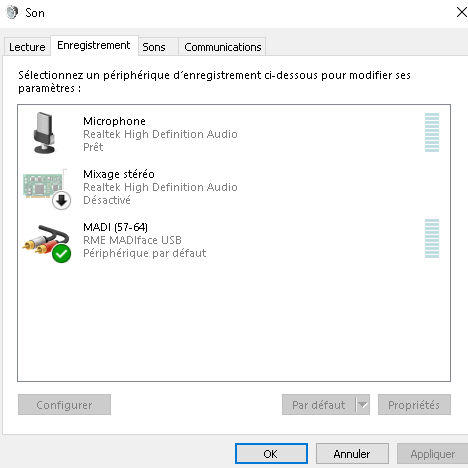
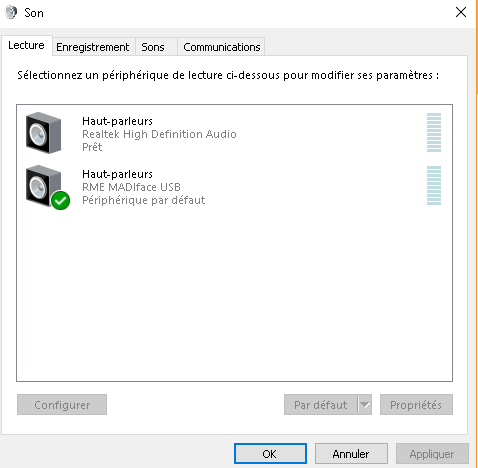
Now - to your issue Sonorhc, can you post your windows “audio devices” screen as a screenshot? or tell me what is on there? That’s the first place to start.
3 Likes
Cant you do that with jack and ardour on windows?
As far as I know, Jack is not stable on Windows
Hi A Wadekar aka “the Buddy” !
I guess this solution will be fine for me, I don’t need synchronization, big buffers are still OK.
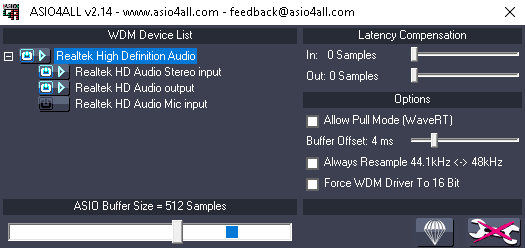
I have reinstalled ASIO4ALL using the trick (check “Off Line Settings” during installation) plugged my ZM1 microphone (having its own ASIO) and run Ardour with ASIO4ALL as Input/Output.
The caption shows what I got with ASIO4ALL : no sign of a ZM1 microphone.
Are you running the ZM1’s ASIO? I believe A is running the ASIO that his Scarlett requires alongside ASIO4ALL.
I’m not sure if I well understand your question 
I can use the ZM1 as an ASIO device on Ardour, I did some recordings with the ZM1 (19 input channels), it works fine. But I’d like to use the Madiface for Output (64 channels with its own ASIO too).
Okay, when you said the ZM1 has its own ASIO I thought you meant ASIO software. Like the Focusrite Scarlett interface has its own software, so A had to run that software as well as ASIO4ALL to get the whole thing to work.
It is, I use it, no problems, no crash. But programs don’t usually support it so there will be no jack transport sync. I don’t know how to set that up but programs will see jack as a fake soundcard. Like an extra layer with but with no extra latency.
It doesn’t seem to be possible to use ZM1 in ASIO4ALL then ?
I’ll have a second look on Jack but so far it never worked well on my computer
Do you use an audio interface? They will sync both devices and use only one sound card.
I mean its hard to say. We’ve asked at least twice now for you to post a screenshot of your windows “audio devices” screen so we can at least see what is recognized by the system itself. I highly doubt there’s anything terribly special about the ZM1 that keeps it from working with a software like ASIO4All.
1 Like
Hi there,
Sorry for this incredibly late response, I was busy on other projects. Here are the screenshots of the “Windows audio devices” . The Madiface is recognized, but not the ZM1, exactly like ASIO4ALL.