is anybody having my same problem? I want Ardour to stop at the End marker, and even if the box “Stop at the end of the session” is checked in Edit/preferences/transport, it still going far away all the time… maybe because I used to have it further???
I am on
System:
Kernel: 5.15.0-168-lowlatency x86_64 Desktop: Cinnamon 6.0.4
Distro: Linux Mint 21.3 Virginia
base: Ubuntu 22.04 jammy
I’d like to thank the entire development team for making the new version possible. There are a lot of new features and improvements that will benefit my workflow, too. Keep up the good work!
Thanks for your work! Can’t wait to try it out (but being on NixOS it might take a little while :)).
In the meantime I’ve relayed the news in French here.
For me the separate piano roll is the thing I was hoping for, 90% of what I do is midi. I didn’t have any complaints about midi editing before the release, so I’m happy!
Slight tangent but excellent video, Aleksandr I feel like the quality of these videos have improved this last year or so, so nice one and thanks for making them.
Congrats to Paul & everybody!
Paul, i’m really sorry we really like pianoroll window .
Wow, an release video?! That’s way to serious, i have to go find some clunkier project asap…
EDIT: Just glanced over release video…Ardour’s native RTA’s for tracks/channels?
How did i even miss that one in annoucements? Seems like pianoroll occupied my attention.
RTA’s are something i use daily everywhere nowadays…
Cooool.
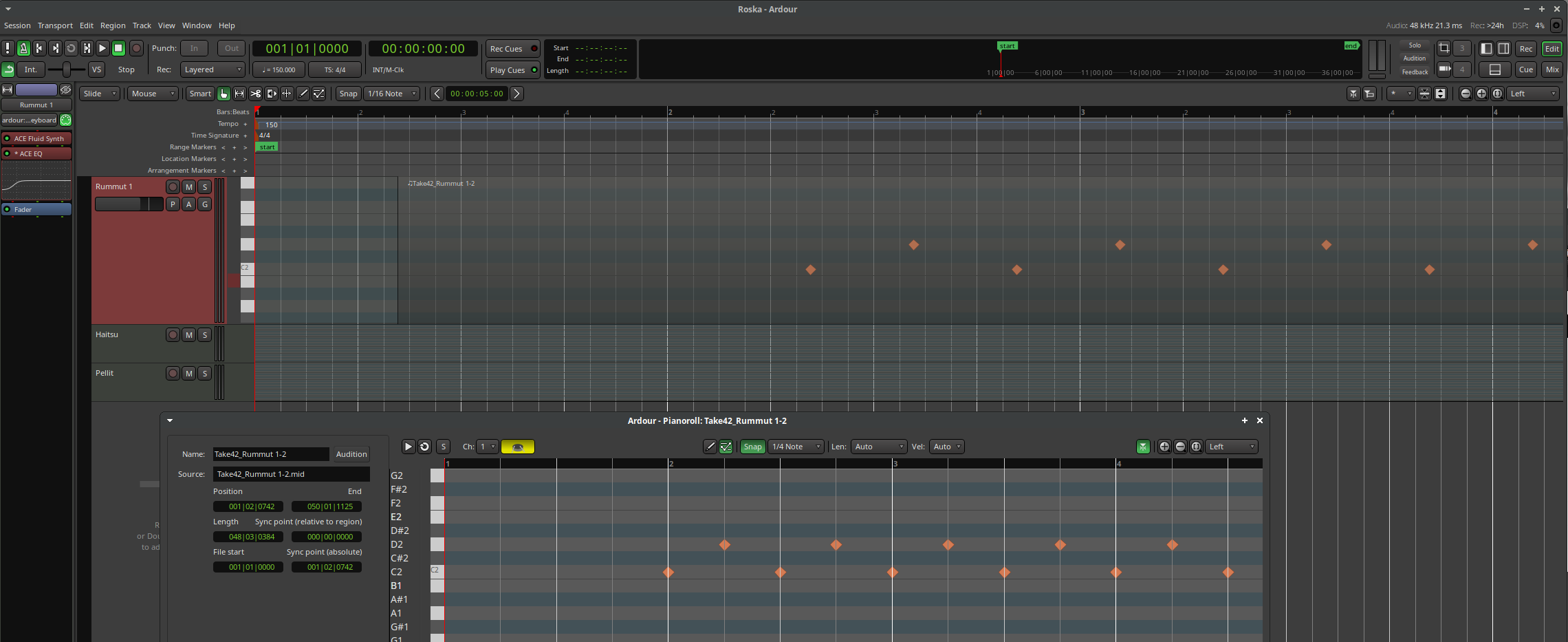
Am I doing something wrong but drawing drum beats on the piano roll window with shift + drag mouse misplaced the midi events. Here is a screenshot showing the same events on the Piano roll and Edit - window and you can see they show the event positions differently. I did draw the events starting from bar 2 on the Piano Roll but they play out offset just like they show on the Edit - window.
It is important to realize that the pianoroll window is not just a “zoom in” on some part of the timeline. It shows just the region (or the whole file the region is from). If the timeline region is not aligned to the grid, then the apparent alignment of notes to the grid shown in the timeline and in the pianoroll will appear to be different. This is the case in the screenshot above.
If you look carefully, you will see that the first note is exactly 1 bar from the start of the region in both the timeline and the pianoroll. The difference is that the grid in the pianoroll is region-centric whereas the one in the timeline is global. In both cases, the note is 1 bar from the start of the region - where that lines up relative to the global grid/click depends on where the region is on the timeline.
Put another way: you could move your region to be precisely aligned to a bar and the notes would line up with the grid/click, but the display of the region in the pianoroll would not change in any way.
This is a very important point - it does seem that there’s a natural inclination among users to think that the pianoroll is like a magnifying glass view of the timeline - it is not.
I did some tests to reproduce this and realized the cause just before reading your comment. So it is by design, but does seem to create some confusion like seen here. Could it be possible to show the real session pattern counts here instead of a regions perspective of the pattern count or would it create other problems ? When one manually inputs midi events those need to go to the exact time in the session and the regions different perspective of rhythm does not help at all.
You can move the region, and the region can exist at multiple different positions on the timeline. It seems to me that the region editor should show where notes are relative to the start of the region, given the lack of a 1:1 relationship with notes on the timeline.
If you’re doing MIDI work and the grid timing matters to you, then you should probably have snap enabled in the editor, so that your regions align to the grid, which then removes most (not all) of the difference between the region editor grid and the timeline one.
Yes I see. One needs to always create regions that start and stop at the exact region boundary and then the problem goes away. Thanks for the explanation.
I really like the fact it allows to nudge the entire region around the beat without losiing the ability to work with a local grid, it sounds very logical to me.
Yes, GMsynth was updated; thanks for reminding me. While it is bundled with Ardour, it is not part of Ardour’s source-tree, which is likely why it was lost.
Support for sample rates up to 192kHz was added.
Trying to use sample-rates larger than the supported max now fails to instantiate the plugin. Previously using sample rates > 96kHz raised the pitch instead.
Learn Ardour | Ardour DAW will get you 90% there, there isn’t a video on recording yet, and you can’t get full Live experience with a grid controller yet, bc the Launchpad surface hasn’t been updated for clip recording. It will be in 9.x.

 I feel like the quality of these videos have improved this last year or so, so nice one