Has anyone had success in using the zoom R16 as a fully functionnal control surface?
In my case the Master rec and play buttons reacts on Ardour. But sometimes the lights work on the buttons sometimes not … with the same settings in mackie control. As for the faders under each track, most of the time they just don’t react, same for the play/mute/rec toggle.
The weird thing is that it happened ONCE when everything worked (it was on ubuntu studio 26.04 with ardour 9.0 i think). Trying midi learn resulted in an erratic behavior of the faders…
Now i have upgraded to ubuntu 26.10 /ardour 9.8 and while i can record using Ardour’s interface i can’t use the physical buttons (except for master and main stop/play/rec)
Any hints ?
Eric
1 Like
There’s a bug. Try the nightly build that will be available in approximately 12 hrs from now.
1 Like
Can confirm R16 should work flawlessly as standard Mackie controller. Using one right now with Ardour 9.12 and Mixbus 12.1 on Kubuntu 2404 and Win10 
1 Like
I’ve been using an R24 as surface controller for years. Some time ago I created my own maps so I could use more of the R24 features in a way that I like.
I’m not aware of strange behaviour but I will check out the nightly to see if something is different.
Thanks a lot! I’ve been scratching my head for days!
I was thinking i had missed something and didn’t want to bother the
devs…I should have asked before…
And it works now! You’re the best!

Cheers
Eric
1 Like
Thank you for fixing this bug so quickly.
However, after testing the setup under actual recording conditions, I
discovered that the main “Rec” button on the Zoom unit does not light up
when I arm a track for recording; it only lights up once the recording
actually begins.
This can be confusing during a recording session.
Furthermore, the “Play/Mute/Rec” toggle buttons below each track only
activate based on the selection made on the Master channel. While still
functional, this is less convenient than when using the Zoom unit on its
own.
Is there any way to adjust this?
Eric
1 Like
Hi folks, still exploring the use of my Zoom R16 as a control surface. A couple of other weird behaviors i’ve noticed :
When I click the stop button, the indicator for the second track lights up green (play), regardless of the mode selected for the master (play/mute or Rec). Where it should not light up at all as i’m only using the first track for my testing. Same occurs with other testing tracks: track nb 2 lights up green…
Another undesirable behavior concerns the REW and FF buttons:
while the playhead does move in the correct direction, it does so while in playback mode!
This means that you hear the recording playing (in reverse too)!
Funny, but I don’t think this is the intended behavior…
Have you noticed the same weird behavior or is it only me?
I’m new to ardour so I haven’t tested the versions prior to 9.0.
I am using the nightly build 251…
Using my R24 with the nightly build, and a clean profile. Default session with one audio track.
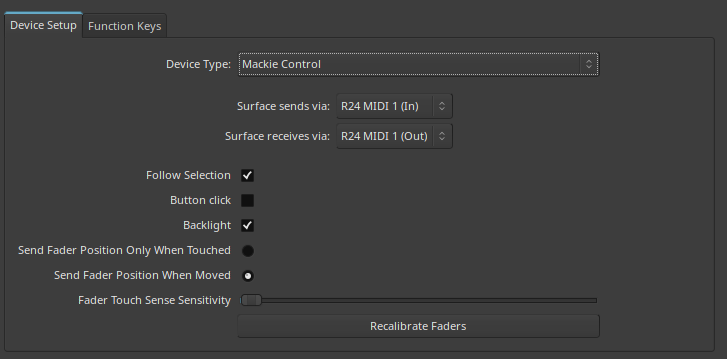
The surface is configured as a Mackie Control (not Pro etc.) and settings ‘backlight’ and ‘send fader when moved’.
There is no feedback (red led) for the REC button. I have always understood this is a fundamental limitation of the R24 (and siblings).
Similar the “Play/Mute/Rec” toggle buttons below each track. They only respond depending on what was selected on the surface.
I do not see anything strange with track#2.
I do get playback with REW and FF but I don’t think that is related to the Zoom.
I hope this is useful.
I have the same settings as you have.
I used to have SOMETIMES feedback for the REC button with Ardour 9.0 ,
but it was random.
Has for the playback while FF or REW, it doesn’t happen when using the
Zoom R16 standalone. I think it is a bug.
Thanks a lot!
Eric
No, it’s an Ardour thing. It may be a bug, it may be by design.
are you using Pipewire? If so, which version? If less than 1.6.2, trying switching to ALSA and see what happens.
My pipewire is at 1.2.9, but I use the R24 with ALSA midi.
With night Build 961 it appears that the play button light green
annoyance thing has disappeared…
But with night Build 966 it appears that the toggle play/rec/mute under
each track doesn’t light up anymore
(it used to light up according to the selection made above the master
slider).
This a regression, but it seems at least someone is working on that!
I’ll stick on the 961 build until the bug is fixed…
Cheers
Eric
I’m not sure what build 961 is… My nightly of 2026-10-30 identifies as 271.
The led above the track slider behaves normally, i.e. it corresponds to the ardour setting that is selected with the Rec/Solo/Mute/Exit buttons.
Using surface Macky > Macky Control; settings see screenshot.
Yes, I meant 261.
Using build 271, same results as with 261 build.
I’ll use that one now.
Same settings as yours…
The “main rec button won’t light up” is still unfixed …