Working on two mixes of the same piece concurrently

Do any of you work on multiple mixes of the same piece? If so, what is your general approach, especially if you’d like to change some elements similarly within the both mixes after they’ve diverged?

My use case is pretty simple, and I already have a solution, but I’m curious whether I might be missing some hacks. I’m mixing a simple orchestral recording (I recorded AB and ORTF for stereo mains, plus a few spots). I’d like to do a basic mix with AB, and another with ORTF. So I will set base levels for both main pairs via region gain, and then automate faders for each set of mains. I can then mix the spots as appropriate for my preferred main pair (AB).

At that point, I can use mixer scenes to mute the appropriate stereo pair to hear (and export) each mix.

But what if I now want to change the spot fader automations for the ORTF mix only? I might use session snapshots to continue, but at this point, the two mixes have diverged, so anything else I might want to tweak (EQ or fader automation on the spots) has to be done 2x.

It seems to me that snapshots work well, but apart from saving a bit of disk space and being able to switch between them quickly, I don’t think snapshots give me any advantage over saving a new session.
1 Like

I used to, several years back. But eventually I realized that doing so was honestly quite cumbersome, and ultimately not very helpful to navigate.

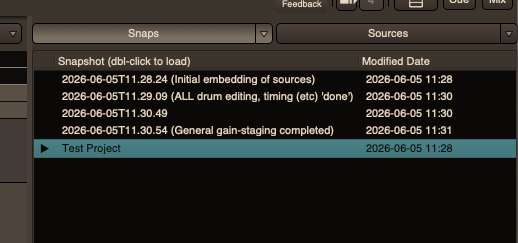
I’ve since switched to a more ‘monolithic’ approach: I have the one, main ‘snapshot’ I edit, and periodically save snapshots, often with notes in parentheses to indicate why I’ve saved it, e.g.:

Screen Shot 2026-06-05 at 11.32.00 AM

For me, ditching any ‘branching’-type snapshots has really, really made returning to mixes so much more enjoyable, as there is only one ‘valid’/‘main’ mix to return to per song! -No navigating a sea of ‘alternative’ edits… :face_with_spiral_eyes:

But, still, with enough generic, Ardour-generated snapshots (as seen in the example above), I can still feel comfortable that I’ve at least got some ‘paper-trail’ in the relatively rare event that I want to track-down some previous mix, edit, or mix decision, or go back and start re-editing using an older draft, etc…


Now, at the end of the day, you’re looking to have a single, final mix, no? -Eventually sent to someone, or posted online, etc.? If true, then I’d at least consider focusing on maintaining just a single, main mix/edit, abandoning the idea of maintaining or cataloging a 100%-perfect, git-like change history.

However, do whatever you deem most comfortable for yourself. :slight_smile:

-J

Thanks for the reply. One of the complicating factors in my case is that I’m mixing several pieces in the same session. I made that choice because 1) same venue, 2) same ensemble, 3) same mics, and 4) limited time for mixing, so it made sense to keep them in a single session for the broad mix decisions.

I’m not wanting to have two full mixes, just trying to extend the timeframe than I can maintain two mixes until each composer can weigh in on choice of main pair for his/her piece.

Honestly these mixes aren’t going to be extensive enough to warrant a lot of complexity. I just love to learn the software inside and out (especially with inter-related tools like automation and mixer scenes), so I can be more efficient.

1 Like

Ah yes, well your situation is very interesting, and I can now better see why the idea for some kind of branching snapshots makes sense in this case…

:thinking: Hmm…

After re-reading your original post a few times and hopefully truly understanding what you’re after, the only suggestion I’m left with might be to duplicate the session folder entirely (or use the “Save Session Copy As…” function), having one project be the AB ‘mix group’ (-across all songs/performances), and the other project being the ORTF alternative.

Furthermore, if there was some basic editing work that both ‘mix groups’ could benefit from, simply do that work first, then duplicate the project and continue mixing from there.


Another solution is to just not record two potential main pairs.
~That’ll help limit the struggle! :melting_face: :grin: :+1:


I’m curious what you’ll decide on.
Seems like quite the session to manage. :face_with_spiral_eyes:

-J

I knew that my use of automation and manual controls were going to be at odds for various tasks, and I also knew that mixing the two techniques is a bit dangerous for someone with a horrible memory. (“Wait, why are both sets of mains automated to 0db?”)

However, I’ve recently begun using snapshots and even git on my current session. Both are pretty powerful. Given my history with moving so many things into git repositories (including Ardour and Mixbus configs), I should have known it’s only a matter of time before I felt the need to do the same with sessions. Version control doesn’t necessarily solve all the problems of moving mix decisions between branches, but it certainly gives me a bunch more tools in maintaining edit/mix sessions. And now working on the same session in multiple computers/locations is a breeze.

I’m guessing Peter Gabriel and his mix engineers might have some advice after mixing I/O. :slight_smile:

1 Like

Be very careful using git on Ardour sessions. Git is designed for line-oriented formats, but Ardour’s session file is XML, which is absolutely not line oriented. If you ever get merge conflicts, git will either fail to resolve them or make an almighty mess of it.

1 Like

I had wondered what hurdles I might run into. I don’t plan doing much that’d require merging, so hopefully that won’t be an issue. If I do encounter it, I’ll just revert to one or the other. I already noticed that blocks tend to move around within both sessions and global config, and I have no interest in reviewing such crazy merges within a giant .arour session file.

Funny enough, I recently saw someone else mention that he uses git for his sessions, and I thought it sounded like overkill. Yet here I am.

1 Like