Hi, everybody
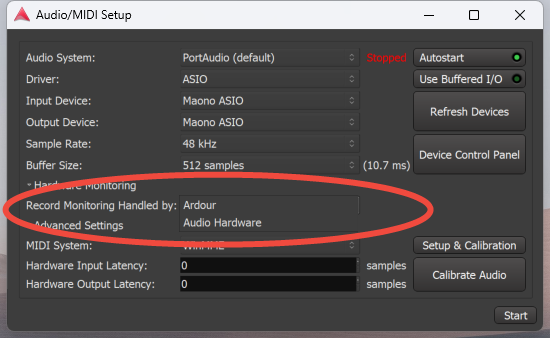
I’m confused about this option when I start up the software. Why should I choose record monitoring handled by Ardour or audio hardware?
As we all know in another DAW, if I need to monitor from the DAW software, I adjust the active monitoring button. But if I want direct monitoring with low latency, what I do is just turn off the monitor button in software and turn on my direct monitor on my hardware.
Yes, so by having that setting on “Audio Hardware”, you are just letting Ardour know that it shouldn’t even try to automatically monitor for you. -That you’ll handle it via your hardware, as you say.
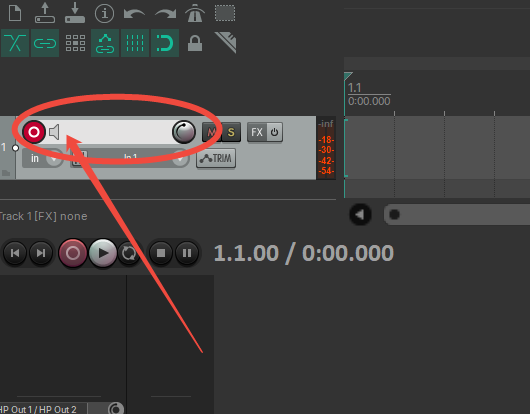
I used to play it on Reaper, and you can see here there is a button that can handle whether I need to turn on or off monitoring from the software, and if I wanna direct monitoring of my voice, I just press the direct monitor button on my interface. And if I turn on the software monitoring and direct monitoring at the same time, I will hear two sounds: one from the software and one from the direct monitoring. I don’t need to pre-adjust or pre-select the choice like here. I can’t understand this scenario
leave monitoring to the hardware [“Hardware Monitoring”]
(then, if you did not choose “Hardware Monitoring”)
monitor the input for the track
monitor existing material on disk for the track
not monitor anything at all.
The latter two can be managed by Ardour’s auto-input handling, which will do what most people most of the time, but you can also control them manually:
Note that in Ardour you can also monitor both the input and the material from disk, which is sometimes useful (and known by some as “cue monitoring”, though unrelated to what Ardour calls cues in other contexts).
Thank you very much. Honestly, this thing doesn’t affect availability. Since I transferred from another DAW to software whose functions I can completely control, I am trying to understand everything in the software as I saw it! Love this community