It’s a bit of a last minute addition, so any testing there will be appreciated.
Note that so far this only affects mixer processor settings.
No timeline dependency (FX automation, audio/MIDI data) nor trigger/cues… and no undo. The jury is still out there if we should perhaps postpone this for 9.1…
While seemingly related, I’m sorry to say they’re still as distant as they were before.
Import/Export just reuses the normal session save/load infrastructure and existing code for track templates, quite unrelated to FX groups.
I admit, I’m frustrated and feel useless: I don’t know how to file a bug report. I didn’t understand how to use an IRC channel. I often think I’d like to contribute despite my poor English. Could someone perhaps provide an example of what a typical crash report might look like?
Is there a link for submitting a report?
anyway… nice job!
it would be great! but i could be patient 2 more years…
To me importing tracks with timeline dependend information from other projects was never something i really missed.
I am just very happy that i can now easyly import track/bus/plugin structures which i often use and recreate everytime i need them. I would love if it would copy the routing from the projects.
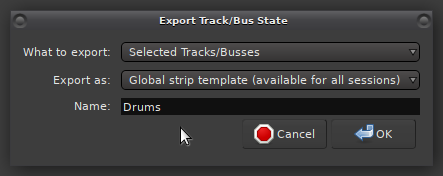
So far in my testing it worked flawlessly. For my usecase it would be helpfull to add some template creation functionality.
So for example i would not always have to find a project and pick the tracks/busses i want to import. It would be helpfull if we could save and reload a selection we once made.
Hello,
I wanted to report a bug/crash in the newly released RC version, but I don’t know where to post it (the report page is only for Mixbus or Ardour version 8.12). Is there a link to the bug report for version 9?
Question #2
If I download the “debug” version of Ardour 9, will it automatically send you a bug report?
Just in case, I’ve submitted a bug report on the usual page.
Someone else has complained about this, but it appears to be window manager dependent. I use XFCE here and it has the relevant buttons and responds to them.
I am seeing the same in Fedora Mate, but I can still resize the window using the bottom right corner. Not a big deal for me but could be for others. What I have noticed in example, clicking the the Velocity button will show the velocity values, and the red light comes on, and clicking the button again removes the velocity levels, but the red light stays on until clicking on it directly. The same with Bender, Pressure and Modulation buttons. Again, not a huge deal, but noteworthy.
Hello
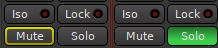
I’m hesitant to submit a bug report (now that I know how) because it seems like a major bug, and I’m surprised I’m the only one who’s noticed it. Maybe I did something wrong (but i really don’t know what…) So, on the latest version of Ardour 9 RC (as on previous versions), the solo button on tracks (audio/bus/MIDI) doesn’t activate a solo despite the display. All muted tracks continue to play in the master. I’ve checked several session types and compared it with Ardour 8.12 and Ardour 8.12’s solo function. there is no crash with ardour 9… just solo don’t work.
The Solo issue appears to be caused by using sidechain.
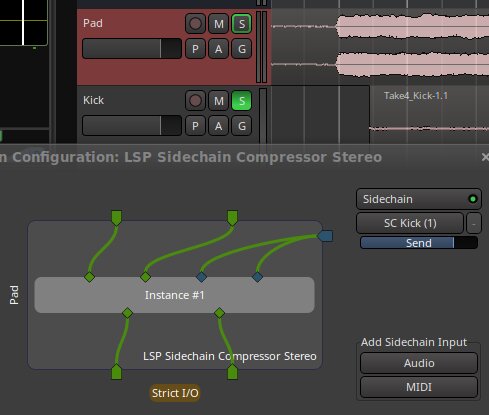
I have a session where Solo works as expected but when I add the LSP Sidechain Compressor on the Pad track and route the Kick track to the sidechain Solo stops working and only outline the Solo button on the track I’m not soloing.
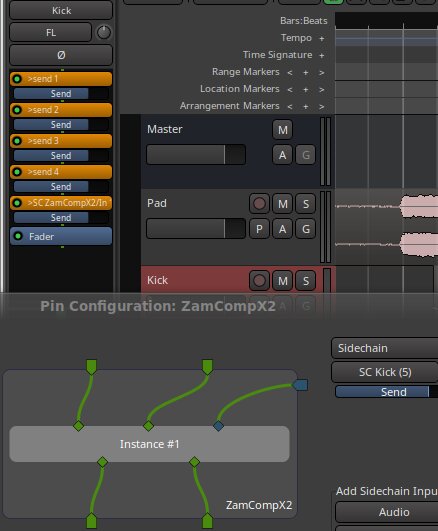
ZamComp2X exhibits the same problem, so it’s not a LSP issue.
Also, and possibly related, connecting and disconnecting the Kick from the SC causes a build-up of sends on the Kick track
Thanks for the reply. I can’t check on the computer I was using this morning, but I just tested my session with Ardour 9 RC on my main computer (works the same with debian 12 and the same install) … and the solo function works perfectly. So I think you’re right and it’s probably a configuration issue on my end. Next time on the other computer, I’ll check the preferences as you suggested, and if in doubt, I’ll delete the Ardour 9 .config file to start from scratch and see if that works.
So, false alarm: it wasn’t a bug. Thanks.
…that would have been a surprising bug…