First I am very new to both music, and DAW’s so if I make errors in the terminology please bare with me.
I have an UMC1820 connected to a linux computer.
So far I’ve worked out that the “mix” control allows a mix between the physical inputs selected by the button “1-2” or “1-8” and the playback channel “1-2”. So far I’m not using any physical output monitors on any channels; just the headphones.
The headphones have a button “1-2” or “3-4” which I’ve worked out is Output channels (from the PC) “1-2” or “3-4” so when mix is all the way to the physical and “1-2” is selected I get sound directly from the input, when the mix is all the way to PB I get the sound from Output “1-2”. With “3-4” selected I get zero sound when the mix is at the physical end, and sound from Output channels “3-4” which I assume is correct?
Now to how this all interfaces with Ardour/Pipewire/PW-Jack.
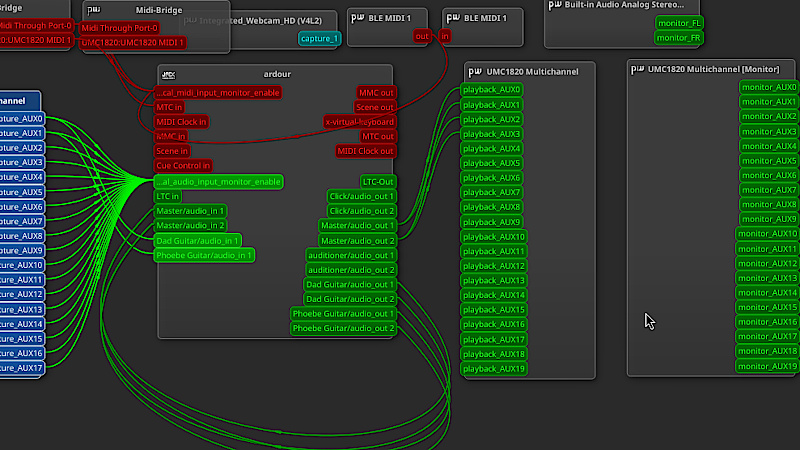
I’ve worked out what most of the inputs/outputs in the attached graphic are and how they connect (both in software and computer to hardware) so I will ignore the ones I am fairly confident about their usage.
I assumed that the “playback_AUX” channels would automatically match inputs (with the exception of 0/1/2/3 which are actually Output channel “1-2” and “3-4” so shifted accordingly), but it seems that if I want to hear just a channel (either through the physical hardware or “mapped” to the on board sound card) then I can either route from “capture_AUX” to “playback_AUX” or from the “audio_in”/“audio_out” pair to the “playback_AUX” I want and some of those map to the physical output ports on the back of the UMC1820 (“1-10”) and if attached the expansion ADA8200 the rest. This seems to make logical sense.
The one connection I have absolutely no idea what it does is “physical_audio_input_enable” as it doesn’t seem to make any difference if they are connected or not. I can get sound from all inputs to any software defined output and then on to at least “1-2” and “3-4” on the UMC1820 as I can hear them on the headphones. So what is that input for and what does it allow?
I did search the forum to see if anyone else had asked the same question, but none seemed to have done so. I’m guessing its something that people in the industry would understand because there is some analogue equivalent which is why no one else has asked.
I think “physical_audio_input_enable” is part of Ardour’s software monitoring section. If you selected hardware monitoring at startup, possible Ardour is not affected by whether or not anything is connected to it.
(Edit: My assumption was wrong. See Robin’s post below for the actual answer.)
So Ardour provides a workaround: just connect all physical inputs to some port.
You can disable this by editing ardour’s config ($HOME/.config/ardour8/config) and set <Option name="work-around-jack-no-copy-optimization" value="0"/> which may or may not break input metering.
Thank you @GuntherT and @x42 for the feedback, much appreciated. I shall leave it at the defaults as it doesn’t seem to hurt anything.
Have to say, I’m really appreciating all that’s gone into this bit of software and pipewire and how everything, including the hardware, all kind of hang together. Its especially great that there are no drivers or other annoying apps that need to be installed. Just route things to where you need them.
The UMC1820 requiring no drivers or proprietary software to control some of its settings was a selling point for me. It is essentially future-proof. I’ve had mine for about 8 years now, and it is still working as well as it did when I bought it. I am a hobbyist, though, so it has had a gentle life. It hasn’t moved out of a mounted rack since I pulled it out of the box, and I don’t operate it all day Monday-Friday like a professional interface would be, so YMMV.
Yeah, for me the price (£145 down from £225 from a, fairly well known I believe, UK bricks and mortar shop) was about the same as the 2 channel Scarlett 2i2 (£158 from a well known internet retailer) and I figured even if I never use all its inputs or outputs I’ll have them if needed. So for that price it was an absolute no-brainer and came to the same cost in total with cheap Behringer studio headphone set.
It will mainly sit on some wood on a chair base to make it mobile between my room and the granddaughters, lol, with a laptop above it to control it and possibly run some guitarix plugins effects under ardour.
Its probably going to be used more as a mixer to help us both learn to play guitar together and then in the future if either of us, or both, keep it up then maybe have fun recording/mixing/editing at some point in the future.