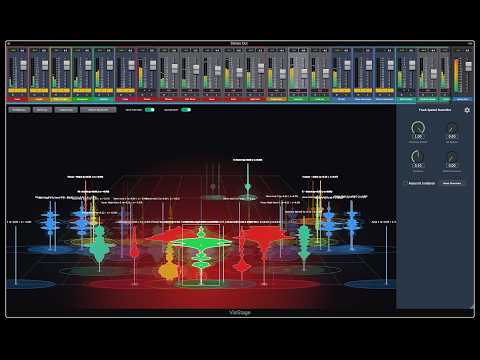
It would be really convenient if Ardour had a feature that allowed you to see where each track is sitting in the stereo spectrum, and what frequencies they are taking up. Something similar to this plugin:
Of course, you could just buy the plugin and run it in Ardour. But doing so requires you to keep all faders and pan pots at zero. Having this functionality integrated into the DAW itself would be a lot easier (not to mention more cost-effective).
I know we already have the real-time perceptual analyzer. But it gets cluttered fast, and it only shows one element of a much bigger picture. What I’m suggesting here is something that would let you visualize your whole mix.
This is just a suggestion of course. I know you guys are busy, and I understand if you are not interested in pursuing this.
I think David Gibson (author of The Art of Mixing) had a similar idea back in the 90s. US patents typically last 20 years, if I’m not mistaken. If he patented it back then, it’s probably expired now. If he didn’t, then the idea should have entered the public domain when he published it.
Yes, Comparisonics’ patent on spectral peaks expired in 2018. Even if it was still in force, it would not apply to what I’m suggesting here.
The plugin I shared in my original post isn’t using color to show frequency content. That is shown by the track’s shape, which corresponds to how much frequency content it has across the spectrum.
My vision for this is that the color of the track would correspond to its color in the mixer. If you color a guitar track forest green, then it would be forest green in this environment as well. This is the same thing that the real-time perceptual analyzer does to differentiate the tracks.
Pfff…i don’t know. Aldo i’ve used some specificaly spatial plugins in a musical context - to furter shape the sound of a specific guitar part to stick out from a dense mix, i don’t think mixing like this would make a night&day difference. You can’t just separate all, make it all nice&clean and thus automaticaly make it sound good. Could it help - yes. Every kind of metering is always useful, as long as you’re aware of what it represents so it doesn’t mislead you. It’s much more important for people to realise that spatial sound design is realy a combination of several more basic things like volume, pan, eq, time-based relations of portions of sound from the same sound source etc…that’s the real part of the craft - to understand how is spatial (3d) sound created when it’s only coming from a stereo speaker system.
Would i like this in Ardour - absolutely.
Would i give it significant amount of attention if i was a dev - not realy.
Would i incorporate it in Ardour if somebody else already did the heavy lifting and did it well - i most probably would.
Thanks for pointing this out to me. I have downloaded it, and will use it on my next mix. It’s not exactly what I’m looking for (I find the GUI a bit less intuitive than that of the plugin in my OP), but I think it’s worth a try.
I think I need to clarify why I want something like this. I’m looking for something that gives me an objective overview of what is going on in my mix, rather than relying solely on my ears for everything.
I often have trouble hearing details in my mix. Maybe it’s my inexperience, or maybe I fried my ears in my teens during my metal phase, but I often can’t hear the subtleties that make a big difference. This leads to a very frustrating mix experience where I’m constantly second-guessing myself. I sometimes spend more time mixing a song than I do writing and recording it.
I want something that shows me exactly what is going on in my mix, and what needs to be fixed. I want to eliminate any guesswork so I can mix with confidence and get back to making music, instead of having to fight with all my tracks to get them to play well together.
I don’t know if something like this is the definitive answer, but I think it’s a step in the right direction.
Just in time, a new release for the meter from airwindows. Maybe that provides you the visual feedback you’re looking for? At least it provides some visual feedback for the master, maybe it’s useful for you
I love Meter, especially now that it gives you directions, but it’s not what I’m looking for in this case.
It doesn’t show you where each track is sitting in the mix, and which ones are fighting for space. It just shows how close the master is to sounding like a hit record. (Though one could make the argument that if it’s a hit, it doesn’t matter if there are frequency clashes. )
I know ConsoleX and X2 offer meters for each track, but I’m still trying to wrap my head around those systems. I end up feeling like this every time I try to use them:

 )
)