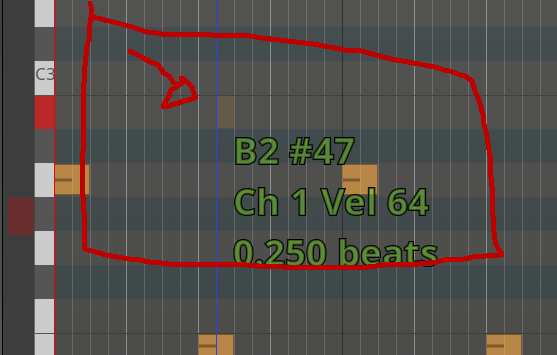
Compared with version 8 the transparency of the preview of a midi is so i can hardly see it. Mainly when not zoomed in, but even then i got hard times.
I went through Preferences, Appearance, Colors, both Items and Transparency, but can’t find if i can change it at all.
Is there a way to change it, to make it more visible?
As it is hard to describe, i use a picture what i mean.
That looks like you might’ve recorded multiple layers: the hard-to-see note would be in an underlying layer.
I might be completely deluded, of course, but that is what that visual cue signals to me.
You could maybe confirm / falsify my hypothesis by switching the track’s “Layers” mode from “Overlaid” to “Stacked”, and see if the obscured note is in a lower layer.
Thanks for the answer.
No, there are not multiple layers. I was very sure, but you know how it is with “being sure”.
So i quickly made a new session to test it there.
In the past i also compared the same session in ardour8.12
In the meantime i’ve gotten kinda used to it, but if zoom-level is low, i can hardly see the “preview of the midi note”.
I’ve also changed the theme to “Cainville”, where it is a bit better. For this comment i quickly changed back to the default theme “dark”, and i for one have really hard times to see the preview at all. If the preview is in one of the darker-green-row ranges for notes it is even worse than in the picture. (well, worse for me, if no one else feels like it it must be a personal preference).
You have a point.
To make the preview a little bit more transparant than the actual note is understandable but this is a step too far I think.
Maybe post an issue in MantisBT?