I’m using antix linux. I’m on ardour 7. I have a casio ct s500 connected from my line out of my casio to the line in on my pc.
I open ardour 7 and select ALSA as an input. I add a track (audio).
If I hit my casio ct s500 then the bar display shows I am getting an input on ardour.
However if I plug in my microphone then I can’t seem to get it to display any input.
I’ve got round this in the past by recording my casio ct s500 on one track. Unplugging the plug to the line in feed and then plugging in my microphone to record over my previous track.
For some reason I installed pipewire from my repository but at the end of the day; I’m not really sure what I’m doing. Which part of the manual should I read? This seems to be a bit of a jungle.
You can’t just plug the microphone cord into a line level input and expect to get any meaningful signal.
The mic output level is much lower than what a line input expects, so you’ll need a preamp between the mic and the input to boost the signal to a proper level.
Yes, I know the line level is roughly 1 volt. The microphone level is a lot less.
To put it more simply. I have the line feed plugged in and the microphone plugged in. I record a track on the line in, on ardour 7. I add another track and it doesn’t seem to recognise the microphone as an input.
There’s actually rarely any mystery at all. More typical is misunderstanding caused by the fact that things change faster than people’s experience of “documentation” does …
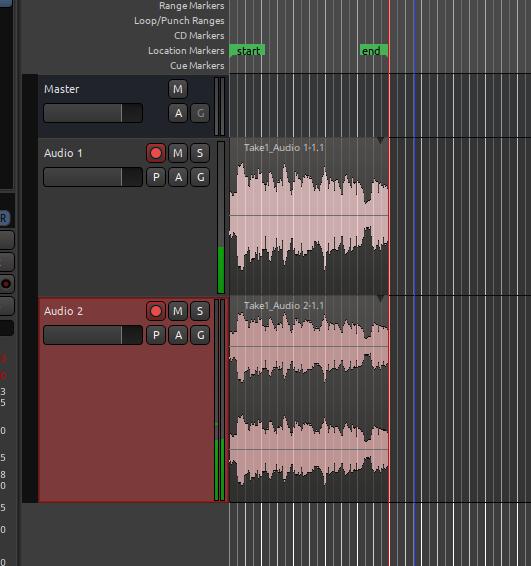
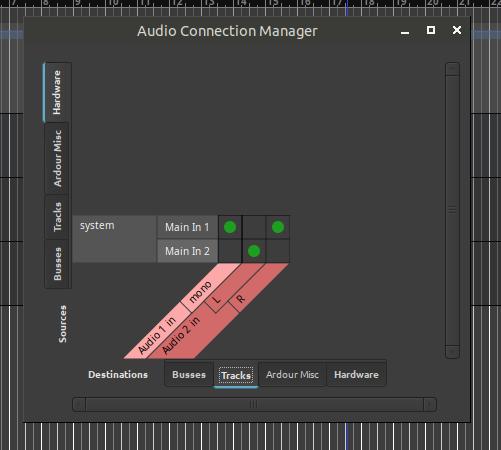
Your screenshot actually doesn’t show connections at all. To show that, open Window > Audio Connections and switch the left side tab to “Hardware” and the bottom tab to “Tracks”, then post the result.
As you can see in the screenshot, your second track has 2 inputs (L & R); one of them is connected to the first input and one to the second.
This is all precisely as intended - it is what Ardour does by default, because with “pro-audio” interfaces and workflows, it’s generally what is desired.
With your built-in audio interface, you’ll need to connect/disconnect things by hand, because there’s no way for Ardour to know what to do with the hardware you have, since it also cannot understand what you’re intending.
It is a little suprising to me that the second input shows as only a single channel, since I think you said it was a line in connection.
Just click on the green dot that shows the connection between “R” and “Main In 1”, then click on the square below it. At that point, “Audio 2” will have two channels connected to the same input channel, on the 2nd input.
You may want to investigate whether you can actually get stereo from the line in connection. If not, you don’t want a 2-input track …
 You cannot record mic and line-in as separate sources at the same time