First some background info: In one of my bands, we’re using an M-Live B.Beat machine to play some backing tracks and have click and cues in our In-Ears. I produce the stems in Ardour.
The B.Beat can also use MIDI files to pilot pedalboards, digital mixer, lights, etc …
We’re not using that today but my experimenting this capibility is the reason for this message
The song has tempo defined with a tempo marker (93 bpm) and is perfectly in sync with the metronome.
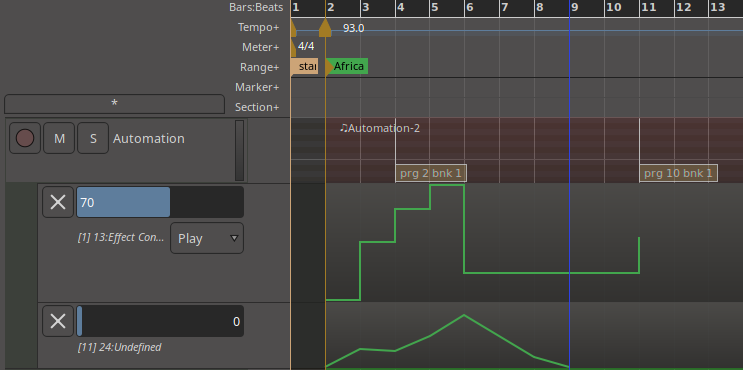
I’ve created a MIDI track and a MIDI region that’s the duration of the song.
On that MIDI track, I’ve created a few MIDI CC events using the automation lanes and a couple of PCs too.
For the sake of testing, these are cleanly aligned on beat 1 of the measures.
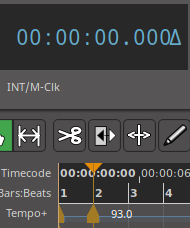
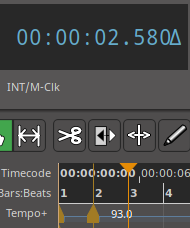
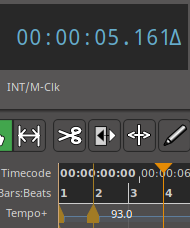
Making the begining of the son the Time Origin, I can observe that the beat 1 of the measures (where my MIDI events occur) are:
Measure 1 : 0s
Measure 2 : 2.58s
Measure 3 : 5.161s
etc
So, next, I do a Stem Export of that channel for the Time Span of my song, which gives me a MIDI file that should be in sync with the exported audio stems.
Trying the MIDI file in the B.Beat machine, I was surprised that the MIDI events are not aligned properly with the beats …
So I opened the MIDI file in a decoder, which shows me (filtering only on the CC13 for simplicity):
0.000s | tick 0 | track 1 | ch 1 | Control Change CC 13 value 0
2.000s | tick 7680 | track 1 | ch 1 | Control Change CC 13 value 64
4.000s | tick 15360 | track 1 | ch 1 | Control Change CC 13 value 100
4.000s | tick 15360 | track 1 | Sequencer Specific (3 bytes)
4.000s | tick 15360 | track 1 | Sequencer Specific (3 bytes)
4.000s | tick 15360 | track 1 | Sequencer Specific (3 bytes)
6.000s | tick 23040 | track 1 | ch 1 | Control Change CC 13 value 127
8.000s | tick 30720 | track 1 | ch 1 | Control Change CC 13 value 30
18.000s | tick 69120 | track 1 | ch 1 | Control Change CC 13 value 70
18.000s | tick 69120 | track 1 | Sequencer Specific (3 bytes)
18.000s | tick 69120 | track 1 | Sequencer Specific (3 bytes)
18.000s | tick 69120 | track 1 | Sequencer Specific (3 bytes)
18.000s | tick 69120 | track 1 | End of Track
Timing is not what it should
It would be right if the tempo was 120 bpm.
Any thoughts ?
Is it linked to Ardour not exporting tempo maps ?
I wonder if fixing up the exported MIDI file with that information is something that could be done with a lua script. I haven’t checked to see if there is a hook to automatically run a particular script on export, but maybe that would be a way to get the tempo line added to the file.
I don’t see that being easily done
Not only finding the tempo marker that would apply to the exported time span … the midi file is binary not the nice text I posted so needing to call an external program/lib to do hack it …
Nah, I’ll do it manually until Ardour does it properly
Looks like in Debian there are midicsv and csvmidi, that do something similar (albeit the format could be a bit more difficult to edit):
Description: translate MIDI file to CSV
Midicsv reads a standard MIDI file and decodes it into a CSV (Comma-Separated
Value) file which preserves all the information in the MIDI file. The ASCII
CSV file may be loaded into a spreadsheet or database application, or processed
by a program to transform the MIDI data (for example, to key transpose a
composition or extract a track from a multi-track sequence). A CSV file in the
format created by midicsv may be converted back into a standard MIDI file with
the csvmidi program.
Just for sharing, I did find a surprising side effect in my attempt to pilot my Behringer mixer via MIDI.
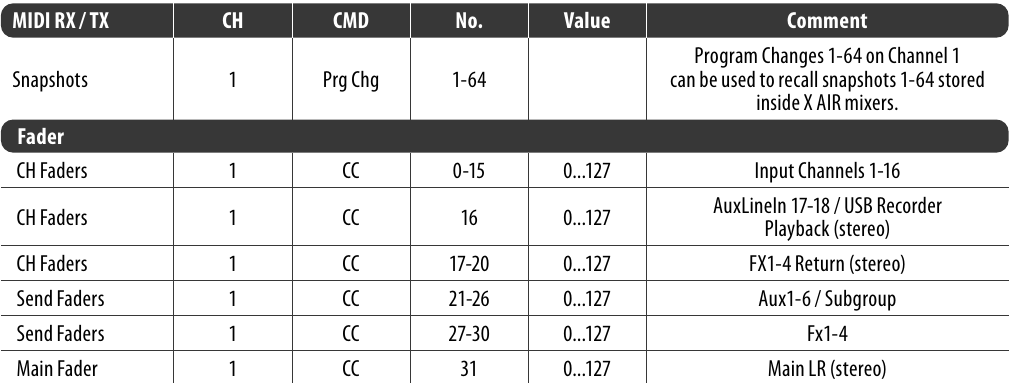
As visible in the table below, calling back a saved config snapshot is done by sending a Program Change. All good.
But what happens when Ardour (or I guess other DAWs too) sends a PC ? They also send the Bank Select command …
MSB, LSB Control Change = CC 0 and CC 32
It turns out Behringer is actually using these CCs to pilot faders !
It took me a while to figure out why, when sending a PC to recall a config snapshot, the first fader of the mixer dropped to infinity
So using the midicsv utilities, I also removed these CC0 and CC32 … And now everything is working as intended
Looks like it is old style (K&R) C syntax, doesn’t use C89 or C90 style C.
I’ll take a look when I have some off time, the program isn’t very large so might just be a few function prototypes to fix up and then it will compile with current compiler defaults. There is probably a way to force gcc to accept K&R syntax, but it would be worthwhile getting the source closer to modern standards.
While poking around at midicomp (which doesn’t have proper function prototypes ) I found in the comments that it was based on mf2t, which was originally written for Atari ST but has been updated to C23 by the original author here:
It also builds the companion program t2mf which is of course needed to go back to MIDI file after converting to text (or to generate a new MIDI file if you generate a text file originally).



 ) I found in the comments that it was based on mf2t, which was originally written for Atari ST but has been updated to C23 by the original author here: