Suggestions to improve MIDI workflow in Ardour v7

“Intuitive” means that things work in a way that is commonly known from standards or in a natural attempt at doing something without prior knowledge or extra steps. Learning and using keyboard shortcuts or constantly switching mouse modifier modes with buttons for such simple and often used tasks is a slow, unergonomic implementation that no new user would simply try to do.

As a MIDI based composer, I need to create a huge amount of MIDI regions, they’re the foundation of my workflow. And since I have worked with around 14 different DAWs, I know the fastest, most userfriendly and natural implementations. Just double-clicking in an empty MIDI track is the fastest, something a new user might try naturally and saves time, mouse travel and button presses for this task. Might not be much for a single MIDI region, but if you compose day by day, it adds up and makes a significant difference in working speed and comfort. And since it can and should be optional, there is no reason to not implement it.

2 Likes

while i agree that double-clicking in the empty track should create midi region - and improve workflow speed (often found in other DAWS - as you already mentioned) i strongly disagree that current workflow is unintuitive.
i mean, if you want to draw a midi region, you have to do exactly that (press d for draw and draw). i still cannot understand the unintuitive part.

since this is your personal workflow, you are a busy composer, and you appreciate mouse travel, efficiency and all of that, you have options:

  1. adopt it (ardour/mixbus)
  2. wait for improvement
  3. use something from the past (that you find most comfortable working with).

did you try playing midi instead of just clicking it throughout?

The unintuitive part is simple. When you got using Ardour for the first time, did you expect and know that there is a keyboard shortcut for “draw”, set to D? No? Me neither. I had to look up how to perform the simplest, common task quicker than constantly clicking UI buttons to switch modes. And I was also highly confused by how “internal edit mode” and generally selecting and editing things behave. Only after reading a forum post about it, I understood the concept. And that is by definition unintuitive. As a new user, I could not do these tasks out of intuition, as I would expect them to work. The implementation is very different than any other DAW, starting by having only an in-line editor instead of a separate area or window. Being required to look up how simple things work = unintuitive.

Thanks for pointing out my options, however instead of waiting for things to improve, I prefer option 4) make suggestions on specific improvements for my workflow, by extension possibly for other users with a similar workflow, and hope they get implemented.

And about playing MIDI, well, my current room setup does not allow me to make use of my giant master keyboard, I simply have no space for it currently. I am fine composing with mouse and virtual keyboard, as long as it is not cumbersome. And that’s where I see a lot of room for improvement in Ardour.

1 Like

apart from internal edit mode which is specific to ardour (from my current viewpoint)
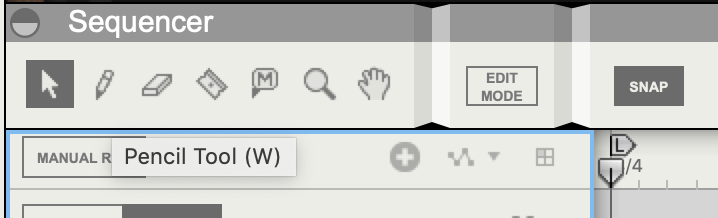
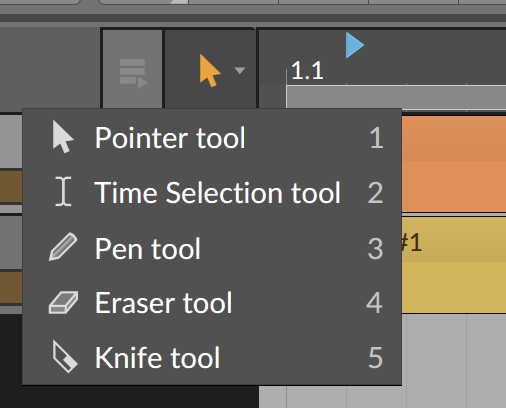
almost every daw has toolbar which has different type of editing context… (bitwig and reason for example)
Reason:


Bitwig: tool2
Ardour:

again, how can this be unintuitive if other DAWs behave exactly the same (apart from internal edit mode)?

the editor is still there, the same as you would have in any other DAW, it’s just that it is inline, not detachable… it’s not a new concept - so you could potentionally call it unintuitive… it’s not a tracker interface so you can say ‘what the heck, i never saw piano roll like this’
Even early acid pro versions had inline piano roll (if i recall correctly?) - so this is nothing new

yes, but that point doesn’t solve your personal issue for composing, it’s just an improvement suggestion for ardour which is awesome, and i cannot agree more, but you have to ‘keep composing’ meanwhile, right?

i can suggest checking renoise (tracker realm) if you utilize qwerty a lot :stuck_out_tongue:
i miss my 88 p115 a lot tho

also to add that i pivot bitwig <> mixbus 32c on a weekly basis… i would like to go for mixbus32c only, but due to easiness of modulation & midi handling in bitwig, i doubt i will ever transfer fully to mixbus. Nonetheless I use it for audio (mostly mastering lately)

I think the UI makes sense conceptually but it misdirects the user in a couple of places.

First of all, it’s not discoverable. You wouldn’t think that enlarging a track would reveal the piano roll. Once you know the trick, it’s quite intuitive, but until then, you’re going to be searching around.

The other thing is that the piano roll invites you to draw midi events, but this won’t work if you haven’t drawn a region first. This catches me out all the time.

What I would do is include 2 new behaviours:

  1. Double-clicking a region expands the midi track to reveal the piano roll.
  2. The piano roll is only shown (or only shown to be active) when you can draw notes.
2 Likes

I have a little addendum on the point of velocity:

I’m actually not a great fan of how most piano rolls do velocity. Having a one-dimentional channel for velocity widgets is pretty cumbersome when dealing with chords because inevitably they overlap. Sure, most DAWs get around this by making you select the note you want to edit first to move its velocity widget to the top, but it’s still fiddly and error prone, and I’ve never really liked it.

I haven’t used Ardour’s piano roll enough to be able offer an opinion on it, but I think the principle of combining velocity and note widgets has merit and is worth refining.

I also I’d like a separate (but dockable) window for piano roll. Oh and midi pan !!

I think the current implementation of MIDI editing is powerful and a step above the separate window most DAWs use. As someone who is primarily a software-based producer and works with MIDI frequently, being able to select and perform operations across multiple inline rolls is a significant workflow feature for me. While I don’t see any inherent issue from allowing rolls or regions to be in a separate window, I think it would be better to focus on fixing the current usability issues people have with inline editing. From my view a separate window is a less flexible editing style and seems to only be requested because of these issues users have with the way inline editing is currently handled. I think if these issues were resolved, more people would prefer the inline editing style.

To touch on some of the suggestions in the OP:

remember the last selected track type

This is a good suggestion, I think it would be nice if we could also use modifier keys on the track list in combination with right clicks to pre-select a specific track type to add. Shift + right click for audio, Ctrl + right click for MIDI, etc.

default note velocity should be 127.

The initial default velocity should be kept the same. Many sampled instruments use relatively unaltered recordings, if the sampler is defaulted to 0db, sample playback can be well above digital zero at max velocity. This could be an issue for inexperienced users who don’t realize they have to reduce velocity or volume levels. Users should instead have the option to set their own default in the MIDI section under preferences.

make scrolling the mouse wheel scroll up and down

The main issue I see with this is that someone will run into the opposite problem, wanting to scroll the track list but being forced to scroll the roll instead and having to move their mouse over to the track list. I think a better solution would be to use modifier keys with the scroll wheel to handle scrolling the roll, similar to the way alt, shift and ctrl are currently used to expand tracks and expand/compress the timeline.

when scrolling with mousewheel to change velocity before drawing a new note, keep this new velocity value for drawing further notes

This is currently the way velocity is handled in the latest release.

double clicking inside a MIDI track creates a new 4-bar MIDI region, starting with the bar that has been double-clicked

I think this is a good suggestion, currently double-clicking opens up the track properties, which I rarely need to open, it would be nice if it was instead used for more context-sensitive editing operations, again with modifier keys to handle controlling which modes are entered, or zoom levels, along with the option to set a default.

2 Likes

Learning and using keyboard shortcuts or constantly switching mouse modifier modes with buttons for such simple and often used tasks is a slow, unergonomic implementation that no new user would simply try to do.

Learning and using the keyboard shortcuts of any complex software is essential to efficient workflow and is something every user should aim to do. I see no reason Ardour’s interface should cater to users who aren’t willing to take the time to read the introductory section of the manual or follow the tutorial, both of which explains key concepts of its usage. Perhaps a big window should pop open on first run with big buttons linking to the tutorial and the manual so people are more inclined to read them, but I feel the same people who aren’t willing to open the help menu in the toolbar would also just skip right past these anyways.

The modal editing paradigm is by no means a new concept in DAWs or other software, I personally prefer it over the highly context-sensitive uni-mode paradigm a lot of software today strives for. In my own experience fiddling with a highly-context sensitive pointer for operations can be frustrating and I’ve found common operations end up in a context menu because you just can’t fit everything into one mode, in a proper modal paradigm they would be made available easily and you can leverage the power of modifiers more effectively based on the mode. It’s really not difficult to remember a few simple keybinds to enter different modes. It has a steeper learning curve, but ultimately it’s the better paradigm when you’re dealing with complex software like a DAW that has many different editing operations to perform.

2 Likes

The double click to create a MIDI region idea is gold. Can you add that to the issue tracker linked earlier in the thread by Beth so it doesn’t get lost here?

Also addressing the hotkeys, I added an issue to have them viewable in the mouse-over popup tooltip. That would have lessened my learning curve dramatically, but those same users who don’t read the documentation are not likely to read the tooltip either.

2 Likes

@whitewolfmusic included the double-click function in the issue.

in a proper modal paradigm [common operations] would be made available easily and you can leverage the power of modifiers more effectively based on the mode.

I share your sentiments on modes to an extent. All the same, there is something a bit odd about Ardour’s modes.

The grab mode selects and moves objects, according to the tooltip, but in reality it only moves regions; something you discover as soon as you try to drag a note.

The range mode doesn’t interact with objects in the timeline at all, but the timeline itself.

The cut mode could split notes, but it only splits regions.

The audition mode only auditions regions, and only the whole region at that.

The stretch mode time stretches regions if you perform the necessary incantations; otherwise it transforms into the grab mode and moves regions instead.

The draw mode is uncharacteristically intuitive, but should probably be called the “internal and external edit mode” because it’s basically the same as the internal edit mode, but works for regions as well.

I’m too dumb to work out what smart mode does, which is quite ironic really because it’s the only mode mentioned here that actually is a mode. The rest are all tools.

An actual modal (and perhaps more sensible) behaviour would be to have separate modes for operating on timelines, regions, or notes/automation, and collections of tools that can work in one or more of those modes. So grab, snip, and edit could be tools that could be used in all three modes, behaving differently depending on which mode they’re in. Other tools, like timestretch, would only be available in region mode, and so on.

This provides the context and the modifiers you were talking about, and increases the utility of your toolkit.

3 Likes

The grab mode selects and moves objects, according to the tooltip, but in reality it only moves regions

There is room for improvement in tooltip descriptions and different modes, that’s something I can definitely agree with.

The range mode doesn’t interact with objects in the timeline at all, but the timeline itself.

The range selection mode as implied allows you to select a range of time on the timeline. A range is not an object, it is only a period of time between two limits. I think the mode is aptly worded and described in the tooltip in the current release.

I’m too dumb to work out what smart mode does

The smart mode transitions the grab mode between range selection and region selection depending on where your cursor is positioned on a track, if it’s in the bottom half, you can grab a region, if it’s in the top half, you can select a range. Personally I’ve never found much use for this, it’s led to me making inaccurate selections which isn’t a good tradeoff for the very slight improvement to workflow it offers.

it’s basically the same as the internal edit mode

They share similar context-sensitive functionality but there is a main difference between the two, you cannot select a range of notes with the draw tool. When I’m editing instead of drawing, selection is more important to me, which is why I think having the separate editing mode is important.

An actual modal (and perhaps more sensible) behaviour would be to have separate modes for operating on timelines, regions, or notes/automation, and collections of tools that can work in one or more of those modes.

I think this would needlessly complicate workflow. On top of just selecting a mode you now need to select from several different tools to perform operations, many of which would probably be very simple and could be made available based on pointer context and modifier keys with the current mode without overloading too much, which is the way Ardour handles it now. As I said earlier, there’s definitely room for improvement, but the current modes are still well formed in my opinion.

EDIT

is quite ironic really because it’s the only mode mentioned here that actually is a mode.

If we take other modal software like vi (a text editor) as an example Ardour’s modes function in a similar way. I don’t think your statement is entirely inaccurate though, some modes are more akin to tools and I think there is a blurry line between the two because they are perhaps not as fleshed out as they could be. However, there is still a defining difference. As an example a tool in graphic manipulation software has a singular purpose, vector selection, drawing circles, rectangles, lines, etc and generally do not have multiple capabilities depending on contexts that handle different functionality. In Ardour when you use the editing or drawing mode, you can manipulate content in many different ways, and different actions and keybinds are available depending on context.
As a long term user of Ardour and Mixbus*, I do like the existing shortcuts and system when working with MIDI and I like the workflow and works very fast on it. I find everything very intuitive. It seems to me that when people want to change the way things are done, it’s because they are used to do it other ways in other DAWs, so many people have different wishes on this subject.

There are however some well-known issues from a long time back, but I think that the developers are very aware of them. From what I understand from @paul, most issues can’t be fixed before the underlying timing system is rewritten and that is a 7.0 target.

I do not do the workarounds, like moving a region start a tiny bit before the regions first note, because workarounds like this kill the flow, so my approach is that I use Rosegarden for most of the MIDI, syncing both Rosegarden and Ardour/Mixbus together. When I’m done with the creative initial work, I export it as a MIDI file which then is imported to Ardour/Mixbus. From there, I do the final editing and the final MIDI stuff. So now, I’m waiting patiently for version 7 to come. Things are like they are and I’m fine with that.

1 Like

All of my suggestions are meant as optional settings to customize Ardour to one’s personal workflow and liking. There are many types of users, and there is no reason to avoid things that can improve the experience for certain types of users. Argumentation that suggests “I am fine with what we have / I dislike the (optional) idea, therefore no change is needed” is nonsense. Ardour is an open project and should be inclusive, instead of exclusive in nature. And if some relatively small change or option makes the experience better for just 10 out of 1000 people, it should still be considered. Also, I’d like to mention that getting used to quirks and workflows surely results in faster workflow and after some time, being fine with it. But please also consider parts of the community / userbase that are newcomers to Ardour, as well as possibly coming from other DAWs, with established habits, workflows and muscle memory. There is no reason to leave those users behind, just because you already had a head start and got used to things the way they are. Again, I am suggestion options, not ultimate changes here.

Oh, and “things are like they are” - no. Progress, evolution, development. If we would approach software development with “things are like they are”, we would have stagnation and terrible software. Bugs? Doesn’t run at all? Doesn’t even perform the intended task? Well, things are like they are.

1 Like

My suggestion to improve MIDI workflow in Ardour 7 - User Defined Menu
Question is where - just extended where it is or maybe in main menu or defined for all clicked objects

Vi is the precise example I had in mind when I was describing modes. I don’t see the similarity at all.

Right, and the grab mode can only move regions, and the snip mode can only snip regions. By your own definition that makes them tools because they only have one purpose. But they’re in the same group as the modes.

Maybe this is the issue. From the point of view of an end uesr, it’s not clear to me that Ardour makes a distinction between tools and modes in the first place.

1 Like

The whole MIDI editing process needs a rework :stuck_out_tongue:

3 Likes

It’s also possible that you find it intuitive because you’ve become used to it. Inconsistencies in the UI that go unnoticed by seasoned users stand out like red flags to newbies. Both perspectives are valuable. The best way to improve a UI is to have a dialogue between both types of user.

So maybe the newbies have a point after all :wink:

1 Like

It’s not that bad. :slight_smile:

I know I’ve found a lot to complain about at the edges but I actually quite like the midi editing feature overall. Like computer games, DAWs are in that unenviable category of software where the threshold for good enough is next to perfect.

3 Likes
