Stretching using markings

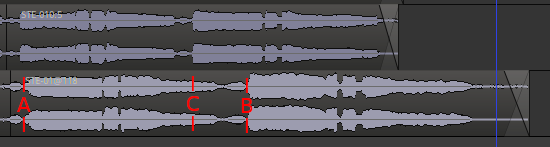
Given the following two tracks:
scrot20260204102656

I want stretch (squeeze) the second track to match the other track. Can this be done with the stretch tool other than trial and error? Ideally, i would like to say something similar to ‘keep this point (A) the same and move that point (B) to there (C)’.
I don’t think it is possible right now.

A possible workflow could be:

  1. switch to ripple mode
  2. cut your region in A and B → you get “start–A”, “A–B”, “B–end”
  3. stretch the resulting A–B region from original length A–B to new length A–C (the region B–end should move accordingly)
  4. combine the three regions

HTH