[SOLVED (sort of)]Hardware/MIDI Through no longer visible in MIDI Connection Manager

Hi, I’ve been following this recent thread:

and thought I might have something to contribute on the subject controlling plugin parameters on audio tracks by generating MIDI CCs on a separate MIDI track, which is what I did years ago here:

However when I went to reproduce the approach I used (this time using the BOGAudio Walk module in Cardinal Synth to output continuous random CC), I noticed that Hardware/MIDI Through was no longer available in my MIDI Connection Manager. At the time, it seemed that was the way to be able to do a MIDI Learn without needing actual hardware.

My MIDI Through ports do appear when I run aseqdump - l or aplaymidi -l from the command line:

$ aplaymidi -l
Port Client name Port name
14:0 Midi Through Midi Through Port-0
14:1 Midi Through Midi Through Port-1
14:2 Midi Through Midi Through Port-2
14:3 Midi Through Midi Through Port-3
20:0 Scarlett 18i8 USB Scarlett 18i8 USB MIDI 1
24:0 LC-Pedal LC-Pedal Port 1
28:0 Keystation Mini 32 Keystation Mini 32 MIDI 1

but they don’t show up inside the Ardour MIDI Connection Manager’s Hardware tab any more regardless of whether I use ALSA or pipewire-jack. I would imagine that 4+ years ago (Ardour 6.5ish) I was not yet using pipewire and possibly just JACK. Could this have something to do with it? Or maybe I’ve changed some setting?

Currently using official 8.12 on Linux Mint

Thanks
Pipewire (like Jack) sits over and uses ALSA. When you use ALSA as your audio system you are bypassing it so it shouldn’t affect it.

I just checked on my system (Ardour 8.12, Kubuntu 24.04) and I see MIDI hardware devices in the MIDI Connection Manager both when using ALSA and Pipewire. The only difference I see is, with Pipewire, I also see Pipewire MIDI devices (Bluetooth audio).

I’m not sure what’s going on with your setup. What setting do you have for MIDI System in the advanced section of Audio/MIDI setup? (I’m not sure it’s relevant, but it’s about the only thing I can think of).

Also, do the MIDI devices show up in something like qpwgraph?

Cheers,

Keith

1 Like

Thanks for the reply. I’ve tried both ALSA Sequencer and ALSA raw devices with no difference. The MIDI Through ports show up in qpwgraph both as ALSA Midi and pipewire Midi-Bridge.

Good to know it just me, I guess? If I get it figured out, I’ll post the solution for posterity.

Again, thanks for the sanity check.

1 Like

Ooh, I apologize, I’m a bit dyslexic and read your reply too fast. I DO see my hardware midi devices (Scarlett, Keystation, and an M-Audio Expression Pedal I have connected through a Teensy-LC, aka LC-Pedal) in Ardour’s MIDI Connection Manager Hardware tab. What I DON’T see are the the virtual MIDI Through ports (created with modprobe snd-seq-dummy I believe) that I see in qpwgraph and aplaymidi -l.

Pretty sure they used to be visible to me in Ardour, and I thought that was how I was able to manage a MIDI Learn with just CCs from another track and not hardware (eg, my expression pedal). I’ll keep fiddling about.

Just checked it on my system, and indeed – no MIDI Through ports visible under ALSA and Pipewire/Jack backends. But the Through port shows up when the standalone Jack backend is running. Dunno why it’s like that… Tested on Debian Trixie/Ardour 8.12.

1 Like

Thanks for checking. That did help.

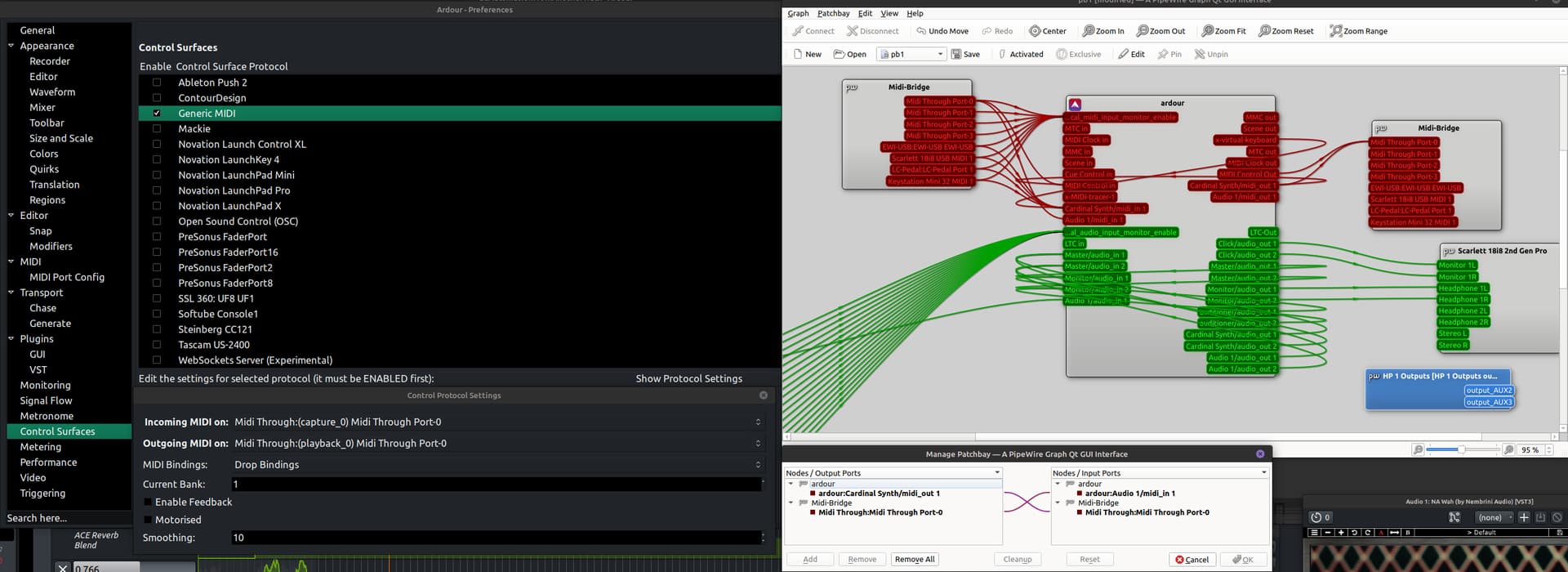
Using Pipewire/JACK, despite the MIDI Through not being visible in the MIDI Connection Manager, it IS visible in the Control Surface->Protocol Settings. This is not so when using ALSA. So I think I figured this thing out.

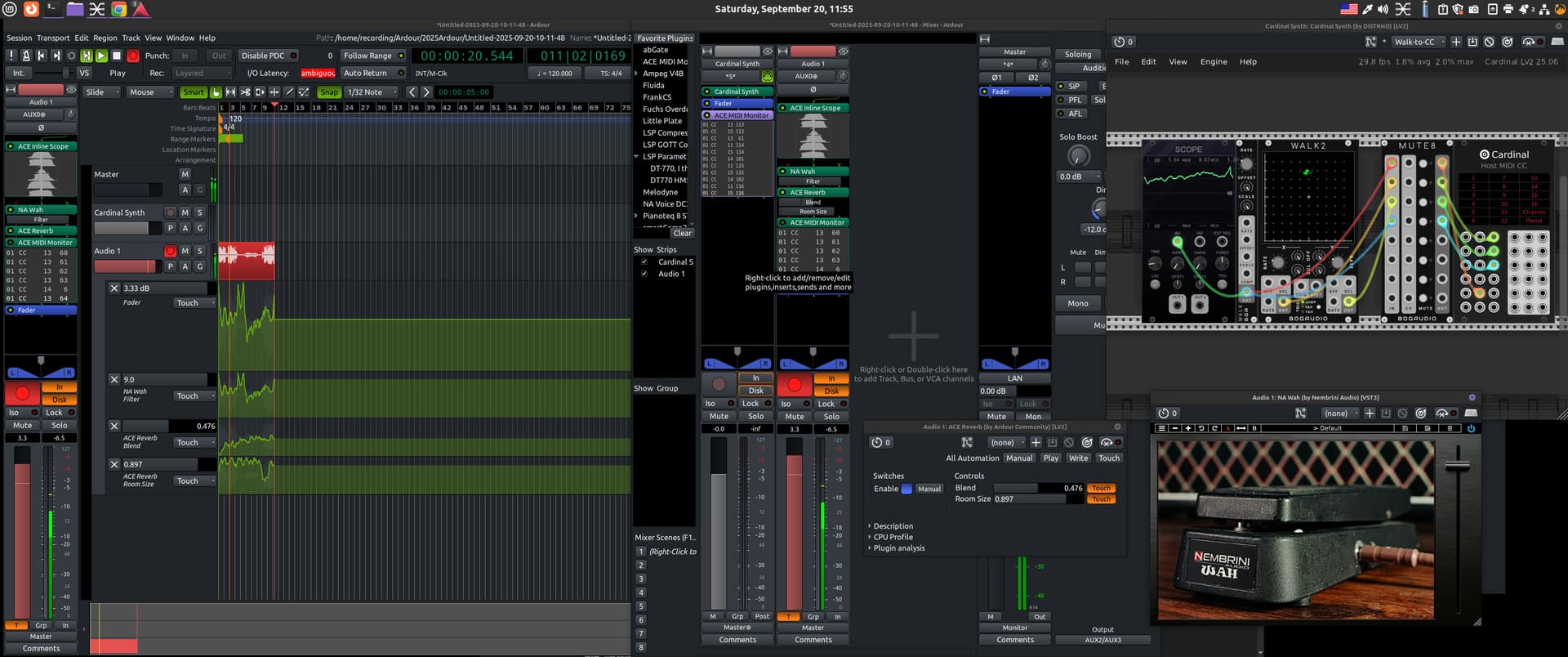
First a big screenshot of what all is going on, later the wiring, and finally some caveats/question marks.

In this picture, Track 1 has Cardinal (upper right) with 1- and 2-D Random Walk Modules attached to CC controls 11, 13, 14 & 15. Note the Mute 8 module where I was able to use MIDI Learn one CC at a time. FYI, if you do use these modules, take note of the Scale and Offset settings.

Track 2 I have Nembrini Audio’s Wah Pedal (through Wine) (CC11), and ACE Reverb (CC13&14). In the mixer section (center) you can see which plugin parameters I’m automating. Note you need to Add MIDI port to your audio track

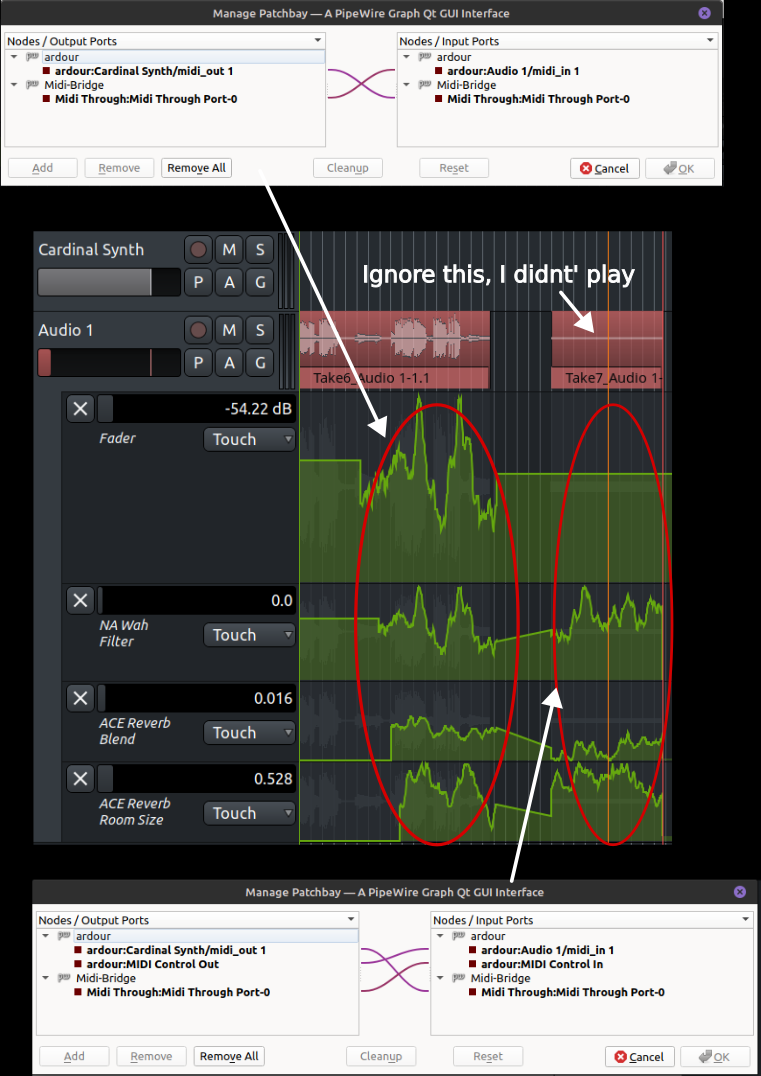
I’ve also attached CC15 to the Track Fader automation. I didn’t expect this to work based on some other things I’ve read on the forum, but one method worked, one didn’t (more on that later).

Next, since the MIDI Through was not available inside Ardour Connection Manager, I hooked those up in qpwgraph. I did have to select MIDI Through in the Control Surface->Protocol Settings. This appears necessary so may conflict with your regular workflow if you have a real Control Surface. Don’t know. Don’t have one (yet).

In the Manage Patchbay window (bottom centerish), you’ll see Cardinal Synth/midi_out going to Audio 1/midi_in via the MIDI Through port. I believe this is how MIDI Learn can be made to work without hardware. Just make sure Cardinal (or whatever you’re using to generate CCs) only has one CC going at a time (thus the Mute module). This seems a bit hacky as I would expect the Control Surface>Generic MIDI Control In/Out to be routed via MIDI Through. However when I tried routing that way, plugin parameter automation was recorded but not the track fader.

I’d still like to know why the virtual MIDI Through ports are not shown in the Connection Manager, and why this doesn’t seem to work at all with ALSA. Also I’d like to understand why the Track Fader automation works one way but not the other. Anyway I hope this helps somebody. I know it helped me :slight_smile:

Rock On

I’d still like to know why the virtual MIDI Through ports are not shown in the Connection Manager

In the time honoured internet tradition of not answering your actual question, I offer the following:

I was having a similar problem with the port for my Korg Kross having disappeared.
Renaming ~/.config/ardour8/port_metadata resolved the issue here.

BTW I have midnams for the Kross rev1 (including bonus patches) and the associated drum maps,
also a map file for using a Tascam Model 12 as a GM controller instead of Mackie. Where do I post those?