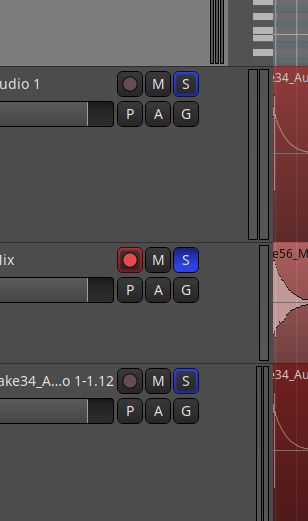
I have some tracks which are not in a same group. I want to solo only one of the tracks (in the photo the second one) but other tracks still are singing, until I explicitly mute them. Where can I arrange the tracks to be soloable on their own (without needing to click mute all other tracks)?
When you’re recording a track, the whole point of a multitrack program is that you can hear the other instruments for reference. You can group the ones you don’t want to hear and mute them. Or am I misunderstanding you?
Why shouldn’t it be possible to have full control over what you want to hear (solo) and what not? I mean that’s the whole point of having the groups functionality; if you want to listen to a group of tracks at the same time you just put them in a group! If you want to solo a track, it really must be an easy way to solo it (such as clicking on the solo button!). I am not an instrumental music recorder, I am an electronic-music guy, so I am not concerned with hearing and monitoring other instruments or singers while I am recording another instrument/voice etc.
Of course creating groups is a possibility, but a not in-point solution for a problem which in fact shouldn’t exist at all!
So your answer really doesn’t answer my question. But thanks for writing
I don’t have this setup in my production system (I tested it in CachyOS rather than AVLinux), but when I record a track in Ardour 9.8.0 and solo it, all other tracks are muted.
The blue outline on the solo buttons means “implicit solo”, it means there is an audio connection between the soloed track and the implicitly soloed one. Using After-fader-listen or Post-fader-listen instead of the default Solo-in-place in the monitor section or enabling “Solo controls are Listen controls” in preferences allows listening to a track without hearing any implicit solo.