Hi there,
i’d like to sync two regions this way:
the first region is at its right position in time (+ edits on other tracks)
I want to snap the end of another one to the beginning of that first region
As I understand, the snap anchors never is the end of a region
Am I missing something?
i search in the forum but didn’t find how to do it
Thanks but that doesn’t work.
I can snap the beggining of a region to the end of another
but I can’t snap the end of a region to the beginning of another…
(that’s what I want to do. Not sure if that’s clear in my first post)
Assuming you can’t change the size of the second region, I’d go for the following approach:
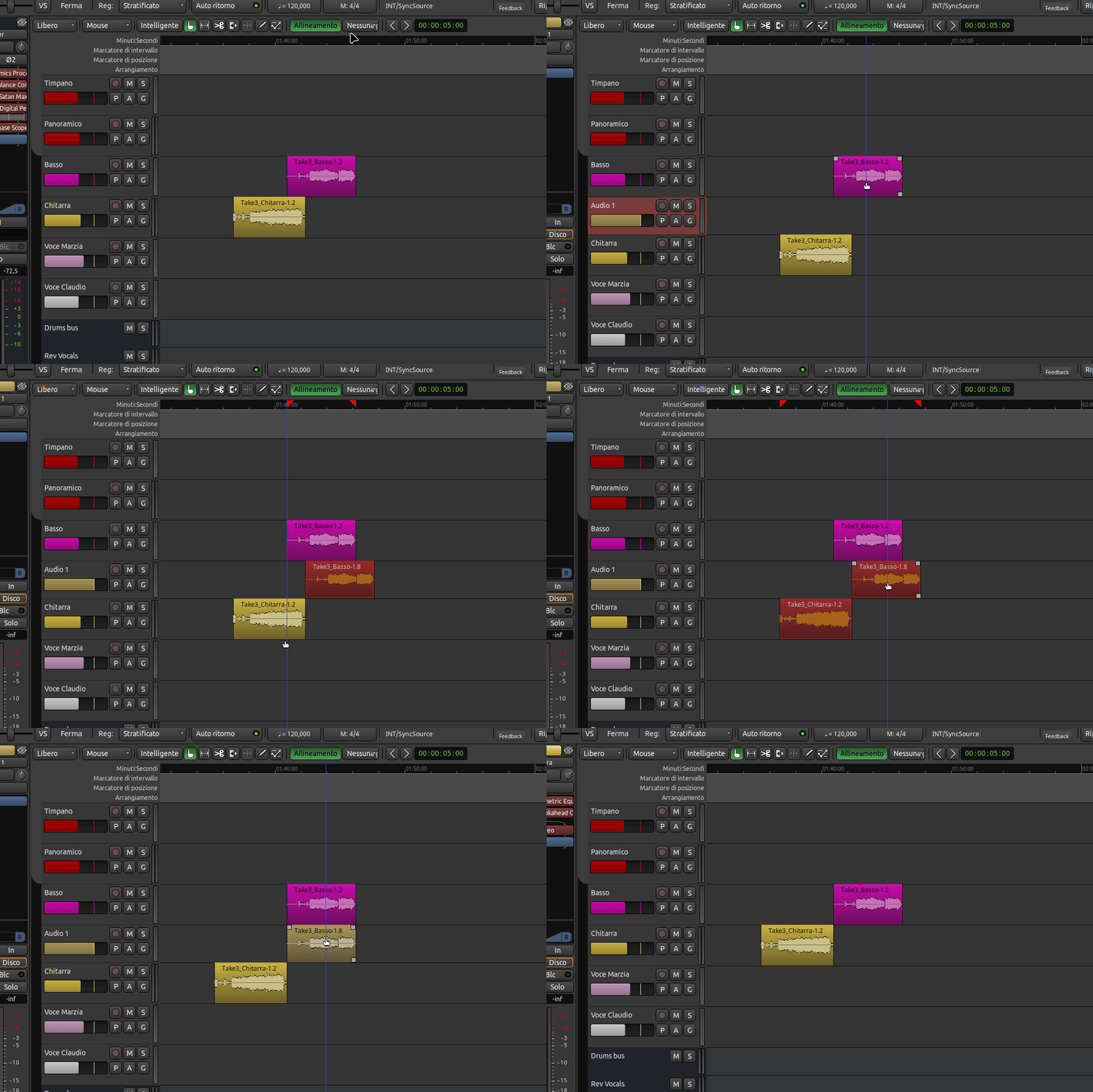
1 - Duplicate the first region to a new track
2 - Now move the duplicated first region start to snap to the end of the second region (regardless of its position)
3 - Select both the duplicated first and the second regions and move them together to make the start of the duplicated first region to snap to the actual first region start
4 - Delete the duplicate and the track (if you have created one for the purpose)
Here’s a screencast of the workflow, first region is purple, second region is yellow
Sadly, “Preferences > Editor > Snap > Snap Targets > Region Ends” doesn’t actually make the end of the region being dragged snap to anything: it only makes the ends of other regions become snap targets. I feel it probably ought to, since resizing or time-stretching the ends of regions does snap, but maybe it doesn’t for a good reason that I can’t think of.
Yes you’re right. I wrote something different from what I meant
What I mean is in my 2nd post
So your altenatives do not work as the end of the region is never snapped!
I am not sure if I understand the question correctly, but if this is about aligning the end of a region to a specific point on the timeline, there is the possibility to assign a keyboard shortcut to “Align end”.
I use this extensively while editing for podcasts, having set the shortcut for “Align Start” to | and “Align End” to § (Shift - |). Just select the region, make sure the edit point (for me that is the playhead) is at the correct position and use your shortcut. This works regardless of the edit mode, too.