I’ve been brainstorming my eventual workflow for editing and mixing classical music (multi-track, multi-take) in Ardour.
I know this overall subject has been covered before, but I wanted to see if anything has changed in the last five years that might affect my editing flow.
At this point, I envision that my workflow will roughly be (assuming editing before mixing):
import all tracks, and combine them into a ‘source’ group
duplicate all these tracks without playlists (empty), and combine these into an ‘edit’ group
copy/paste the best take from 'source’to ‘edit’
fake the 4-point edits by splitting the ‘edit’ tracks, and copy/paste a section from an alternate take from ‘source’.
The part of the process that seems tedious is that all the takes are distributed across the timeline horizontally, rather than being readily available in track groups vertically like Reaper/Cohler. (https://www.youtube.com/watch?v=KOcHlpNeTkY) So I’ll be doing more copying/pasting from different points in the timeline, and unless I’m missing something, auditioning will be a bit more difficult.
I’m curious whether this overall approach matches how others edit/mix, and whether I might be missing something crucial that’d simplify auditioning and editing.
I watched both of those videos, and it’s all certainly interesting…
“Cohler Classical” is obviously well thought-out and highly custom-tailored for editing classical music it seems, yes. (~Hence why it costs $125. )
But I see no reason why most of the functionality it includes couldn’t be incorporated into Ardour as well.
…
How much coding experience do you have?
And do you know about (or use) Lua scripts in Ardour perchance?
Because I think it would likely be possible to create a custom script to do this “4-point editing”, as it’s called. …
…
Hmm…
I was typing-up a possible idea for doing that with Lua, but realized there’s actually quite a lot of steps necessary in this… potentially. So I’m going to have to think about this another day or so and consider what it might take…
As for other things I’ve considered (and tested), and which I’ll have to consider more:
• Maybe stacking all regions (of the exact same take/performance) onto single tracks, instead of having them across multiple tracks. -Would save screen space for initial editing.
• Maybe even using Ardour’s region Combine option for even further, initial simplification. -To which you’d then use Uncombine later on when you wanted to split-up everything (all the different mic recordings) for further mixing… which leads me to…
→ The one big drawback here, though (potentially), is that if you want to mix the final, composite version of the music piece, it might be easier to have all the various mic recordings across several tracks (-just as you currently do, as in your video). That way panning of certain mics is easier, adding plugins, riding the fader up and down for certain mic recordings during different portions, etc…
…
~Just some initial ideas and food for thought.
I’ll probably comment a bit more later…
I’m not familiar with combining regions. I’ll take a look and see if it makes editing easier.
But that did give me an idea. I could:
do a basic mix (levels, panning)
bounce to a single stereo track
edit the stereo mix track
invoke a lua script that replicates all the cuts/fades from the stereo mix to the other tracks
finish mix
Step 3 could be conventional copy/paste edits or, with a lua script as you mentioned, actual 3- and 4-point edits. Regardless, it’d be easier to audition and manage the edits.
I’m guessing that the script for step 4 wouldn’t be difficult.
I do write code, and learning lua has been on my to-do list for a while.
I’m terribly sorry for the length of this post… O___o
I’ve thought about this on-and-off over the past few days, actually. And I’m thinking I might try to write a script or two to get this “4-point editing” business off the ground in Ardour 'cause… why not?
But first…
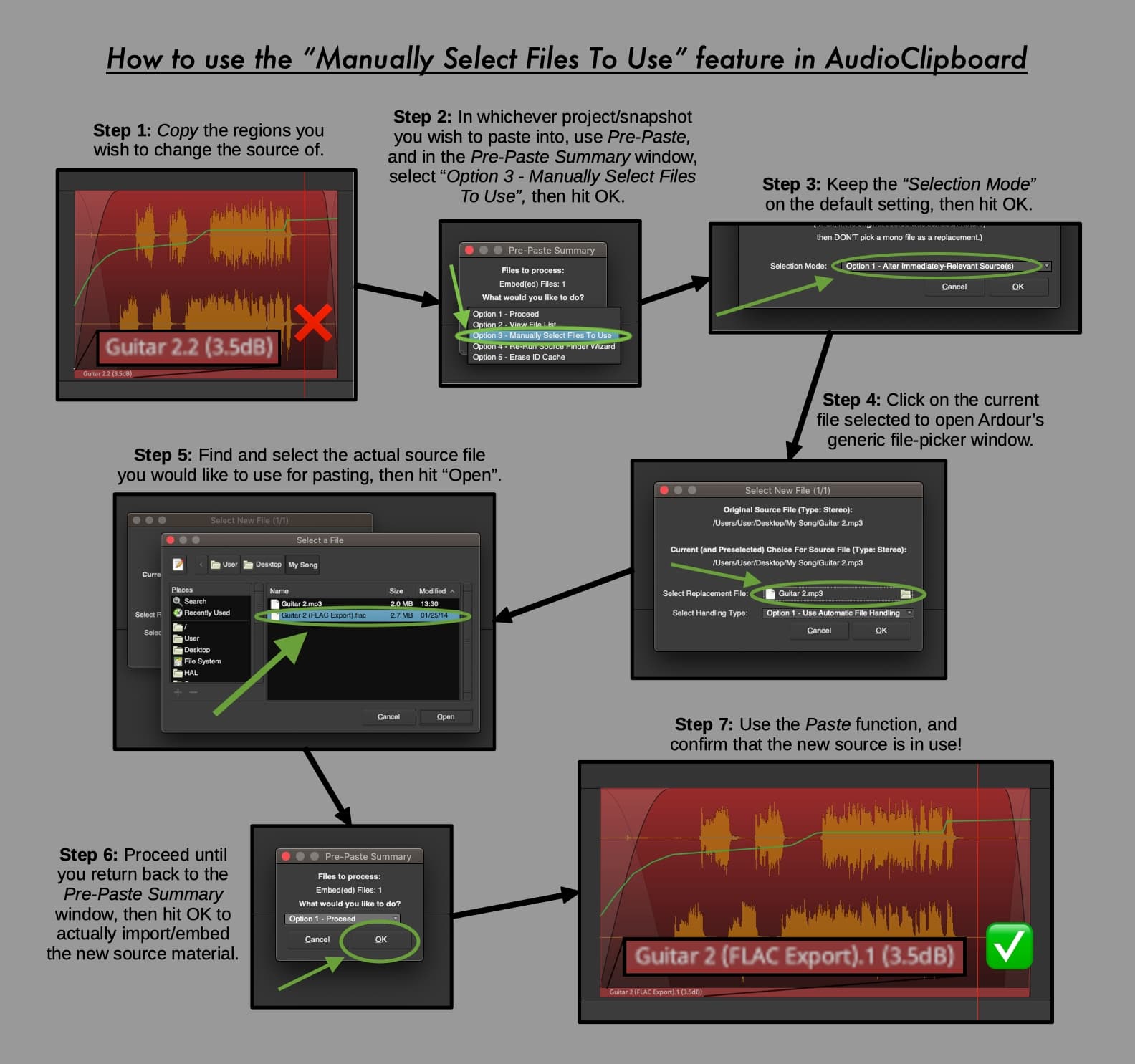
Unless I’m misunderstanding you here, that would probably be very complicated to achieve. However, my copy-paste script AudioClipboard can indeed swap sources (i.e. copy some regions, but paste using other sources, thus preserving all the original fades, envelope, etc.), but in your situation you’re talking about trying to ‘de-bounce’ (so to speak) a series of regions pointing to who knows how many different takes/recordings/sources… O___o … It just seems like a nightmare waiting to happen, having to go back and split everything back up in order to finish the mix.
So…
I’d suggest working with either:
• Groups of tracks, as you currently do.
• Or combined regions (which you can then uncombine later).
…Each of those options still comes with its own set of pros and cons though. (And so perhaps there’s another option we haven’t thought of yet…? )
~And now for the fun part(!), about a potential Lua scripting solution…
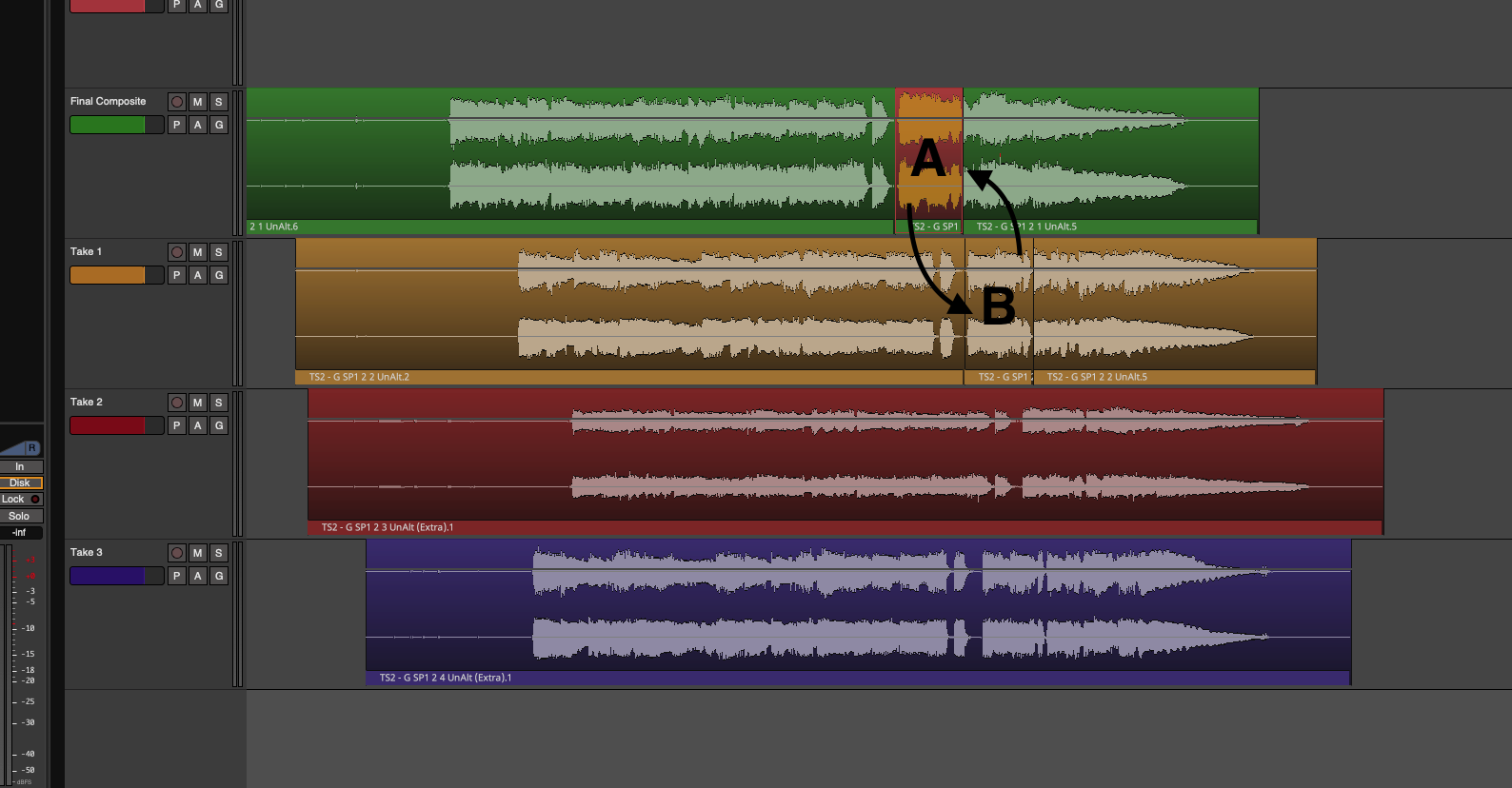
For initial simplicity (and so to ignore groups of tracks for the time being), the goal here might be to swap region “A” with region “B”:
…
As I considered how to do this, it seemed best to have two Lua scripts to make this happen.
Obviously it would be slightly more convenient to (in one simple flow like this) select A, then B, then hit a button (or key-command) to execute a single script that would immediately swap them. But simultaneously selecting A and B like this when, down the road, A and B are strewn amongst multiple tracks (as in your multi-mic recordings), would be at best incredibly tedious, as you’d have to hold-down cmd/ctrl and click region after region to select all constituents of A and then B. … Also, I don’t even know if Lua could differentiate between the regions first selected (A), and the regions selected last (B), etc…
All in all, there’s many possible roadblocks here. So again, I think two separate scripts to clearly differentiate between the ‘establish this as the destination region/range’ phase, and the ‘use this new region/range’ phase would be best, and thus 4 clicks for a swap, like so:
Click to select region A, or click and drag to select a range to define A.
Click (or use a key-command) to execute script #1, which would:
• If a range was selected, our script would automatically use the Ardour function “Separate” to create a distinct region.
• Save A’s track’s name(/etc.), start of region A, and A’s unique ID onto a temporary file in the computer’s /tmp/ directory (or similar).
Click to select region B, or click and drag to select a range to define B.
Click (or use a key-command) to execute script #2, which would (in this order or some other sequence, etc.):
• If a range was selected, use “Separate” to create a distinct region (B).
• Save (in a temporary Lua table) B’s unique ID, and starting position.
• Erase B.
• Read our temporary file in /tmp/ for data on A.
• Duplicate A (using its ID) in B’s former position based on when B had started on the timeline.
• Find and erase A.
• Duplicate B (using its ID) in A’s former position based on when A had started on the timeline.
• Finally, overwrite B’s info (namely its ID) onto our temporary, external /tmp/ file. (This way our current destination range/area remains the same, and a further selection of a region C, say, could then be followed merely by script #2, and B would be swapped for C, and so on… -Would be convenient for inserting different takes into A’s original position, one after another, with at most 2 clicks for each new swap.)
…
Now, just to be clear, I decided to go with the idea of swapping takes because I don’t think it’s wise to delete A, or B, or C, etc., from the timeline. → All possible versions should be available to the editor until they decide to delete them. …But I’m curious now what your thoughts are, @mkindred? ~I would love to continue getting your feedback and ideas on what you think might be the best approach here, seeing as you’re the OP.
…
Even if I began making something along these lines, it unfortunately would only get us started, as expanding the script to work across multiple tracks of regions (potentially) would probably get modestly more complex. … And none of this even addresses convenient cross-fading handling (obviously), or what if A and/or B are composed of multiple regions horizontally, the effects of Slide vs Ripple mode, how to ensure horizontal space is automatically shrunk or expanded to accommodate a new region, how any potential underlying automation might be destroyed, etc., etc… o_____o
Because of how much simpler life would be editing a single stereo track, I had already constrained my thinking along those lines. Given that approach, then the complexity of each step of editing is vastly simplified.
(This post might answer the question about how complicated my proposed lua script would be, or it might show my lack of knowledge about the relationships between source, region, and playlist.)
Let’s say I have 10 mono mic channels. I’d begin ensuring that each track (one per mic) would have a single source/region of the same length. If that weren’t the case, then I’d bounce them 1:1 to get that starting point.
I’d then do a basic level/pan mix and bounce that to a single stereo track. At that point, I’d have 11 tracks (one per mic, plus a single rough 2-mix) with the exact same length, each with a single region/source. I could then cut up the 2-mix into the appropriate takes to make editing easier.
If I were then to copy/paste sections from the 2-mix to a new ‘edit’ track, regardless of the edit process (actual 4-point edits or just copy/paste/adjust), I’d have a single edited track that draws from a single source.
At that point, couldn’t I have a single lua script that’d duplicate the edited 2-mix one time for each mic track, and then replace the source for each from 2-mix to individual mic?