Hello! So, I installed Ubuntu studio 24.04.3 and ardour 8. What I’m trying to achieve is to record 2 separate tracks at the same time, one for my instrument through a Motu M4 USB sound card, and one stereo track for the system audio (Firefox, VLC, or whatever). I managed to record the instrument as ardour show the Motu M4 inputs, but really struggling to get the system inputs. How could this be done?
1 Like
I’m guessing it’s doable using JACK (although Ubuntu Studio uses Pipewire I think so you probably need the pipewire-jack package…? Hopefully someone else will chime in).
See this and this for a bit more info.
Begs the question why you need this, however? Why not save the audio from Firefox / VLC / whatever as an audio file → import into Ardour → record your instrument thereafter?
Yes, what Willy D wrote is the typical way, make sure Pipewire is as updated as possible with your distribution, make sure pipewire-jack is installed and use the JACK/Pipewire backend in Ardour for real time recording.
If you don’t need real time then save the audio file and import is probably easier. In that case you can use the ALSA backend and not worry about setting up routing.
Pipewire is installed and I’m using jack; I just can’t figure out how to identify the loopback inputs in ardour, as it seems that the system audio is not listed among the various inputs. Any hint?
There is no single “system audio” port, but there will be individual ports for each application.
And this is a very good feature.
I have so many audio events on my computer, I would not want to record everything that comes out of it. Maybe some would, but not me. I get audio notifications of motion in driveway, hallway, sunroom, etc. I don’t want to record that stuff, but I could if I wanted to. If I am wanting to record something from a desktop app, ie Firefox, I don’t want anything else to be there, so I patch in just that app. Don’t get me wrong. I DO disable those motion notifications when recording audio just to save CPU cycles and any chance of an xrun.
I understand there are valid reasons for recording ALL desktop audio, and it is probably possible. I just don’t know how without a bit of research.
EDIT: There may be some issues with this as well, as restarting a video in a browser (or even moving the playhead), in example, may open a different named audio port. I have ran into this many times and my solutions are based on luck, mostly.
but there will be individual ports for each application
I found the “Firefox” input in the “External” inputs in Ardour, but only when there is something actually playing. Is there a way to keep it alive even if the YouTube player is paused?
so I patch in just that app
How do you patch just a specific app?
There is still the good ol’ alsa-loopback trick which will be as close to a “system outputs” as you can get.
Perhaps you could patch into the “Monitor” ports of the default audio device?
Cheers,
Keith
How is this done? I’m totally new to Linux, so the question might seem obvious for you but not for me …
You would need a Jack/Pipewire connection application, such as qpwgraph or helvum. I believe qpwgraph (which is what I use below) is part of most Linux distros these days, although you will probably need to install it using your package manager.
This should show all of the audio devices and active audio applications on your system, and all of the current connections. You can also rewire these by connecting and disconnecting them.
You can use this to connect the output of an active audio application or device to a stereo track in Ardour. For example, here I am connecting the stereo “Monitor” ports of my main audio device to a stereo track I have created in Ardour.
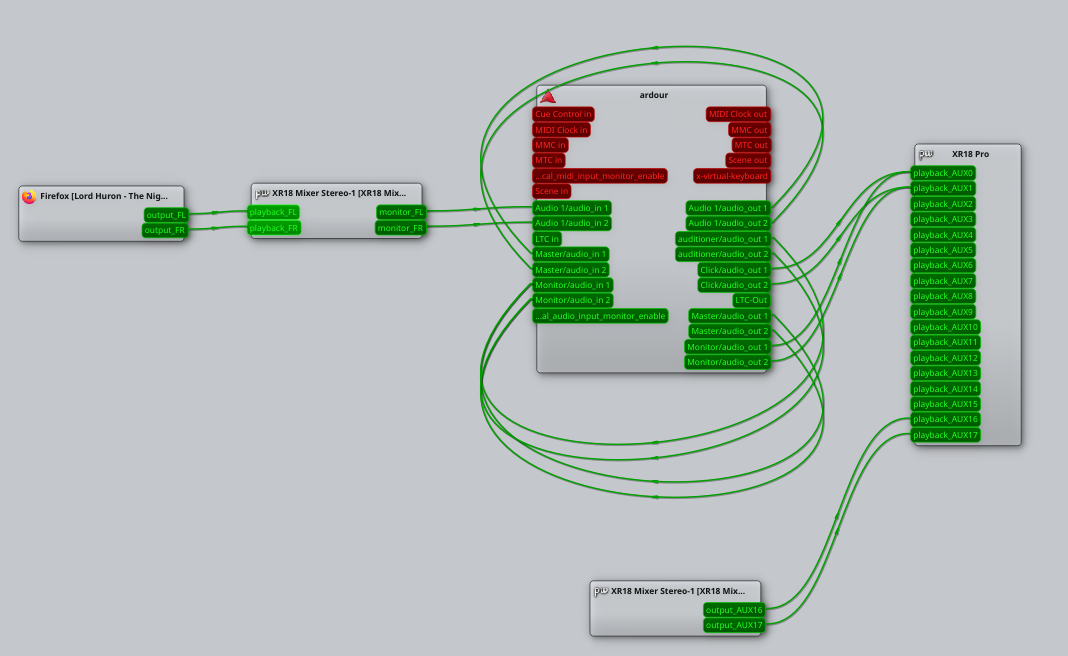
“XR18 Mixer Stereo” is my default desktop audio device, so when I start playback in Firefox it automatically connects to that device and gets recorded by the Monitor ports.
Note that most audio applications will have persistent ports, whilst others (like web browsers) will have transient ports that are only created when they play audio.
Where you have persistent ports, you can manually connect them to a track in Ardour. Where you have transient ports, it’s more tricky. Using the Monitor ports is one way to make this work.
Another way is to start the audio stream in the browser before connecting the ports directly to the browser application. But if the audio stream stops for any reason, the ports will be destroyed and the connections will be lost. In Youtube, for example, I found that adverts in a video will cause the ports to be destroyed and recreated, but pausing a video kept the ports up for around 20 seconds.
Note that, if you use the Monitor ports, you will need to be careful to avoid feedback loops. Ardour will be using an audio device (typically the output from the Master bus) and any output from Ardour will also be captured by the Monitor ports for that device. Ideally you need to disconnect Ardour from the audio device whilst doing this, or connect it to different ports on the device if you have a multichannel audio interface. Or, if you have another audio device, connect Ardour to that instead.
Cheers,
Keith
1 Like
As you can read from @Majik it can be tricky.
I usually prefer h/w solutions when they can be discreet and don’t interfere with my work. I have a laptop which I use at home and my rehearsal room. Home and practice rooms have different sound setups but what they have in common is that they provide an S/PDIF input (optical or coax). So, for the laptop’s system sounds, I purchased a USB-to-SPDIF dongle a few years ago and made it my default soundcard: so all applications like web browsers, etc, will usually default to that one. I then plug the SPDIF output to my pro soundcard. From there, I can h/w monitor it but also record it as extra inputs in the DAW.
For reference I use this little guy: Douk Audio U2 USB Converter but this is only relevant if your recording setup has an SPDIF input.
Hello 3thinking, to be able to record in Ardour, the general audio of the system in Ubuntustudio (I imagine that in other Linux systems as well), you have several possibilities:
-
Use ardour with pipewire by selecting it in the audio configuration of ardour itself, this does not work for everyone because they do not have the pw-jack or are missing something else in the configuration or because they do not directly use pipewire.
-
Use Ardour with alsa but using the LSP SEND AND LSP RETURN plugins Linux Studio Plugins Project, as explained in this video->> https://www.youtube.com/watch?v=x336_XxHp2o, in the video they use it to connect REAPER with ARDOUR, but you can use it between pipewire (the system audio) and Ardor too, also while I write I remember that the plugins LSP include a jack version, in addition to vst3 and lv2.
-
Use the hardware method, if you are using a different audio card than the motherboard you can use the motherboard’s audio output (selecting it as a pipewire output and connecting that output to the sound card you are using) nowadays they are usually USB.
On my Ubuntustudio 24.04 system I can use all three options
The first option may not be completely stable for many tracks, whether for podcasts and using it with OBS or for backing tracks or similar, at least it is my experience when using this method.
I have tested the second option occasionally and it has worked without problems. The creator of the LSP plugins is in this forum, and he can explain how it works.


The third option is the least suitable because you convert digital to analog and vice versa and also adds latency, but it works.
In my case I have 2 sound cards, the UMC404HD (USB) that I use with Ardour and an internal MAUDIO 192 pci, which I use with pipewire for other tasks, and finally I have an ALTO LIVE 1604 hardware mixer that serves as a distributor for several things, such as a small patch of connections, the external reverb, the compressor, 2 synths, the hifi equipment, the living room audio, etc.
Ardour is very flexible, although it prefers ALSA, on the other hand pipewire and before pulseaudio, it has made things easier for less experienced users, when they had to use and sometimes fight with qjackCtl (I used it and I had fun but it was not very practical to have to depend on it, it is simpler, faster to use pipewire for the basic things the system audio and alsa for something more “serious” or complex.
At least this has been my experience with these configurations.
The sound in Linux is still not completely simple, simple, you still have to decide between alsa and now pipewire, before pulseaudio and before oss… and… On mac (apple) it is better solved for the less experienced and nowadays you are starting to see exiles from windows who look at linux… if they see that it is difficult they can back out and go back to windows.
Greetings
This topic was automatically closed 91 days after the last reply. New replies are no longer allowed.