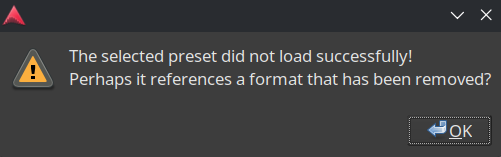
I’ve been having some trouble using the quick export feature when exporting to mp3. I keep getting this message:
I am using the Arch linux packaged install on Endeavour OS (kernel 6.19.8-arch1-1 (64-bit), which, as far as I can tell, comes bundled with the necessary libsnd. And ffmpeg seems to be installed as well:
I can successfully use lame -b320 %f as a post-processing command, and I suppose that’s fine, but it would definitley be convenient to be able to do it from the Quick Export menu.
Is there an error or warning message in Ardour’s Window > Log?
That message pertains to presets (not export formats).
So perhaps pick a different one, or use empty present, add mp3 as format (tab below the preset select).
Your original post stated you were using the Arch package.
The standard is distribution packages install into /usr/local and packages unrelated to the distribution install into /opt.
Robin’s suggestion was based on your statement that you are using the distribution package.
OK, now that I have had some coffee I think I should qualify that to make sure I don’t confuse anybody.
Binary distribution packages install into the /usr file hierarchy. For example I just checked where my distribution places the ardour package from the repositories, and it installs /usr/bin/ardour9 which is the shell script to launch ardour, and /usr/lib64/ardour9/ardour-9.2.0 as the binary executable, all the ACE plugins are in /usr/lib64/ardour9/LV2.
Note that I am running fedora which uses /usr/lib64 as the system directory for 64 bit builds to distinguish from 32-bit libraries which get installed for compatibility. Not everyone agrees with that convention, I think on Debian based distributions system installed files are always in /usr/lib no matter whether the OS is 32-bit or 64-bit.
The /usr/local directories are traditionally for software that you compile locally and install, so that if you make any changes to the compile configuration you can have the binaries in a distinct location from the location used for distribution provided binary files.
Okay, here’s what’s in the folder. I’m wondering if maybe this has happened because I used to have the website package installed previously, then deleted it and replaced it with the distro packaged one?