Although Ardour works nearly perfect on 4 computers, it is not found by qpwgraph on one of them.
Are you connecting to ALSA?
Yes. Look at the Picture here…
There is no picture attached.
If you connect to ALSA, it won’t show on qpwgraph because it’s not connecting to pipewire. You need to connect to jack/pipewire for it to show on qpwgraph.
It is connected to pipewire!
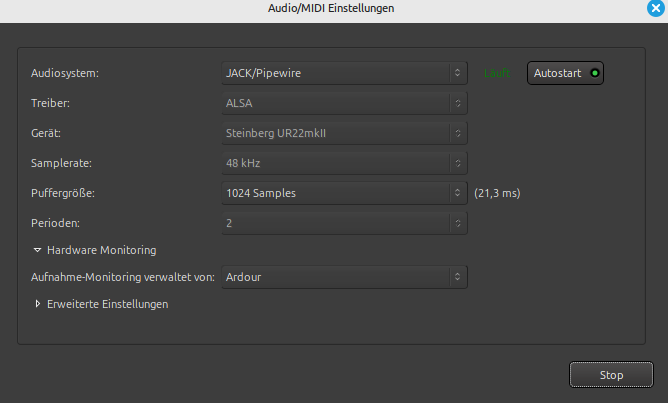
That’s odd, that’s how the alsa setting menu looks to me. The jack/pipewire settings for me has only two drop down menus and a notice saying jack is already running. What distro are you using?
That is what should be displayed when pipewire-jack is already running.
I believe the fact that OP sees an option to select the hardware device indicates that pipewire-jack is not properly installed as the only or default JACK library.
Usually in that case the pw-jack tool will be installed in that case, and starting Ardour using the command
pw-jack ardour
will set the correct environment variables to cause ardour to use the pipewire-jack installed libjack instead of the jackd provided libjack.
I use Linux Mint 22.2 on 4 computers where Ardour works correctly on three of them…
The picture looks like the old Jack is used.
That’s how it looks for me using pw-jack
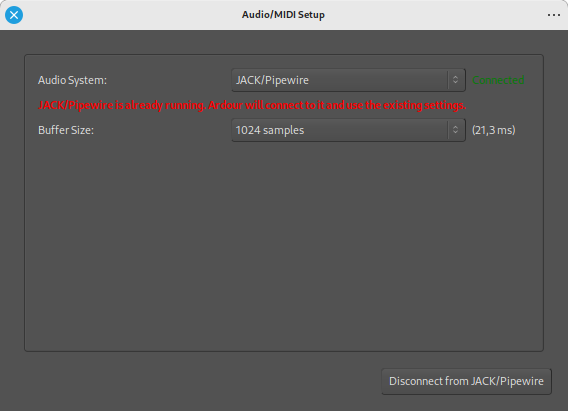
Are you using the pw-jack prefix as suggested?
Where can I get the newest version of Jack?
If you have pipewire-jack installed then you have pw-jack already
dpkg -l | grep jack | grep ii
Is there a reason why you want jackd, when you have pipewire on your system?
When pipewire is running, you have two options for a JACK application (like Ardour) to use pipewire’s JACK emulation:
- run the JACK app using
pw-jackprefix - set pipewire to provide system-wide JACK support (usually done by setting library paths in
/etc/ld.so.conf.d/- some distros provide a package for those).
Have you tried to start ardour from a terminal like as suggested above?
pw-jack Ardour8
or if you got ardour from your distro:
pw-jack ardour8
This topic was automatically closed 91 days after the last reply. New replies are no longer allowed.