And, any improvement? I would definitely look at the the other suggestions too (CPU performance mode, try out Millisecond).
Sadly, no. I’ve managed to get the CPU to performance mode, but had no luck solving three remaining possible bottlenecks reported by millisecond:
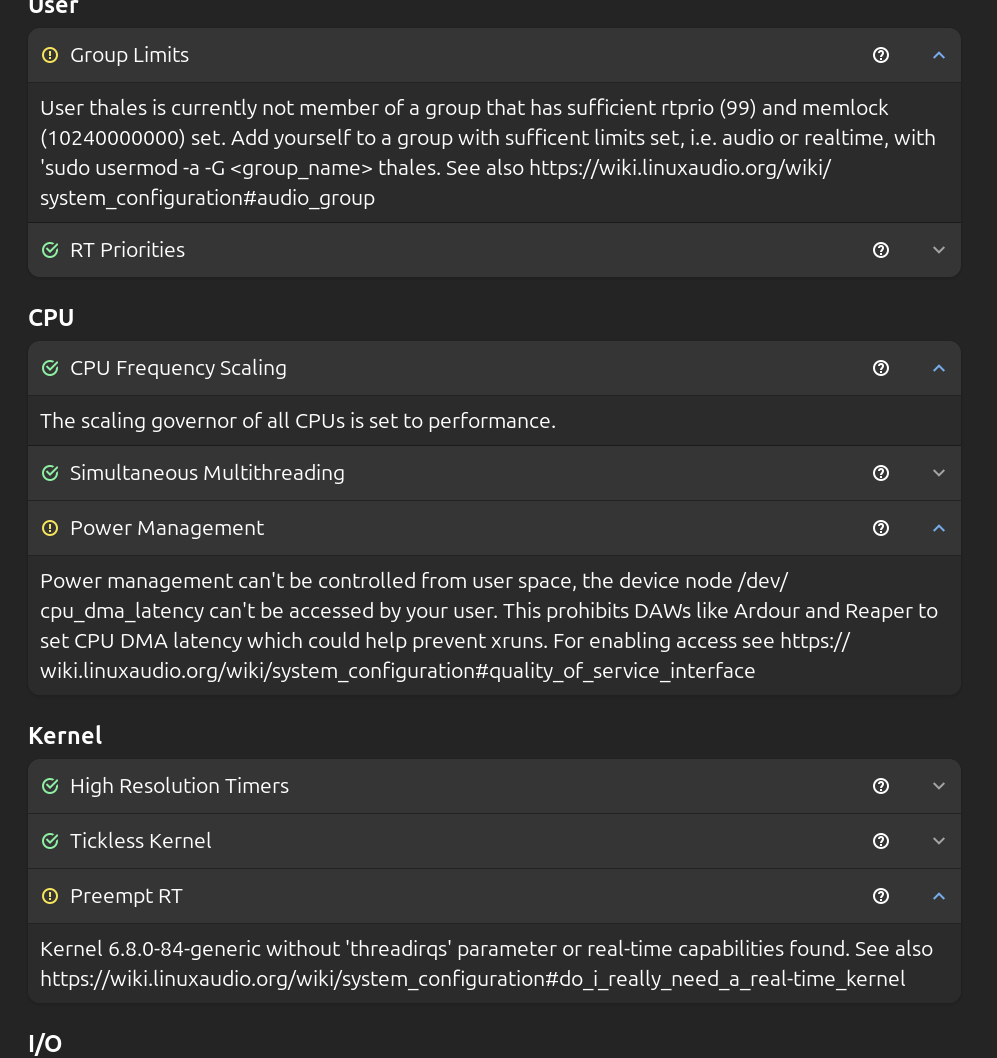
I’ll start trying to solve the group limits issue
Edit: I managed to get the audio group to be created and its memlock to be set to unlimited, but nothing has changed regarding the crackling sound, it’s still very much there.
When Ardour starts, what driver are you using? Pipewire? I looked through your messages and could not see it. Sorry if I missed it.
Have you tried ALSA ? And select your device inputs and outputs in the drop-downs.
Your version of Pipewire may be too old on Mint 22
1 Like
I’ve always used ALSA, because JACK/Pipewire doesn’t play any sound for me when selecting it on ardour. (To be honest, I still don’t get how JACK and pipewire work beeing new to linux music production, still studying that topic)
Pipewire is a desktop audio server which lets multiple applications share access to the audio interface. For example if you have one application playing audio, but another application needs to make some type of chime or beep sound to alert you, the pipewire audio server mixes the different sounds together and sends them to the output.
JACK is a programming interface (API) made to allow music production applications to send audio data between different programs, for example a stand-alone software synthesizer can have the audio output routed to Ardour, and a stand-alone drum programing software like Hydrogen can route the audio to Ardour.
Originally the JACK implementation was a stand-alone program named jackd that you ran when you were working on audio production, and you had to make some separate configurations to enable desktop audio (such as a browser or a program like VLC) to also play audio while you had jackd running.
The latest versions of most linux distributions now have a pipewire module which provides the JACK API so that the single pipewire audio server can route audio from desktop applications (which use an API called PulseAudio after the previous separate desktop audio server application name), and also audio production apps which use the JACK API.
The short version is that if you do not need to route audio between different applications, and intend to just use Ardour (possibly with plugins) to record and edit audio, you do not need to worry about any audio server and the best backend choice is ALSA. Start with that, which also simplifies analyzing performance issues, and if you find you need to route audio between applications later you can move on from a solid base once you have Ardour running on the ALSA backend performing well.
2 Likes
Thank you, Chris. That helps a ton. As when using Ardour I use it exclusively, I will mantain ALSA as the selected option. Still trying to figure out any reason behing my problem on it.
Just a pedantic point, but 512ms is half a second, which would be absolutely huge latency. I think you probably mean 512 samples per buffer, which is usually around 10.5-11.5ms per buffer, depending on sample rate.
The other parameter which is relevant is buffers per period, meaning how many buffers of audio samples are kept in process at once. I believe you said you are using the ALSA backend of Ardour, which if you have not gone out of you way to change will use 3 buffers per period (labeled as “periods” in the Audio/MIDI setup dialog). I believe 3 may be specific to USB interfaces, if you happen to have a PCIe connected interface it may default to 2. Since you mentioned using a UMC USB interface you can double check to make sure you did not change from the default of 3 for USB.
As far as I am aware, the memlock setting will not typically cause xruns, it will show up in e.g. a software sampler plugin unable to load the entire sample set, or some other memory allocation failure.
An insufficient rtprio setting would be much more likely to cause xruns, so was that addressed by getting your user added to the audio group?
The lack of threadirqs kernel command line may cause problems. You generally do not need full preempt-rt configuration to run down to 256 samples/buffer, but having either preempt-full, or dynamic preemption with the mode set to full (or lazy if you have a recent enough kernel) will provide better performance for realtime scheduled tasks like the Ardour audio processing thread.
You can check your current kernel preemption configuration with this command, which will print output similar to this (the value with parenthesis indicates the mode currently in use):
$ sudo cat /sys/kernel/debug/sched/preempt
none voluntary full (lazy)
If your configuration has the parenthesis around either “none” or “voluntary” you may be able to change that easily depending on how Mint configures the kernel.
This command will show what preemption configuration options were chosen at build time for the kernel. If the dynamic options have a “y” then you can just modify the kernel boot parameters without having to install new kernel:
$ grep PREEMPT_DYNAMIC /boot/config-`uname -r`
CONFIG_PREEMPT_DYNAMIC=y
CONFIG_HAVE_PREEMPT_DYNAMIC=y
CONFIG_HAVE_PREEMPT_DYNAMIC_CALL=y
If those values are “n” then you should check to see if Mint has a different kernel in the repository with something like low latency in the package name.
1 Like
I’ve become a big fan of Ubuntu’s realtime kernel (available on Ubuntu 22/24 Pro for AMD/Intel).
The guys on the Linux Studio project swear by their low latency kernel, too.
Ardour will promote its DSP threads to realtime priority if the kernel supports it and Ardour has suitable permissions (CAP_SYS_NICE).
1 Like
Hey there
Finally got some time to read through your observations.
That is correct, yes, thank you for the correction
It really was set to 2, instead of 3. Changing it back to 3 made it so I don’t hear any noise at 512 samples per buffer (which by itself is already amazing), but I can still hear it at 256. What would be your advice regarding this? I could keep recording in 512, but I seems like the geral consensus is that 256 is overall better for instrument recording so maybe it’s worth it to keep looking for possible changes, right?
Regarding the kernel preemption configuration, it is currently set to (voluntary), and the dynamic options all have a “y” as follows:
CONFIG_PREEMPT_DYNAMIC=y
CONFIG_HAVE_PREEMPT_DYNAMIC=y
CONFIG_HAVE_PREEMPT_DYNAMIC_CALL=y
Having fewer samples per buffer is only needed if you’re using software plugins to create the sound.
Like if you’re plugging your guitar cable directly into the sound card and then using Guitarix or some other simulation software to actually create the sound you’re recording.
In that case you’ll notice an obvious delay between hitting the string and hearing the sound if you have higher s/b settings.
The same goes for MIDI and software synths.
If you’re recording an actual guitar amp or vocals through a microphone or a hardware synth or something similar you can go as high as you want.
Here’s a few pointers on latency and latency compensation in Ardour
1 Like
As pointed out by Peter Hedlund it very much depends on what you mean by “instrument recording.”
If you mean you are playing a physical instrument of some type and recording that, then you can set the latency has high as you want as long as you have some way separate from Ardour to monitor what you are playing (either listening to the instrument directly if it is loud enough, or using something like an analog mixer for monitoring if playing an electronic instrument).
If by “instrument recording” you mean recording instruments which are only software plugins running in Ardour, or separate software programs running on the same computer and routed to Ardour, then yes, lower latency is often more comfortable because it will reduce the time between pressing a key or hitting a pad and hearing the sound play.
Then you could expect to get better performance with either full or lazy preemption (lazy is like full, but if there are no realtime tasks running makes some allowances that help throughput oriented tasks).
Consult the Mint documentation to find the method that fits best with that distribution, but the end result you want is that the kernel boot command line adds preempt=full and threadirqs to the existing kernel command line.
The way I have used in the past seems to have been superseded by an easier method. You can try this to see if Mint includes this grubby program to modify the entries in the grub bootloader configuration:
sudo grubby --update-kernel=ALL --args="preempt=full threadirqs"
You may have to experiment a bit, I think the quotation marks will be required to add two new arguments simultaneously, but I haven’t verified that syntax yet.
The next reboot after making the change should use those new arguments.
If your kernel supports lazy preemption and you want to experiment with that use “lazy” in place of “full.”
You can check whether your distribution kernel supports lazy preemption with this command, and check for the “y” in the output lines:
$ grep LAZY /boot/config-`uname -r`
CONFIG_ARCH_HAS_PREEMPT_LAZY=y
CONFIG_PREEMPT_LAZY=y
In my kernel config I no longer see an entry for CONFIG_PREEMPT_FULL, so I think LAZY may have superseded FULL in the configuration, even though the kernel scheduling debug entry still shows that full is a valid scheduling option from the kernel command line. So if you grep for all the CONFIG_PREEMPT entries in your kernel config, depending on your kernel version there may or may not be entries for LAZY or FULL.
I am using hardware monitoring myself, so I have not tried to see how low in latency I can achieve these days, but I think with recent kernels and full or lazy preemption settings with threadirqs you should have a good chance of running at 256 if you decide that is what you want.
1 Like
This is very important. What I found out is ALWAYS use a back usb port gor Audio devices like my usb mic and my RP150, but Never front usb.
That is very machine layout dependent, you cannot generalize that rule to all computers.
You must look at the USB device tree to determine which ports are connected to the same hub.
2 Likes
Has anyone tried installing the Ubuntu Studio Installer on Mint? (apt install ubuntustudio-installer) One of the things it can do is set up your machine for pro audio automatically, setting kernel, rtprio, users, performance profiles etc automatically. I don’t know if it’d work on Mint though, or hose it. I did try it on ElementaryOS once, selecting only the performance tweaks and low latency settings, and it worked fine.
Hey Ian, if you can install the timeshift package, do so and run it (GUI also available). It is kinda like Time Machine on Apple and Restore on Windows. It things go wrong, you can completely restore your OS to its previous state, and fairly quickly too for that matter. Just insure you have a rescue kernel to boot from if things go badly and you can restore it easily.
With that said, if Linux Mint is based on Ubuntu, it should work. I’ve never used it so I don’t know the specifics of it, as I only have used RedHat/Fedora on servers and desktops (since ~1995) and Debian on RPis.
This installer is such a GREAT idea! While Fedora does give similar options, a RT kernel is not one of them. Well, it does indeed include a semi-RT kernel, it is not enabled by default.
Using Jack with Pipewire works very well on my system. 24/96 for everything. It works perfectly with both my Nvidia HDMI audio and my Behringer UMC202HD.
1 Like
That was previously the case, but recent kernels in Fedora 42 compile with dynamic preemption, which allows changing the preemption class at boot time, and have lazy preemption as the default, which is a superset of CONFIG_PREEMPT (aka full preemption, which is still distinct from preempt-RT).
I had previously added threadirqs to my kernel command line, although I am not sure whether it is still required to be explicitly set when using CONFIG_PREEMPT or if that is implicit now. It does not hurt to still have it set on the cmdline arguments, so I am leaving it until I find any definitive documentation that threadirqs is no longer needed on the kernel cmdline.
1 Like
Updates:
I think that I’ve got every task pointed by Millisecond completed.
Now, for some reason, I can still hear the clicks recording at 512 samples per buffer, so it’s back to square one unfortunately.
I will definitely try this out!
Thanks again
Does your distro deploy cpu-dma-latency.rules from ardour/tools/udev at master · Ardour/ardour · GitHub ?
Hey, Robin! Finally got some time to read through your answer again (crazy last couple of weeks got me off the computer almost entirely haha).
I think so, the file is copied to rules.d.
What I couldn’t do yet was to compensate latency through the Audio/MIDI setup window. I use ALSA and when ALSA is selected I can’t seem to press the “calibrate audio” button. Is there a way to do this without JACK/PIPEWIRE?
Thanks!
This topic was automatically closed 91 days after the last reply. New replies are no longer allowed.