Hey, Ardour community! I have been getting to know the software and its features for the past month, but while enjoying the experience a ton, I’ve come to a problem that I have no clue on how to solve. I have what I think of as beeing a pretty ok PC (Ryzen 9 5900X, RTX 2060, 16 Gb Ram), and yet I get that awful crackling sound with a selected latency as high as 512 ms, which would be ok for recording live instruments, but is impossible with all the popping sound. The problems seem to disappear at 1024 ms. Any Ideas on what to do? Also, Cpu usage stays at an average of like 8% without a bottleneck from other components as far as I can tell.
I don’t really have another cable, but switching ports didn’t do anything in terms of reducing noise. One thing I’ve noticed that completly cuts the crackling is increasing the latency, but only to really large and not suitable for live recording numbers, that is why I thought that the problem may be related to that variable
In a lot of cases the USB ports are shared by more than one perphiral and when connecting an USB audio device to such a crowded port you can run into the issues you describe. You have to find an USB port that’s the least crowded. You can do so with the lsusb command in a terminal. Would it be possible to post the outcome of that command here?
Like I said in other threads, I’ve had a bad experience using USB 3 ports, so my advice here is to make sure you connect you audio card to a native USB 2 port. On the other hand other users reported they had no issue with USB 3 ports…
Mint uses Pipewire by default I believe and was problematic for me when I last tried it (even though most users don’t report issues with it). Might be worth further investigation?
I ended up uninstalling pipewire completely and reinstalling pulseaudio and JACK. I only really use ALSA so this is fine for me but for others (who insist on watching YouTube videos while making music, for example) it’s not.
Otherwise, are you recording onto a HDD or an SSD?
Does recording in other DAWs, like Reaper and Qtractor, work OK?
Will definetly try that one out, Schmitty. Not sure if related to this problem, but I was shown this warning for the first time opening ardour:
WARNING: Your system has a limit for maximum amount of locked memory!
This might cause Ardour to run out of memory before your system runs out of memory.
You can view the memory limit with ‘ulimit -l’, and it is normally controlled by /etc/security/limits.conf
@willy_dinglefinger Regarding your questions, I am currently recording into a Sata SSD, and the problem does, in fact, appear in diferent DAWs, as I had the same issues while testing Reaper, Waveform and like software.
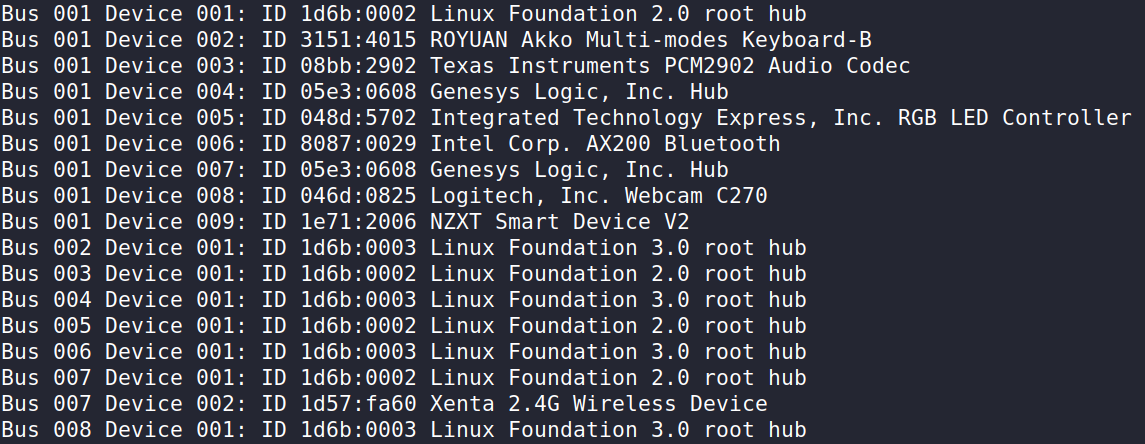
Oh wow, everything seems to be on bus 001. And if you connect your UMC22 (which is referred to as Texas Instruments PCM2902 Audio Codec) to different USB ports, does it always stay on bus 001? Because if you could connect it to an USB port that is on bus 002, 003, 004, 005, 006 or 008 then that could already help.
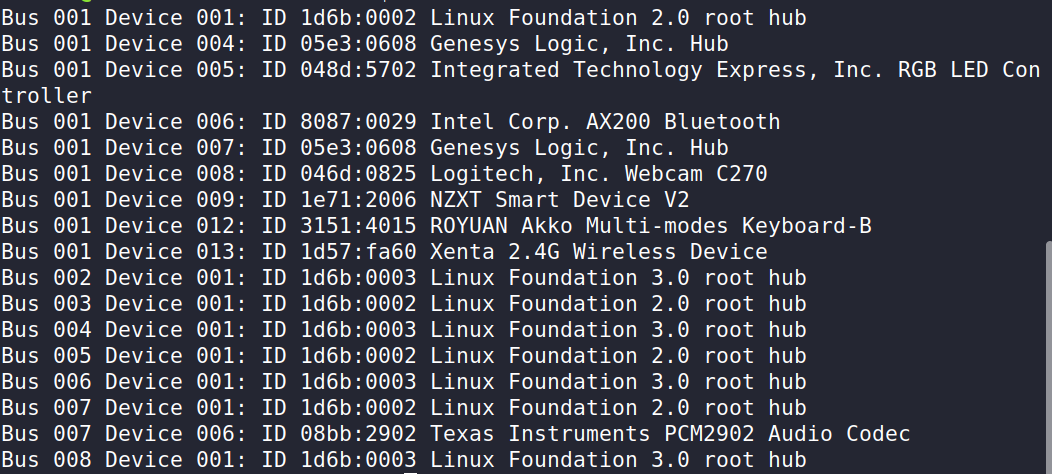
Weird thing is that it seems all of the IO ports are on bus 001, except for 2 that are on bus 007 (I couldn’t manage to even find the other busses). The workaround was to empty bus 7 and leave the audio interface there alone. Like that:
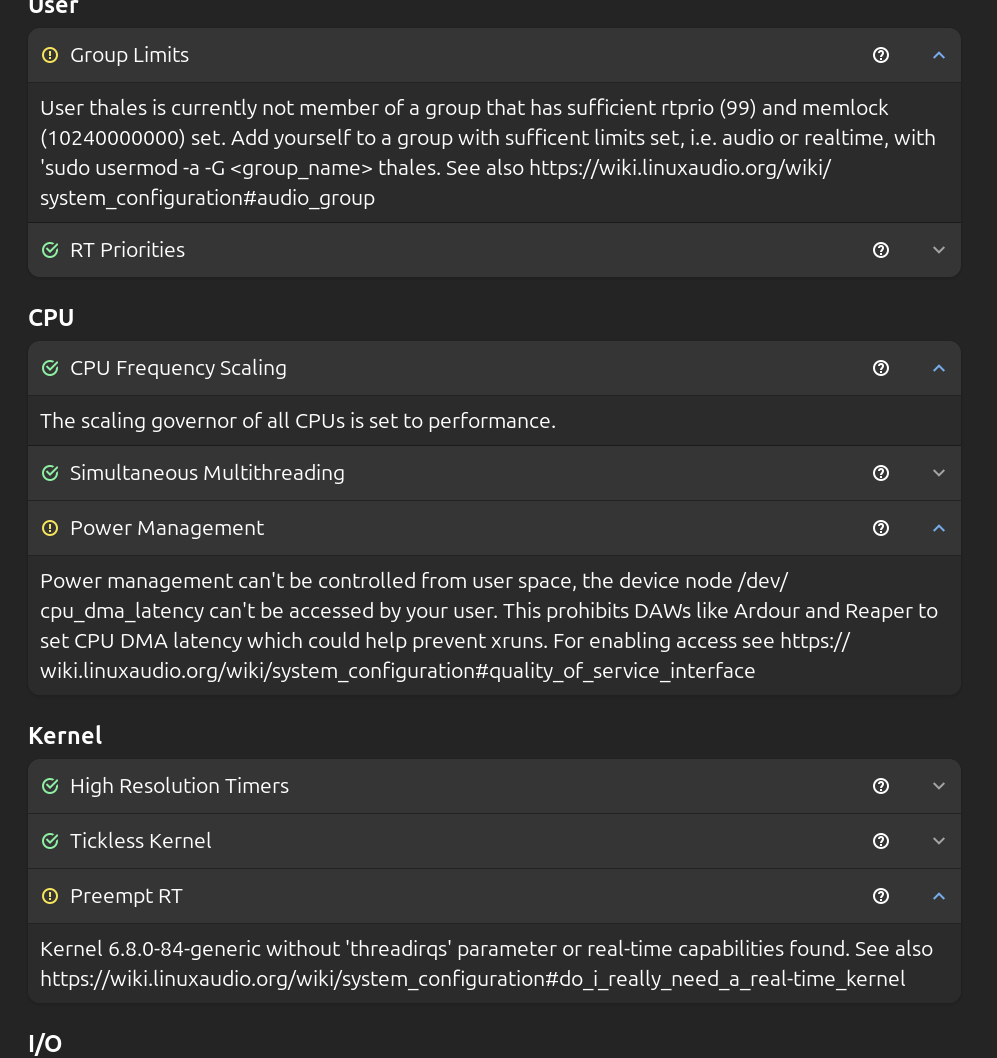
Edit: I managed to get the audio group to be created and its memlock to be set to unlimited, but nothing has changed regarding the crackling sound, it’s still very much there.
I’ve always used ALSA, because JACK/Pipewire doesn’t play any sound for me when selecting it on ardour. (To be honest, I still don’t get how JACK and pipewire work beeing new to linux music production, still studying that topic)
Pipewire is a desktop audio server which lets multiple applications share access to the audio interface. For example if you have one application playing audio, but another application needs to make some type of chime or beep sound to alert you, the pipewire audio server mixes the different sounds together and sends them to the output.
JACK is a programming interface (API) made to allow music production applications to send audio data between different programs, for example a stand-alone software synthesizer can have the audio output routed to Ardour, and a stand-alone drum programing software like Hydrogen can route the audio to Ardour.
Originally the JACK implementation was a stand-alone program named jackd that you ran when you were working on audio production, and you had to make some separate configurations to enable desktop audio (such as a browser or a program like VLC) to also play audio while you had jackd running.
The latest versions of most linux distributions now have a pipewire module which provides the JACK API so that the single pipewire audio server can route audio from desktop applications (which use an API called PulseAudio after the previous separate desktop audio server application name), and also audio production apps which use the JACK API.
The short version is that if you do not need to route audio between different applications, and intend to just use Ardour (possibly with plugins) to record and edit audio, you do not need to worry about any audio server and the best backend choice is ALSA. Start with that, which also simplifies analyzing performance issues, and if you find you need to route audio between applications later you can move on from a solid base once you have Ardour running on the ALSA backend performing well.
Thank you, Chris. That helps a ton. As when using Ardour I use it exclusively, I will mantain ALSA as the selected option. Still trying to figure out any reason behing my problem on it.