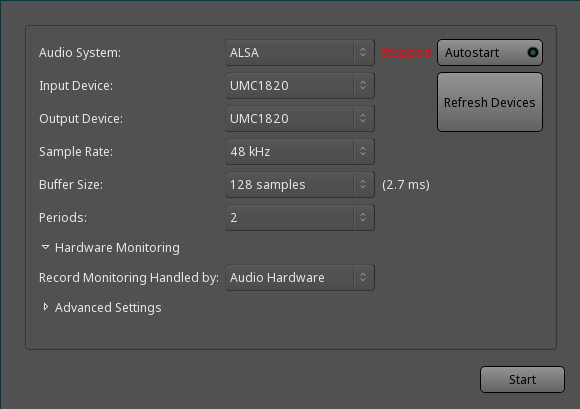
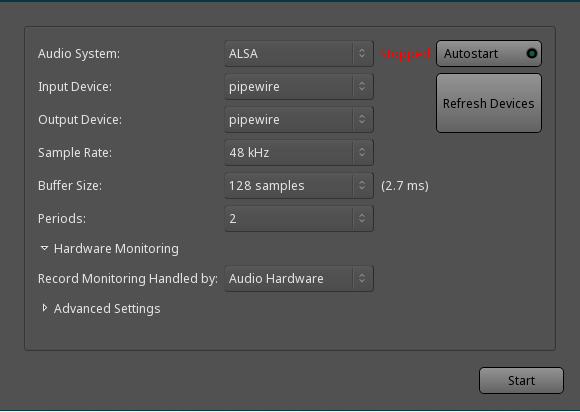
And so I wanted to give it another chance to see how Ardor 8.4 works with Pipewire on Ubuntu 23.10 (the standard version).
I first installed all the Pipewire packages (including pipewire-jack), then from the Debian ppa I updated to the latest version of Pipewire and now Ardour works very well.
I still don’t know what exactly I went to configure apart from the real time permissions for audio but in fact everything seems to be working properly now.
I will investigate further to better understand how Pipewire works since from now on it will be the default sound server of almost all outgoing distributions.
Mau65, maybe you should not use the Digital Stereo Profile? Just a guess. If not, maybe the PipeWire Wiki FAQ will help. Explanation follows.
Did you RTM? Admittedly, that’s always a research project great or small as the case may be for Gnu/Linux (my tribute to Richard Stallman). I found that I had to understand the configuration better, which turned out to be simply using correctly the GUI control interface of pavucontrol, which is familiar if not known by name. I expect you use it all the time. However, with PipeWire, the pavucontrol is a front end to the PipeWire implementation of PulseAudio (as I understand it, it’s been a while). On a Debian-like system: ‘apt show pavucontrol’ and ‘apt show pipewire-pulse’.
I am guessing you need to change your understanding of pavucontrol for PipeWire because new options. The definitive documentation for PipeWire’s PulseAudio is at: https://gitlab.freedesktop.org/pipewire/pipewire/-/wikis/Config-PulseAudio . But that might not help you until you have more advanced needs. Expect things to work ‘out of the box’ before slogging through configuration files. You’re welcome.
In my case, if I recall correctly, this was a pertinent gotcha I had to reverse:>
The Digital Stereo Profile is meant to send uncompressed stereo and compressed surround formats such as AC3, DTS or Dolby Atmos digitally to a receiver to be decoded by the receiver. It bypasses part of the mixers in the hardware and makes the digital signal available for receiver with either a coaxial S/PDIF cable, an optical S/PDIF cable or an HDMI cable. If you do not have a receiver that can decode these streams, you should use the Analog Stereo profile to get better mixer controls.
Maybe something else in the PipeWire’s Wiki’s FAQ will help you. I found that it is well written. The problem is the PipeWire does everything, which of course is the solution. Moar options. Moar power. Moar metaphorical rope. I realize how dense today’s software interfaces are and it intimidates me. Good luck!
For the ones that are looking how to use Pipewire with Ardour, just run
env ARDOUR_ALSA_DEVICE=pipewire ardour8
It’s working quite well for me since I’m using Jack to connect Ardour to Hydrogen while being able to use Firefox to browse Youtube and stuff. To be honest, if any Ardour dev is reading my message, I encourage you to support officially Pipewire. I’m currently using it on my Macbook Pro M2 on Fedora Asahi Remix as it provides an audio environment as easy to use as MacOS with CoreAudio which is really a relief.
You can use a group called “windows_xp_and_mac_osx” if you want; it really doesn’t matter.
The rtprio and memlock settings appy to the user and not the specific audio system, so the only thing that matters is that the user is a member of that particular group.
If you carefully re-read all the posts in this topic you will find lots of advices on how to get your audio hardware working in a system with Pipewire.
I tested it on Ubuntu 24.04. If perhaps you are using another distribution you may have to change some settings: not all distris are the same.
I just updated to Pipewire 1.0.7-2 and I’m still having problems with ALSA playback in Ardour with my firewire setup. I get the same error message as @martibs. I have these error messages:
2024-06-08T01:27:55 [ERROR]: AlsaSeqMidiIO: Device initialization failed.
2024-06-08T01:27:55 [WARNING]: AlsaMidiIn: failed to open midi device ‘147:0’.
2024-06-08T01:28:27 [ERROR]: AlsaAudioBackend: failed to allocate parameters.
When I select/activate the audio interface in Ardour it disappears from the system’s mixer though returns pretty soon. Having another interface as system default doesn’t change the problem despite there’s no conflict regarding the interfaces.
So, to clarify, my post was in reply to c. s. on using the ARDOUR_ALSA_DEVICE variable. I’m using the same settings as when I start Ardour with ALSA, or with Jack (using pw-jack):
This is how it looks when the env is set:
Both ALSA and pw-jack works, but not ARDOUR_ALSA_DEVICE=pipewire. I guess it could be down to the pipewire-alsa setup on my system? pipewire-alsa:amd64 1.0.5-1~bpo12+
On Ubuntu 24.04 I didn’t have to write any configuration files regarding Pipewire or jack beyond the real time permissions for audio group and my user. I don’t even have a lowlatency kernel installed, the generic default on Ubuntu 24.04 is fine for me.
That is not a documented feature, and I don’t believe it is recommended for use.
In the past Robin (x42) made the comment “That is mainly for overriding device detection. I’d be surprised if it works with non hardware devices.”
The recommended API for use with pipewire is JACK.
I am not sure what C.S. would consider “officially” supporting pipewire, but the Paul has been quite clear that the JACK backend is expected to work with pipewire-jack, but that due to the immaturity of the pipewire JACK implementation that jackd behavior was considered the reference, and any behavior which appeared to be in error would need to be duplicated with jackd, otherwise it would have to be considered an error in the pipewire-jack implementation. I think that is very reasonable, given how long it took Pipewire to reach feature parity with jackd (the 1.0 release was the first considered fully suitable for low-latency music production use).
Ardour has done this from day 1 (and ardour devs have been involved in the design of pipewire). It’s called pipewire JACK.
We regret that pipewire made the same mistake as pulseaudio did, and exposed an additional API (the original idea was supposed to only emulate existing ones), but from a pro-audio viewpoint the JACK API is still the most powerful and appropriate API to use with pipewire.

 ).
).