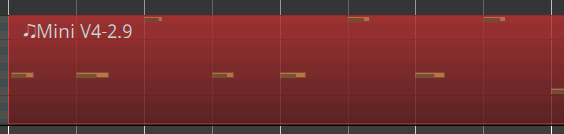
I did some searching and couldn’t find this, but hopefully this is a me issue and not a bug. I recorded some Midi and ended up needing to nudge the notes back to the beat (probably a separate issue). After nudging I quantized and in the edit view the notes all look aligned with my 1/8 time:
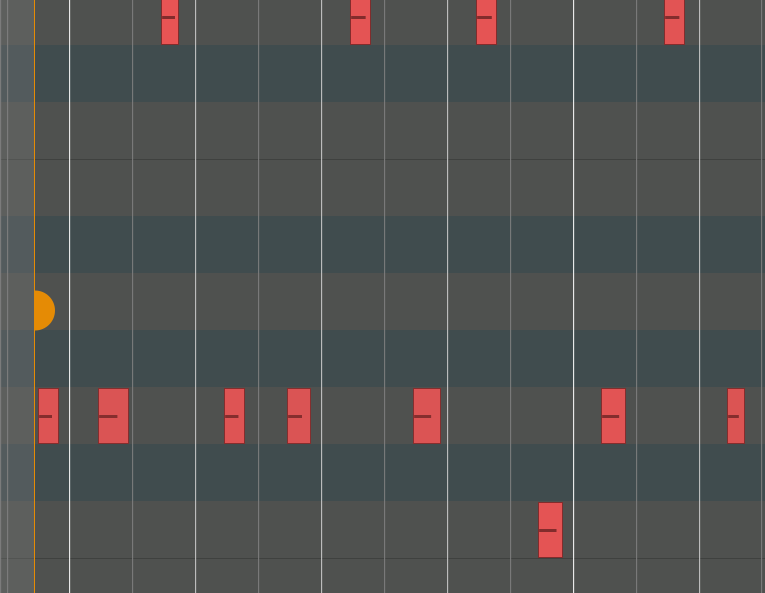
But if double click on the region and open the piano roll, the notes aren’t aligned to the grid:
As for the crash I’ve bisected it to commit 19fc0327cc44
All subsequent versions up to the most recent 35c0d29a8c71d80 crash if you double click on the MIDI region to open the piano roll window, close it and then double click the region again.
Could you attach the whole session rather than just .ardour file? Thanks.
I can’t reproduce the crash as described at this point. When you say “open the pianoroll window” do you mean the separate, standlone window, or the bottom pane?
That’ll have to be tomorrow then.
But you can just draw a couple of MIDI notes, quantize them to nearest quarter note and then double click on the region to see the the misalignment dchenbecker’s images are showing.
I mean double clicking on the MIDI region so that the separate piano roll window opens.
What is happening here is that you trimmed the original region a bit later than its original condition; this moves the region start later in its underlying source file; when the pianoroll is opened, we’re showing the whole source file (plus the region boundaries).
This was done intentionally (since often being able to see the rest of the source file is valuable), but ti’s not clear that it’s the right thing to be doing.
OK, I see what you mean. I trimmed and shifted the region because there was some sort of delay recording MIDI notes, so clearly I need to fix that. However, on the point of “is this the right thing to do”, the main problem I’m running into with this behavior is that because the piano roll grid isn’t aligned, I don’t know how to snap notes as I’m editing.