When I have Ardour open with a session, and I try to load a new session from WITHIN Ardour, via Ardour menu Session > Open / Recent, Ardour closes ( crashes ).
Same behaviour when I try to load a snapshot via the list editor > snapshots, Ardour closes.
Does someone else experience this behaviour ?
Sidenote :
After Ardour has closed and opening Debian13 system monitor > applications tab ; I notice there’s still an Ardour instance consuming some memory.
try to load a session from harddisk, from within Ardour’s menu via session > open / recent .
try to restore to a snapshot from the list editor.
This crash while opening from within Ardour, applies to Debians ‘integrated’ Ardour 8.12 and also to my self compiled version’s up to 9.2.
Even with test session I did create without any plugins, same crash behaviour.
Opening sessions / snapshots in the pre ardour recent sessions dialog box works without any issues.
Just to be sure, today I downloaded the demo Ardour-9.2.0-x86_64.run, and to my surprise in the demo version all session loading from within Ardour functions 100% fine.
I don’t have any clue what could be causing this.
Only difference is the location of installation usr/bin/ardour9 compared to demo at opt/ardour-demo/bin/ardour9.
Maybe I have to do some further investigation…
Any idea is welcome.
Kind Regards, Luc.
/opt/Ardour.. comes with its own handpicked library stack.
Ardour depends on a significant number of free/libre software libraries. Most GNU/Linux distros just use dependencies of whatever library they have around when compiling Ardour, some also add custom optimizations… Ubuntu packages of Ardour have historically been broken many times in subtle ways.
Though this is the first time I hear that debian’s version has issues. Notably because I do use debian’s user-land when developing Ardour.
In your self-compiled version, run ardour from the source-tree inside a debugger:
./gtk2_ardour/ardbg
run
and when ardour crashes, get a backtrace: thread apply all bt
I don’t have any experience in this debugging procedure ;
But when looking at the gdb window I notice an endless loop with this info :
“JackAudioDriver::ProcessGraphAsyncMaster:process error”.
I wonder if this is related to my pipewire configuration or audio interface ( rme ucx ) ?
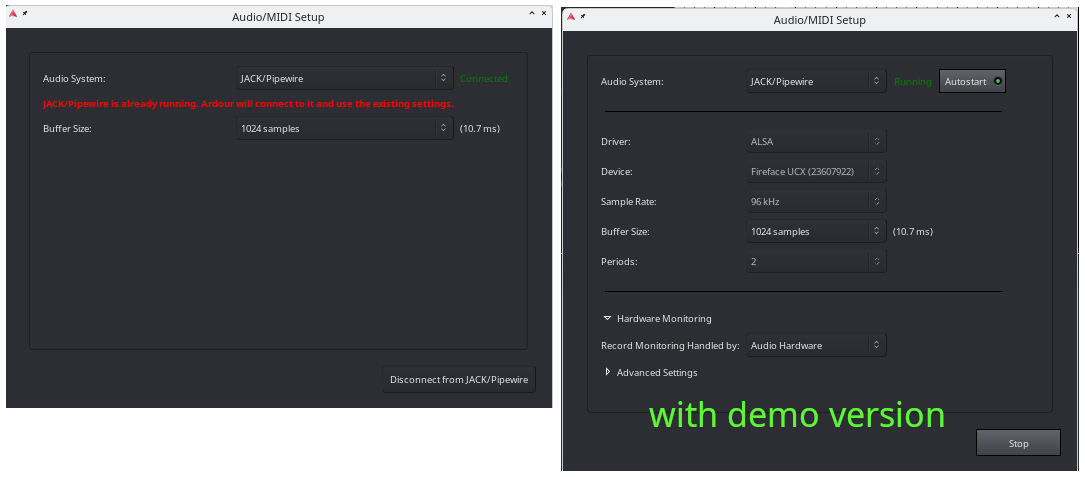
When I compare Ardour’s Audio/MIDI Setup dialog window, I also notice there’s a difference.
Left screenshot is my self compiled version, at the right is the Ardour demo version.
Maybe someone has any idea what’s going on my system.
That right hand side setup window (from the demo version) looks like the interface to configure jackd.
Do you by chance have jackd and pipewire-jack installed on your system?
If so, try starting ardour from the command line using the pw-jack helper command:
pw-jack /opt/Ardour-9.2.0/bin/ardour9
Replace 9.2.0 with 9.5.0 if you have already downloaded the latest release today.
[Edit: just to clarify, I suggest that to make the demo version connect to the system pipewire-jack, which seems to be what the left panel shows; that is just so you can make an equivalent comparison of the behavior between the system version and the demo version]
Thank you for the comment.
Yes you are right, when starting the demo from the console with : pw-jack /opt/Ardour-9.5.0-demo/bin/ardour9, the audio/midi setup dialog is identical with the self compiled version.
Since installing all pipewire modules only once in the beginning of Debian installation, did forget that indeed I have jackd and pipewire-jack installed on the machine over here
Despite the main issue, why I did start this post in the forum over here remains on my linux pc.
May I ask, can you load a saved session from within Ardour without causing Ardour to close ?
For now enjoying and exploring all new features in the newly released 9.5 version.
The Ardour developpers did again create something fantastic with all added features !!
During my daylight hours I can unfortunately only access a Windows machine with Ardour.
That operation does work on my Windows installation.
I will check tonight when I am home on my Linux machine, but in the past I have loaded a saved session from within Ardour. I typically close the existing session first before loading the new session, in case that is a difference. On Windows I checked both by closing the open session, then opening a different session, and also by choosing open in the file menu without first closing the existing session. Both paths worked on Windows, but I will verify on my Linux system tonight (around 4 or 5 hours from posting this).
Just did try Ardour/Alsa, but over here same behaviour, ardour closes.
Also if I have Ardour open with a session and choose : session > close, Ardour closes completely.
Maybe this is a combination of some strange coincidences on my linux-PC, causing pipewire to close Ardour because of a bad server / client initialisation… ??
My workaround is to open sessions / snapshots from the pre Ardour Recent sessions dialog window.
For now a BIG thank you for your comments and help !
If I can get this solved in the near future I will update with a post over here, just in case someone else experiences similar behaviour.
Did not reproduce on my Linux machine using pipewire-jack, I could open another session or snapshot with no problem, and when I closed an open session it just went to the session selection dialog, no crash.
That was referring to a user who had started jackd with an inappropriate option, but you indicated you were using pipewire-jack, and the behavior also happens when using the ALSA backend.
Have you tried starting Ardour from a terminal to see if additional messages are printed?
Also, I note from an earlier comment that you said the Ardour demo build does not crash. Is it still the case that only your self built version crashes, not the official build? I am running the official build, but let me check with the most recent version I built…no crashes with my self-built version either.
Well starting Ardour from the terminal ( Debian’s Konsole ), I see some additional information.
When I try to load a saved session from within Ardour, just before the crash I notice this in the terminal with my self compiled 9.5 version :
I cannot find threads_posix.h on my machine. What is that full path?
On my machine the only libusb directory I have does not include an os subdirectory:
$ find /usr/include -path “libusb”
/usr/include/libusb-1.0
$ ls /usr/include/libusb-1.0
libusb.h
Did not find threads_posix.h by name in either the ardour source directory or under /usr/include.
It’s not included when you install libusb but it’s used when compiling the lib and it’s referenced in the binary.
You’ll see it ff you run strings /usr/lib/libusb-1.0.so | grep threads_posix
Maybe try adding --c++17 and see if that makes any difference.
And if you want to be able to easily remove older versions of Ardour or go back to an older one because the bleeding edge one you git pulled had a bug or something I’d recommend adding something like --prefix=/opt/ardour-9.5 to your ./waf line.
Then you can use the stow program to create symlinks in /usr/local like this stow -d /opt -t /usr/local ardour-9.5
If you want to “uninstall” that version you just add a -D before the -d , to remove the symlinks and either rm -rf /opt/ardour-9.5 or keep it as a backup while you’re trying out a possible ardour-9.6, compiled and stowed the same way.
This error message and referenced source-code line also hints that it’s a self-built version, not the official binary. Since we don’t know what versions of external libraries you use, there’s no way we can provide support.