Well, if it was just about me, i’d just make dual boot of AVL or Mint with Win on both of my newest&best machines and get it over with. Hell, i was contemplating buying an older MacBook (as in the topic title) or the same ThinkPad T490 as you have (which can be also found here for pretty cheap, and it just works, as you can testify). But, the longer i think about it, the further i am from doing exactly that.
I’m not gonna give world-wide-hope-charged speeches here&now, but i do think it is important that this software becomes as available and as useful as it can be. There’s tons of reasons for it…i’m not gonna start about it  .
.
So, yeah, i think i’m gonna try &AVL with that sepecific Mesa version too. It’s not that hard. I’m in the organizing phase, right now (time, displays, ssds, cables&perifery so i don’t have to constantly jack everything up from 0).
@werner.back it would be nice if you provide stack trace for the crash of Spectrum Analyzer plugin.
UPD: nevermind, I’ve reproduced the bug. Please update and try again.
Hey, i tried compiling as you suggested from devs branch this morning before work. Followed a few “how to-s” from youtube and your directions from github (first timer here)…
After a while, everything seemed to be going well, and i could see the bulid process is going well in the terminal automaticaly for about 5 min, suddenly i got the error that wen’t something like fatal error - x11, Xrandr:h - cannot find such file or directory (i’m paraphrasing this), the build process stopped there and i alredy had to run to work, so i abandoned it all at that point.
Any suggestions?
Edit: I think that i should also point out that one of the dependencies, the second one on the list, gcc c++ as i remeber, i wasn’t able to find thru synaptic or install it directly with apt-get install in terminal, so i suppose it is maybe already a part of some other, larger lybrary?
For apt-based systems you need the following installation:
apt-get install gcc g++ git make php-cli pkg-config valgrind libx11-dev libxrandr-dev libjack-dev libcairo2-dev libgl-dev libfreetype6-dev libsndfile1-dev libgstreamer1.0-dev libgstreamer-plugins-base1.0-dev
Yep. That error is gone now.
I kind of did it, but not so flawlesly… i did get an permission error when it came to make install part (i could see the .o machine code files in hidden .build folder). I figured it’s maybe because i used sudo before commands. So i repeated make install without sudo and it went thru.
The lv2 variants used as channel insert plugins in ardour show they’re 1.2.26 version, OpenGL, but they don’t realy work good - they work ok when only one GUI is activated, as soon as i have multiple of them, they become unresponsive and bring Ardour down.
I tried JACK variants not as inserts but as external, standalone variants. Those worked okay-ish, i was able to pull 4 of them and use them simultaniously. 5th made everything sluggish.
In this case we’re talking - Debian 13, XFCE, Fujitsu Notebook E746, i5 6300u, Intel HD520, 8GB ram.
I’ll have to delete everything and repeat the build process, and then i’ll get back again, cause i’m not entirely sure everything went absolutely ok with build process.
@Ljuba I suppose you didn’t swith to the devel branch if you see the version 1.2.26 in the About dialog. The development version is already 1.2.27.
You need to clone git repository, then switch to the devel branch and fetch all dependencies for the devel branch:
git clone https://github.com/lsp-plugins/lsp-plugins.git
cd lsp-plugins
git checkout -b devel origin/devel
make config
make fetch
make
sudo make install
Then try again.
(I was just typing…I think that last line you wrote will resolve the dillema that i’m having right this moment ) - It doesn’t realy matter now, you can look for bolded line at the end of the message and skip the inbetween . Anyway, here’s what i was about to say before:
Yes, exactly, i figured it out a few minutes ago. I didn’t use the branch name after command while cloning from githubs url, because i assumed that when you change it in the dropdown menu to devel it automaticaly gives you the right adress to clone from…which isn’t the right way one should do it .
Anyway, i repeated the process and folldewed it, and yes, right now it’s realy devel branch, but i got these mesagges at the end of the build. Everything before was ok, as far as i could notice, but, what about this:
Validating plugin metadata
Overall validation statistics: plugins=194, warnings=0, errors=0
make [lsp-r3d-glx-lib]
make[4]: Entering directory ‘/home/ljuba/build/lsp-plugins/modules/lsp-r3d-glx-lib’
make[5]: Entering directory ‘/home/ljuba/build/lsp-plugins/modules/lsp-r3d-glx-lib/src’
make lsp-common-lib.o
make[6]: Entering directory ‘/home/ljuba/build/lsp-plugins/modules/lsp-common-lib’
make[6]: Leaving directory ‘/home/ljuba/build/lsp-plugins/modules/lsp-common-lib’
make lsp-r3d-iface.o
make[6]: Entering directory ‘/home/ljuba/build/lsp-plugins/modules/lsp-r3d-iface’
make[6]: Leaving directory ‘/home/ljuba/build/lsp-plugins/modules/lsp-r3d-iface’
make lsp-r3d-base-lib.o
make[6]: Entering directory ‘/home/ljuba/build/lsp-plugins/modules/lsp-r3d-base-lib’
make[6]: Leaving directory ‘/home/ljuba/build/lsp-plugins/modules/lsp-r3d-base-lib’
g++ [lsp-r3d-glx-lib] liblsp-r3d-glx-lib-1.0.26.so
ar [lsp-r3d-glx-lib] liblsp-r3d-glx-lib-1.0.26.a
make[5]: Leaving directory ‘/home/ljuba/build/lsp-plugins/modules/lsp-r3d-glx-lib/src’
make[4]: Leaving directory ‘/home/ljuba/build/lsp-plugins/modules/lsp-r3d-glx-lib’
Install lsp-r3d-glx-lib
make[4]: Entering directory ‘/home/ljuba/build/lsp-plugins/modules/lsp-r3d-glx-lib’
make[5]: Entering directory ‘/home/ljuba/build/lsp-plugins/modules/lsp-r3d-glx-lib/src’
make lsp-common-lib.o
make[6]: Entering directory ‘/home/ljuba/build/lsp-plugins/modules/lsp-common-lib’
make[6]: Leaving directory ‘/home/ljuba/build/lsp-plugins/modules/lsp-common-lib’
make lsp-r3d-iface.o
make[6]: Entering directory ‘/home/ljuba/build/lsp-plugins/modules/lsp-r3d-iface’
make[6]: Leaving directory ‘/home/ljuba/build/lsp-plugins/modules/lsp-r3d-iface’
make lsp-r3d-base-lib.o
make[6]: Entering directory ‘/home/ljuba/build/lsp-plugins/modules/lsp-r3d-base-lib’
make[6]: Leaving directory ‘/home/ljuba/build/lsp-plugins/modules/lsp-r3d-base-lib’
g++ [lsp-r3d-glx-lib] liblsp-r3d-glx-lib-1.0.26.so
ar [lsp-r3d-glx-lib] liblsp-r3d-glx-lib-1.0.26.a
Installing lsp-r3d-glx-lib
mkdir: cannot create directory ‘/usr/local/lib/pkgconfig’: Permission denied
make[5]: *** [Makefile:162: install] Error 1
make[5]: Leaving directory ‘/home/ljuba/build/lsp-plugins/modules/lsp-r3d-glx-lib/src’
make[4]: *** [Makefile:53: install] Error 2
make[4]: Leaving directory ‘/home/ljuba/build/lsp-plugins/modules/lsp-r3d-glx-lib’
make[3]: *** [Makefile:1433: install_LSP_R3D_GLX_LIB] Error 2
make[3]: Leaving directory ‘/home/ljuba/build/lsp-plugins/modules/lsp-plugin-fw/src’
make[2]: *** [Makefile:67: install] Error 2
make[2]: Leaving directory ‘/home/ljuba/build/lsp-plugins/modules/lsp-plugin-fw’
make[1]: *** [Makefile:145: install] Error 2
make[1]: Leaving directory ‘/home/ljuba/build/lsp-plugins/src’
make: *** [Makefile:68: install] Error 2
EDIT: So, yes “sudo make install” at the end resolved it. Built and installed OK. Let’s se how it behaves now…
Hey cool, i just fast-tested it.
The changes you made realy make a difference:
1.)I was able to pull up to 6 instances of LV2 LSP GUI’s and use 'em at the same time, with Ardour’s own graphics not being glitchy at all, while keeping the buffer at 256 samples. That is already good, in my opinion.
2.)When you feel the graphics is begining to choke the GPU and you try to close a few GUI’s it stays responsive and doesn’t crash Ardour anymore.
3.)Now Ardour’s graphics do it’s own thing and doesn’t seem to be affected by the LSP GUI’s you pull up.
That’s much, much better.
There is still this thing that, whenever you open up more and more LSP GUI’s at the same, their analysers become more and more visibly less responsive, but, that is expected i guess?
I mean, those things are normal, i do get that kind of behaviour with heavy plugins in DAWs on Windows too. That’s like, standard stuff .
If you know what else could ease the burden on gpu’s, i guess you should apply that, because, you know, best real-time analysers (at least for me) are the most precise and fastest ones, and eye candy stuff is not realy what you expect for audio plugins, right?
Anyway, bravo
this is realy a good improvement!
I’ll get back to you as soon as i get more test info for other machines.
Here’s a little picture :
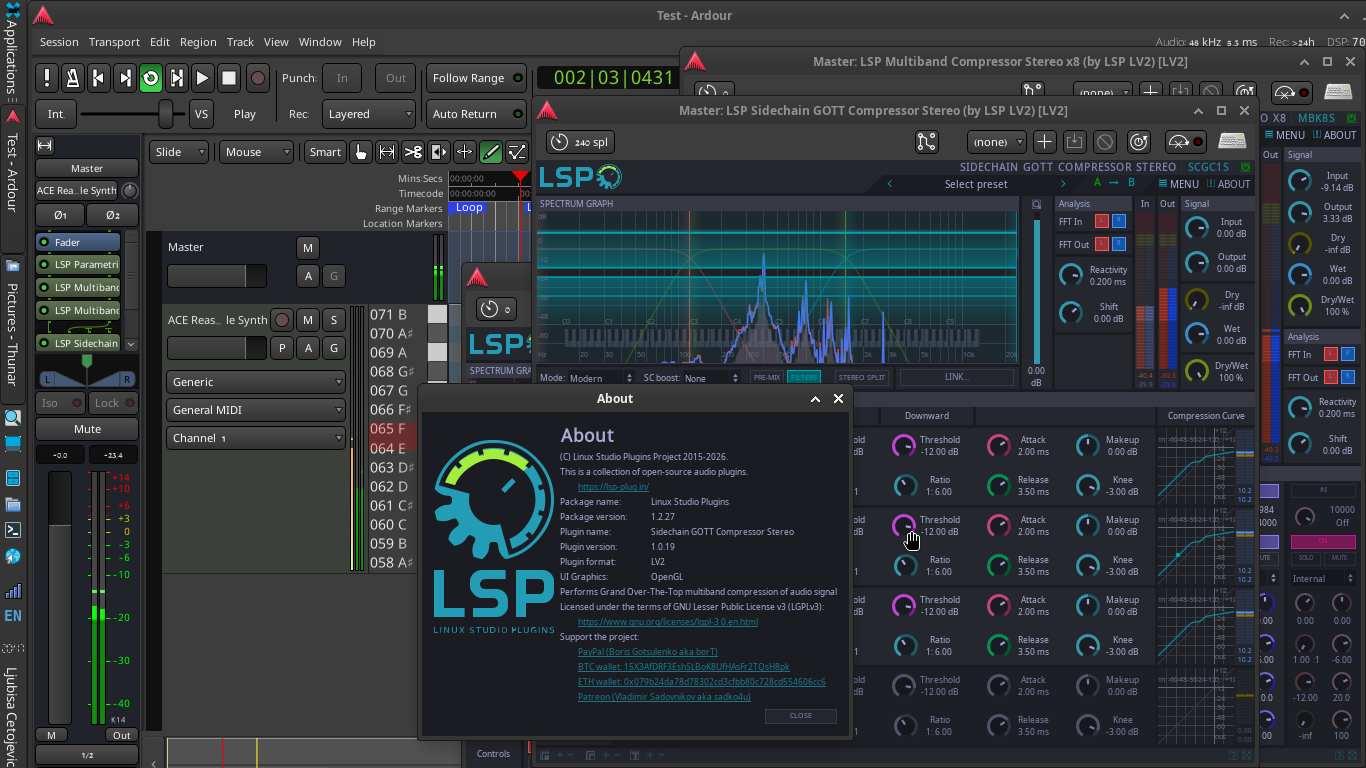
Yes, we don’t redraw window if previous frame drawing is still in progress. If drawing thread or GPU thread starts lagging, we try to render a bit later. I did this to not to overload GPU and CPU threads.
Also it would be nice if you could show the perf top output on your machine, in default mode and browsing for lsp-plugins package. To browse lsp-plugins package, you need to run perf top as root, then navigate to some LSP plugins’ function call and press ‘enter’. After that, select inspect lsp-plugins... DSO.
Probably it will help to understand which hardware part in your setup is more overloaded: GPU or CPU.
I will, as soon as i get the chance to sit still for a while.
Tried to grasp what exactly i’m doing when i’m looking around perf top.
It suffices to say i just see it’s some sort of real-time system processes monitoring .
But what exactly i’m doing with it…i don’t have a clue .
??is this it?? pardon my confusion
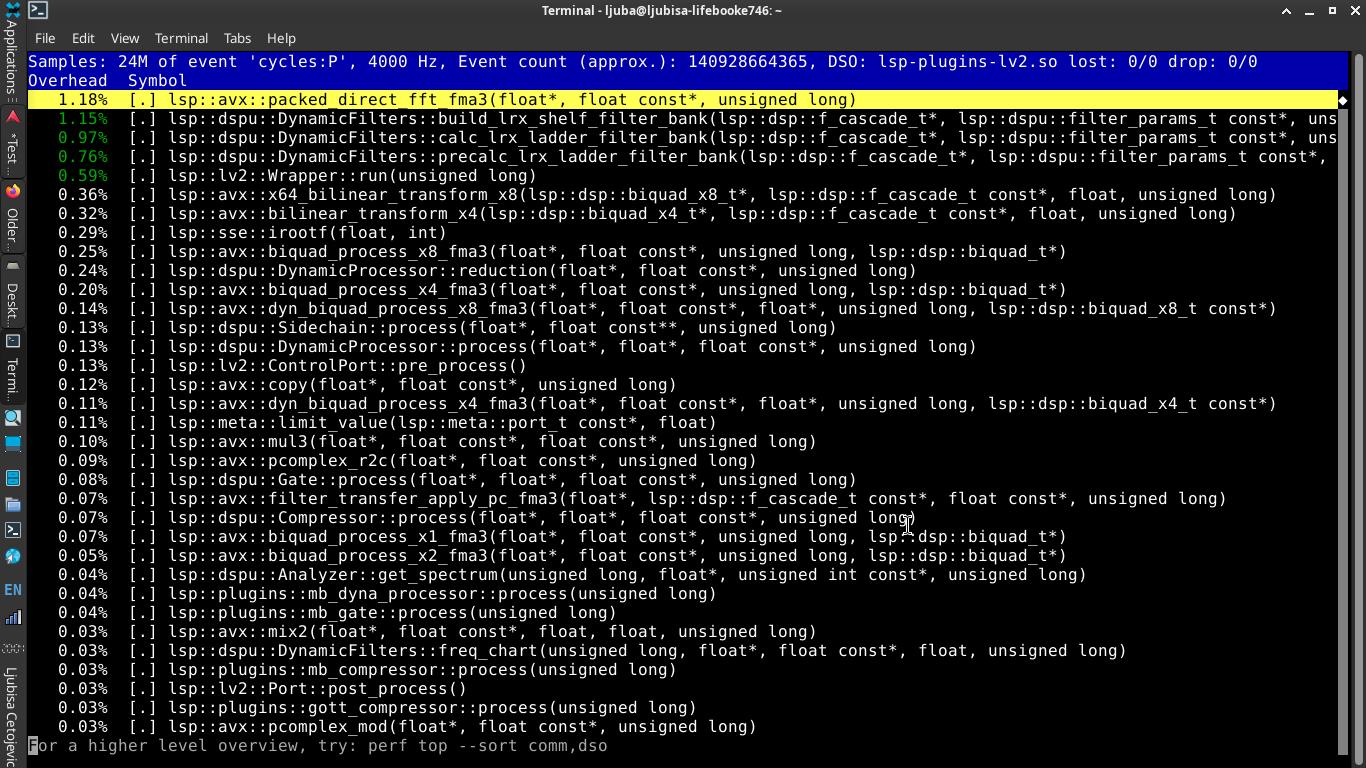
Interestingly enough, i don’t see anything “going to red”? At first glace it looks like everything’s normal?
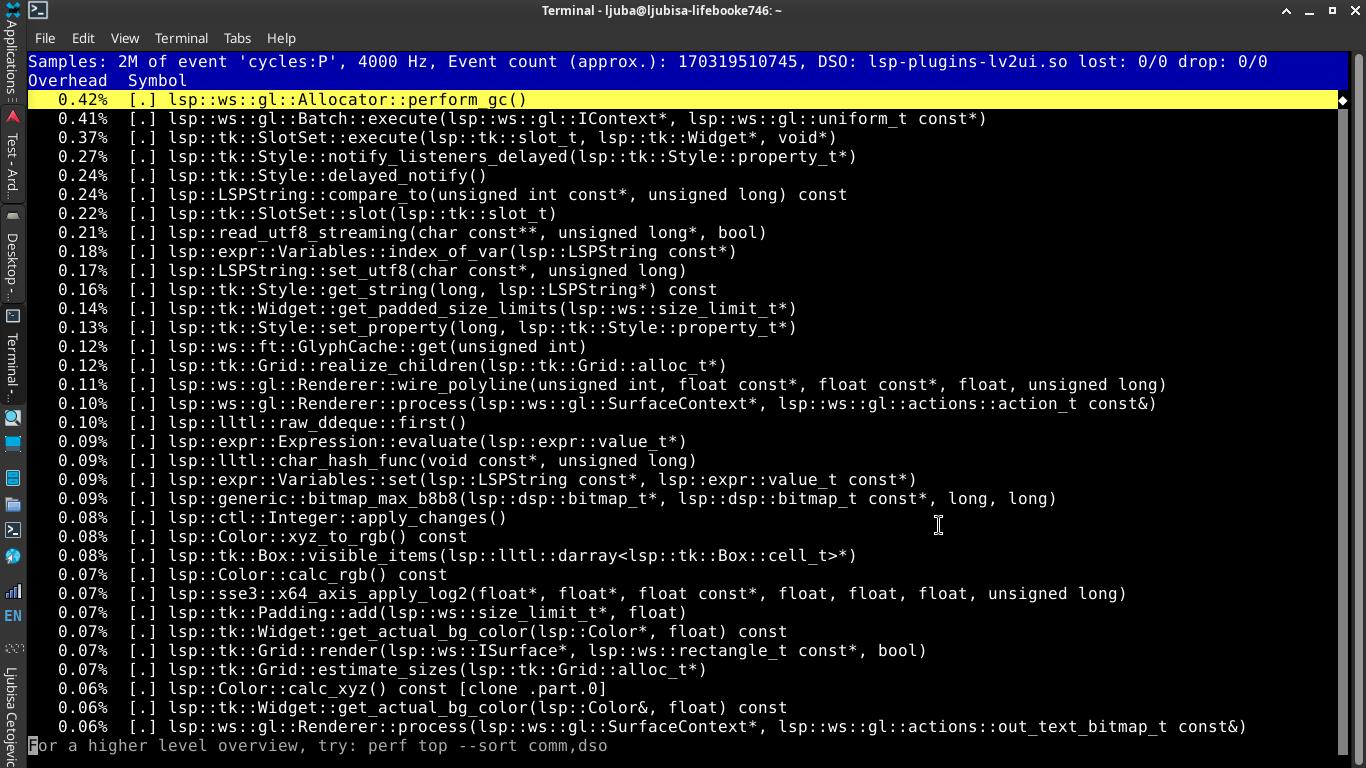
This is perf top of DSP thread which looks pretty OK. There should also be lsp-plugins-lv2ui.so. Can you look at it, too?
@SadKo, sorry it took so long,
i had to wait for the weekend to come just to have a minute-two for myself.
C’est la vie
Here it is, perf top for lsp’s ui (that’s with 7 lsp gui’s simultaneously open in Ardour):
EDIT: Here’s something i just noticed:
- I do get some clicks(pipewire/jack backend) even with only one lsp gui engaged(while other 6 just work in the channel plugin chain without gui pulled up) but i suspect that’s because i kept buffer is at only 256 samples.
- Aldo audio settings in Ardour report only 5.6 ms latency, real-time analyser in LSP’s gui deifinitely shows with much greater lag. Just by looking at it, LSP’s rta graphics feels more like 30-70ms latency compared to audio or Ardour’s graphics. Is that how it’s suppose to be?
I do get some clicks(pipewire/jack backend) even with only one lsp gui engaged
This is more related to audio I/O scheduling. I think you can look at Ardour’s DSP consumption graph to see if some plugins goes out of the allowed time quantum.
Aldo audio settings in Ardour report only 5.6 ms latency, real-time analyser in LSP’s gui deifinitely shows with much greater lag. Just by looking at it, LSP’s rta graphics feels more like 30-70ms latency compared to audio or Ardour’s graphics. Is that how it’s suppose to be?
Yes. To perform audio analysis, we need to collect data into buffer to perform FFT. That gives some lag.
This topic was automatically closed 28 days after the last reply. New replies are no longer allowed.