Normalizing only a small section of region

Do you really mean sum to a track, or to a bus? Typically a bus would be used, although you could sum to a track if you wanted to record the combined signal for some reason.

Adding a compressor to a bus is common for the very purpose you describe.
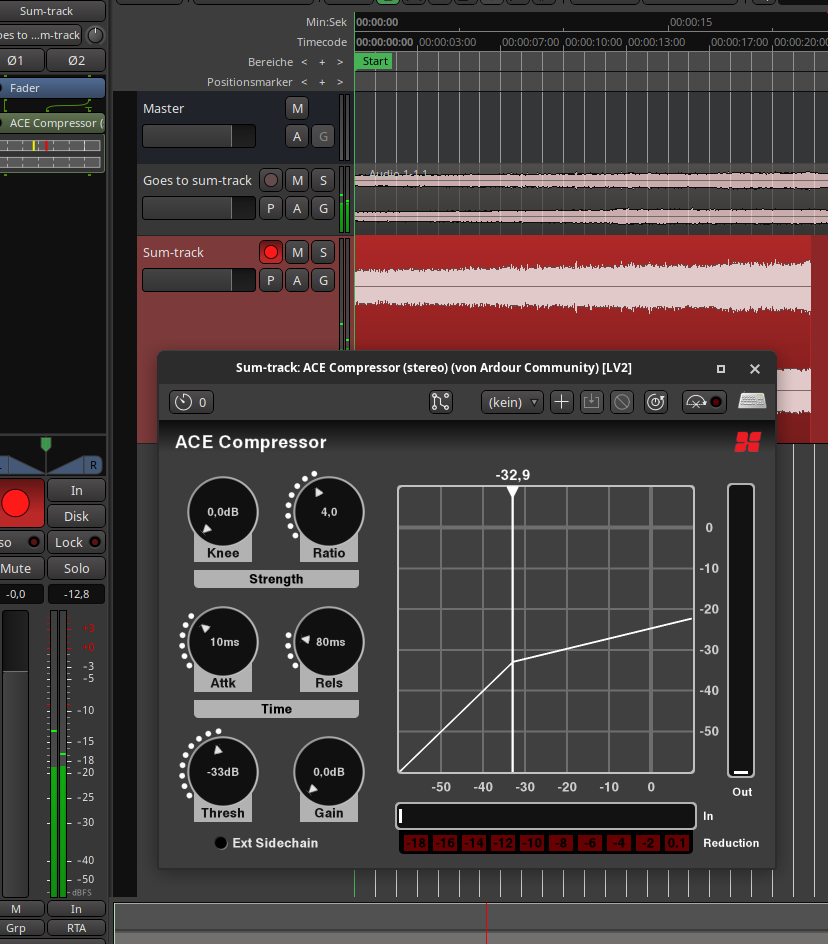
Perhaps a screenshot of the mixer strip with the sum bus (or track) showing where you inserted the compressor and another screenshot showing the compressor settings would help determine why it is not working as you expect.
One thing to keep in mind is that the attack time of a compressor is the time before the compressor becomes active, so short peaks will get through a typical compressor.

No, definitely not, ardour is designed for real time, non-destructive processing. The most typical flow is record unprocessed and add processing to the mix tracks and busses.

You can, but that is very rarely what you want, so it is not the default. For this specific case of controlling level, if the digital signal is not clipped you can control the level with proper plug-in use. There is an application in analog processing for limiting before the analog signal gets to the analog-to-digital convertor, but that is not the case discussed here.

1 Like

A bus is not an option for me, since you can’t record to a bus (as far as I know!) for further modifying the recorded sum (via effects, cut/paste etc).

Correct, although ardour routing is flexible enough that you can route the output of a bus to a track to record without a lot of effort.
But if you feel like you want to record from a bus, you are probably working against the design intent of the ardour interface.

In addition to the original source material? I think the typical approach would be to perform cut and paste edits on the source tracks, and add effects plugins to the bus.

1 Like

Yes this is intended when looking at this zoom level, as you are talking about a mS long fade, this prevents things like clicks and pops from suddenly value changes.

Replying to your later posts however, it appears you are misunderstanding a realtime DAW vs an offline file editor. These are in fact two different tools, Audacity is much more the latter, Ardour much more the former. You generally won’t bounce, modify, and bounce again except in VERY specific situations, you edit the sources (Non-destructively in Ardour), and apply processing in realtime. Want to apply processing, and then apply more, just make sure that later processing is after the former. This is how a realtime DAW works in general. While it makes sense in Audacity to some extent, even there, they are moving to a more realtime capable workflow as well and it requires a different workflow to understand to truly take advantage of it.

  Seablade

I have different tracks with their different own effects.
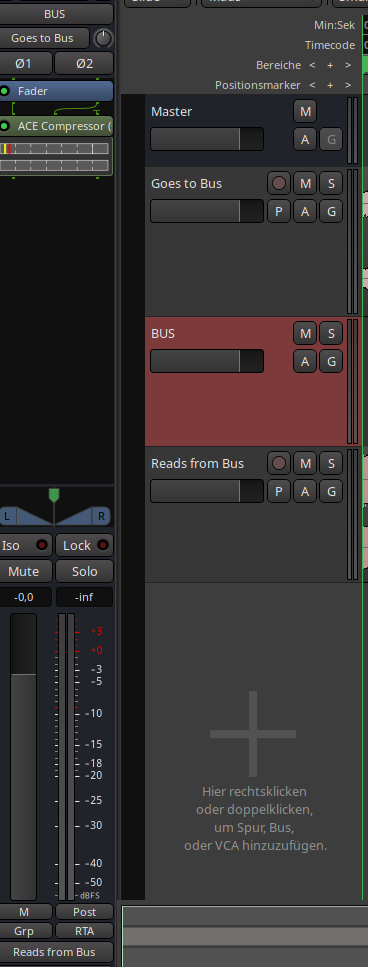
Based on my experience though, routing the sum of tracks to a bus equipped with a compressor, and then recording from there into a final sum-track:

does what I want (ok, against the design of Ardour! :smiling_face_with_tear:), since trying this task with directly routing the tracks to a sum-track equipped with a compressor, I don’t get anything from the compressor, I don’t know what I am doing wrong, or why can’t the input signal be routed first to the compressor before being recorded to the sum-track?

Are you trying to ā€œbounceā€ the other tracks to the sum-track?

Is there a reason for doing this?

That’s normally what the Master bus is for.

Cheers,

Keith

That is fine, very common to have effects on individual tracks (EQ and compression are very common, noise gate, guitar processors, etc. on individual tracs).

I do notice that the compressor is after the fader, which will make the amount of compression dependent on the fader value. It is more common to place the compressor before the fader so that you can then balance the tracks into the summing bus with the levels already controlled and having the sound you want.

You will need to go back to basic setup and show how you have everything connected. Especially if you are changing connections it is possible you ended up with dual connections, e.g. a track to your new bus as well as the master bus. The default connection for a newly added track would be to the master bus, so if you wish to connect to an intermediate summing bus (common in the past for example to have a bus for background vocals, or for individual drum tracks, although using VCA groups for that purpose is common as well in cases where you don’t need effects on the group).

It can, Ardour is super flexible with routing.
This may be where the information you are looking for is located in the manual:

However nothing you have described is particularly well suited to using I/O plugins. There is likely some minor change that is needed then the standard work flow can work for you.

I don’t quite understand that phrasing. Do you mean that the compressor does not compress as much as you expect, that there is no output signal, there is no input signal shown, or something else?
With the attack time set to 10ms any peaks which are shorter than 10ms will get through almost unchanged, and any peaks longer than 10ms will have the first 10ms through at the same amplitude as input before being reduced after that time.
As pointed out previously you likely want a limiter for this specific case of attempting to reduce just a few short peaks. Placed before the fader so that after the peaks are limited, you can change the overall track signal level.

2 Likes

@amte Please just tell me, are you recording music (i.e. instruments)? -A podcast (i.e. talking)? -Etc.? What is it that you are using Ardour for producing?

I’m recording sounds coming from Supercollider, then mixing them to a final piece in Ardour

I asked about bouncing tracks because that’s what you appear to be doing and, in my view, unnecessarily. I suspect this is because you don’t really understand a DAW workflow.

Consider this high level view of a typical DAW usage/workflow:

First you capture your performances into tracks. For a typical piece of music, you might have separate tracks for each instrument (guitar, drums, vocals, etc.) or, in your case, Supercollider.

Each of these tracks then feeds the Master bus, which is where these tracks are mixed together to create your recording. You don’t need any intermediate track or recording step for this. You control the mix levels with the mixer.

You can apply some very basic level adjustments (gain, normalisation) to each individual track or region within a track if you need to adjust things within a track, but the level you get on the Master bus is, ultimately, controlled by the mixer still, so if you boost the track level in the editor, you may need to turn it down in the mixer (this is known as ā€œgain stagingā€).

For control of dynamics, such as over-loud transients, the usual approach is to employ limiters, compressors, etc. in various combinations depending on the result you want. Understanding these is a bit of an art in itself, and is one of the skills that takes some developing. As @ccaudle states, it’s normal to apply these pre-fader.

Compressor and limiter plugins (amongst others) can be applied to each individual track and they normally act on track playback. As stated by others, it is possible to place them so that they effect the recording, but this is more unusual (although there are use-cases. Again, I get the impression they don’t apply here).

Alternatively, the output of multiple tracks can be fed into a bus and one or more plugins used there. The difference between a bus and a track is a bus does not record anything, where a track does. But, unless you need to bounce, then there’s usually no benefit to having a track over a bus. Putting plugins onto a bus and feeding tracks to it is commonly used either to reduce CPU use (because only one plugin is used for multiple tracks rather than one per track) or because the same effect settings are desired for bunch of tracks.

The latter usage is common with reverb: imagine you have a drumkit recorded with different tracks for the snare, toms, cymbals, and bass drum. If you put different reverb levels on the toms compared to the snare drum, it would probably sound weird. So, instead, it’s common to connect all the individual drum tracks through a shared ā€œdrum busā€ and apply things like reverb to all of the drum kit elements at once.

From your description, what I think you need is either:

  1. Individual tracks with limiters and compressors on each one, individually tuned to the track

or

  1. A bus containing limiters and/or compressor plugins being fed from the tracks with common plugin settings

or

  1. A mixture - maybe individually tuned limiters on each track and then all tracks fed into a bus with a common compressor

In each case, the final output is the Master bus, which is where your final recording gets produced. The actual output from this, after you have done all the tweaking, is an audio file that is produced with a rendering step.

This arrangement/workflow covers >95% of normal DAW tasks including, I suspect, yours.

Cheers,

Keith
3 Likes